What is a treasure file?
Treasure files are what determine the loot tables for BetterStructures chests. They are usually assigned to generators but they can also be set at the level of an individual build configuration.
These loot tables are quite powerful, but also require knowledge of some basic statistics concepts to understand.
Statistics concepts
Read about those concepts here, the rest of the page assumes you understand them!
Weighted probability
BetterStructures and EliteMobs (another plugin by the same author) both use the concept of weighted probability in their loot systems. This is to solve a simple problem: how can you set the chance of picking one item from a list of potentially infinite items?
Weighted probability solves this issue by giving each item a weight. If you have 100 items and each has a weight of 1, then they all have an equal chance - 1% - of getting picked. If you add one more item, bringing the total to 101 items, you give that last item a weight of 1, all items still have the same chance - ~0.99% - of getting picked. If you give the last item a weight of 2, the chance of it getting picked increases - the new total weight is 102, the last element has a weight of 2 and 1/102 = ~0.98% so 0.98%+0.98% = 1.96% chance of getting picked. If you give the last item a weight of 100, the new weight is 200, and since half of that weight is your new item, your new item has a 50% chance of getting picked.
As you can see, this is good to use when you might have lists of hundreds of things to randomize from.
Gaussian distribution
A gaussian distribution is a bell-shaped mathematical function.
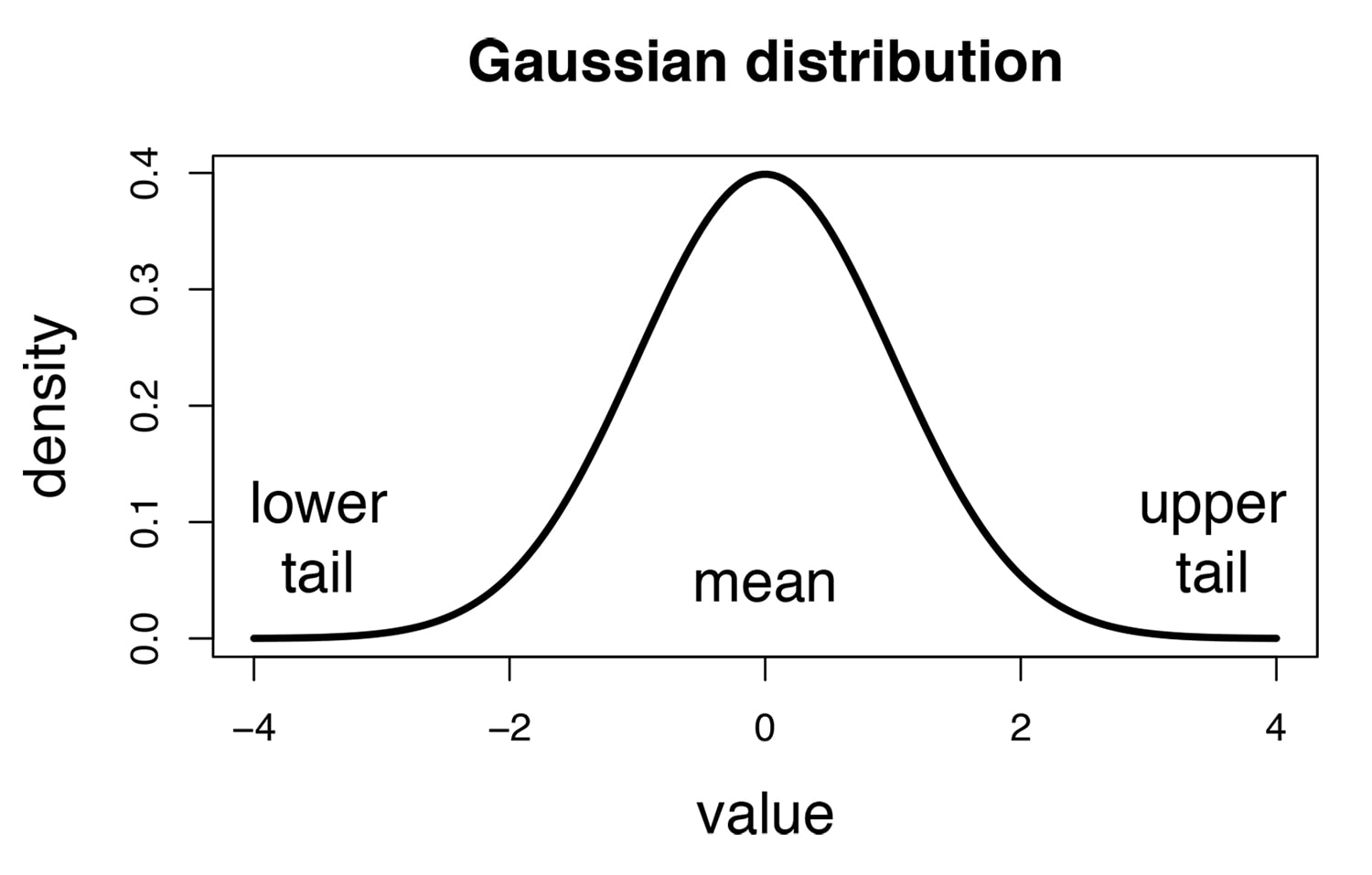
You might be wondering how this is relevant to the loot system. One thing BetterStructures has to decide when setting loot in chests is just how much loot appears in those chests. The amount should be consistently around a specific number, but ideally not so predictable that opening a chest might become less exciting.
To achieve this semi-random effect, gaussian distribution is used to randomize how many items are picked. Once this amount is picked, the weighted probability picks one element from the rarity table at random and taking the weights into account.
So how does the gaussian distribution work?
Fortunately, you don't have to worry about how the math behind it works, and can instead focus on the two settings that modify it: mean and standard deviation.
Mean
mean sets the center of the Gaussian roll used to choose the number of loot attempts. The implementation rounds up, clamps negative results to zero, then adds one attempt, so a mean of 5 does not mean an average of exactly five delivered stacks.
Standard deviation
standardDeviation controls the spread of that initial roll. Before rounding, about 68% of Gaussian values fall within one standard deviation of the mean and about 95% fall within two. A mean of 5 and standard deviation of 1 therefore puts about 68% of raw rolls between 4 and 6; wider or narrower settings change that spread.
These are probabilities, not hard minimums or maximums. The final number of delivered stacks also depends on valid loot entries and available inventory slots.
The default mean is 4, and the default standard deviation is 3.
Implementation Details
Understanding how the treasure system works internally can help you configure it more effectively:
Minimum Loot Attempts
For a nonempty custom rarity list, the number of loot attempts is max(ceil(gaussian(mean, standardDeviation)), 0) + 1. The extra attempt means the configured mean is not the final average number of stacks. At least one attempt is made, but an invalid or empty item table, failed item creation, or a cancelled chest-fill event can still leave a chest empty.
Random Slot Placement
Items are placed in random slots within the chest rather than filling sequentially from the first slot. Each stack goes into a randomly chosen empty slot, and existing contents are never overwritten. Rolling stops once the container has no empty slots left, and a container that is already full gets no loot, custom or vanilla.
Error Handling
If an item material does not exist in your Minecraft version (for example, using an older config on a newer version where items were renamed), that item will be silently skipped rather than causing errors. Enchantment entries that do not resolve to a real minecraft: enchantment key are also skipped silently, while a procedurallyGeneratedItemSettings block keyed on a material that does not exist logs a warning naming the file.
A missing or invalid amount logs a warning. The parsed minimum is raised to at least 1 and the maximum to at least that minimum: a missing amount becomes 1, while 5-2 becomes a fixed amount of 5. Malformed ranges may retain a successfully parsed minimum, so correct the file rather than relying on this repair.
Use finite, positive weights for both rarities and their items. A rarity whose weight is missing, zero, negative or not a number is omitted. An item entry whose weight is missing, negative or not a number is dropped; non-numeric and negative values log a warning naming the file. An item with weight 0 stays in the table but is never picked. If every item in a rarity has weight 0, a roll that lands on that rarity adds nothing. A failed selection warns only once per warning category during the plugin's loaded lifetime, not once for every file. Do not rely on a warning to detect every bad weight.
Special format
Treasure files have a special format that looks like this:
isEnabled: true
mean: 4.0
standardDeviation: 3.0
vanillaTreasure: BURIED_TREASURE
items:
  common:
    weight: 60
    items:
    - amount: 1-1
      material: STONE_PICKAXE
      procedurallyGenerateEnchantments: true
      weight: 1.0
    - amount: 1-1
      material: STONE_SHOVEL
      procedurallyGenerateEnchantments: true
      weight: 1.0
  rare:
    weight: 30
    items:
    - amount: 1-1
      material: ANVIL
      weight: 6.0
    - amount: 1-6
      material: BEETROOT
      weight: 6.0
  epic:
    weight: 10
    items:
    - amount: 2-10
      material: DIAMOND
      weight: 1.0
    - amount: 1-1
      material: DIAMOND_AXE
      weight: 6.0
procedurallyGeneratedItemSettings:
  golden_sword:
    bane_of_arthropods:
      minlevel: 1
      maxlevel: 5
      chance: 0.2
    looting:
      minlevel: 1
      maxlevel: 3
      chance: 0.2
This is a shortened example. Shipped treasure files contain larger item tables and enchantment settings, and some presets use different means and deviations; for example, the barrel food table uses a mean of 1 and a deviation of 0.7.
isEnabled
| Key | Values | Default |
|---|---|---|
isEnabled | Boolean | true |
This field is saved, but the current treasure loader and loot roller do not use it to suppress a table. Setting it to false alone does not stop loot. Disable the relevant structure or generator, or use the barrel-loot toggle for barrels.
mean
| Key | Values | Default |
|---|---|---|
mean | Double | 4 |
Set the mean. Read the details about that here.
standardDeviation
| Key | Values | Default |
|---|---|---|
standardDeviation | Double | 3 |
Set the standardDeviation. Read the details about that here.
vanillaTreasure
| Key | Values | Default |
|---|---|---|
vanillaTreasure | String | none, except in the shipped vanilla_* files |
Sets an optional vanilla Minecraft loot table to use in addition to the custom loot. This uses Bukkit's LootTables enum values (e.g., BURIED_TREASURE, SHIPWRECK_TREASURE, SIMPLE_DUNGEON), ignoring letter case. The vanilla roll runs after custom loot and uses the remaining empty slots. If not set, only custom loot is used; invalid names warn and disable the vanilla portion.
The shipped vanilla treasure files default to their matching table when the key is missing: vanilla_bastion_treasure.yml uses BASTION_TREASURE, vanilla_buried_treasure.yml uses BURIED_TREASURE, vanilla_end_city_treasure.yml uses END_CITY_TREASURE, vanilla_fishing_treasure.yml uses FISHING_TREASURE and vanilla_shipwreck_treasure.yml uses SHIPWRECK_TREASURE. Any other file needs the field set explicitly; a vanilla_* name alone does not select a loot table.
items
This is where it gets a tricky, as many of the options can be set by admins. Let's zoom in on the configuration file example from earlier.
items:
  common:
    weight: 60
    items:
    - amount: 1-1
      material: STONE_PICKAXE
      procedurallyGenerateEnchantments: true
      weight: 1.0
    - amount: 1-1
      material: STONE_SHOVEL
      procedurallyGenerateEnchantments: true
      weight: 1.0
  rare:
    weight: 30
    items:
    - amount: 1-1
      material: ANVIL
      weight: 6.0
    - amount: 1-6
      material: BEETROOT
      weight: 6.0
Here, you can see that under the items configuration key we have a map with common and rare. These are rarities!
rarities
Rarities do not have a fixed name. You can add or remove them, and customize them as much as you want, as long as you use the same format.
Note that what makes these rarity tables more or less rare is the weight of the loot table!
By default:
commonhas a defaultweightof 60rarehas a defaultweightof 30epichas a defaultweightof 10
Making common items 6x more likely to drop than epic items. You can read more about weights here!
Aside from the weight, each rarity table has its own list of items.
rarity items
Rarity items are a map list which lists all the items that the rarity table has.
There items have the following settings:
| Key | Values | Default |
|---|---|---|
amount | min-max Integer | variable |
material | Material | variable |
procedurallyGenerateEnchantments | Boolean | variable |
weight | Double | variable |
amount
Sets the amount to drop. This can be expressed as a range amount: MIN-MAX or as a single value amount: VALUE for fixed amounts. Examples:
- Variable amount:
amount: 1-5(drops between 1 and 5 items) - Fixed amount:
amount: 3(always drops exactly 3)
material
Sets the material using the Spigot API names of the item to potentially drop.
Special case - serialized
/bs lootify writes a serialized map using Bukkit item serialization, preserving the held item's data. Let the command generate it instead of constructing it manually. Use only one item source per entry: material, serialized, or mmoitem. If a valid material is also present, it takes precedence over the serialized or MMOItems item. Procedural enchantments apply only to material entries.
mmoitem
Sets a custom item from the MMOItems plugin. This is an alternative to the material field for using custom items instead of vanilla Minecraft materials.
The format is: mmoitem: TYPE@ITEMNAME
Example:
- amount: 1-1
  mmoitem: SWORD@Excalibur
  weight: 1.0
This requires MMOItems. mmoitems is also accepted as a field alias. Invalid item lookups normally warn and skip the entry, but absence of MMOItems is not safely guarded: missing classes can fail content loading. Install the dependency or remove these entries before loading the file.
info
Optional field for adding notes or comments to item entries. This field is completely ignored by the plugin and exists solely for administrative documentation purposes. Use it to remind yourself why certain items are configured in specific ways.
Example:
- amount: 1-1
  material: DIAMOND_SWORD
  weight: 1.0
  info: "Rare drop for completing the dungeon"
weight
Sets the weight for the weighted chance. More about that here.
procedurallyGenerateEnchantments
Sets whether the item should be procedurally generated based on the settings in procedurallyGeneratedItemSettings. Note that based on the settings this might result in an item generating without enchantments regardless.
procedurallyGeneratedItemSettings
Let's take another look at our configuration file example:
procedurallyGeneratedItemSettings:
  golden_sword:
    bane_of_arthropods:
      minlevel: 1
      maxlevel: 5
      chance: 0.2
    looting:
      minlevel: 1
      maxlevel: 3
      chance: 0.2
As you can see, this file lists material types, followed by enchantments and then followed by minimum and maximum levels and a chance.
This section accepts Bukkit materials and registered enchantments under the minecraft: namespace. Other enchantment namespaces are skipped. Use a serialized item entry when you need to preserve an item supplied by another plugin.
If a treasure file has no procedurallyGeneratedItemSettings section, BetterStructures writes its default enchantment table into the file. A file that already has the section uses only the entries it lists.
As for the enchantment settings:
| Key | Values | Default |
|---|---|---|
minlevel | Integer | variable |
maxlevel | Integer | variable |
chance | Chance | variable |
minlevel
Sets the minimum enchantment level. Keep it at least 1 and no greater than maxlevel.
maxlevel
Sets the maximum enchantment level, included in the random roll. The plugin does not clamp it to the vanilla enchantment limit; it adds enchantments with Bukkit's level restrictions bypassed. Invalid numeric values or reversed ranges can prevent loading or item creation.
chance
Sets the probability of the enchantment being applied, as a decimal value between 0.0 (never) and 1.0 (always). For example, a value of 0.2 means a 20% chance. This uses a simple probability check, not weighted probability like the item selection system.
Troubleshooting
Items not appearing in chests
- Verify the structure and generator are enabled and reference a valid treasure file; a schematic override still requires a valid generator treasure table
- Check console for warnings about invalid materials or items
- Ensure MMOItems is installed if using custom items
- Materials must use exact Spigot API names
Enchantments not applying
- Set
procedurallyGenerateEnchantments: trueon the item - Verify enchantment names match Minecraft's namespaced keys
- Check that min/max levels are within valid ranges for that enchantment
- Remember that
chancevalues are probabilities (0.2 = 20%), not guarantees
Custom plugin enchantments not working
Only enchantments registered under the vanilla minecraft: namespace are read. Anything else in a procedurallyGeneratedItemSettings block is skipped without a warning, so a custom enchantment that quietly does nothing is the expected symptom rather than a bug. Check with the enchantment plugin's author about compatibility.
Empty chests appearing
The minimum applies to loot attempts, not successful items. If you are seeing empty chests, verify:
- The chest is being populated by BetterStructures (not another plugin)
- All items in your treasure file are valid (check console warnings)
- The treasure file is actually being loaded (check startup logs)