Creating NPCs
Put NPC configuration files in plugins/EliteMobs/npcs/, using unique filenames including .yml. Save the file and run /em reload before placing a newly defined NPC. As a player with elitemobs.place.npc, use /em place npc <npcfilename.yml> at the desired position and facing direction. One file can contain multiple placements.
Reusing another NPC file
An NPC file can start from another NPC file with extends, then change only what differs:
extends: my_base_npc.yml
name: "&aSecond Guard"
spawnLocations:
- my_world,20,64,20,90,0
The file inherits every value from the base and overrides the keys it sets. Nested sections, such as patrol, merge key by key; a list, such as dialog, replaces the base list as a whole. Name the base by filename only, without a folder path. It must be another file in npcs, including its subfolders, and it can extend a further base.
isEnabled, spawnLocation and spawnLocations are never inherited, so each file keeps its own placements. A base set to isEnabled: false can serve as a template: files that extend it still load. EliteMobs does not write default values into a file that uses extends. A missing base, a path in extends or a loop of extends references disables the file with a console warning. The patrol editor uses extends when it splits one placement out of a file with several.
Configuration settings
isEnabled
Enables the NPC definition when configurations are loaded. Reload after changing this setting. A SCROLL_APPLIER also requires the global useEliteItemScrolls setting to spawn.
| Key | Values | Default |
|---|---|---|
isEnabled | Boolean | true |
Example
isEnabled: true
name
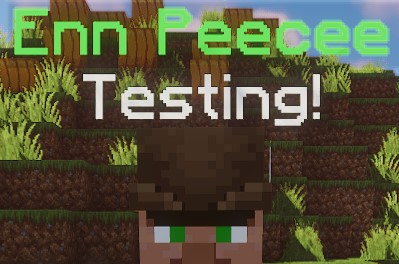
Sets the display name of an NPC. Supports color codes. EliteMobs registers this source text in its translation CSV and uses the configured language's translation when available.
| Key | Values | Default |
|---|---|---|
name | String | empty string |
Example
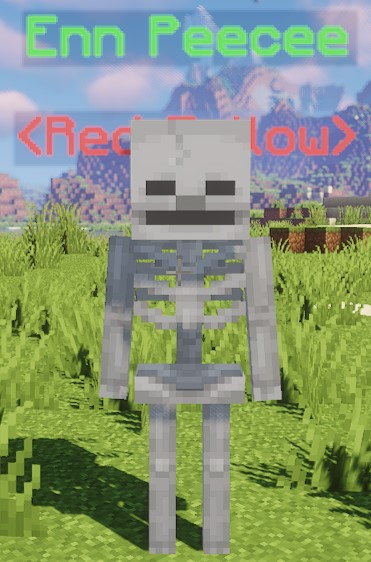
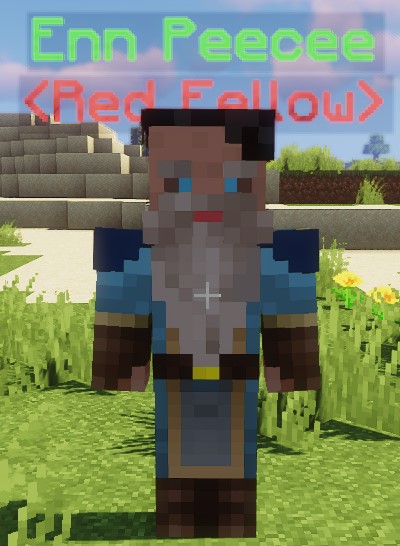
name: "&aEnn Peecee"
Nameplate layout
NPC name and role labels use a fixed layout. There are no per-NPC nameplateScale or nameplateLineGap settings. Plain and disguised NPC labels follow the entity or disguise height. Compatible FreeMinecraftModels models own their nameplate layout; ModelEngine keeps its own name while EliteMobs renders the role. Personal quest markers are positioned above the resulting label stack.
When gambling is enabled, the special gambling_den_owner.yml NPC adds its house earnings to this same label stack, refreshed about once per second.
scale
Sets the scale of the underlying villager through Minecraft's scale attribute. A custom model or disguise can control its own visual size; this setting does not guarantee that its appearance scales with the villager.
| Key | Values | Default |
|---|---|---|
scale | Multiplier | 1.0 |
When scaling, 1.0 represents the default size. To make the entity larger, increase the value (e.g., 1.2). To make the entity smaller, decrease the value (e.g., 0.8).
Example
scale: 1.2
role
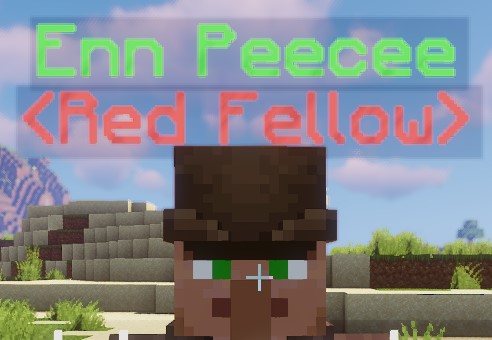
Sets the role label under the NPC's name. This is visual only, supports color codes and is registered in the translation CSV.
| Key | Values | Default |
|---|---|---|
role | String | empty string |
Example
role: "&c<Red Fellow>"
profession
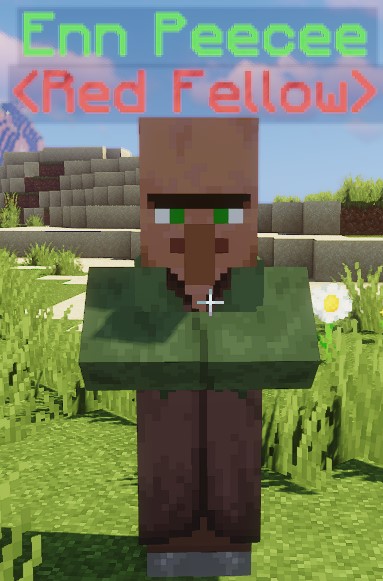
Sets the underlying villager's profession and its appearance when neither a disguise nor a custom model is used.
| Key | Values | Default |
|---|---|---|
profession | Profession | NITWIT |
Example
profession: NITWIT
greetings
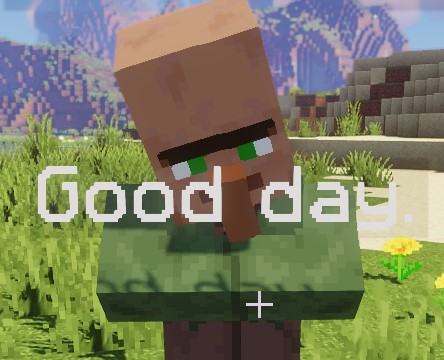
Sets the greetings attempted when a proximity scan first detects a player inside activationRadius. One entry is picked at random for a floating chat bubble above the NPC, visible only to that player for about 5 seconds. The list is registered in the translation CSV. Speech still requires canTalk and an available dialogue cooldown.
| Key | Values | Default |
|---|---|---|
greetings | String List | none |
A greeting is attempted only on detected entry. If the shared dialogue cooldown blocks it, remaining inside the radius does not retry that greeting.
Example
greetings:
- Hi there!
- Good day.
dialog
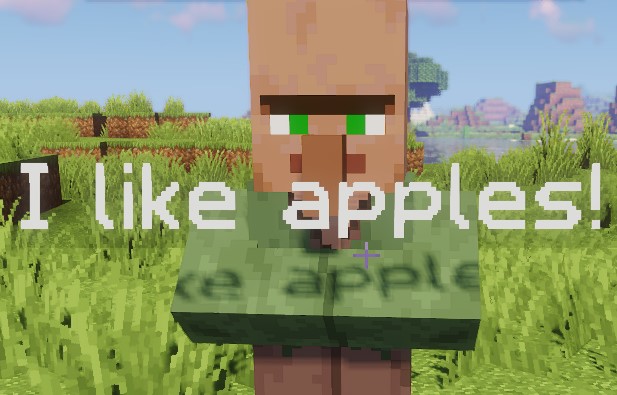
Sets the lines the NPC can say as a floating chat bubble. One entry is picked at random each time (the list is not read in order). The list is registered in the translation CSV.
When it fires depends on the interactionType:
CHATNPCs attempt a dialog line when interacted with, normally by right-clicking. FreeMinecraftModels also forwards model left-clicks to the interaction handler.- Every other
interactionTypeattempts dialog on subsequent proximity scans while the player remains insideactivationRadius; the entry scan attempts a greeting instead.
A literal \n inside a line splits it into stacked bubble lines. Use single-quoted YAML to preserve it, or write \\n in a double-quoted YAML string. This applies to greetings and farewells too.
| Key | Values | Default |
|---|---|---|
dialog | String List | none |
Example
dialog:
- I like apples!
- Sure is hot.
farewell
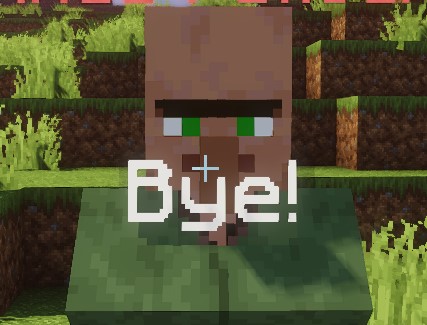
Sets the farewell messages of the NPC. One entry is picked at random and shown as a floating chat bubble. The list is registered in the translation CSV.
| Key | Values | Default |
|---|---|---|
farewell | String List | none |
Closing any inventory view with a nonempty title attempts farewells from nearby NPCs. The search extends 5 blocks along each axis around the player; it is not restricted to the NPC whose menu was opened. Several nearby NPCs can attempt to speak. Walking out of activationRadius does not trigger a farewell.
Example
farewell:
- Until next time!
- Bye!
canTalk
Controls built-in chat bubbles. false suppresses greetings, dialog and farewell. It does not disable menus, commands, Lua scripts, quest dialogue, proximity detection or quest markers.
| Key | Values | Default |
|---|---|---|
canTalk | Boolean | true |
Example
canTalk: true
activationRadius
Sets the radius, in blocks, at which an NPC can detect a player approaching.
| Key | Values | Default |
|---|---|---|
activationRadius | Double | 3.0 |
Proximity is scanned every 100 ticks, about 5 seconds. Distance is measured in three dimensions, without a line-of-sight check. Inside this radius, stationary NPCs can face players, greet them on entry and use subsequent scans for dialog. Setting it to 0 or lower disables these proximity interactions, including the Lua proximity hooks. Quest indicators for QUEST_GIVER and CUSTOM_QUEST_GIVER use a separate 30-block radius and can still appear with activationRadius: 0. These personal indicators reflect the player's available quests and turn-ins.
The proximity scan and chat bubbles are suppressed while a patrol is actively moving or being edited. Patrols can pause near players and control facing with patrol.pauseNearPlayersRadius and patrol.faceNearbyPlayers; see Patrols.
Example
activationRadius: 3.0
scripts
Sets the Lua scripts attached to this NPC. Script files are loaded from plugins/EliteMobs/npc_scripts/. The .lua extension is optional - it is appended automatically if you leave it out.
| Key | Values | Default |
|---|---|---|
scripts | String List | none |
NPC scripts run on the shared MagmaCore Lua engine and support on_spawn, on_game_tick, on_remove, on_npc_interact, on_npc_proximity_enter, on_npc_proximity_leave, on_zone_enter and on_zone_leave. The NPC tick hook is on_game_tick. Each NPC gets its own script instances; lower priorities run first. A script with only a tick hook needs an on_spawn hook, which can be empty, to initialize it. See Lua NPC Scripts for the full API and examples.
A script name that does not resolve to a loaded script definition is skipped with a warning; the NPC still spawns. Match the filename's case. Reload after changing scripts.
Quest dialogue can consume a click before on_npc_interact runs. Otherwise this hook runs before the configured interaction and does not cancel that interaction.
Example
scripts:
- wave.lua
interactionType
Sets the type of interaction the NPC will do.
| Key | Values | Default |
|---|---|---|
interactionType | Special [1] | NONE |
Example
interactionType: TELEPORT_BACK
noPreviousLocationMessage
When a TELEPORT_BACK NPC has no saved return location, it displays this message. The return location is the origin saved by an EliteMobs teleport from outside an EliteMobs world; it is not the player's most recent movement or death location. Returning uses the normal EliteMobs teleport process, including its configured delay and cancellation rules. This message supports color codes and is registered in the translation CSV.
| Key | Values | Default |
|---|---|---|
noPreviousLocationMessage | String | empty string |
Example
noPreviousLocationMessage: '&8[EliteMobs] &cCouldn''t send you back to your previous location - no previous location found!'

timeout
Sets the delay in minutes before removing a spawned NPC. Values of 0 or less disable this timer. Removal does not delete the saved placement or disable the definition: the NPC can return after a reload, restart or chunk restoration.
To remove a placement, enable removal mode with /em remove, hit the NPC, then disable removal mode with /em remove again. This requires elitemobs.remove. For list-based placements, the matching saved entry is removed. A legacy single-location definition is disabled instead. Remove an obsolete spawnLocation key when migrating to spawnLocations, or it can become active again when the list is emptied.
| Key | Values | Default |
|---|---|---|
timeout | Double | 0 (never) |
Example
timeout: 0
questFileName
Lists quest filenames from plugins/EliteMobs/customquests/, including .yml, for CUSTOM_QUEST_GIVER. The key is singular (questFileName) even though it takes a list. The menu offers eligible quests and handles turn-ins assigned to this NPC's filename. A turn-in NPC can therefore have an empty offer list. Multiple placements of the same NPC file share that quest identity. Individual quest permissions and eligibility still apply.
| Key | Values | Default |
|---|---|---|
questFileName | String List | none |
Example
questFileName:
- my_quest_one.yml
- my_quest_two.yml
disguise
Sets the NPC's disguise and requires LibsDisguises. A successfully loaded custom model takes precedence over this disguise.
| Key | Values | Default |
|---|---|---|
disguise | LibsDisguises format | none |
Example
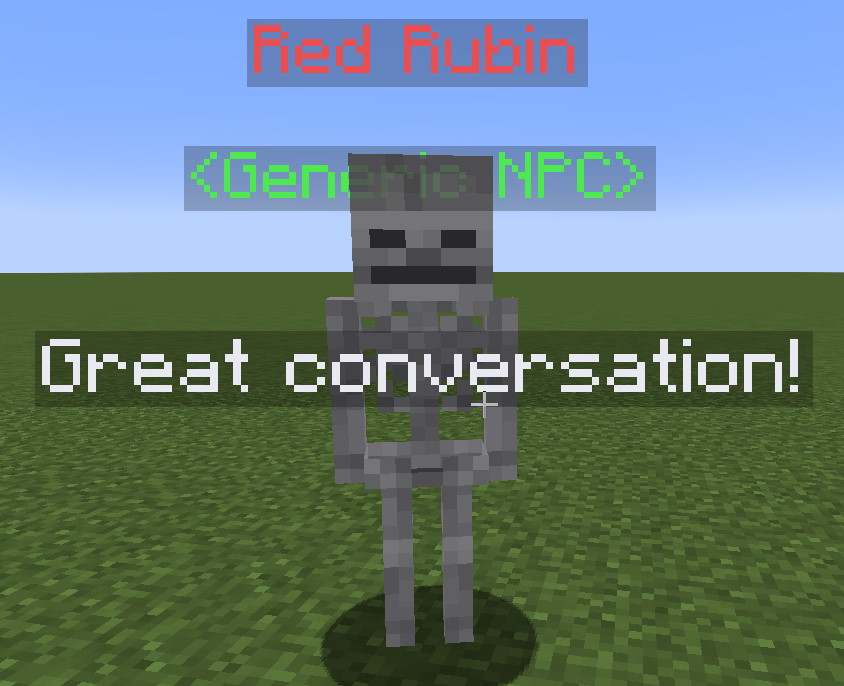
disguise: SKELETON
customDisguiseData
Sets the data for a custom LibsDisguises disguise.
| Key | Values | Default |
|---|---|---|
customDisguiseData | LibsDisguises format | none |
Example
disguise: custom:my_cool_disguise_name
customDisguiseData: player my_cool_disguise_name setskin {"id":"364acb6d-9050-46f7-b5fb-f8c3fd83a6fc","name":"Unknown","properties":[{"name":"textures","value":"ewogICJ0aW1lc3RhbXAiIDogMTYxMTk4ODA4Nzc1NSwKICAicHJvZmlsZUlkIiA6ICJkZGVkNTZlMWVmOGI0MGZlOGFkMTYyOTIwZjdhZWNkYSIsCiAgInByb2ZpbGVOYW1lIiA6ICJEaXNjb3JkQXBwIiwKICAic2lnbmF0dXJlUmVxdWlyZWQiIDogdHJ1ZSwKICAidGV4dHVyZXMiIDogewogICAgIlNLSU4iIDogewogICAgICAidXJsIiA6ICJodHRwOi8vdGV4dHVyZXMubWluZWNyYWZ0Lm5ldC90ZXh0dXJlLzliYmVkODQzNWY4YmYyNzhhZmUyNmU2NGZkOTI2YjhiMzc3MzJkODhlMzM0ODk3ZGJkNTI3ZDU2ZmY5MTk5MGUiCiAgICB9CiAgfQp9","signature":"ujLq1joYVktuQAp1xpFKlxQFUVinSePiDBiVCAxxix/mA5vP86i/eAOfb1mtGjaAZ6sO0l2olbzvycnGXNBtbAxgqprguROXY4tpWiePVTDmy3iD4GdOCxHAkYLoyMV5qTT4SNsldUFFuND8GSEgbNMltKDLmhNKwzm08iCigPfpeuYpwljgJPxu6ka54PKNaQu4doI0ZDZXKqq4hPhR3Bs2Sz9MI0SmdmQWwcCzUz3DFdVno27fmQ6LwqmT+eSoOv0EttVG/XMaTYQ5lhBY61mqf6WlJyYVUSfjJk1AbYsctu7dWM+sbY8jFq5ljvXJGGr5TyKi+fs8vHy06Z2go20QgTYOw+caFxFijAS6fgm3oY57VEO/+/9OLHdD+Z9BrWqQWcIIrVeIfxjue/yt4pyeVv9jX59hjNFjhcPEwotkxJ+vZ96WlTLWDG4BiqauDr2VeGyLlVaygO9ZU0wwsN65iSh91GI3tMIA5wbDR0Hts/9ABvt9eafHbowS+4SZXN0i9mYnKg7op1eiB8nMEAGsPJg3DwsmUrh3ACAapQ6eYHiJpo59RXDqKlRcXwo7wsEFp//5LgQWbPj0NP3nxnywdpozqSAeq6236qlhE9BT9eiyJ41V9sMelYFEWMlUAltR40NdbIrHB0J3nmfuLJz44/sTwWf6P1khOy//XX0="}],"legacy":false}
customModel
Sets the custom model the NPC will use through FreeMinecraftModels or ModelEngine. Install the model in the selected provider before referencing its ID. FreeMinecraftModels is preferred when both providers are available; a missing FMM model does not select ModelEngine instead. If no model loads, the NPC uses its configured disguise or ordinary villager appearance. See Custom Models.
| Key | Values | Default |
|---|---|---|
customModel | String | none |
Example
customModel: MY_MODEL_ONE
Class trainers and transport NPCs
Use the existing NPC type field interactionType: CLASS_TRAINER with classRoot to select its class branch. Start from the bundled class_trainer_*.yml NPC definitions. Trials and progression are covered in Advanced Combat System.
For interactionType: TRANSPORT, transportRoutes is a list of route IDs without .yml; clicking the NPC opens route selection. See Transport routes.
arena
Sets the filename of the arena the NPC will open a menu for (requires the ARENA_MASTER interactionType).
| Key | Values | Default |
|---|---|---|
arena | Filename | none |
Example
arena: my_arena.yml
command
Sets the command for COMMAND. It runs as the clicking player on the next tick and requires that player's normal command permissions. Omit the leading slash (/). This field does not automatically expand player placeholders or use the EliteMobs console-command format.
| Key | Values | Default |
|---|---|---|
command | String | none |
Example
command: say Look at me running a command, how cool!

spawnLocation
Sets a single spawn location for the NPC. This is the legacy single-location key: it is only read when spawnLocations is absent or empty. New locations placed in-game are written to spawnLocations instead, so prefer that key.
The recommended format is world,x,y,z,yaw,pitch. The named world must already be loaded; this setting does not load it.
| Key | Values | Default |
|---|---|---|
spawnLocation | String | none |
Example
spawnLocation: my_world,10,50,10,0,0
spawnLocations
Sets multiple placements for the same NPC definition. Use /em place npc <npcfilename.yml> to append your current position and facing direction, rounded to two decimal places, and set isEnabled: true. Repeating an identical serialized placement does not create another entry. NPCs are restored as their chunks become available for entity ticking.
The format of each entry is world,x,y,z,yaw,pitch.
| Key | Values | Default |
|---|---|---|
spawnLocations | String List | none |
Example
spawnLocations:
- my_world,10,50,10,0,0
- my_world,-10,50,-10,0,0
instanced
Sets if the NPC should be instanced (for use in instanced dungeons). When set to true, the NPC is not spawned in the blueprint world; instead it is registered as a template and cloned for each dungeon instance, with each clone existing in the corresponding instance world.
| Key | Values | Default |
|---|---|---|
instanced | Boolean | false |
Example
instanced: false
syncMovement
Sets if the NPC's custom model should have its movement synchronized with the underlying entity. This only has an effect when customModel is set and the model is loaded - it is ignored for plain and LibsDisguises NPCs.
NPCs with a valid configured patrol enable movement synchronization even when the patrol is paused or this setting is false. The setting remains useful for custom-modeled NPCs that do not patrol.
| Key | Values | Default |
|---|---|---|
syncMovement | Boolean | true |
Example
syncMovement: true
patrol
Adds a native, automatically pathfound route to this NPC. Nodes are offsets from this NPC's authored spawn location, or exact coordinates in its world with patrol.relative: false. Long legs are solved and divided automatically, and patrols do not force-load chunks. patrol.startNodeWaitSeconds makes the NPC rest at the first node once per lap, the NPC-only patrol.pauseNearPlayersRadius pauses it near players, and patrol.faceNearbyPlayers turns it toward them while paused. See NPC & Boss Patrols for the complete schema, in-game editor, long-distance behavior, and Lua controls.
NPC Config Example
isEnabled: true
name: "&cRed Rubin"
role: "&a<Generic NPC>"
profession: NITWIT
greetings:
- Hiya!
- Hello!
dialog:
- Great conversation!
- Pleasure talking with you!
farewell:
- Goodbye!
- Laters!
canTalk: true
activationRadius: 4
interactionType: CHAT
timeout: 0
spawnLocations:
- my_world,584,55,127,90,10
Special [1]
The following is the list of valid NPC interaction types:
| Type | Description |
|---|---|
GUILD_GREETER | Opens weapon skill bonus selection. Requires elitemobs.skill.npc. |
CLASS_TRAINER | Opens the class branch specified by classRoot. Requires elitemobs.command. |
TRANSPORT | Opens the destinations listed in transportRoutes. |
CHAT | Attempts a random dialog line on interaction. |
CUSTOM_SHOP | Opens the custom shop. Requires elitemobs.shop.custom.npc. |
PROCEDURALLY_GENERATED_SHOP | Opens the generated shop. Requires elitemobs.shop.dynamic.npc. |
BAR | Unimplemented. Tells the player the feature is coming soon. |
ARENA | Does nothing. Use ARENA_MASTER instead. |
QUEST_GIVER | Opens generated quests. Requires elitemobs.quest.npc. |
CUSTOM_QUEST_GIVER | Offers eligible quests from questFileName and accepts assigned turn-ins. |
NONE | No built-in action; scripts, proximity and quest dialogue can still run. |
SELL | Opens the sell menu. Requires elitemobs.shop.sell.npc. |
TELEPORT_BACK | Uses the saved EliteMobs return location. Requires elitemobs.back.npc. |
SCRAPPER | Opens scrapping. Requires elitemobs.scrap.npc. |
REPAIRMAN | Opens repairs. Requires elitemobs.repair.npc. |
ENCHANTER | Opens enchanting. Requires elitemobs.enchant.npc. |
REFINER | REPLACED - Tells the player the feature was replaced; admins are told to remove the NPC |
SMELTER | REPLACED - Tells the player the feature was replaced; admins are told to remove the NPC |
ENHANCER | REPLACED - Tells the player the feature was replaced; admins are told to remove the NPC |
UNBINDER | Opens unbinding. Requires elitemobs.unbind.npc. |
ARENA_MASTER | Opens the arena menu for the arena set in arena |
COMMAND | Runs the command set in command |
SCROLL_APPLIER | Opens elite item scrolls. Requires elitemobs.scroll.npc; does not spawn while useEliteItemScrolls is disabled. |
ARROW_SHOP | Opens the arrow shop. Requires elitemobs.shop.arrow.npc. |
GAMBLING_BLACKJACK | Opens blackjack. Requires elitemobs.gambling.npc. |
GAMBLING_COINFLIP | Opens coin flip. Requires elitemobs.gambling.npc. |
GAMBLING_SLOTS | Opens slots. Requires elitemobs.gambling.npc. |
GAMBLING_HIGHERLOWER | Opens higher/lower. Requires elitemobs.gambling.npc. |
For more information on what the SCRAPPER and similar interaction types do click here.
NPC Behavior Notes
The built-in NPC behavior also includes:
- Movement: NPCs normally remain stationary and face nearby players. Patrols and scripts can move them. A patrol controls the body's route instead of ordinary villager behavior.
- Interaction order: Quest dialogue can handle a click before Lua or the built-in action. Otherwise Lua runs first, followed by the configured action and its permission checks. A one-tick guard prevents repeated interactions by the same player across NPCs. Patrol editing blocks interactions; ordinary patrol movement does not.
- Protection: NPC bodies do not collide normally, and EliteMobs cancels damage, villager transformations and ordinary merchant inventory opening.
- Role Display: Name and role rows use the fixed nameplate layout described above. Plain and disguised NPCs use their current body height, so changing the entity scale also changes the label's position. Compatible FMM models manage the name and role together.
- Bedrock labels: Bedrock presentation depends on the active display/model integration. The retained
bedrockNPCRoleYOffsetconfiguration key is not used by the current NPC nameplate renderer. - Dialogue Cooldown: Each NPC waits 3 seconds between speech events, shared across players. A greeting shown to one player can suppress another player's greeting during that interval. Chat bubbles are per-player floating text that disappears after about 5 seconds.
- Invisibility: An NPC under the invisibility potion effect will not show chat bubbles.
- Chunk Lifecycle: NPCs despawn on chunk unload and are restored when the chunk can tick entities again. NPC entities are never saved to the world; configurations supply their placements.
- Renaming Blocked: Ordinary villager right-clicks with a name tag in the main hand are cancelled with a message. Model integrations use their own click callbacks; FreeMinecraftModels forwards both left- and right-clicks to the NPC interaction handler.