Creating Items
Creating Custom Items
What are Custom Items?
Custom Items are items as defined by EliteMobs through configuration files. You can customize several aspects about these items, such as the level of the item, the enchantments, name, lore, texture and more!
Webapp
You can easily and quickly create Custom Loot here!
Before you begin
Where do Custom Items go?
Custom item files go in plugins/EliteMobs/customitems/.
Subfolders such as plugins/EliteMobs/customitems/myitems/ help organize files. References use the filename including .yml, so keep filenames unique across subfolders. Save changes, run /em reload, and generate a fresh item to inspect the result.
Files are stored in the .yml file format and Notepad++ is the recommended file editing software for configuration work. One file defines one custom item. Multiple bosses, chests or quests can reference that item file.
It is possible to use the webapp to quickly and easily create custom bosses and more.
Smallest possible configuration
Please note that the smallest possible configuration file for a Custom Item is:
An empty ordinary item file defaults to a wooden sword called "Default name". Specialized definitions have additional requirements: CLASS_LOOT, consumables and magic weapons must provide the fields described in their sections below.
Example item
Let's take a look at an example of what an item file looks like.
Example
isEnabled: true
material: WOODEN_AXE
name: '&4Test item'
lore:
- This is a cool item
- It has cool lore
enchantments:
- SHARPNESS,4
- elitemobs:flamethrower,1
potionEffects:
- HASTE,0,self,onHit
- POISON,0,target,onHit
- GLOWING,0,self,continuous
dropWeight: dynamic
scalability: scalable
itemType: custom
Custom Item settings
The following is a list of all the things you can configure for custom items:
isEnabled
Enables the definition for new items. Existing items are not rewritten. However, consumable services resolve the current enabled definition, so disabling one can stop previously generated items from serving that role.
| Key | Values | Default |
|---|---|---|
isEnabled | true / false | true |
Example
isEnabled: true
material
Sets the item material.
| Key | Values | Default |
|---|---|---|
material | Pick from this list! | WOODEN_SWORD |
Example
material: DIAMOND_SWORD
level
Sets the item level.
| Key | Values | Default |
|---|---|---|
level | Integer | 0 |
Leaving this at the default of 0 makes EliteMobs derive the level from the material instead of using a fixed one.
With scalability set to scalable, the drop or reward path supplies the level. This is not always the boss's exact level. With limited, the configured level is the cap; with fixed, it is the item's level. Default-item previews use the configured or material-derived level instead.
Armor has a material baseline: leather, gold and turtle count as level 3, chainmail 5, iron 6, diamond 7 and netherite 8. An item level below that baseline grants no additional elite level defence. Enchantments and vanilla attributes are separate, so this does not mean the item behaves exactly like unmodified vanilla armor.
Example
level: 100
name
Sets the display name of the item.
| Key | Values | Default |
|---|---|---|
name | String with color codes | "Default name" |
Example
name: "&2Cool item"

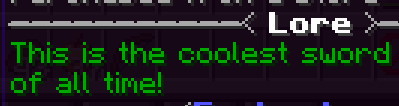
lore
Sets the lore of the item.
| Key | Values | Default |
|---|---|---|
lore | List with color codes | none |
Example
lore:
- "&2This is the coolest sword"
- "&2of all time!"
enchantments
Sets the enchantments on the item.
| Key | Values | Default |
|---|---|---|
enchantments | List with Minecraft enchantments or EliteMobs Custom Enchantments | none |
Native entries use Bukkit enchantment names. Custom effects require lowercase provider IDs such as elitemobs:loud_strikes,3 or freeminecraftmodels:multicast,2, followed by one positive integer level. Duplicate custom IDs and malformed custom entries disable the definition. Retired unnamespaced custom names also disable it; they are not converted. The supplying enchantment provider must be available and accept the item.
Example
enchantments:
- "SMITE,8"
- "UNBREAKING,4"
- "SHARPNESS,7"
- "elitemobs:loud_strikes,3"
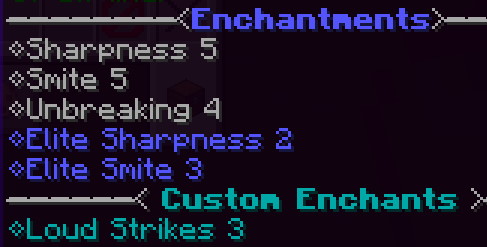
Supported elite enchantments, such as Sharpness, retain their full EliteMobs level while their native enchantment is capped at the vanilla maximum. Native application respects the enchantment's enabled setting. Procedural generation caps are not a universal clamp on authored levels.
During scaled generation, scalable and limited items draw ceil(total configured native levels * 0.5) enchantment units without replacement. This does not preserve the full total or guarantee a particular enchantment. Custom enchantments are outside that budget. Default-item generation, including /em loot give, uses the authored native levels instead. fixed items also use their authored levels.
Automatic class loot uses the same budget principle with configurable difficulty/rank profiles, independent rule chances and a configurable minimum primary enchantment. Use that system for consistent baseline equipment; keep separate custom-item files for deliberately exceptional rewards.
proceduralEnchantments
Optional boolean, default false. Enables procedural rolls during ordinary custom-item construction, subject to the procedural settings. Each rolled enchantment merges with the authored or scaled result using the higher level, rather than adding the two levels. Rolls can introduce new enchantment types; compatible magic weapons can also roll FMM enchantments. CLASS_LOOT uses its own profiles instead.
potionEffects
Sets the potion effects the item will have. These can be applied to the player or to an entity damaged by the player.
| Key | Values | Default |
|---|---|---|
potionEffects | List with Minecraft potion effects | none |
Furthermore, potion effects use a specific format that allows admins to select who gets affected and when:
| Setting | Description | Values | Default |
|---|---|---|---|
| Potion effect level | Sets the level of the potion effect. Potion effects start at level 0! | Integer | none |
| Affected entity | Sets who gets affected by an on-hit effect. | self (the player) / target (entity that gets hit) | self |
| Application method | Sets when the effect applies. | onHit / continuous | continuous |
The format for potion effects is potionEffectName,potionEffectLevel,affectedEntity,applicationMethod. The last two parameters (affectedEntity and applicationMethod) are optional and default to self and continuous if not specified. Check the example below!
Use Bukkit effect names and no spaces around commas. Effects are collected from the main hand, offhand and four armor slots, not the rest of the inventory. Broken items, another player's soulbound items and equipment rejected by the skill restriction do not contribute. Continuous effects always affect the wearer; target,continuous does not create an aura. On-hit effects can come from any of those six slots and apply on an uncancelled player attack against a living target, including projectile attacks.
Potion Effect Durations:
- Continuous equipment effects are checked every second. Ordinary applications last 2 seconds and are refreshed near expiry; Night Vision lasts 15 seconds and is refreshed when 12 seconds or less remain.
- For each effect type, the strongest equipped source wins. Unequipping or replacing it removes or updates the effect EliteMobs tracks as its own. An existing effect from another source is preserved, even if the equipment's effect would be stronger; the equipment effect can apply after that external effect expires.
- Ordinary on-hit effects use
onHitDurationin the correspondingpotionEffects/configuration, in seconds.
Self-applied INSTANT_HEALTH, INSTANT_DAMAGE and SATURATION use special handlers, for either application method. Each has a shared per-player cooldown of 100 ticks (5 seconds at 20 TPS). The amount is amplifier plus one: health points restored, damage submitted, or food points restored, respectively. SATURATION changes the food bar, not the saturation reserve. These effects do not use the ordinary continuous-effect lease.
The default potion-effect icons below can be changed in ItemSettings.yml:
- ☠️ Skull – Targets enemies.
- 🛡️ Shield – Targets the user/player.
- ⚔️ Swords – Activates on hit.
- ⟲ Circle – Applies continuously while the item is worn or held.
EliteMobs also features custom items that function as charms. These items do nothing else but provide potion effects to the player when the item is being held or is equipped in a slot.
WARNING: Using the INSTANT_DAMAGE potion effect will heal undead mobs upon impact, as this is a default mechanic in vanilla Minecraft.
Effects that do not work:
ABSORPTIONandHEALTH_BOOSTare skipped by the item potion effect system entirely. They never get applied, whether you set them tocontinuousoronHit.LEVITATION,SLOWNESSandBLINDNESSapplied to thetargeton hit are ignored when the entity you hit is an elite with a health multiplier above 1. This includes bosses authored with increased health;healthMultiplierdefaults to 1, so it does not cover every Custom Boss. They still work on other elites and on vanilla mobs.
Example
potionEffects:
- "POISON,0,target,onHit"
- "INSTANT_HEALTH,1,self,onHit"
- "NIGHT_VISION,0,self,continuous"
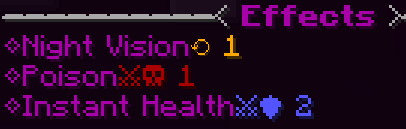
With this set of potion effects, the following things will happen:
On hit, the target receives Poison I. The player recovers 2 health points through the special heal handler, at most once every 100 ticks.
Continuously, the player will be given night vision. This means that the player will have night vision for as long as they are wearing or holding the item.
scalability
Controls how the item uses the level supplied by its drop or reward path.
| Key | Values | Default |
|---|---|---|
scalability | fixed, limited or scalable. Check below! | scalable |
Check this list to understand what the different options do!
| Setting | Description |
|---|---|
fixed | Uses the configured or material-derived item level. |
limited | Uses the lower of the requested level and the configured cap. |
scalable | Uses the requested level. |
An ordinary item with a numeric dropWeight is forced to fixed. dynamic does not force a mode. CLASS_LOOT follows its own scalable construction.
Example
scalability: "scalable"
itemType
Sets where you can obtain the item from.
| Key | Values | Default |
|---|---|---|
itemType | custom, unique, droppable, CLASS_LOOT | custom |
There are four item types:
| Setting | Description |
|---|---|
custom | Eligible for ordinary random custom-item drops and the custom shop. Pool and level selection still apply. |
unique | Excludes the item from the ordinary random drop pool and custom shop. Reference it explicitly from boss loot, treasure chests, quest or arena rewards, or give it with an administrator command. |
droppable | Eligible for ordinary random custom-item drops, but excluded from the custom shop. |
CLASS_LOOT | Uses class-loot profiles when explicitly referenced. Excluded from ordinary custom-item pools and the custom shop. |
Example
itemType: "unique"
dropWeight
Sets the loot table the item will fit into.
| Key | Values | Default |
|---|---|---|
dropWeight | dynamic or an Double value. | dynamic |
Ordinary random equipment generation chooses among five pools. Explicit tables such as a boss's uniqueLootList are separate.
These are as follows:
| Loot table | Description | Default weight |
|---|---|---|
| Procedurally generated items | Items that are randomly generated based on server configuration files | 90.0 |
| Weighed items | Items that have a weight other than dynamic | 1.0 |
| Fixed items | Items that have a fixed scalability | 10.0 |
| Limited items | Items that have limited scalability | 3.0 |
| Scalable items | Items that are scalable | 6.0 |
When an ordinary random equipment drop is generated, its pool is selected using these weights from ItemSettings.yml. These weights choose the pool; they do not guarantee an item on every boss death or control explicit boss loot tables.
Weighed items have a small Default weight, meaning they will not drop very often. Items with a dropWeight that is not dynamic are meant to be rare and are only used in the defaults for the charms bosses drop - items not used directly for combat, but rather for buffing players with potion effects.
Use a finite numeric dropWeight of 0 or more. It controls relative selection within the weighed pool, not the chance of selecting that pool. A weight of 0 still loads the item as fixed but keeps it out of the weighed pool. A negative or non-numeric value stops the item from loading.
If you are confused and just want to make weapons and armor, skip this setting as it correctly defaults to be dynamic.
Weighed items usually have a weight of 1.0.
A numeric dropWeight adds the item to the fixed and weighed drop pools unless its itemType is unique. A unique item with a numeric weight stays out of both pools and still uses fixed scalability.
The weighed pool clones cached items, so it does not re-roll procedural enchantments for each drop. When it picks an item for a player, it skips unique and disabled items and items whose permission the player lacks. The drop is soulbound only when this definition has soulbound: true and the global soulbind enchantment is enabled. CLASS_LOOT ignores dropWeight and does not enter these pools.
The ordinary random limited-item selector currently considers only definitions whose cap is strictly below the requested drop level. Do not assume every limited definition is eligible for every lower-level random drop; explicit loot references select the definition directly.
Example
dropWeight: "dynamic"
customModelID
Note: This setting has been removed. It is no longer read from configuration files. Use customModelV2 instead, which is the only model ID setting recognized since Minecraft 1.21.4+ (EliteMobs 9.1.13+). Any existing customModelID entries in your configuration files will be ignored.
Sets the texture of the item. Requires using a valid texture from the resource pack!
| Key | Values | Default |
|---|---|---|
customModelID |
Example (no longer functional)
material: DIAMOND_SWORD
customModelID: 1
This setting no longer works. Migrate to customModelV2 instead.
customModelV2
Starting with Minecraft version 1.21.4 (EM 9.1.13), this is the new required setting for configuring custom item model IDs. Sets the texture of the item. Requires using a valid texture from the resource pack!
Item and equipment model keys require useModels: true in CustomModels.yml and either ResourcePackManager installed or useResourcePackEvenIfResourcePackManagerIsNotInstalled: true in config.yml. The latter flag does not deliver a pack: players still need the matching assets.
| Key | Values | Default |
|---|---|---|
customModelV2 | String | none |
Automatic skin tiers: if you leave both this and equipmentModelID unset, EliteMobs applies its own level-based skins from the EliteMobs resource pack. The tier is picked from the item's level:
| Minimum item level | Tier |
|---|---|
20 | bronze |
40 | palladium |
60 | corrupted |
80 | living |
100 | ultimatium |
Items below level 20 get no tier skin. Tiers are only applied to swords, axes, hoes (which are rendered as scythes), bows, crossbows, helmets, chestplates, leggings and boots. Tridents are deliberately excluded.
Setting either customModelV2 or equipmentModelID uses your explicit key for that appearance, where supported. The other appearance can still fall back to its tier model. Any explicit key skips automatic vanilla attribute scaling, even when models are disabled. Without explicit keys, useAttributeScaling in CustomModels.yml controls scaling on supported server versions (1.21.2+), including positive levels below 20; it does not require models to be enabled. This changes vanilla attack damage, attack speed, armor, toughness and knockback resistance. EliteMobs damage and defence still use their own calculation.
Example
customModelV2: elitemobs:equipment/magmaguys_toothpick
This setting assigns a specific texture to an item. Here’s how it works:
elitemobs:is the main directory in the resource pack'sassetsfolder.equipmentis a subdirectory insideassets/elitemobs/items.magmaguys_toothpickselects the item definitionassets/elitemobs/items/equipment/magmaguys_toothpick.json. That definition references the actual model underassets/<namespace>/models/.
Item definition path:
\.minecraft\resourcepacks\elitemobs_resource_pack\assets\elitemobs\items\equipment\magmaguys_toothpick.json
This will use the custom texture magmaguys_toothpick from the EliteMobs resource pack the player is using. It is recommended you set your server up to give players resource packs on login if you want to use this feature correctly.
equipmentModelID
Sets the worn equipment asset for supported armor slots. It does not make an arbitrary material wearable. Helmets deliberately use their item model instead, so use customModelV2 for their appearance. The model requirements above also apply here.
| Key | Values | Default |
|---|---|---|
equipmentModelID | String | none |
An unset customModelV2 can still fall back to the level-based inventory model.
Example
material: DIAMOND_CHESTPLATE
equipmentModelID: elitemobs:bronze
This selects assets/elitemobs/equipment/bronze.json for the chestplate's worn appearance, separately from its inventory item model.
weaponType and fmmItemModel
Use weaponType: WANDS or weaponType: STAVES for magic weapons. Other weapon skills follow the material. fmmItemModel identifies an FMM authored weapon or a display-only model:
material: BLAZE_ROD
name: "&bApprentice's Wand"
lore: []
weaponType: WANDS
fmmItemModel: fmm_default_arcane_wand
enchantments:
  - "POWER,3"
  - "freeminecraftmodels:multicast,1"
scalability: scalable
A magic weapon requires an available, compatible FMM weapon definition matching the declared type. A missing magic identity prevents item generation; merely changing a material or display model does not create a functioning wand. A missing non-weapon display model leaves the vanilla material appearance; when FMM is available, an unknown model also logs a warning. Magic weapons discard PUNCH and have stack size 1; damageable magic items without an authored maximum durability receive a maximum of 384.
FMM identity fields take precedence over customModelV2, equipmentModelID, and automatic level-based skins, even when the display model cannot be resolved. EliteMobs retains its name, lore, enchantments, level, and ownership systems. See FMM magic weapons.
scriptedItem
This older field remains an FMM authored-item identity/display bridge. It no longer runs equipped-item Lua scripts. The referenced item ID must exist in FMM's item catalog, without .yml; an item definition containing a nonempty scripts: list is no longer valid.
Use fmmItemModel and, for magic weapons, weaponType for new content. Do not combine an authored magic weapon with scriptedItem; generation rejects that combination. Neither bridge copies FMM's name, lore, or enchantments onto an EliteMobs item.
consumable
Service items use explicit roles, not marker enchantments:
material: PAPER
name: "&aRepair Scrap"
lore: []
consumable:
  type: repair_scrap
  tier: 2
| Type | Extra fields | Role |
|---|---|---|
repair_scrap | Integer tier, 1 through 5 | Repairman scrap, Tiny through Huge |
lucky_ticket | None | Lucky ticket used by the upgrade system |
unbind | None | Soulbind removal item |
Only repair scrap accepts tier. Unknown fields, missing/invalid types or an out-of-range scrap tier disable the definition. The resolved material must be a non-air item. Services check the current enabled custom-item definition, identity and matching material, not an old REPAIR, LUCKY_SOURCE, or UNBIND enchantment.
CLASS_LOOT items
Set itemType: CLASS_LOOT in an ordinary custom-item file, then reference it from a boss's ordinary loot table. Author valid material, name, and lore fields; lore: [] is accepted. Armor additionally needs a matching classLootFamily, such as TANK_HELMETS.
This type uses its own scalable constructor and ignores ordinary scalability, dropWeight and proceduralEnchantments. Boss context supplies rank and difficulty; commands without that context cannot reproduce a particular boss's roll. Default previews use at least level 1. Authored enchantments override matching profile entries, and authored potion effects are appended to the profile's effects.
The class loot guide covers family inference, profile rolls, authored overrides, and selection. Boss-side classLootItems presentation is no longer read.
showSource
Note: This setting currently does nothing. The key is still read from the configuration file without erroring, but no part of the plugin reads the resulting value, so setting it to false will not hide the item's source lore.
The generated source line uses $itemSource in itemLoreStructureV2 in ItemSettings.yml. Remove that placeholder to hide that line globally. Source lore is only added to equipment or items with maximum stack size 1; ordinary stackable non-equipment does not receive it. Authored custom lore is separate.
| Key | Values | Default |
|---|---|---|
showSource | Boolean | true |
permission
Sets the permission required in order to obtain the item.
| Key | Values | Default |
|---|---|---|
permission | String | none |
Grant the node using your permission management plugin.
Player-aware generation checks this permission: random drops, including weighed drops, explicit personal drops, /em loot give and /em loot reward. A personal drop with no recipient skips an item that has a permission. It is not a universal acquisition barrier: playerless generation and the administrator loot menu can bypass it. There is no registered /em loot get command. Trading does not re-check the node. soulbound restricts transfer when the generated item has an owner; it does not make the permission an ongoing usage check.
Example
permission: "elitemobs.cool.permission"
Permission-checking generation paths require elitemobs.cool.permission with this setup.
soulbound
Sets if the item should be soulbound on drop.
Binding requires a recipient and the global soulbind feature to be enabled. Playerless previews have no owner. Ordinary construction, weighed drops and group-loot awards respect false.
| Key | Values | Default |
|---|---|---|
soulbound | Boolean | true |
Example
soulbound: true
Testing your item
Save the file, run /em reload, then generate a fresh item. Leave inventory space and use the filename including .yml. These commands require an online recipient:
| Command | What it does |
|---|---|
/em loot give <player> <filename> | Uses default construction at the configured or material-derived level, with full authored native enchantments and the recipient's permission check. Inventory overflow is not delivered. |
/em loot reward <player> <filename> | Supplies the recipient's combat level to normal construction: fixed levels and limited caps still apply. Scaled construction rolls native enchantments. Inventory overflow drops on the ground. |
Both require the elitemobs.loot.admin permission.
Inspect the generated lore, equipped appearance, potion effects and ownership. Also check the actual boss, chest or reward path you intend to use: command generation does not prove that its selection rules and source context match.