Creating Bosses

Creating custom bosses
Before you begin
Where do boss files go?
Boss files go into the configuration folder ~/plugins/EliteMobs/custombosses.
It is possible to create subfolders, such as ~/plugins/EliteMobs/custombosses/mybosses. This is recommended to keep things organized.
One file defines one boss, though it is possible to spawn the same boss several times and even set several spawn locations for the same boss file.
Use Nightbreak Forge to create custom boss configurations.
Smallest possible configuration
The smallest possible configuration file for a Custom Boss is:
Note how this is just an empty file. This will still spawn a zombie custom boss with a custom name, as those are the defaults. Everything in this page is optional!
Reusing another boss file
A boss file can start from another boss file with extends, then change only what differs:
extends: my_base_boss.yml
name: '&cEnraged Copy'
healthMultiplier: 3
The file inherits every value from the base and overrides the keys it sets. Nested sections, such as patrol, merge key by key; a list, such as uniqueLootList, replaces the base list as a whole. Name the base by filename only, without a folder path. It must be another file in custombosses, including its subfolders, and it can extend a further base.
isEnabled, spawnLocation, spawnLocations, leashRadius, powers and eliteScript are never inherited, so set them in each file that needs them. A base with isEnabled: false works as a template: it cannot spawn by itself, but files that extend it still load. EliteMobs does not write default values into a file that uses extends, so it stays as short as you wrote it. A missing base, a path in extends or a loop of extends references disables the file with a console warning.
Example boss
Let's take a look at an example of what a boss file looks like.
Example
isEnabled: true
entityType: ZOMBIE
name: '&eTest boss'
level: dynamic
timeout: 10
isPersistent: false
healthMultiplier: 2.0
damageMultiplier: 0.5
helmet: GOLDEN_HELMET
chestplate: IRON_CHESTPLATE
leggings: LEATHER_LEGGINGS
boots: CHAINMAIL_BOOTS
mainHand: GOLDEN_AXE
offHand: SHIELD
isBaby: false
powers:
- invulnerability_knockback.lua
spawnMessage: A test boss has been spawned!
deathMessage: A test boss has been slain by $players!
escapeMessage: A test boss entity has escaped!
locationMessage: 'Test entity: $location'
uniqueLootList:
- magmaguys_toothpick.yml:1
dropsEliteMobsLoot: true
dropsVanillaLoot: true
trails:
- BARRIER
onDamageMessages:
- "I've hit you!"
onDamagedMessages:
- "I've been hit!"
Basic settings
isEnabled
Sets if the boss is enabled.
| Key | Values | Default |
|---|---|---|
isEnabled | true / false | true |
Example
isEnabled: true
entityType
Sets the entity type of the boss.
| Key | Values | Default |
|---|---|---|
entityType | A spawnable creature from EntityType with registered EliteMobs mob properties. Unsupported types disable the boss configuration. | ZOMBIE |
Magma Cubes and Slimes
Since these entity types do not attack players directly, but instead deal damage through contact, this can result in large bursts of damage in a short time. Because of this, we generally do not recommend using them as Elite mobs frequently. However, if you still wish to use them, we suggest setting damageMultiplier to around 0.1.
We also recommend using the following EliteScript to prevent Magma Cubes or Slimes from stun-locking players:
eliteScript:
  NerfDamage:
    Events:
    - ZoneEnterEvent
    - ZoneLeaveEvent
    Zone:
      shape: SPHERE
      radius: 1
      Target:
        targetType: SELF
    Actions:
    - action: SET_MOB_AI
      Target:
        targetType: SELF
      bValue: false
      duration: 10
Example
entityType: ZOMBIE
name
Sets the name of the boss.
| Key | Values | Default |
|---|---|---|
name | String, accepts color codes and the placeholders listed below | "Default Name" |
Example
name: "$normalLevel &cCool boss!"
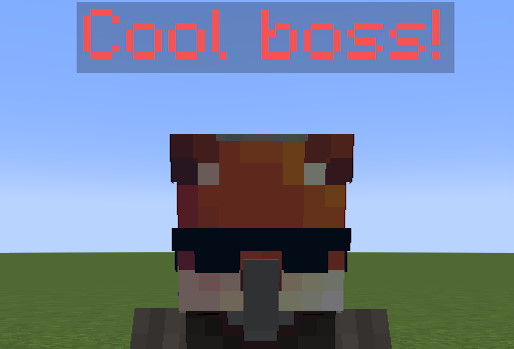
If you wish to include the boss level in their name field, simply use one of the following placeholders.
| Placeholder | Description | Example | Output (for a level 10 boss) |
|---|---|---|---|
$level | Replaces with the level | "$level Cool boss" | 10 Cool boss |
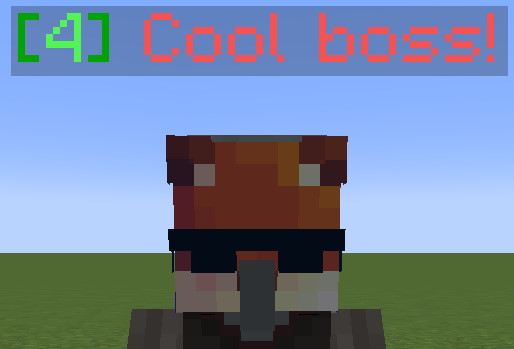
$normalLevel | Replaces with the level, made for normal mobs | "$normalLevel Cool boss" | [10] Cool boss |
$minibossLevel | Replaces with the level, made for minibosses | "$minibossLevel Cool boss" | 〖10〗 Cool boss |
$bossLevel | Replaces with the level, made for bosses | "$bossLevel Cool boss" | 『10』 Cool boss |
$reinforcementLevel | Replaces with the level, made for reinforcements | "$reinforcementLevel Cool boss" | 〔10〕 Cool Boss |
$eventBossLevel | Replaces with the level, made for event bosses | "$eventBossLevel Cool boss" | 「10」 Cool boss |
Example
name: "$normalLevel &cCool boss!"
level
Sets the level of the boss.
| Key | Values | Default |
|---|---|---|
level | Positive Integer numbers or dynamic | dynamic |
dynamic starts from the highest natural-spawn level calculated for players within 16 * (server view distance + 2) blocks in the same world, with a minimum of 1. Registered dynamic bosses are re-evaluated every 5 seconds, so their level can change after spawning. An explicit spawn level overrides this behavior. Use a fixed level for regional encounters that need a stable difficulty.
Example
level: 1
scale
Sets the scale (size) of the boss.
| Key | Values | Default |
|---|---|---|
scale | Multiplier | 1.0 |
When scaling, 1.0 represents the default size. To make the entity larger, increase the value (e.g., 1.2). To make the entity smaller, decrease the value (e.g., 0.8).
Example
scale: 1.2
bossType
Classifies the boss for systems such as automatic class loot. Health displays use healthMultiplier and the settings in MobCombatSettings.yml, rather than this label.
| Key | Values | Default |
|---|---|---|
bossType | NORMAL, MINIBOSS, BOSS, REINFORCEMENT, EVENT | NORMAL |
For automatic class loot, MINIBOSS selects miniboss rank, BOSS and EVENT select boss rank, and ordinary bosses use trash rank unless classLootRank overrides it.
REINFORCEMENT is a configured classification, not an automatically assigned label for every summon. Runtime tracking of summoned reinforcements and mounts separately controls their reward eligibility.
Example
bossType: MINIBOSS
silent
Sets if the boss sounds should be muted.
| Key | Values | Default |
|---|---|---|
silent | Boolean | false |
When true, this mutes the living entity's native Minecraft sounds. Separately played script sounds and boss music are not controlled by this flag.
Example
silent: true
healthMultiplier
Multiplies the boss's health. Health displays also consult this value: a separate boss bar requires displayBossBarForHighMultiplier and a multiplier above bossBarHealthMultiplierThreshold in MobCombatSettings.yml.
| Key | Values | Default |
|---|---|---|
healthMultiplier | Multiplier | 1.0 |
The exponential base health is first capped to the server limit. EliteMobs then applies healthMultiplier, clamps the result to at least 1 HP, and caps it again to the server's settings.attribute.maxHealth.max from spigot.yml. EliteMobs raises that value to 2048 on startup if it is lower, but never above it, so 2048 is the effective ceiling on a default server.
These limits describe the base boss calculation. Instanced bosses apply the party multiplier 0.75 * playerCount afterward when at least two players participate, without another plugin health clamp. Do not treat the table below as a guarantee of final instance health or assume the server will accept a value above its attribute limit.
Base health follows 2.1875 × 2^(level / 5), so it doubles every 5 levels. Combined with the clamp, every healthMultiplier has a level past which the boss stops gaining health entirely while its damage keeps scaling:
healthMultiplier | Health stops growing at level |
|---|---|
1.0 | 50 |
2.0 | 45 |
5.0 | 38 |
7.0 | 36 |
10.0 | 33 |
20.0 | 28 |
40.0 | 23 |
Above that level, increasing the configured level no longer increases actual maximum health. Damage still depends on the combat path, relative skills, weapon stats, and configured multipliers; the cap does not guarantee a fixed number of hits in either direction. EliteMobs warns when the multiplied health exceeds the limit, but the earlier base-health clamp is silent. A multiplier below 1 is applied to the already-capped base health.
If you need more than 2048 HP, raise settings.attribute.maxHealth.max in spigot.yml yourself; the clamp reads the server's live value, not a hardcoded constant.
Example
healthMultiplier: 1.5
damageMultiplier
Sets the damage multiplier of the boss.
| Key | Values | Default |
|---|---|---|
damageMultiplier | Multiplier | 1.0 |
Example
damageMultiplier: 1.5
isBaby
Sets if the boss uses the baby variant of the mob. Can only be applied to mobs with baby variants. If you would like to disguise the boss but would like it to also remain a baby while in disguise (make sure the disguise entity also supports the baby variant) you can use this setting:
disguise: HOGLIN:baby
| Key | Values | Default |
|---|---|---|
isBaby | true / false | false |
Example
isBaby: true
helmet/chestplate/leggings/boots/mainHand/offHand
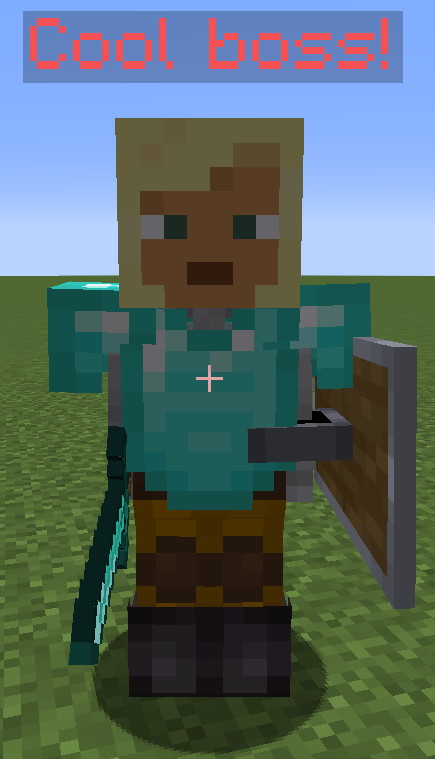
Sets the boss's armor and held items. Some entity types and custom models cannot display these slots. Equipped armor does not supply armor points in ordinary EliteMobs combat, but held items can affect native attacks, such as a skeleton using a bow.
| Key | Values | Default |
|---|---|---|
helmet | Material, UUID | none |
chestplate | Material | none |
leggings | Material | none |
boots | Material | none |
mainHand | Material | none |
offHand | Material | none |
Use uppercase material names. These fields create equipment from materials; they do not load custom item .yml files. For non-leather items, append an integer custom model data value as ITEM_MATERIAL:ID. For example, DIAMOND_SWORD:1 selects custom model data 1 from your resource pack.
Note 2: This field also lets you set custom leather colors with the format ITEM_MATERIAL:CODE where the code is the hexadecimal representation of the color. Example: LEATHER_LEGGINGS:ffa500 would create orange leggings. You can use hex codes, just remove the # from the hex code. You can get hex codes from here.
Note 3: A lowercase, hyphenated player UUID creates a player head through Bukkit's offline-player profile lookup. The parser does not require that player to be online; the displayed skin depends on the server resolving that profile.
Example
helmet: 198c4123-cafc-45df-ba79-02a421eb8ce7
chestplate: DIAMOND_CHESTPLATE:1
leggings: LEATHER_LEGGINGS:ffa500
boots: NETHERITE_BOOTS
mainHand: DIAMOND_SWORD
offHand: SHIELD
powers
Sets the powers the boss has.
| Key | Values | Default |
|---|---|---|
powers | Refer to the list below | none |
Example
powers:
- hyper_loot.lua
- attack_arrow.lua
- mycoolpower.lua
Note: You can check out this page if you want to see a list of premade powers that you can use.
Note: Powers can be .yml files (EliteScript) or .lua files (Lua scripts). Both types are supported and can be mixed freely in the powers list. Almost all premade powers are now .lua.
.yml power names still workIf a .lua power with the same base name is loaded, EliteMobs resolves a .yml or .yaml request to it automatically. For example, attack_arrow.yml selects the loaded attack_arrow.lua. A file merely existing on disk is insufficient. New configs should name the .lua file directly.
Intermediate configuration - Spawning reinforcements
Reinforcements also go into the powers category, using the following settings:
Note: Reinforcements are configured within the powers section of your boss configuration file, not as a separate section.
Reinforcement settings
| Key | Description | Values | Default |
|---|---|---|---|
summonType | What triggers the reinforcement spawn. Mandatory. | Refer to the list below | none |
filename | Filename of the boss to summon. Required except for crystal entries. | String | none |
chance | Chance for an ordinary summon batch. Ignored by GLOBAL and crystal entries. Optional. | Double | 1.0 |
amount | Sets the amount of reinforcements to spawn. Optional. | Integer | 1 |
inheritAggro | Makes the reinforcement inherit the aggro from the boss. Optional. | true / false | false |
spawnNearby | Makes the reinforcements spawn in a 30x30 block area (±15 blocks on X and Z) around the spawn point. Optional. | true / false | false |
inheritLevel | Makes the reinforcement inherit the level of the boss. Optional | true / false | false |
customSpawn | Makes the reinforcement spawn using the custom spawn system. Only used for summonType: GLOBAL | Custom Spawn filename | none |
location | Relative spawn offset. Optional. | x,y,z — always a relative offset from the boss. The offset is relative to the spawn location for regional bosses. | none |
lightningRod | Special setting for summonType: ON_COMBAT_ENTER_PLACE_CRYSTAL. Makes end crystals spawn lightning around them. Optional. | true / false | false |
difficultyID | Restricts the entry to specific instanced dungeon difficulties. Optional. | String or list of strings | none |
Summon types set the conditions for the reinforcements spawning. The following is a list of the valid summon types:
Summon types
| Value | Description |
|---|---|
ONCE | Attempts a summon batch on qualifying player damage until one attempt is marked summoned. A failed chance roll can retry on a later hit. |
ON_HIT | Attempts a summon batch when a player damages the boss. Requires active AI, a non-cancelled damage event, and at least 3 damage. |
ON_COMBAT_ENTER | Spawns the reinforcements when the boss enters combat. |
ON_DEATH | Spawns reinforcements when the boss dies. |
GLOBAL | Queues amount summons through customSpawn immediately after boss spawn and every 10 seconds, including outside combat. It stops adding summons once the tracked count reaches 30 * players in the spawn world. Requires a valid custom spawn. |
ON_COMBAT_ENTER_PLACE_CRYSTAL | Places one end crystal at the configured offset on combat enter. amount and chance are ignored; intended for custom dragon fights. |
ONCE uses the same active-AI and 3-damage gates as ON_HIT. GLOBAL uses its custom-spawn configuration rather than the ordinary location, spawnNearby, inheritLevel, and inheritAggro fields. See Reinforcements for the full behavior.
Note that it is also possible to spawn reinforcements through Elite Scripts, so there are more customizable ways of spawning reinforcements.
Example
powers:
- summonType: ON_COMBAT_ENTER
  filename: test_boss.yml
  chance: 0.5
  amount: 5
  inheritAggro: true
  spawnNearby: true
  inheritLevel: true
  location: 10,20,30
  lightningRod: false
Expert configuration - Creating your own powers
It is possible to create your own powers, either on the boss file itself or as a new configuration file in the powers folder. You can learn more about that here.
Note: You can also define boss behaviors directly in the boss configuration file using the eliteScript field. For complete documentation on using Elite Scripts, see the powers guide.
As an alternative to EliteScript, you can also write powers using Lua scripts. Lua powers are placed in the powers folder with a .lua extension and referenced by filename in the powers list. See the Lua Getting Started guide for more information.
Limiting powers based on instanced dungeon difficulty
Instanced dungeons can have difficulty settings, and it is possible to make it so a specific power is only enabled for specific difficulties.
Limiting power options
| Key | Description | Values | Default |
|---|---|---|---|
filename | Filename of the power. | String | none |
difficultyID | One difficulty ID or a list, resolved using the dungeon's numeric or named difficulty convention. | String, number, or list | none |
This only applies to instanced bosses: bosses in instanced dungeons, and instanced bosses that another plugin spawns through the EliteMobs API with a difficulty.
Example
powers:
- filename: movement_speed.lua
  difficultyID:
  - myDifficultyName1
  - myDifficultyName2
  - myDifficultyName3
spawnMessage
Sets the message to send when the boss spawns. Requires setting up announcementPriority.
| Key | Values | Default |
|---|---|---|
spawnMessage | Strings and color codes | none |
Example
announcementPriority: 3
spawnMessage: I rise once more!

deathMessages
Sets the list of messages to send when the boss dies with recorded damagers. doCustomEliteMobsDeathMessages in MobCombatSettings.yml (default true) must be enabled. Priority 0 sends these privately to the damagers; positive priorities broadcast them.
| Key | Values | Default |
|---|---|---|
deathMessages | Strings, color codes and the placeholders below | none |
Example
announcementPriority: 3
deathMessages:
- '&e&l---------------------------------------------'
- '&4The Test Boss has been killed!'
- '&c&l    1st Damager: $damager1name &cwith $damager1damage damage!'
- '&6&l    2nd Damager: $damager2name &6with $damager2damage damage!'
- '&e&l    3rd Damager: $damager3name &ewith $damager3damage damage!'
- '&4Slayers: $players'
- '&e&l---------------------------------------------'
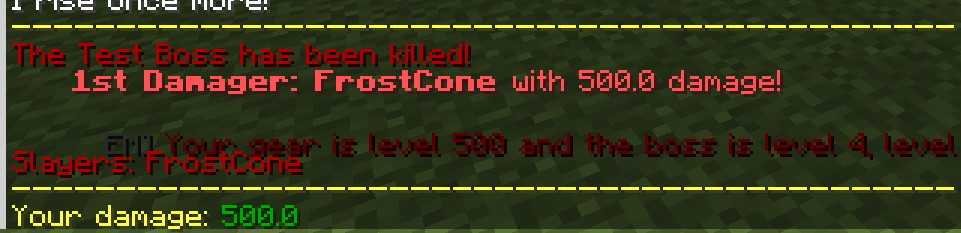
Death messages use the following placeholders:
Placeholders
| Value | Description |
|---|---|
$damager1name | The display name of the top damager |
$damager1Name | The username of the top damager |
$damager2name | The display name of the second top damager |
$damager2Name | The username of the second top damager |
$damager3name | The display name of the third top damager |
$damager3Name | The username of the third top damager |
$damager1damage | The damage amount of the top damager |
$damager2damage | The damage amount of second top damager |
$damager3damage | The damage amount of the third top damager |
$players | Lists all damagers by display name |
$playersName | Lists all damagers by username |
deathMessage
Sets a single message to send when the boss dies. Used when deathMessages is empty, under the same global toggle and priority rules. The scalar message supports $players and $playersName, but not individual damager placeholders.
| Key | Values | Default |
|---|---|---|
deathMessage | String, color codes, $players and $playersName | none |
Example
announcementPriority: 3
deathMessage: '&4The Test Boss has been killed by $players!'
onKillMessage
Sets the player death message when this boss kills a player. This uses the player-death path and does not require announcementPriority.
| Key | Values | Default |
|---|---|---|
onKillMessage | Strings and color codes | none |
Placeholders:
| Value | Description |
|---|---|
$player | The display name of the player who was killed |
$playerName | The username of the player who was killed |
$entity | The boss name |
Example
announcementPriority: 3
onKillMessage: I win, you lose!
slimeSize
Sets the size of the slime boss, but only works for Slimes and Magmacubes.
| Key | Values | Default |
|---|---|---|
slimeSize | Integer | 4 |
Example
slimeSize: 5
neutral
Opts out of EliteMobs forcing neutral entity types, such as wolves and iron golems, to target players. It also prevents a Mind behavior program from starting. Native entity behavior still applies; this setting does not make a hostile entity type passive.
| Key | Values | Default |
|---|---|---|
neutral | Boolean | false |
Example
neutral: true
Advanced settings
timeout
Sets the amount of time, in minutes, before the Custom Boss despawns. 0 disables this timeout.
| Key | Values | Default |
|---|---|---|
timeout | Time (in minutes) Integer | 0 |
Example
timeout: 20
Sets the boss to escape after 20 minutes.
isPersistent
Preserves the boss's logical state for restoration when its chunk loads again. Ordinary bodies use removal and respawn; a persistent native Mind body can instead suspend and reattach within the same server session. This flag does not keep chunks loaded or persist an arbitrary command-spawned boss across server restarts. Regional boss placement and respawn deadlines are stored separately.
| Key | Values | Default |
|---|---|---|
isPersistent | true / false | false |
Example
Example:
isPersistent: true
damageModifiers
Sets damage multipliers keyed by the attacking weapon's Bukkit material. Tracked projectiles use their recorded shooter material. Custom bypass damage does not apply this ordinary weapon-material modifier.
| Key | Values | Default |
|---|---|---|
damageModifiers | Material | none |
Example
damageModifiers:
- material:DIAMOND_SWORD,multiplier:0.8
- material:TRIDENT,multiplier:2.0
In this example, bosses will only take 80% damage from diamond swords (or 20% less), but will take 200% damage from tridents (or 2x more).
normalizedCombat
Selects the normalized combat path and its normalizedDamageToEliteMultiplier / normalizedDamageToPlayerMultiplier settings. The current health and skill-based damage formulas are explained in Damage System. normalizeRegionalBosses in MobCombatSettings.yml forces normalization for regional and instanced bosses even if this per-boss field is false. Phased encounters take their normalization flag from phase 1.
| Key | Values | Default |
|---|---|---|
normalizedCombat | true / false | false |
Example
Example:
normalizedCombat: true
scaledCombat
Selects the scaled combat path, which calculates damage using the attacking or defending player's effective progression level and converts player damage back onto the boss's actual health pool. The boss keeps one shared health pool and stored level. Reward-level resolution and loot eligibility are separate checks; this flag does not guarantee identical difficulty or unrestricted loot for every player.
Scaled combat is primarily designed for overworld event bosses and custom bosses that should be accessible to players at any level. For dungeon content with a fixed intended difficulty, use normalizedCombat instead.
When scaledCombat: true is set, it takes priority even if the boss would otherwise use normalized combat. Naturally spawned elite mobs use scaled combat by default (controlled by the useScaledCombatForNaturalElites config in MobCombatSettings.yml).
See the Damage System page for full details on how scaled combat works.
| Key | Values | Default |
|---|---|---|
scaledCombat | true / false | false |
Example
scaledCombat: true
escapeMessage
Sets the message that gets broadcasted to players when the boss escapes through the timeout mechanic. Requires announcementPriority to be configured.
| Key | Values | Default |
|---|---|---|
escapeMessage | String | none |
Example
announcementPriority: 3
timeout: 60
escapeMessage: "Sayonara!"

locationMessage
Sets the boss tracking bar's location message. Tracking requires announcementPriority of at least 1 and showCustomBossLocation enabled in MobCombatSettings.yml. The message is optional: a missing or blank value uses $name: $distance blocks away!.
| Key | Values | Default |
|---|---|---|
locationMessage | String, Color codes and the placeholders listed below | $name: $distance blocks away! when missing or blank |
Placeholders:
| Value | Description |
|---|---|
$name | The Custom Boss display name |
$distance | Gets replaced with the distance the player is from the Custom Boss. This is the preferable option. |
$location | Gets replaced with the x y z location coordinates of the Custom Boss |
Example
announcementPriority: 3
locationMessage: "&4Cool boss: At $location only $distance blocks away!"

This would show something like Cool boss: At 414,55,347 only 10 blocks away!
uniqueLootList
Sets the Custom Items that drop from the boss.
| Key | Values | Default |
|---|---|---|
uniqueLootList | List | none |
Loot entries in the Custom Loot follow the Loot Table format. Info about that here! Take note that some older files might be using outdated loot tables that look different than the example.
Example
uniqueLootList:
  - filename: magmaguys_toothpick.yml
    chance: 0.02
  - minecraft:type=DIAMOND:amount=1:chance=0.9
  - magmaguys_toothpick.yml:0.5:elitemobs.*
dropsEliteMobsLoot
Sets if the boss will drop EliteMobs loot, excluding items in uniqueLootList. Includes coins.
| Key | Values | Default |
|---|---|---|
dropsEliteMobsLoot | true / false | true |
Recommended to set to false for reinforcement mobs.
Example
dropsEliteMobsLoot: true
dropsVanillaLoot
Sets whether the Custom Boss will drop the vanilla loot usually associated to its vanilla mob type.
| Key | Values | Default |
|---|---|---|
dropsVanillaLoot | true / false | true |
Example
dropsVanillaLoot: true
dropsRandomLoot
Sets whether the Custom Boss will drop procedurally generated loot from EliteMobs. Does not include elite coins.
| Key | Values | Default |
|---|---|---|
dropsRandomLoot | true / false | true |
Example
dropsRandomLoot: true
dropsSkillXP
Sets whether the boss drops skill XP when killed. Skill XP advances weapon and armor skills and their bonuses. Reinforcements and mounts are excluded by the XP handler even if this flag is true.
| Key | Values | Default |
|---|---|---|
dropsSkillXP | true / false | true |
Recommended to set to false for reinforcement mobs or bosses that should not contribute to skill progression.
Example
dropsSkillXP: false
Automatic class loot
classLoot enables a separate baseline equipment roll. It defaults to enabled except for bossType: REINFORCEMENT. classLootDifficulty accepts AUTO, NORMAL, HARD or MYTHIC; classLootRank accepts AUTO, TRASH, MINIBOSS or BOSS. Both default to AUTO, and invalid overrides log a warning and revert to AUTO.
Define authored class equipment as ordinary itemType: CLASS_LOOT items referenced from uniqueLootList. They participate in class selection rather than independent unique-drop rolls. The old boss-side classLootItems field is not read. See automatic class loot for eligibility, caps, family coverage, profiles and difficulty resolution.
trails
Sets the trail that the boss leaves behind when moving.
| Key | Values | Default |
|---|---|---|
trails | Particles or item materials | none |
Only particles that do not require additional data work as boss trails (i.e., all "simple particles" from the valid particles list). Particles requiring data, such as DUST and ITEM, are skipped. BLOCK and LAVA stop processing the remaining trail list, so avoid those entries. Material names spawn an animated item trail instead. Trails run while the boss is valid, including while it stands still.
Example
trails:
- CLOUD
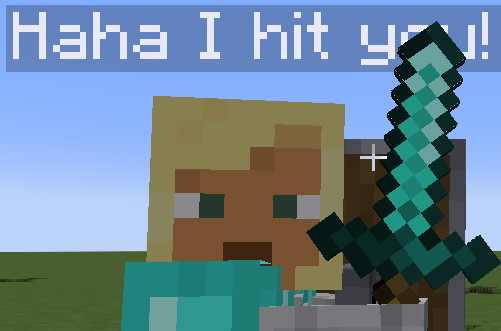
onDamageMessages
Selects a random line to temporarily replace the boss entity's name when it damages a player. The name is restored after 80 ticks; overlapping hits can replace a line or restore the name sooner than the latest line's own timer.
| Key | Values | Default |
|---|---|---|
onDamageMessages | List | none |
Example
onDamageMessages:
- "I hit you!"
- "Haha I hit you!"
onDamagedMessages
Selects a random line to temporarily replace the boss entity's name when an EliteMobs damage event occurs. This is not limited to player damage. The name is restored after 80 ticks; overlapping events can replace a line or restore the name sooner than the latest line's own timer.
| Key | Values | Default |
|---|---|---|
onDamagedMessages | List | none |
Example
onDamagedMessages:
- "You hit me!"
- "I've been hit!"

mountedEntity
Sets the entity that the boss will mount and ride.
| Key | Values | Default |
|---|---|---|
mountedEntity | Filename of the boss to mount or entity type | none |
Don't try to make the boss mount itself.
Example
mountedEntity: wild_wolf.yml
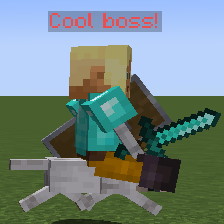
Note: Regional bosses will share their leash with the entity they're mounting, meaning they'll both be dragged back to the spawn location if they exceed the distance allowed by their leash.
announcementPriority
Sets the priority level for announcements. Lower priorities mean no announcements are made, higher priorities can announce not only on chat but also on discord if configured.
| Key | Values | Default |
|---|---|---|
announcementPriority | Integer | 0 |
Note: if the key is missing from a boss file that does have announcement text (locationMessage, spawnMessage, deathMessage, escapeMessage or a non-empty deathMessages list), EliteMobs writes announcementPriority: 0 into the file on load so the setting is visible and easy to raise. The boss still behaves as priority 0 until you change it.
Here is a list of what the priorities do:
| Value | Description |
|---|---|
0 | This is the default. No spawn/escape broadcasts or tracking; configured death text can still be sent privately to damagers. |
1 | Bosses can send configured spawn, death and escape chat messages. Tracking through /em is available when showCustomBossLocation is enabled; locationMessage is optional. |
2 | Identical to 1 for Custom Bosses — there is no separate code path for priority 2. (Custom events do treat 2 differently; see Announcement Priority System.) |
3 | On top of the things in 1, broadcast messages will be mirrored on Discord if configured. Discord configuration info here. |
Here's an example of a boss that is trackable, is able to send spawn/death/escape messages on chat and on Discord:
Example
announcementPriority: 3
Note: Configure spawnMessage, deathMessage/deathMessages and escapeMessage for the corresponding chat and Discord announcements. Tracking has a default location message; set locationMessage only to customize it.
followDistance
Set the distance at which bosses aggro and enter combat. Measured from the mob itself.
| Key | Values | Default |
|---|---|---|
followDistance | Integer | 0 |
A positive followDistance overrides the living entity's native follow-range attribute; 0 leaves that attribute unchanged.
Note 1: Non-alert regional bosses divide their current follow range by 3 when slowed on spawn or combat exit; combat entry restores their recorded range. This is so they don't aggro from too far away, which can cause annoying combat issues due to leash constraints.
Note 2: The higher the followDistance, the more intensive on the server CPU the boss becomes. Use carefully and responsibly!
Example
followDistance: 30
Sets a range of 30 blocks where if a player gets within that distance near the boss it will start chasing/attacking the player.
onDeathCommands
Sets the list of commands to run on custom boss death.
| Key | Values | Default |
|---|---|---|
onDeathCommands | List | none |
Commands run from the console. A $chance=x$ command containing $players rolls separately for each damager. The list supports the following placeholders:
| Value | Description |
|---|---|
$level | Placeholder for the boss level. |
$name | Placeholder for the boss name. |
$chance=x$ | Makes a command have a chance to run. |
$players | Makes the command run once for every player in the damagers list and replaces each time with the username of a different player on that list. |
$locationWorldName | World name at the time of death. |
$locationX | X coordinate of the boss at the time of death. |
$locationY | Y coordinate of the boss at the time of death. |
$locationZ | Z coordinate of the boss at the time of death. |
$damager1name | Username of the top damager |
$damager2name | Username of the second top damager |
$damager3name | Username of the third top damager |
Take a look at the example below to get a better understanding of how these work.
Example
onDeathCommands:
- "say $players has killed $name! That was level $level!"
- "$chance=0.5$ say What a kill!"

If Player1, Player2 and Player3 all damaged the boss before killing it, this is what the command output will be from console:
say Player1 has killed CustomBossName! That was level X!
say Player2 has killed CustomBossName! That was level X!
say Player3 has killed CustomBossName! That was level X!
Additionally, there is a 50% chance that the following will also be output:
say What a kill!
onSpawnCommands
Sets the list of commands that will run on boss spawn.
| Key | Values | Default |
|---|---|---|
onSpawnCommands | List | none |
Commands run from the console and accept $chance=x$. This hook does not supply the boss, location or player placeholders supported by onDeathCommands.
Example
onSpawnCommands:
- say Boss has spawned!

onCombatEnterCommands
Sets the list of commands that will run when the boss enters combat.
| Key | Values | Default |
|---|---|---|
onCombatEnterCommands | List | none |
Commands run from the console and accept $chance=x$. This hook does not supply the boss, location or player placeholders supported by onDeathCommands.
Example
onCombatEnterCommands:
- say Boss has entered combat!

onCombatLeaveCommands
Sets the list of commands to run when the boss leaves combat.
| Key | Values | Default |
|---|---|---|
onCombatLeaveCommands | List | none |
Commands run from the console and accept $chance=x$, without the death-hook placeholders. Death itself uses onDeathCommands; the combat-leave hook skips dead entities.
Example
onCombatLeaveCommands:
- say Boss has left combat!

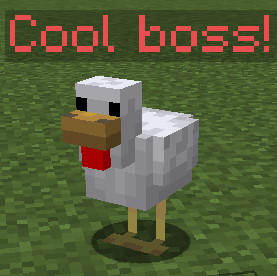
disguise
Sets the LibsDisguises disguise if that plugin is enabled. More info here.
| Key | Values | Default |
|---|---|---|
disguise | String | none |
customDisguiseData | String | none |
Example disguise
disguise: CHICKEN
Example custom disguise
disguise: custom:the_beast_sanctuary_beast
customDisguiseData: player the_beast_sanctuary_beast setskin {"id":"44e6d42b-bd8d-4e48-873b-fae7afed36e4","name":"Unknown","properties":[{"name":"textures","value":"ewogICJ0aW1lc3RhbXAiIDogMTY2NjcwNjYwODA1MCwKICAicHJvZmlsZUlkIiA6ICI3MmY5MTdjNWQyNDU0OTk0YjlmYzQ1YjVhM2YyMjIzMCIsCiAgInByb2ZpbGVOYW1lIiA6ICJUaGF0X0d1eV9Jc19NZSIsCiAgInNpZ25hdHVyZVJlcXVpcmVkIiA6IHRydWUsCiAgInRleHR1cmVzIiA6IHsKICAgICJTS0lOIiA6IHsKICAgICAgInVybCIgOiAiaHR0cDovL3RleHR1cmVzLm1pbmVjcmFmdC5uZXQvdGV4dHVyZS82YmYyMTY4NmM1MGQ1ODhmZmExMDZhZDdjNmViZTk1ZWZiMjE2NDU5ODRjZDFjZWYwODkzNDc4NzMzNmI2YTI3IiwKICAgICAgIm1ldGFkYXRhIiA6IHsKICAgICAgICAibW9kZWwiIDogInNsaW0iCiAgICAgIH0KICAgIH0KICB9Cn0=","signature":"jSsQvpUeWVtyqjtnydPadormkrZLVihetiX4dFQb3+BF/1x6wOgsNKRnnwj6J1mfu2im79LYEJbL+fQ9p1SJIW1uZ6hV7vPSAGUopyXGHNibNXorfV/dGjM77S0t86Jls50XWgJAnLn5RdhQcHahDAHHZ8to6K0HW5gvKKSalR5X/myaiV0E5ujJ+LUFWIiuDmtsmyxTX1zsohyYrVMo/4sD0DpBN+as95wO476gLb5fDTDV569QwExlDOt60W8qSzPw6ncYsOKJIiRE3EddspUm3/NrfDiKApUh8UbzVtwu1XlVAxWNgYN3PkqhWKuE4kvORQuoSJzOgSHkiqdXsQOED2HXfOKdfsnpZUwjepIU5A+/mu0gc3mPQPToKSss2bC1nXn//0bOZZSuQRgTS6PkKDHIQ1nClSZQZlJIsiLmaaN2k1tIHTIlDquKN6G1Ta9c3t6G5kugjqRo78ebbt7l3e0Z3BcdOkuO2WbvBjIg5Uiqyf+cYDZedJ+OEOqL/U6VVlsmbw0rd5deHrbnPn9cRzmWGjrXnxIlAszl+0Uqabj/BrkWcbBCwZJEPaV1hHpC4nJX1m5xvKZHB2Bw0AYWaQ3f3tRBbCA/xqwCS0Px1QohzV0nvtiMbjB38ziT1M5DgLtAVLcHPio7THZMxXAi4IjEIMac9ODbh5OxthA="}],"legacy":false}

Sets a custom disguise from skindex. Check this page to learn how to correctly format this data.
customModel
Sets the custom model to use, if you have a custom model and the FreeMinecraftModels or ModelEngine plugins. More info on making and using custom models here.
| Key | Values | Default |
|---|---|---|
customModel | String | none |
Example
customModel: your_model
customModelMountPointID
Sets the ModelEngine mount point used when this boss rides another modeled boss. The current FMM custom-model passenger attachment method is unimplemented, so this key does not select an FMM seat.
| Key | Values | Default |
|---|---|---|
customModelMountPointID | String | none |
Example
customModelMountPointID: your_mount_point_id
frozen
Sets the movement-speed attribute to zero and clears velocity immediately and again one tick after an EliteMobs damage event. Frozen bosses retain AI and can still attack. This setting does not stop scripts, teleports, or every entity-specific movement mechanic.
| Key | Values | Default |
|---|---|---|
frozen | true / false | false |
Example
frozen: true
ai
Sets if the boss has AI enabled. When set to false, the boss will not move or attack on its own. This is useful for bosses that are controlled entirely through Elite Scripts.
| Key | Values | Default |
|---|---|---|
ai | true / false | true |
Example
ai: false
behavior
behavior selects a reusable Lua Mind program from plugins/EliteMobs/behaviors/. For example:
entityType: ZOMBIE
ai: true
behavior: basic_melee.lua
The bundled basic_melee.lua composes target, pursuit, melee, and wander modules from behaviors/modules/. Edit or copy a behavior program there; it is not a power file and does not belong in powers/.
If a custom boss omits behavior, it uses the entity type's mob-properties setting. Explicit behavior: native selects native AI. ai: false and neutral bosses do not start a behavior program. The ordinary boss loader still owns spawning, equipment, powers, persistence, and cleanup.
Programs require the native Mind service on a supported server version. An unknown or invalid file is a configuration error, not a request to silently choose another AI. Program IDs must use the elitemobs: namespace; subfolder references use forward slashes. See the Mind context reference for the program API.
alwaysShowName
Keeps the boss name visible outside combat. The global alwaysShowEliteMobNameTags setting can also enable this. Current FreeMinecraftModels uses a tag_ bone such as tag_head to position the name when available, and otherwise places it above the model hitbox. Older FMM builds may require an authored anchor. See custom models for model-specific behavior.
| Key | Values | Default |
|---|---|---|
alwaysShowName | true / false | false |
Example
alwaysShowName: true
reinforcement
Marks a boss definition as a reinforcement. This skips ordinary regional placement initialization and excludes automatic class loot. Instanced placement registration uses its own path. The flag does not summon the boss or establish a summoner; runtime reinforcement and mount tracking separately controls other reward exclusions.
| Key | Values | Default |
|---|---|---|
reinforcement | true / false | false |
Example
reinforcement: true
song
Sets the music a boss offers to nearby players after spawning. The sound key and its .ogg audio must be defined in the resource pack.
| Key | Values | Default |
|---|---|---|
song | String | none |
Set a positive followDistance to define the starting range. Every 10 ticks, the boss checks players in its world within that configured distance. Once playing, music continues while the player remains online, in the same world, and within 1.5 times the boss's recorded runtime follow range. Boss removal stops it. Boss music takes priority over dungeon ambience; a player hears one managed track at a time.
Use name=SOUND_KEY length=MILLISECONDS, with a space between the two fields. Lengths are integer milliseconds converted to ticks, rounded down, with a minimum scheduling delay of one tick. Playback uses the MUSIC category at volume 1 and pitch 1.
Example
There are two ways to set up songs. Here is the first one:
song: name=elitemobs:ice_queen.idle length=76370
This will play the song ice_queen.idle for 76370 milliseconds and then loop it. Note that the location of the song is determined by the resource pack.
Here is the second way of setting up songs:
song: name=elitemobs:ice_queen.end_transition length=14328->name=elitemobs:ice_queen.end_loop length=28657
This will play the song ice_queen.end_transition for 14328 milliseconds and then transition to ice_queen.end_loop for 28657 milliseconds and loop the end_loop.
This allows bosses to have an "intro" or "transition" song and then a main track that loops.
cullReinforcements
Controls whether the boss’s tracked reinforcements, including GLOBAL summons, are culled during its removal cleanup. Combat-exit and full-heal cleanup separately cull ordinary tracked reinforcements; this is not a blanket guarantee that summons survive when set to false.
| Key | Values | Default |
|---|---|---|
cullReinforcements | true / false | true |
Example
cullReinforcements: true
movementSpeedAttribute
Sets the movement speed of the boss.
Note: anything beyond 0.36 might be too fast.
| Key | Values | Default |
|---|---|---|
movementSpeedAttribute | Double | none |
Example
movementSpeedAttribute: 0.3
patrol
Adds a native, automatically pathfound route to this Custom Boss. Nodes are offsets from the boss's authored spawn location, or exact coordinates in its world with patrol.relative: false. patrol.startNodeWaitSeconds makes the boss rest at the first node once per lap. Long legs are solved and divided automatically without force-loading chunks; the patrol pauses during combat and resumes afterward. The boss must use ai: true, have positive movement speed, and not be a passenger. See NPC & Boss Patrols for the schema, editor, persistence rules, and Lua controls.
Boss phases
Bosses can have phases that change when the boss reaches a certain percentage of health. When this happens, the boss starts using a different configuration file, meaning that everything about the boss can change, including things like the entity type.
To learn more about boss phases click here.
| Key | Description | Values | Default |
|---|---|---|---|
phases | Sets the phases that the boss will have. Mandatory | List | none |
phaseSpawnLocation | Sets where the phase boss spawns. Optional | String | none |
Example
For this example, we are going to show three different configuration files.
First boss configuration file: phase_1_boss.yml
name: "Phase 1"
entityType: ZOMBIE
phases:
- phase_2_boss.yml:0.60
- phase_3_boss.yml:0.30
Second boss configuration file: phase_2_boss.yml
name: "Phase 2"
entityType: SKELETON
Third boss configuration file: phase_3_boss.yml
name: "Phase 3"
phaseSpawnLocation: same_as_boss,10,64,100,0,0
entityType: RAVAGER
This boss would change to the configuration file phase_2_boss.yml at 60% health, and to the configuration file phase_3_boss.yml at 30% health in the same world as phase 2 and at coordinates x=10, y=64 and z=100. The entity type and name of the boss would also change.
The format for an entry is filename:healthPercentage, where the percentage is a fraction of at least 0 and below 1. An entry with another format, an out-of-range fraction or a missing boss file stops the boss from spawning.
phaseSpawnLocation is optional, if it is not set the boss will change phases where it's standing.
The following things are important to know when designing a phase boss:
- The configuration file for the first phase sets all phases of the boss.
- Threat / damage counted is kept between phases for players.
- The threshold-crossing hit is cancelled and the next phase starts at its configured health percentage. Changing
healthMultiplierchanges its absolute HP at that threshold. Overkill damage is not carried into the next form. - Non-instanced phase bosses return to phase 1 when fully healed, including the configured regeneration after combat. Instanced bosses skip this full-heal reset.
- Phase bosses which are also regional bosses share the same leash radius and timeout mechanic across all phases, and will respawn as the phase 1 boss when the timer is finished.
- The configuration file for the last phase sets the loot for the boss.
- Phases can not be skipped - overkill damage will still make the boss switch phases at the percentage defined.
- Switching phases removes the outgoing mount. A new phase can define its own mount.
- Phase switches and full-heal resets use silent spawning, so they do not send the ordinary boss spawn announcement.
Regional bosses
Regional bosses are a specific type of Custom Bosses that spawn at a specific configured location and are able to respawn at that location after a delay. Additionally, they can have leashes that make sure they stay in a specific zone, among other features.
These are used for all of the dungeon content. To learn more about regional bosses click here.
| Key | Description | Values | Default |
|---|---|---|---|
isRegionalBoss | Sets if the boss is regional. Should be true if you want a regional boss. | true / false | false |
spawnLocations | Sets the spawn locations of the boss. | Add these through the /em place boss [filename.yml] command! | none |
spawnCooldown | Sets the respawn cooldown of the boss, in minutes. | Integer | 0 |
leashRadius | Sets the distance the boss can go from its spawn point before getting pulled back. Measured from spawn. | Double | none |
onSpawnBlockStates | Sets the blocks the boss will modify when it spawns. | Check commands below | none |
onRemoveBlockStates | Applies saved blocks on death, the kill command or phase advancement; excludes timeout, full-heal reset, reload and shutdown. | Check commands below | none |
As indicated, Regional Bosses can have onSpawnBlockStates and onRemoveBlockStates.
This is a very useful feature for modifying combat arenas during combat, especially when combined with phase switches, as it becomes possible to open and close combat arenas through changing block states.
The format for these is too complex to write manually, so a few commands exist to help you set them up:
| Command | Description |
|---|---|
| /em transitiveBlocks register [regional_boss_file.yml] [ON_SPAWN/ON_REMOVE] | Starts registering manual block selections for on spawn or on remove block states. |
| /em transitiveBlocks edit [regional_boss_file.yml] [ON_SPAWN/ON_REMOVE] | Edits the on spawn or on remove block states. |
| /em transitiveBlocks registerArea [regional_boss_file.yml] [ON_SPAWN/ON_REMOVE] | Allows admins to select large areas of blocks to save as states. |
| /em transitiveBlocks editArea [regional_boss_file.yml] [ON_SPAWN/ON_REMOVE] | Allows admins to edit large areas of blocks to save as states. |
Example use:
Let's say you want to make a fight where a boss spawns in an arena that has an open door, and you want to make it so the door closes when the fight starts and reopens when the fight is over.
To do this, you will need two boss phases and to register three different sets of block states. For this example, I will name these phases phase_1_boss.yml and phase_2_boss.yml respectively.
- Use
/em transitiveBlocks register phase_1_boss.yml ON_SPAWNor/em transitiveBlocks edit phase_1_boss.yml ON_SPAWNto register the door blocks in their open state.
This means registering the air blocks. Area selection is recommended here.
This is necessary to make sure that the door is open when the boss spawns so players are guaranteed to have a way in.
- Use
/em transitiveBlocks register phase_2_boss.yml ON_SPAWNor/em transitiveBlocks edit phase_2_boss.yml ON_SPAWNto register the door blocks in their closed state.
This means registering the solid blocks of the door that would prevent the player from leaving.
This is necessary to change the door to be solid when the boss enters phase 2, preventing players from leaving.
- Use
/em transitiveBlocks register phase_2_boss.yml ON_REMOVEor/em transitiveBlocks edit phase_2_boss.yml ON_REMOVEto register the door blocks in their open state.
This means registering the same blocks from the first step again (the air blocks).
This is necessary to open the door when the boss dies, allowing players to leave the arena.
alert
Sets whether the boss is alert. By default, Regional Bosses are slowed and have a shorter aggro distance when they are out of combat. This setting prevents Regional Bosses from being slowed and having a shorter aggro distance while outside of combat, so they will always behave the same way in or out of combat.
| Key | Values | Default |
|---|---|---|
alert | Boolean | false |
Example
alert: true
removeAfterDeath
Permanently removes this regional placement after death or timeout. This is used for one-time encounters such as BetterStructures shrines. The shared boss definition can still have other placements.
| Key | Values | Default |
|---|---|---|
removeAfterDeath | Boolean | false |
Example
removeAfterDeath: true
Instanced bosses
Instanced bosses are a subtype of Regional Bosses used in Instanced Dungeons.
| Key | Description | Values | Default |
|---|---|---|---|
instanced | Makes the custom boss instanced. Mandatory. | true / false | false |
Setting bosses to instanced is mandatory for instanced dungeons to work correctly. We also recommend removing leashes for any instanced bosses.
Example
instanced: true