Item Upgrade System
Players can unbind, scrap, repair and enchant Elite Items. This guide explains the inputs, costs and possible outcomes.
Scrolls, scrap and tickets must be enabled custom items with a matching material and a consumable.type of unbind, repair_scrap or lucky_ticket. Repair scrap also requires an integer consumable.tier from 1 to 5; the other two types do not accept a tier. A matching name or lore alone does not make an item usable. Invalid consumable configuration disables that custom item.
System Costs Summary
| System | Items Required | Currency Cost | Success Rate |
|---|---|---|---|
| Scrapping | Elite Item | None | 75% (default) |
| Unbinding | Elite Item + Unbind Scroll | None | 100% |
| Repairing | Elite Item + Scrap | None | 100% |
| Enchanting | Elite Item + Enchanted Book (+ Lucky Ticket optional) | (enchantment weight+1)^4 coins | Variable (see formula) |
Unbinding Items
If you have an item unbind scroll, you are able to use the Unbinder NPC to combine 1 scroll with 1 item in order to unbind it.
The scroll can only be used once. Unbinding removes the item's Soulbind owner and legacy prestige tag. Once unbound, items can be sold or given to other players. The menu accepts Elite Items with damageable metadata and checks ownership of the scroll.
Scrapping Items
Elite Items can be scrapped at the Scrapper NPC. When scrapping items depending on the level of the item you will get the following scrap:
- Level 0-49: Tiny Scrap (
elite_scrap_tiny.yml) - Level 50-99: Small Scrap (
elite_scrap_small.yml) - Level 100-149: Medium Scrap (
elite_scrap_medium.yml) - Level 150-199: Large Scrap (
elite_scrap_large.yml) - Level 200+: Huge Scrap (
elite_scrap_huge.yml)
The Scrapper checks that the Elite Item belongs to you when Soulbind applies. If the matching scrap custom item is missing, disabled or does not define the expected repair-scrap tier, the source item stays in the menu and a warning is logged.
Scrap tier uses the item's rounded level. Level 100 produces Medium Scrap; the tiers available on your server depend on the items it distributes.
Scrap is the basis for the rest of the Item System.
Scrap Success Rate: The default chance is 75% per item in each submitted stack. Once the required scrap can be generated, every submitted item is consumed, including failed rolls. The menu reports success and failure counts. Scrap that does not fit in the inventory drops at the player.
Repairing Elite Items
Elite items can be repaired at the Repairman NPC using scrap. The extent of damage to your item determines the quantity and size of scrap required to fix it.
Repair Amounts: Each scrap type repairs a fixed amount of durability:
- Tiny Scrap: 100 durability
- Small Scrap: 200 durability
- Medium Scrap: 300 durability
- Large Scrap: 400 durability
- Huge Scrap: 500 durability
One scrap item is consumed per repair attempt, restoring up to the listed amount without exceeding full durability. Heavily damaged items may require multiple repairs or higher-tier scrap. Confirming a repair on an undamaged item still consumes the scrap.
Enchanting Elite Items
Before we proceed to describe how to enchant items, it is advisable to familiarize yourself with the items required for enchanting and understand their functions.
Elite Item
An elite item encompasses any loot available in the EliteMobs shops, dropped by Elite Mobs, or received as a reward for completing a quest, among other sources.
Enchanted Books
Enchanted books are typically dropped by Elite Mobs or bestowed upon players as rewards in Arenas or Quests. They contain enchantments that players can transfer to their desired items.
Lucky Tickets
Lucky tickets, usually obtained from Elite Mobs or as rewards in Arenas or Quests, enable players to double their chances of success when enchanting items.
The players can access the enchantment menu by visiting the Enchanter NPC in the Adventurer's Guild or by using the /em menu.
With both an Elite Item and an Enchanted Book, players can attempt to add the enchantment stored in the book to their item. Each attempt will cost the players some Elite Coins. They can also double their chances by using a Lucky Ticket if they have one.
Enchanting Cost: The price is (enchantment weight + 1)^4 Elite Coins. Weight counts enchantment levels, not just distinct names: native or stored-book levels, custom-effect levels, and the supported enhanced-native contributions above vanilla caps. For example, Sharpness III contributes three native levels. The menu displays the quote for the actual item.
Examples:
- Enchantment weight 0: 1 coin
- Enchantment weight 1: 16 coins
- Enchantment weight 2: 81 coins
- Enchantment weight 5: 1,296 coins
- Enchantment weight 10: 14,641 coins
Success Rates: Base success is min(1, 4 / (enchantment weight + 1)), rounded to two decimal places before the roll. For example:
- Enchantment weight 0: 400% (capped at 100%)
- Enchantment weight 1: 200% (capped at 100%)
- Weight 5: 67%
- Weight 10: 36%
By default, a Lucky Ticket multiplies the unrounded success chance by two before the cap and rounding. It also halves the configured critical-failure coefficient; the final destruction probability depends on the remaining chance and rounding, so it is not simply half the displayed probability without a ticket.
Enchantment Stacking: Levels add together: Sharpness III + Sharpness II = Sharpness V. The complete result must pass the configured level limits and compatibility checks. Native enchantments must be enabled; custom effects must have a valid provider and fit the target's equipment or magic-weapon profile. Invalid combinations are rejected before payment. A native enchanted book does not need an EliteMobs custom-item ID, but must contain valid supported enchantments.
Place one Elite Item, one Enchanted Book and, optionally, one Lucky Ticket in the menu and confirm. Each completed gameplay attempt consumes the book, payment and ticket if supplied, with one of these results:
- Success: The enchantment is successfully added to the item. (Probability varies based on current enchantments)
- Failure: Unsuccessful attempt, resulting in the loss of the Enchanted Book and Elite Coins. The item is returned safely. (Remaining probability after success, critical failure, and challenge)
- Critical Failure: Loses the book, coins and item. Its configured fraction is 1% of the probability remaining after success, halved by a Lucky Ticket; the resulting probability is rounded to two decimal places.
- Challenge: Engage in a Boss Battle with a 10% chance of critical failure upon losing. The item is enchanted if the players win. (30% of remaining probability after success and critical failure are calculated)
An item with enchantment weight above 10 can trigger a server announcement. The current implementation reads successAnnouncement as both a boolean and a message string; it has no separate announceImportantEnchantments YAML key. This type collision means the setting is not a reliable independent announcement toggle.
If a challenge is rolled but no installed challenge is available, or its launch event is cancelled, the attempt succeeds immediately. A failure after challenge startup has been queued instead aborts and attempts to restore the inputs and payment. Challenges are private: party entry and additional players are rejected. Provider compatibility is checked while the challenge runs and before settlement.
The purchase checks current inputs and provider compatibility before and after withdrawing coins. Closing the menu before purchase returns the inputs. Inventory overflow during settlement drops at the player; unresolved or offline delivery is recorded for recovery.
If payment, refund or item delivery cannot be safely resolved, the server writes a transaction record under plugins/EliteMobs/enchantment_recovery/ and tells the player its reference ID. Administrators must reconcile the recorded payment and item states manually: an unknown delivery or withdrawal is not safe to repeat blindly. An infrastructure abort attempts to return the original item, book and ticket and refund the payment; ordinary gameplay failure consumes the purchased attempt.
Enchanting configuration
The enchanting knobs live in SpecialItemSystems.yml, and the scrap success rate lives in the scrapper menu config.
| Key | File | Default | Effect |
|---|---|---|---|
luckyTicketMultiplier | SpecialItemSystems.yml | 2.0 | Multiplier applied to the success chance when a Lucky Ticket is used |
criticalFailureChanceV2 | SpecialItemSystems.yml | 0.01 | Share of the remaining (non-success) probability that becomes a critical failure. Halved by a Lucky Ticket |
challengeChance | SpecialItemSystems.yml | 0.30 | Share of the probability left after success and critical failure that becomes a boss challenge |
criticalFailureChanceDuringChallengeChance | SpecialItemSystems.yml | 0.10 | Chance of losing the item if you lose the challenge fight |
scrapChance | scrapper menu config | 0.75 | Chance an item actually yields scrap when scrapped |
The probabilities are calculated in order, rounding each to two decimal places: success, critical failure from the non-success remainder, challenge from the next remainder, then ordinary failure. One random roll selects the result. With default settings, weight 10 and no ticket, the quote is 36% success, 1% critical failure, 19% challenge and 44% failure. A 100% success chance guarantees success. Invalid probability settings or a price outside the supported integer range prevent the purchase.
Visual Example
MagmaGuy's Video explaining some of the systems.
Make your own Enchanted Books
Here is a short guide that explains how you can make your own Enchanted Books.
isEnabled
Sets if the item is enabled.
| Key | Values | Default |
|---|---|---|
isEnabled | Boolean | true |
Example
isEnabled: true
name
Sets the name of item. Supports Color Codes.
| Key | Values | Default |
|---|---|---|
name | String | none |
Example
name: '&aElite Custom Enchanted Book'
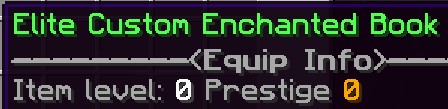
lore
Sets the lore of the item. Supports Color Codes.
| Key | Values | Default |
|---|---|---|
lore | String List | none |
Example
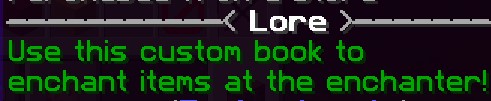
lore:
- '&2Use this custom book to'
- '&2enchant items at the enchanter!'
material
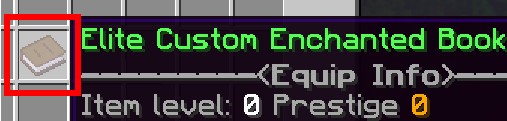
Use ENCHANTED_BOOK. The enchanter requires an actual enchanted-book item; an ordinary BOOK with enchantment metadata is not accepted.
| Key | Values | Default |
|---|---|---|
material | ENCHANTED_BOOK | none |
Example
material: ENCHANTED_BOOK
enchantments
Sets which enchantments the item should hold.
| Key | Values | Default |
|---|---|---|
enchantments | MineCraft Enchantments or EliteMobs Enchantments | none |
Example
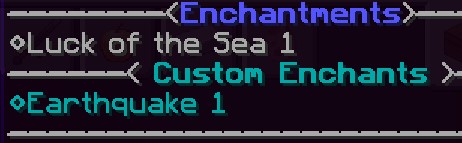
enchantments:
- elitemobs:earthquake,1
itemType
Sets where you can obtain the item from. You can set this to custom if you want your book to be dropped by random elites and sold in shops.
Otherwise you can set it to unique to have it only drop from configured loot tables.
| Key | Values | Default |
|---|---|---|
itemType | Values | none |
Example
itemType: custom
soulbound
Sets whether the book binds to its recipient. Set false to allow trading.
| Key | Values | Default |
|---|---|---|
soulbound | Boolean | true |
Example
soulbound: true
Enchanted Book Example
Enchanted Book Config Example
isEnabled: true
material: ENCHANTED_BOOK
name: '&5Excellent Mining Enchanted Book'
lore:
- '&2Used to enchant items at the enchanter!'
enchantments:
- MENDING,1
- elitemobs:drilling,1
itemType: UNIQUE
soulbound: false
As you can see making your Enchanted Books is not that complicated. Most of the settings are regular settings you would use when creating an item.
The example book contains the native MENDING enchantment and the custom effect elitemobs:drilling.
This would make our example book an excellent book you would want to use on a pickaxe.
For Server Administrators: The table lists the configurable chances. The fourth-power price formula and repair amounts are fixed in the current implementation. Players should check the menu's quote and their server's settings before confirming.