Elite Script Zones
Zones are locations defined by a shape that can be used as targets by scripters to run any kind of action.
Only one Zone mapping can be set per script. Use that exact top-level spelling; fields inside it are case-insensitive, while shape and filter enum values must be uppercase. Multiple origin targets can create multiple shapes from that mapping.
To target zones, the target type ZONE_FULL or ZONE_BORDER can be used.
Zones themselves also use Script Targets to define where the zone will appear.
An omitted zone Target defaults to SELF. Other parser defaults are shape: CYLINDER, filter: PLAYER, radius: 5, borderRadius: 1, height: 1, pointRadius: 0.5, animationDuration: 0, and ignoresSolidBlocks: true. Rotation and cuboid dimensions default to zero. Set useful dimensions explicitly; defaults are not validation of a complete encounter. The tables below mark fields to set explicitly for each shape, rather than fields whose omission always produces a parser error.
Use finite positive dimensions and distinct, same-world endpoints for rays and cones. Fixed numeric values are preferable: a floating-point ~ range samples from min up to, but not including, max, and can be sampled repeatedly. A reversed range such as 5~1 makes EliteMobs skip the whole script. Large volumes generate many positions. Entity queries for cylinders, cones, cuboids and rays search a box around the shape when that box spans 256 blocks or less on each axis; spheres, domes and larger shapes check candidates across the shape's world. Keep shapes and repetition rates proportionate to the effect.
Particle actions use sampled geometric positions, not entity hitboxes. A zone SPAWN_PARTICLE action defaults to approximately 30% coverage; set its target's coverage: 1.0 explicitly to keep every sampled position. filter does not change particle positions. Entity containment differs by shape, as noted below; a particle outline is not an exact collision boundary.
shape
Sets the shape of the zone. Valid shapes:
| Shape Type | Details | Animatable | Border |
|---|---|---|---|
CYLINDER | Cylindrical shape | ❌ | ✅ |
SPHERE | Spherical shape | ❌ | ✅ |
DOME | Dome shape (half sphere) | ❌ | ✅ |
CUBOID | Cuboid shape (cube-like) | ❌ | ✅ |
STATIC_RAY | A line between two resolved points, without its own animation | ❌ | ❌ |
ROTATING_RAY | A rotating line between two points | ✅ | ❌ |
TRANSLATING_RAY | A line that moves between two initial points to two final points | ✅ | ❌ |
CONE | Cone shape | ❌ | ✅ |
Animatable
An animated shape starts its animation when an action generates and caches that shape. With a positive animationDuration, this normally happens when the action starts, before its wait. Separate actions can create separate animated shapes.
This means that if an action has a wait time, when the action starts the zone has already been moving around while the action was waiting.
Zone animations advance every tick. Use SPAWN_PARTICLE with repeatEvery: 1 for a visual each tick. Less frequent particle actions show fewer frames while the zone continues moving.
If you want to make a rotating zone action but want to wait for a set amount of ticks before starting the action, make that a different script and call that script through RUN_SCRIPT. Make sure the RUN_SCRIPT has the wait time you want.
Zones retain their last computed geometry after the animation task ends. Use positive animation durations. The last animation frame applies exactly the configured rotation or reaches exactly the final targets.
With a positive animationDuration, each action caches its shapes when it starts, whatever its track setting. The cached shapes animate from their initial endpoints instead of following moving bosses or players. For static shapes, set track: false on the action's Target to keep the origin fixed; setting it only on Zone.Target does not freeze the action's shape. See the target guide for cache lifetime.
Border
Certain zones can have borders. Borders mean that ZONE_BORDER can be used as the target of the zone. Borders are defined by creating a second, smaller shape inside the first, larger shape. The area between the smaller zone and the larger zone is the border.
borderRadius is the inner radius, not the border's thickness. Keep it nonnegative and smaller than the outer radius. Cylinders subtract an inner cylinder of the same height, creating a side ring rather than top and bottom caps. Cuboid border sampling uses separate rules and can differ from its entity border query. Rays have no border result; use ZONE_FULL for them.
Example
eliteScript:
  Example:
    Events:
      - EliteMobDamagedByPlayerEvent
    Zone:
      shape: CYLINDER
      radius: 4
      borderRadius: 3
      height: 8
      Target:
        targetType: SELF
    Actions:
      - action: SPAWN_PARTICLE
        particles:
          - particle: SMOKE_LARGE
        Target:
          targetType: ZONE_BORDER
        repeatEvery: 5
        times: 20
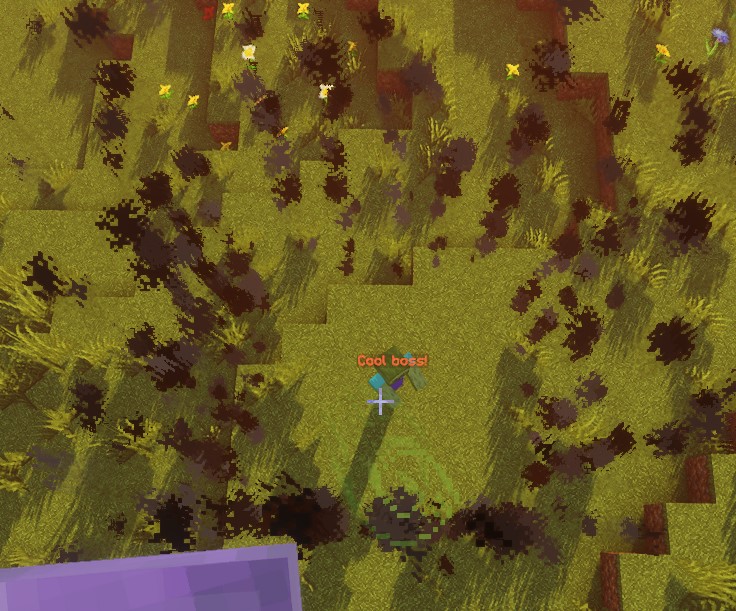
This script produces 20 smoke bursts on sampled border positions, at 5-tick intervals. The first is immediate and the last is 95 ticks later, about 4.75 seconds at 20 ticks per second; the repeat task finishes on its next interval. Particle lifetime is separate from action timing.
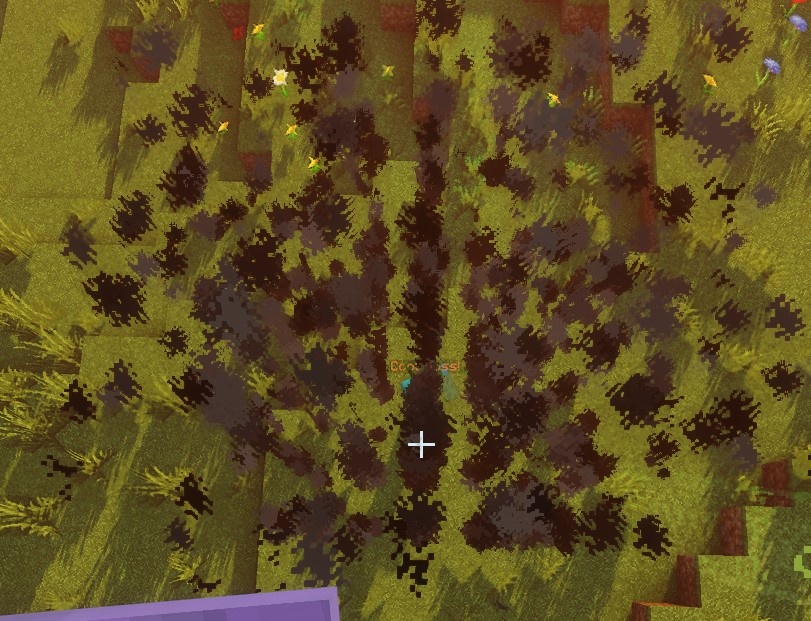
With ZONE_FULL, sampled particle positions come from the full zone instead of its border:
SPHERE
The origin is the sphere's center. Position sampling uses an integer grid inside the radius. Entity checks approximate each entity as a sphere using half its feet-to-eye height, so entities can overlap the zone even when their feet are outside it. Border entity checks also exclude entities overlapping the inner sphere.
| Key | Details | Set explicitly |
|---|---|---|
shape | Sets the shape of the zone. Should be SPHERE | ✅ |
target | Sets the location for the center of the sphere | ✅ |
filter | Sets which types of entities get targeted | ❌ |
radius | Radius of the sphere | ✅ |
borderRadius | Radius of the inner sphere | ❌ |
Example
eliteScript:
  Example:
    Events:
      - EliteMobDamagedByPlayerEvent
    Zone:
      shape: SPHERE
      radius: 4
      borderRadius: 3
      Target:
        targetType: SELF
    Actions:
      - action: SPAWN_PARTICLE
        particles:
          - particle: CLOUD
        Target:
          targetType: ZONE_FULL
        repeatEvery: 5
        times: 20
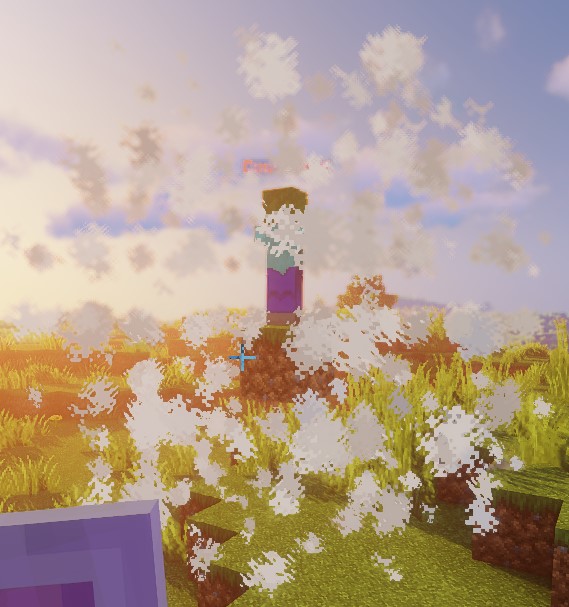
This script demonstrates the shape of a sphere using cloud particles.
DOME
Particles sample the upper half of the sphere, starting at the origin's height. Current limitation: full entity queries inherit the sphere's entity check without a hemisphere restriction, so ZONE_FULL can select entities below the dome. Border entity queries additionally require feet above originY - 1; direct position checks use that threshold too. Do not use a dome's particle display as proof of a matching upper-half hit area.
| Key | Details | Set explicitly |
|---|---|---|
shape | Sets the shape of the zone. Should be DOME | ✅ |
target | Sets the location for the center of the dome | ✅ |
filter | Sets which types of entities get targeted | ❌ |
radius | Radius of the dome | ✅ |
borderRadius | Radius of the inner dome | ❌ |
Example
eliteScript:
  Example:
    Events:
      - EliteMobDamagedByPlayerEvent
    Zone:
      shape: DOME
      radius: 4
      borderRadius: 3
      Target:
        targetType: SELF
    Actions:
      - action: SPAWN_PARTICLE
        particles:
          - particle: CLOUD
        Target:
          targetType: ZONE_FULL
        repeatEvery: 5
        times: 20
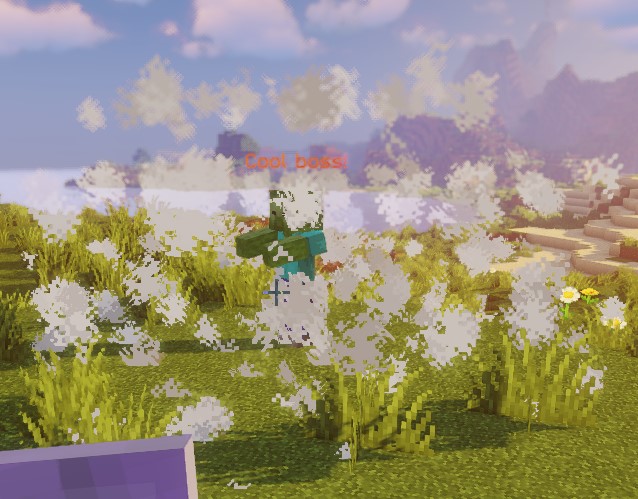
This script demonstrates the shape of a dome using cloud particles.
CONE
For each origin, a cone uses the first resolved Target2 location. A nearby-player query is not sorted by distance; use a single target when the cone must aim at a particular entity.
Target is the tip and Target2 is the base center; their distance sets the cone's height. Keep these points distinct and in the same world. Entity checks test the feet, bounding-box center and top, rather than exact box intersection. Sampled positions use the world's integer coordinate grid.
| Key | Details | Set explicitly |
|---|---|---|
shape | Sets the shape of the zone. Should be CONE | ✅ |
target | Sets the location for the apex (tip) of the cone | ✅ |
target2 | Sets the location for the center of the base of the cone | ✅ |
filter | Sets which types of entities get targeted | ❌ |
radius | Radius of the base of the cone | ✅ |
borderRadius | Radius of the inner cone | ❌ |
Example
eliteScript:
  Example:
    Events:
    - EliteMobDamagedByPlayerEvent
    Zone:
      shape: CONE
      radius: 10
      Target:
        targetType: SELF
        offset: 0,0,0
      Target2:
        targetType: SELF
        offset: 0,10,0
    Actions:
      - action: SPAWN_PARTICLE
        particles:
        - particle: CLOUD
        Target:
          targetType: ZONE_FULL
          coverage: 0.8
        repeatEvery: 5
        times: 20
This script demonstrates the shape of a cone using cloud particles. Keep in mind that this zone is a CONE shape, meaning it is a 3D volume, important to consider if you're aiming to create sweep effects.
CYLINDER
The origin is the center of the bottom face. The cylinder extends upward by height, not equally above and below the origin. Entity checks require the entity's entire bounding-box height to fit between the bottom and top, plus the horizontal check. A height-1 visual cylinder therefore will not normally select a standing player. Use sufficient height and an appropriate origin for entity actions.
| Key | Details | Set explicitly |
|---|---|---|
shape | Sets the shape of the zone. Should be CYLINDER | ✅ |
target | Center of the bottom face | ✅ |
filter | Sets which types of entities get targeted | ❌ |
radius | Radius of the cylinder | ✅ |
borderRadius | Radius of the inner cylinder | ❌ |
height | Height of the cylinder | ✅ |
Example
eliteScript:
  Example:
    Events:
      - EliteMobDamagedByPlayerEvent
    Zone:
      shape: CYLINDER
      radius: 4
      borderRadius: 3
      height: 8
      Target:
        targetType: SELF
    Actions:
      - action: SPAWN_PARTICLE
        particles:
          - particle: CLOUD
        Target:
          targetType: ZONE_FULL
        repeatEvery: 5
        times: 20
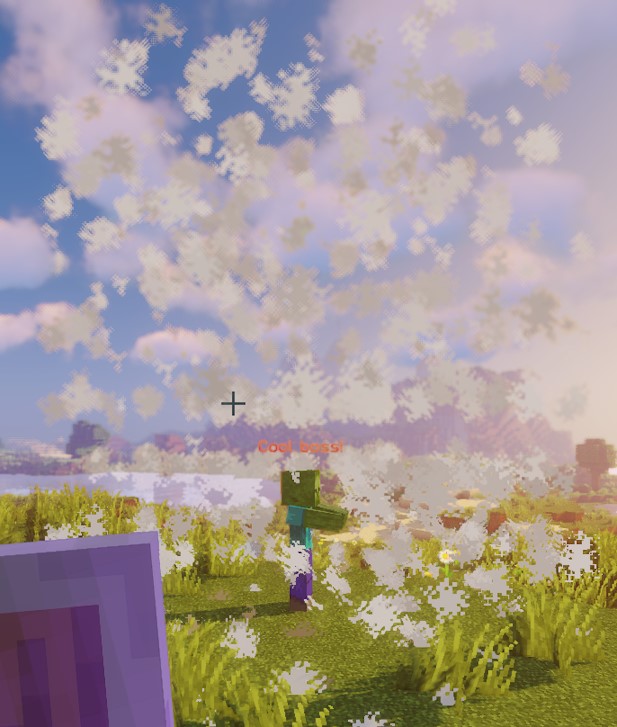
This script demonstrates the shape of a cylinder using cloud particles.
CUBOID
The current cuboid implementation uses different bounds for sampled locations, individual point checks, and entity checks. Sampled points span x and z blocks around the center and rise y blocks upward. Entity overlap uses half-widths x / 2 and z / 2, but only y / 2 upward. A direct point check instead uses ±x, ±y, and ±z. Do not assume a particle cuboid and its entity query cover identical volumes; check the intended encounter geometry on your server. This also applies to native Lua cuboids.
For positive integer dimensions, particle coordinates run from -floor(x / 2) to x - 1 - floor(x / 2), similarly for Z, and from 0 to y - 1 vertically. Entity bounds instead use the origin's block coordinates and floor their horizontal edges. Border particles retain sampled points with Y <= yBorder and X or Z outside the inner half-width; this is not a complete outer-minus-inner cuboid shell.
| Key | Details | Set explicitly |
|---|---|---|
shape | Sets the shape of the zone. Should be CUBOID | ✅ |
target | Sets the location for the center of the cuboid | ✅ |
filter | Sets which types of entities get targeted | ❌ |
x | Sets the length of the cuboid | ✅ |
y | Sets the height of the cuboid | ✅ |
z | Sets the width of the cuboid, defaults to x | ❌ |
xBorder | Sets the length of the inner cuboid | ❌ |
yBorder | Sets the height of the inner cuboid | ❌ |
zBorder | Sets the width of the inner cuboid; 0 falls back to xBorder when xBorder is nonzero | ❌ |
Example
eliteScript:
  Example:
    Events:
      - EliteMobDamagedByPlayerEvent
    Zone:
      shape: CUBOID
      x: 4
      y: 4
      z: 4
      xBorder: 3
      yBorder: 3
      zBorder: 3
      Target:
        targetType: SELF
    Actions:
      - action: SPAWN_PARTICLE
        particles:
          - particle: CLOUD
        Target:
          targetType: ZONE_FULL
        repeatEvery: 5
        times: 20
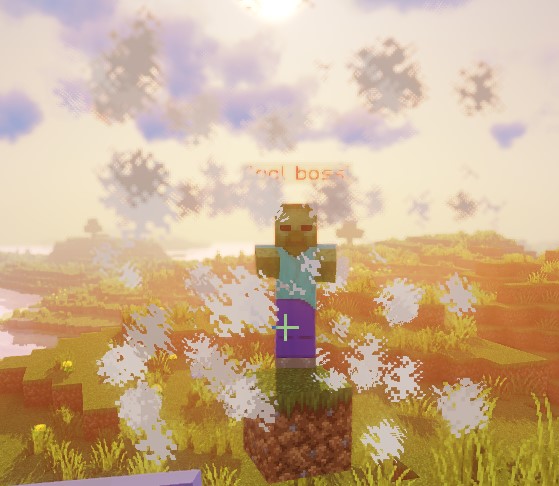
This script demonstrates the shape of a cuboid using cloud particles.
STATIC_RAY
Every resolved Target origin is paired with every resolved Target2 endpoint in the same world. STATIC_RAY has no independent animation, but with the default action-target track: true, repeated actions regenerate it from current endpoints. Use track: false on the action target to freeze them.
pointRadius controls both sampling step and hit-test radius; it is not the full diameter. Static and translating rays take at most 500 steps, so their maximum sampled reach is roughly 500 * pointRadius blocks. Rotating rays use steps of 2 * pointRadius. Use a strictly positive value. With ignoresSolidBlocks: false, sampling stops at a sampled solid block; this is not continuous collision tracing and large steps can skip obstacles. Entity checks test overlap with spheres around sampled points.
| Key | Details | Set explicitly |
|---|---|---|
shape | Sets the shape of the zone. Should be STATIC_RAY | ✅ |
target | Sets the location for the first point of the line | ✅ |
target2 | Sets the location for the last point of the line | ✅ |
filter | Sets which types of entities get targeted | ❌ |
ignoresSolidBlocks | Sets if the ray will pass through solid blocks. Defaults to true | ❌ |
pointRadius | Sets the thickness of the ray. Default is 0.5 blocks. | ❌ |
Example
eliteScript:
  Example:
    Events:
      - EliteMobDamagedByPlayerEvent
    Zone:
      shape: STATIC_RAY
      Target2:
        targetType: DIRECT_TARGET
        offset: 0,1,0
      Target:
        targetType: SELF
        offset: 0,1,0
    Actions:
      - action: SPAWN_PARTICLE
        particles:
          - particle: CLOUD
        Target:
          targetType: ZONE_FULL
        repeatEvery: 5
        times: 20
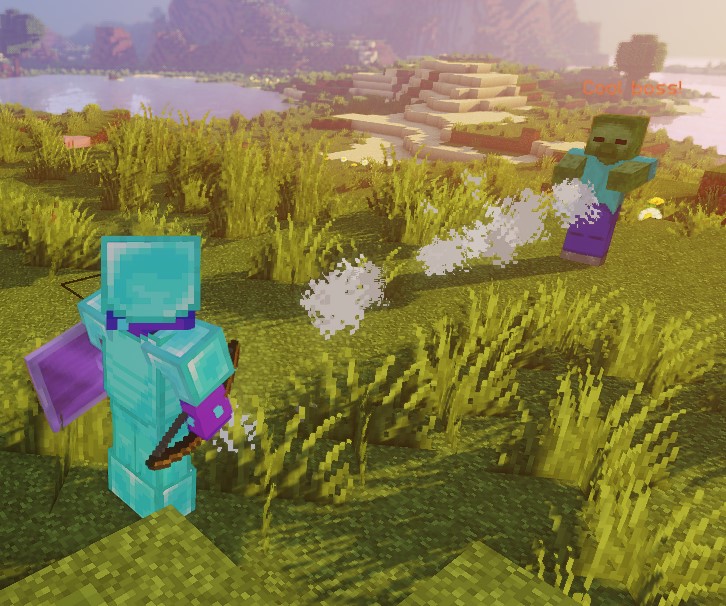
This script demonstrates the shape of a static ray using cloud particles.
Both endpoints use offset: 0,1,0, placing the ray one block above their feet. This is not automatically the middle of entities of every height.
ROTATING_RAY
Rotation values are degrees; duration is ticks. Each origin is paired with each valid same-world Target2. The source endpoint stays fixed as the pivot. Initial and animated pitch/yaw rotations accept either sign. The complete pre-rotated ray exists before the first animation tick, including when duration is zero. Starting endpoints must differ. Negative durations and nonfinite values are rejected.
| Key | Details | Set explicitly |
|---|---|---|
shape | Sets the shape of the zone. Should be ROTATING_RAY | ✅ |
filter | Sets which types of entities get targeted | ❌ |
target | Sets the location for the first point of the line | ✅ |
target2 | Sets the location for the last point of the line | ✅ |
animationDuration | Sets, in ticks, the amount of time for the rotation | ✅ |
pitchPreRotation | Applies an initial rotation to the pitch before the animation | ❌ |
yawPreRotation | Applies an initial rotation to the yaw before the animation | ❌ |
pitchRotation | Sets the pitch rotation for the animation | ❌ |
yawRotation | Sets the yaw rotation for the animation | ❌ |
ignoresSolidBlocks | Sets if the ray will pass through solid blocks. Defaults to true | ❌ |
pointRadius | Sets the thickness of the ray. Default is 0.5 blocks. | ❌ |
Example
eliteScript:
  Example:
    Events:
      - EliteMobDamagedByPlayerEvent
    Zone:
      shape: ROTATING_RAY
      animationDuration: 100
      pitchPrerotation: 0
      yawPrerotation: 0
      pitchRotation: 0
      yawRotation: 360
      ignoresSolidBlocks: true
      Target:
        targetType: SELF
        offset: 0,1,0
      Target2:
        targetType: DIRECT_TARGET
        offset: 0,1,0
    Actions:
      - action: SPAWN_PARTICLE
        particles:
          - particle: CLOUD
        Target:
          targetType: ZONE_FULL
        repeatEvery: 1
        times: 100
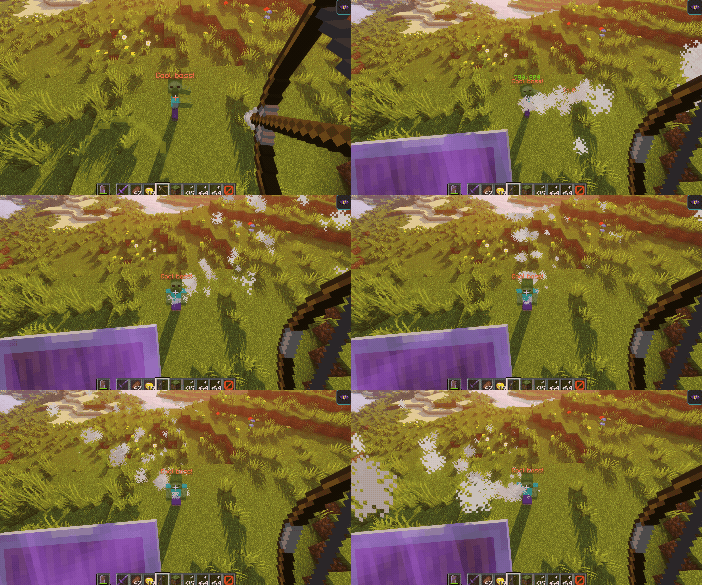
This script shows how a rotating ray looks using cloud particles.
First, it creates a ray from the boss to the player who harmed it, using cloud particles. Then, it adjusts the positions slightly upward by one block using offset.
Next, it rotates the ray through 360 degrees from the boss-side origin over 100 ticks. The target player establishes the initial direction, not the rotation center. Negative pitch/yaw values rotate in the opposite direction.
TRANSLATING_RAY
Each initial Target / Target2 pair uses the first resolved FinalTarget and FinalTarget2. An omitted final target leaves that endpoint at its starting position. Keep all endpoints in the same world. A positive duration animates to the exact destinations; zero duration keeps the initial ray static. Negative duration is rejected.
| Key | Details | Set explicitly |
|---|---|---|
shape | Sets the shape of the zone. Should be TRANSLATING_RAY | ✅ |
filter | Sets which types of entities get targeted | ❌ |
animationDuration | Sets, in ticks, the amount of time for the translation | ✅ |
target | Sets the location for the first point of the line | ✅ |
finalTarget | Sets the location of the destination for the first point of the line | ✅ |
target2 | Sets the location for the second point of the line | ✅ |
finalTarget2 | Sets the location of the destination for the second point of the line | ✅ |
ignoresSolidBlocks | Sets if the ray will pass through solid blocks. Defaults to true | ❌ |
pointRadius | Sets the thickness of the ray. Default is 0.5 blocks. | ❌ |
Example
eliteScript:
  Example:
    Events:
      - EliteMobDamagedByPlayerEvent
    Zone:
      shape: TRANSLATING_RAY
      Target:
        targetType: SELF
      FinalTarget:
        targetType: SELF
        offset: 0,10,0
      Target2:
        targetType: DIRECT_TARGET
      FinalTarget2:
        targetType: DIRECT_TARGET
        offset: 0,10,0
      animationDuration: 100
      ignoresSolidBlocks: true
    Actions:
      - action: SPAWN_PARTICLE
        particles:
          - particle: CLOUD
        Target:
          targetType: ZONE_FULL
        repeatEvery: 1
        times: 100
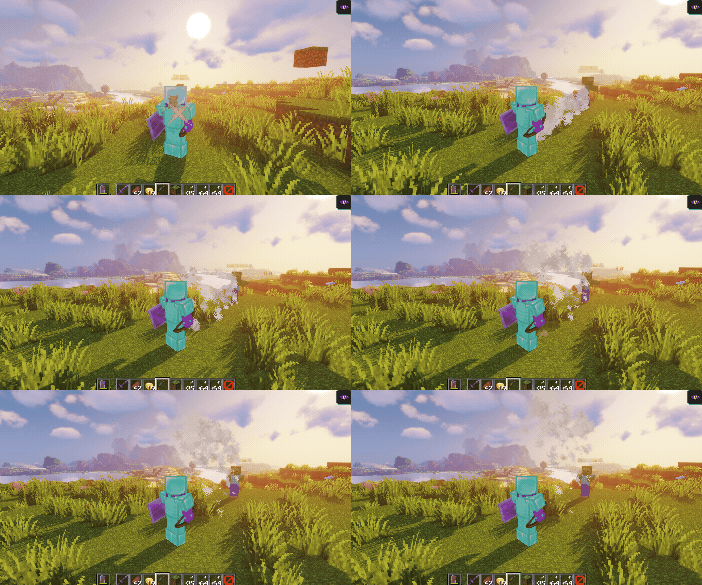
This script shows how a translating ray looks using cloud particles.
First, it creates a ray from the boss to the player who harmed it, using cloud particles.
Then, it animates the ray upwards by 10 blocks using the offsets on FinalTarget and FinalTarget2.
The configured duration is 100 ticks, approximately 5 seconds at 20 ticks per second. The last frame lands exactly on the final targets.
We can easily make the ray move sideways by adjusting the Z offset to something like offset: 0,0,10:
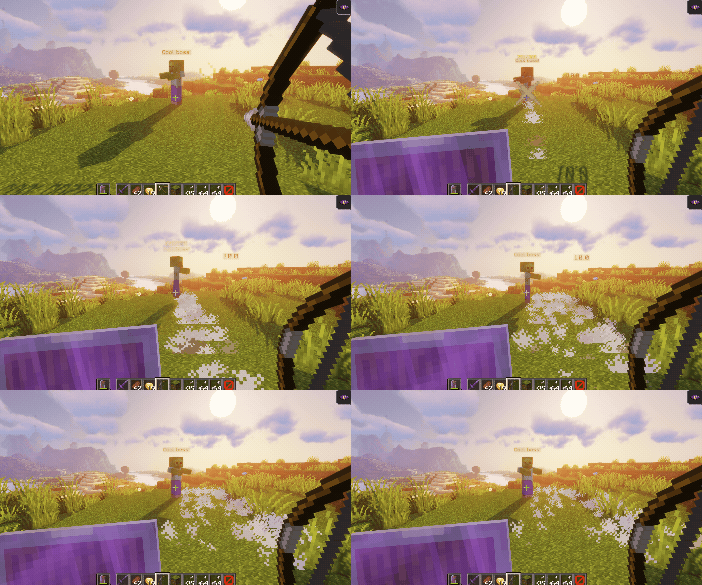
Offsets use world axes; changing your view only changes how the motion looks on screen. An X offset moves along world X regardless of your facing direction.
filter
The filter property can be used to only target specific entities inside of the zone. These entities can be:
These filters apply to entity queries, not particle locations. ELITE and LIVING can include the casting boss if it passes the shape check. PLAYER does not itself exclude spectators or players from other encounters. Additional action-specific eligibility rules may still apply.
| Value | Details |
|---|---|
PLAYER | Only targets players in the zone (default) |
ELITE | Tracked elite living entities in the zone |
LIVING | Living entities in the zone, including players |
Example
eliteScript:
  FilterExample:
    Events:
    - PlayerDamagedByEliteMobEvent
    Zone:
      shape: SPHERE
      radius: 12
      borderRadius: 11
      filter: ELITE
      Target:
        targetType: SELF
        track: false
This fragment sets the zone's entity filter to elites. It has no Actions yet and is not a complete runnable script. The track: false shown on the origin target does not freeze an action's zone; put that setting on the action's ZONE_FULL or ZONE_BORDER target when adding actions that need a fixed origin.