Elite Script Actions
Actions are at the core of the script. These determine what the script does and allows you to set custom intervals.
Each action starts with an action type and its settings. Most actions resolve entities or locations through Target, which defaults to SELF when omitted. RUN_COMMAND_AS_CONSOLE and MODIFY_DAMAGE do not read targets, while RUN_SCRIPT passes context to its child scripts. Use wait for a delay and the fields listed below for each action's settings.
The NEARBY_PLAYERS, NEARBY_MOBS, and NEARBY_ELITES examples below use a search box extending range blocks along each axis, rather than a spherical radius. See Targets for exclusions and target limits.
Shared attributes
| Values | Details | Special |
|---|---|---|
Target | More info here | ❌ |
wait | Sets the amount of time to wait (ticks) before running actions | ❌ |
repeatEvery | Repeats this action at a positive interval in ticks. Use times to limit executions. Accepts ranges such as 1~5; see the lifetime rules below. | ❌ |
times | Sets the amount of times an action will happen for. You can randomize this value by using ~ example: 1~5. | Requires repeatEvery |
scripts | Sets the scripts that will run at the end of the action | ❌ |
onlyRunOneScript | Picks one of the scripts at random and only runs that one. | ❌ |
offset | This option goes under Target. Allows you to offset the target location. On ZONE_FULL or ZONE_BORDER targets it shifts each sampled zone location. | ❌ |
debug | This option goes under the action section of the script. When set to true it will display barrier icons in the area that the action is. | ❌ |
Conditions | Per-action conditions. More info here. Default conditionType is FILTERING here, unlike script-level conditions. | ❌ |
FinalTarget | A second target block used as a destination. At action level only TELEPORT and NAVIGATE read it. (Zone: has its own separate FinalTarget / FinalTarget2, used by TRANSLATING_RAY.) | ❌ |
RelativeVector | More info here. Read by PUSH, SET_FACING, SPAWN_FALLING_BLOCK, SUMMON_ENTITY and SUMMON_REINFORCEMENT. For SPAWN_PARTICLE, put relativeVector inside each particle entry. | ❌ |
offset must be nested under TargetAn offset: written directly under an action that has a Target block is parsed without a warning and then never read -- nothing offsets. It has to sit inside the Target (or FinalTarget / Target2) block to take effect. When an action has no Target block at all, its default SELF target reads target keys such as offset from the action itself.
Action types
An action's wait delays that action independently. A repeating action starts immediately after its wait, then repeats at repeatEvery; times: 3 with repeatEvery: 20 runs at approximately ticks 0, 20, and 40 after the wait. A failed blocking condition terminates the repeat. Omitting times uses -1, which also stops when the boss becomes invalid. Do not use times: 0 as a way to disable an action.
Closing a power, including a phase switch or boss removal, cancels its pending waits and repeats. On death, finite actions started by EliteMobDeathEvent may finish while the source world remains loaded; repeating cycles of child scripts cannot continue indefinitely through that exception. Temporary property restorations keep their own timers. Closing a power does not undo blocks or entities it already created.
Integer ranges use inclusive bounds. repeatEvery is selected when the repeating task is scheduled, while a randomized times value is sampled again during its counter checks. Floating-point ranges sample from min up to, but not including, max. A reversed range such as 5~1, a range with more than two values, a decimal in an integer field such as duration, or text that is not a number makes EliteMobs skip the whole script and log Skipped script <name> in <file>.
Timed SCALE, SET_MOB_AI, SET_MOB_AWARE, MAKE_INVULNERABLE, TAG, and UNTAG changes preserve the original state. If changes overlap on the same entity property, the newest active change wins; expiration restores an older active value or the original baseline. A duration of 0 or less makes a lasting assignment and cancels pending restorations for that property. Plugin shutdown restores still-active temporary state.
MAKE_INVULNERABLE tracks one change per action and target. Running the same action again replaces that action's earlier change and timer instead of stacking another one. A duration of 0 or less gives that action's change no expiry, unlike the lasting assignment above: it stays tracked, and plugin shutdown restores the original state. If a tracked property is changed outside these actions, EliteMobs stops tracking it and does not restore it later.
POTION_EFFECT, SET_ON_FIRE, and VISUAL_FREEZE recheck targets when they execute. Players must be online, alive, and in the source world. In a dungeon instance they must also be current participants in that instance. These checks do not apply to every action on this page.
ACTION_BAR_MESSAGE
Sets the action bar message for the targets.
Note: This action supports placeholders. See Placeholders for the full list.
| Values | Details | Mandatory | Special |
|---|---|---|---|
Target | More info here | ✅ | ❌ |
sValue | Message | ✅ | Can use Color Codes with & |
Example
eliteScript:
  Example:
    Events:
    - EliteMobDamagedByPlayerEvent
    Actions:
    - action: ACTION_BAR_MESSAGE
      Target:
        targetType: NEARBY_PLAYERS
        range: 10
      sValue: "&2Hello World!"
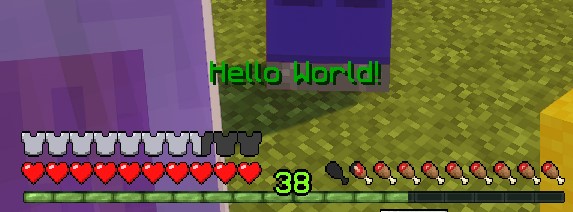
Will set the action bar to say Hello World to any players that are within 10 blocks from the boss.
BOSS_BAR_MESSAGE
Adds a bossbar to the target(s).
Note: This action supports placeholders. See Placeholders for the full list.
| Values | Details | Mandatory | Special |
|---|---|---|---|
Target | More info here | ✅ | ❌ |
sValue | Message | ✅ | Can use Color Codes with & |
duration | Duration of the boss bar in ticks | ❌ | Defaults to 100 (5 seconds) when unset or nonpositive |
barColor | Sets the color of the boss bar. Valid values here | ❌ | Defaults to WHITE |
barStyle | Sets the style of the boss bar. Valid values here | ❌ | Defaults to SOLID |
Example
eliteScript:
  Example:
    Events:
    - EliteMobDamagedByPlayerEvent
    Actions:
    - action: BOSS_BAR_MESSAGE
      Target:
        targetType: NEARBY_PLAYERS
        range: 10
      duration: 120
      sValue: "&2Hello World!"
      barColor: GREEN
      barStyle: SEGMENTED_10
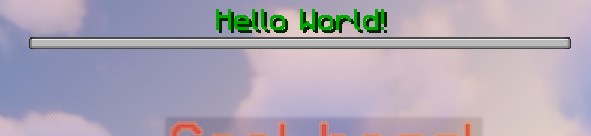
Will set a boss bar saying Hello World to any players that are within 10 blocks from the boss for 6 seconds (120 ticks).
DAMAGE
This is how you can damage entities as other entities.
Note: this natively uses the EliteMobs damage system! This means that you will see the normal elite armor reduction from strikes. More on this in the multipliers section.
| Values | Details | Mandatory | Default |
|---|---|---|---|
Target | More info here | ✅ | ❌ |
multiplier | Damage multiplier for the player combat pipeline | ❌ | 1.0 |
amount | Damage passed into Bukkit. When a living boss is the source, player combat recalculates it using the boss's stats and multiplier; the elite-versus-elite event can also replace it. | ❌ | 1.0 |
Note on recursion: Nested synchronous DAMAGE calls stop at a damage depth of 3. This limit does not count ordinary child-script calls and does not stop loops scheduled for later ticks.
Example
eliteScript:
  Example:
    Events:
    - EliteMobDamagedByPlayerEvent
    Actions:
    - action: DAMAGE
      Target:
        targetType: NEARBY_PLAYERS
        range: 10
      multiplier: 0.5
Sets the damage to be half the amount of base damage the boss would deal to the player, taking damage reductions into account.
multiplier
Sets the damage multiplier of the boss for the effect.
Important: in order to make powers scale easily and automatically, damage is applied by having the boss hit the player once and multiplying the base damage of the boss with the multiplier.
1.0 keeps the boss's base damage, 2.0 doubles it, and 0.5 halves it. Armor, other combat modifiers, cancellation, and damage immunity still affect the final damage received.
The action's multiplier only applies to player targets through the EliteMobs combat pipeline. For non-player targets, the action submits amount, which defaults to 1.0, to Bukkit without this multiplier. Other damage processing still applies: when the source and target are recognized elites, the elite-versus-elite handler replaces the submitted damage with the attacker's baseline damage plus its level. If the boss no longer has a living entity, the action submits unattributed damage instead of a boss attack.
HEAL
This is how you can heal entities including players.
Elite targets use the EliteMobs heal system. Other living targets, including players, receive a direct health update capped at their base maximum-health attribute; that path does not provide the EliteMobs heal event or floating notification.
| Values | Details | Mandatory |
|---|---|---|
Target | More info here | ✅ |
amount | Heal for how many points. (2 points is one heart) | ✅ |
Example
eliteScript:
  Example:
    Events:
    - EliteMobDamagedByPlayerEvent
    Actions:
    - action: HEAL
      Target:
        targetType: NEARBY_MOBS
        range: 15
      amount: 20
When the boss is hit then it will heal all mobs within 15 blocks for 20 points (10 hearts).
MAKE_INVULNERABLE
Makes a target invulnerable.
| Values | Details | Mandatory |
|---|---|---|
Target | More info here | ✅ |
invulnerable | Sets if the boss is invulnerable. Defaults to true | ❌ |
duration | Sets the duration of the invulnerability (ticks) | ❌ |
Example
eliteScript:
  Example:
    Events:
    - EliteMobDamagedByPlayerEvent
    Actions:
    - action: MAKE_INVULNERABLE
      Target:
        targetType: SELF
      invulnerable: true
      duration: 60
Makes a boss invulnerable for 60 ticks (3 seconds).
MODIFY_DAMAGE
Modifies the damage dealt to a boss or dealt to players by that boss. This is a special action with a few special requirements.
| Values | Details | Mandatory |
|---|---|---|
multiplier | Damage multiplier. | ✅ |
This action is special and must be in a script that has an event listener for a damage event. The following are valid damage events: EliteMobDamagedByEliteMobEvent, EliteMobDamagedByPlayerEvent, EliteMobDamagedEvent for events that reduce damage dealt to the boss and PlayerDamagedByEliteMobEvent for events that reduce damage dealt to players.
For EliteMobDamagedByEliteMobEvent, the event starts with the attacking elite's baseline damage plus its level, and the hit uses the event's damage after its scripts run, including any MODIFY_DAMAGE change. All listed hooks remain subject to any subsequent damage processing.
Use hasTags with a BLOCKING condition to control this action. MODIFY_DAMAGE modifies the current event directly and does not resolve per-target filtering conditions. Run it synchronously in the damage hook: a delayed action changes an event that has already been processed.
Put MODIFY_DAMAGE directly in that event script's Actions. Child scripts called through scripts or RUN_SCRIPT do not receive the damage event in their action data, so moving this action into a child script prevents it from modifying the hit.
Example
eliteScript:
  Example:
    Events:
    - EliteMobDamagedByPlayerEvent
    Actions:
    - action: MODIFY_DAMAGE
      multiplier: 2.0
      Conditions:
        conditionType: BLOCKING
        hasTags:
        - "CoolPlayer"
        Target:
          targetType: DIRECT_TARGET
Increases the damage dealt to the boss by the players by 2x, but only if the player has a tag called "CoolPlayer"
MESSAGE
Sends a message to the target(s).
Note: This action supports placeholders. See Placeholders for the full list.
| Values | Details | Mandatory | Special |
|---|---|---|---|
Target | More info here | ✅ | ❌ |
sValue | Message | ✅ | Can use Color Codes with & |
Example
eliteScript:
  Example:
    Events:
    - EliteMobDamagedByPlayerEvent
    Actions:
    - action: MESSAGE
      Target:
        targetType: NEARBY_PLAYERS
        range: 10
      sValue: "&2Hello World!"

Will send a chat message to all players within 10 blocks from the boss.
NAVIGATE
Makes targeted Custom Bosses walk toward the first location resolved by FinalTarget. Each execution captures that destination once; it does not continuously follow a moving player. A new navigation action replaces the previous navigation task for that boss.
| Values | Details | Mandatory | Special |
|---|---|---|---|
Target | More info here | ✅ | ❌ |
FinalTarget | More info here | ✅ | ❌ |
velocity | Speed passed to the navigation adapter. | ❌ | Defaults to 1.0 |
bValue | When true, teleports the boss to the destination if its navigation duration expires. It does not teleport on every early navigation exit. | ❌ | Defaults to false |
duration | How long should the boss try to navigate before it gives up. Set in ticks. Default is 100 ticks. | ❌ | ❌ |
Example
eliteScript:
  Example:
    Events:
    - EliteMobDamagedByPlayerEvent
    Actions:
    - action: NAVIGATE
      Target:
        targetType: SELF
      FinalTarget:
        targetType: DIRECT_TARGET
      velocity: 1.0
      bValue: true
      duration: 100
Will make the boss navigate to the spot the player was standing at when they hit the boss.
PLACE_BLOCK
Places a block at the target location(s) for the duration.
| Values | Details | Mandatory |
|---|---|---|
Target | More info here | ✅ |
material | Material of the block, full list here | ✅ |
duration | Duration of effect, in ticks | ❌ |
Example
eliteScript:
  Example:
    Events:
    - EliteMobDamagedByPlayerEvent
    Zone:
      shape: DOME
      radius: 3
      Target:
        targetType: SELF
    Actions:
    - action: PLACE_BLOCK
      Target:
        targetType: ZONE_FULL
      duration: 120
      material: GLASS
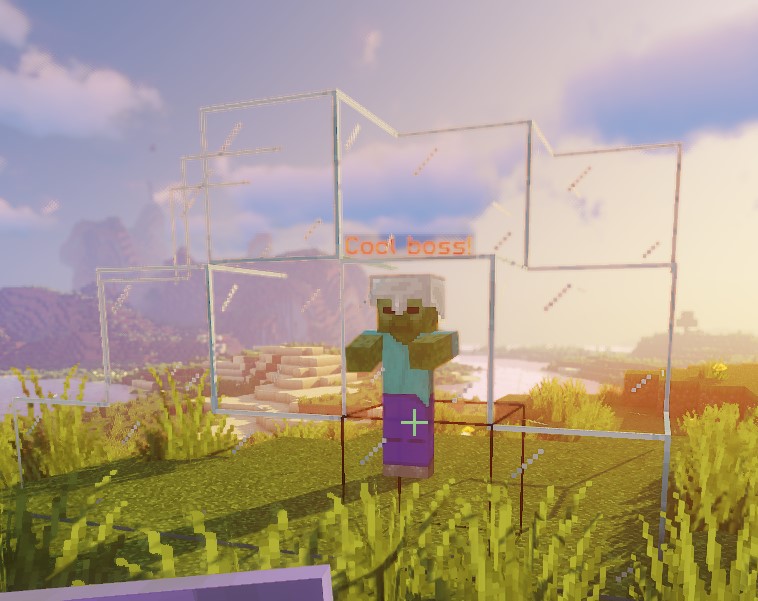
Places a glass dome around the boss that will last for 6 seconds.
Note: If no duration is defined, the block placement is permanent.
When a temporary placement expires, it restores the block data that was there before the first placement, as long as the placed block is still there. A player breaking a temporary block gets no drops and the block is not restored. A new temporary placement on a block that is still temporary replaces the material and restarts the timer from the new duration. Temporary placements skip containers and other blocks with block entities, and blocks that another owner, such as another plugin, already holds as temporary.
PLAY_ANIMATION
Plays the specified animation for a Custom Model. Requires the target to be a Custom Boss with a valid Custom Model, provided by either FreeMinecraftModels or Model Engine. Targets without a custom model are silently skipped.
| Values | Details | Mandatory |
|---|---|---|
Target | More info here | ✅ |
sValue | Sets the name of the animation | ✅ |
Example
eliteScript:
  Example:
    Events:
    - EliteMobDamagedByPlayerEvent
    Actions:
    - action: PLAY_ANIMATION
      Target:
        targetType: SELF
      sValue: "fortnite_dance"
Plays fortnite_dance on the boss's custom model. The model must supply that animation through FreeMinecraftModels or Model Engine.
PLAY_SOUND
Plays an in-game sound.
| Values | Details | Mandatory |
|---|---|---|
Target | More info here | ✅ |
sValue | Sets the name of the sound to be played | ✅ |
pitch | Sound pitch. Defaults to 1.0. | ❌ |
volume | Sound volume. Defaults to 1.0. | ❌ |
Here's a handy list of all Minecraft sounds! Remember that this can also play custom sounds from resource packs. The sound plays in the world at each resolved location, so nearby listeners can hear it even if they are not targets. A zone produces one sound per sampled location. Use a single location or lower the volume to avoid overlapping sounds.
Example
eliteScript:
  Example:
    Events:
    - EliteMobDamagedByPlayerEvent
    Actions:
    - action: PLAY_SOUND
      Target:
        targetType: SELF
      sValue: minecraft:block.bell.resonate
Plays the resonate sound from Minecraft bells at the boss location
POTION_EFFECT
Applies a specific potion effect to the target(s).
| Values | Details | Mandatory |
|---|---|---|
Target | More info here | ✅ |
potionEffectType | Effect type, valid list is here | ✅ |
amplifier | Potion effect level (starts at 0) | ✅ |
duration | Duration of the effect (ticks) | ✅ |
Example
eliteScript:
  Example:
    Events:
    - EliteMobDamagedByPlayerEvent
    Actions:
    - action: POTION_EFFECT
      Target:
        targetType: NEARBY_PLAYERS
        range: 10
      potionEffectType: LEVITATION
      amplifier: 1
      duration: 40
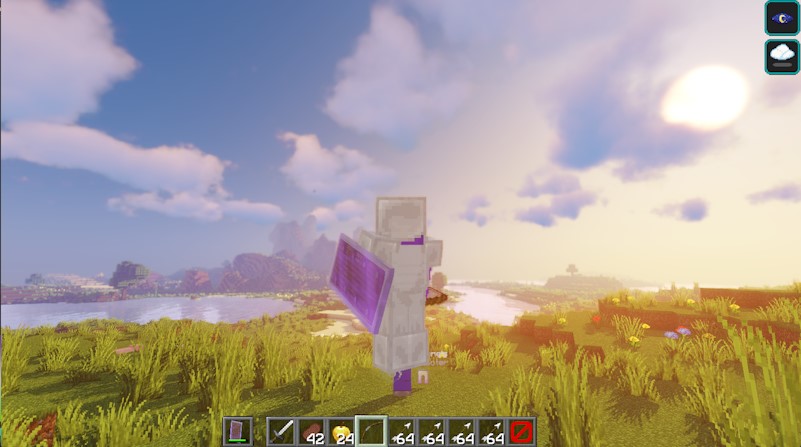
This will make any players within 10 blocks from the boss levitate for 2 seconds (40 ticks).
PUSH
Applies one velocity vector to all resolved targets one tick later. By default it replaces their velocity. RelativeVector takes precedence over vValue; a missing or nonfinite vector becomes zero.
| Values | Details | Mandatory |
|---|---|---|
Target | More info here | ✅ |
vValue | Sets the velocity vector. May be omitted when using RelativeVector. | ❌ |
bValue | If set to true, adds the velocity to the target's current velocity instead of replacing it. | ❌ |
Note: This action also accepts relative vectors. Learn more about how to use those here.
Example
eliteScript:
  Example:
    Events:
    - EliteMobDamagedByPlayerEvent
    Actions:
    - action: PUSH
      wait: 3
      Target:
        targetType: NEARBY_PLAYERS
        range: 10
      vValue: 0,0.3,0
      times: 10
      repeatEvery: 10
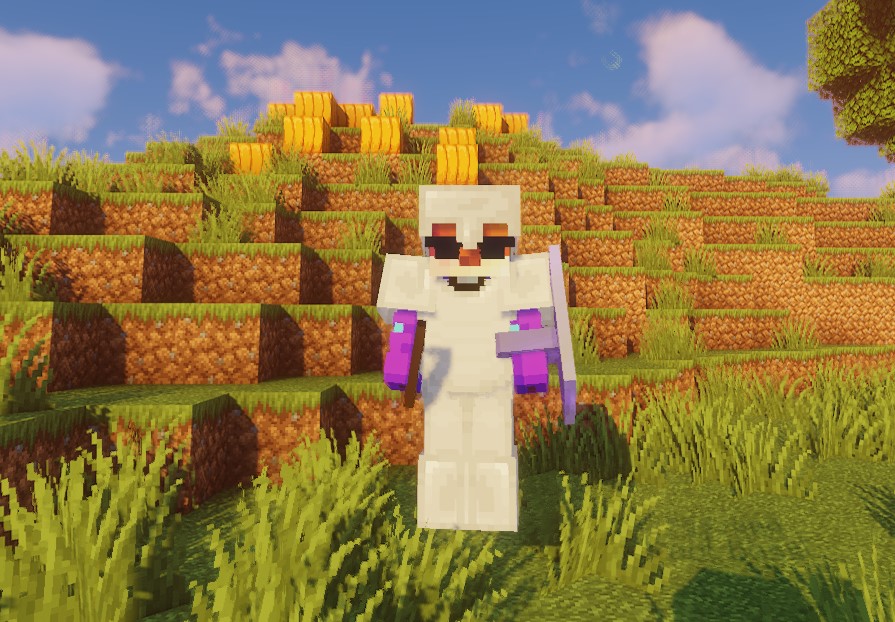
This pushes players in the nearby target box upward with a velocity of 0.3. After the 3-tick wait, the action runs 10 times, 10 ticks apart. The first and last executions are 90 ticks (4.5 seconds) apart; each push is applied one tick after its action execution. This does not impose a fixed duration on the resulting movement.
This will make it seem like the players are jumping.
vector
Vectors are defined by vValue: x,y,z. As an example, if you want the target to be pushed upwards, you can do vValue: 0,0.3,0.
REMOVE_ELITE
This action will remove any targeted Elites. Can be combined with Conditions and Tags to only remove certain Elites.
| Values | Details | Mandatory |
|---|---|---|
Target | More info here | ✅ |
Example
eliteScript:
  Example:
    Events:
    - EliteMobDamagedByPlayerEvent
    Actions:
    - action: REMOVE_ELITE
      Target:
        targetType: NEARBY_ELITES
        range: 10
This removes nearby elites in the search box extending 10 blocks along each axis.
eliteScript:
  Example:
    Events:
    - EliteMobDamagedByPlayerEvent
    Actions:
    - action: REMOVE_ELITE
      Target:
        targetType: NEARBY_ELITES
        range: 3
      Conditions:
        conditionType: FILTERING
        hasTags:
        - remove_me
        Target:
          targetType: ACTION_TARGET
This removes nearby elites in the search box extending 3 blocks along each axis, but only if they have the tag remove_me.
RUN_COMMAND_AS_CONSOLE
Runs a command as console. To conditionally prevent the command, use BLOCKING conditions: this action does not resolve entity targets and therefore does not apply filtering conditions to them.
The command runs once per action invocation, not once per entity in Target. Player placeholders refer to the event's direct player target.
| Values | Details | Mandatory |
|---|---|---|
Target | Not read by this action; the command runs once. | ❌ |
sValue | Command that will be run | ✅ |
Note: This action supports placeholders. See Placeholders for the full list.
Example
eliteScript:
  Example:
    Events:
    - EliteMobDamagedByPlayerEvent
    Actions:
    - action: RUN_COMMAND_AS_CONSOLE
      Target:
        targetType: NEARBY_PLAYERS
        range: 10
      sValue: say Hello $bossName my name is $playerName. What is your level? $bossName my level is $bossLevel.

Makes console broadcast the message "Hello $bossName my name is $playerName. What is your level? $bossName my level is $bossLevel"
RUN_COMMAND_AS_PLAYER
Runs a command as a player. Requires the target to be players.
| Values | Details | Mandatory |
|---|---|---|
Target | More info here | ✅ |
sValue | Command that will be run | ✅ |
Placeholders
RUN_COMMAND_AS_PLAYER, RUN_COMMAND_AS_CONSOLE, MESSAGE, TITLE_MESSAGE, ACTION_BAR_MESSAGE, and BOSS_BAR_MESSAGE all support the following placeholders:
$playerName and player coordinates describe the event's direct player, not each recipient. With no direct player, the name is Unknown and coordinates are zero. $targetName is the account name of each command executor and is available only in RUN_COMMAND_AS_PLAYER; neither player-name placeholder uses a display nickname.
| Placeholder | Details | Special |
|---|---|---|
$playerName | Account name of the event's direct player | Unknown without a direct player |
$playerX | Direct player's X location | 0 without a direct player |
$playerY | Direct player's Y location | 0 without a direct player |
$playerZ | Direct player's Z location | 0 without a direct player |
$targetName | Account name of each command executor. Only available in RUN_COMMAND_AS_PLAYER, where it is replaced per target. | Target must be player |
$bossName | Display name of the boss | ❌ |
$bossX | Boss' X location | ❌ |
$bossY | Boss' Y location | ❌ |
$bossZ | Boss' Z location | ❌ |
$bossLevel | Level of the boss | ❌ |
$bossWorldName | Name of the boss's world | ❌ |
Example
eliteScript:
  Example:
    Events:
    - EliteMobDamagedByPlayerEvent
    Actions:
    - action: RUN_COMMAND_AS_PLAYER
      Target:
        targetType: NEARBY_PLAYERS
        range: 10
      sValue: say Hello $bossName my name is $playerName.

Makes the player run the say command with Hello $bossName my name is $playerName., meaning they just say "Hello $bossName my name is $playerName."
RUN_SCRIPT
Runs the scripts named in scripts. Other actions can also use this field to call child scripts after their own execution. RUN_SCRIPT does not resolve targets or apply per-target filtering itself; use a BLOCKING condition to prevent the call. If a child uses an inherited-target selector, configure the parent targets it needs.
| Values | Details | Mandatory |
|---|---|---|
Target | Optional for this action; child scripts resolve their own targets and can inherit the caller's context. | ❌ |
scripts | Scripts that will be run | ✅ |
onlyRunOneScript | Run only one script from the list. | ❌ |
Example
eliteScript:
  Example:
    Events:
    - EliteMobDamagedByPlayerEvent
    Actions:
    - action: RUN_SCRIPT
      onlyRunOneScript: false
      scripts:
      - Example1
      - Example2
  Example1:
    Actions:
    - action: DAMAGE
      Target:
        targetType: NEARBY_PLAYERS
        range: 10
      multiplier: 0.5
  Example2:
    Actions:
    - action: MESSAGE
      Target:
        targetType: NEARBY_PLAYERS
        range: 10
      sValue: "&cCool boss!: &fGotcha back!"

When an elite gets damaged, runs RUN_SCRIPT, which runs Example1 and Example2 scripts.
Example1 script will damage all players within 10 blocks from the boss.
Example2 script will message all players within 10 blocks from the boss with the message "&cCool boss!: &fGotcha back!".
SCALE
Allows you to scale entities.
| Values | Details | Mandatory |
|---|---|---|
Target | More info here | ✅ |
scale | Sets the scaling size | ✅ |
duration | Sets how long the scaling effect should last | ❌ |
When scaling, 1.0 represents the default size. To make the entity larger, increase the value (e.g., 1.2). To make the entity smaller, decrease the value (e.g., 0.8).
Note: This can target players so please be careful with how you use it!
When a timed scale expires, it restores the previous base scale, including a configured boss scale. Overlapping timed scales follow the temporary-state rules above.
Example
eliteScript:
  Example:
    Events:
    - EliteMobDamagedEvent
    Actions:
    - action: SCALE
      Target:
        targetType: SELF
      scale: 0.3
      duration: 60
When the mob is hit, its base scale becomes 0.3. After 60 ticks it returns to the previous base scale, unless a newer timed scale is still active.
SET_FACING
Turns targeted entities to face one direction, often alongside an animation. Target defaults to SELF. Supply vValue or RelativeVector; the relative vector takes precedence and the same direction is used for every target.
| Values | Details | Mandatory |
|---|---|---|
vValue | Which direction should the boss face. X,Y,Z | ❌ |
RelativeVector | Uses relative vectors to make the boss face a target. | ❌ |
Example
eliteScript:
  Example:
    Events:
    - EliteMobEnterCombatEvent
    Actions:
    - action: SET_FACING
      vValue: 1,0,0
Will make the boss face East.
eliteScript:
  Example:
    Events:
    - EliteMobEnterCombatEvent
    Actions:
    - action: SET_FACING
      RelativeVector:
        SourceTarget:
          targetType: SELF
        DestinationTarget:
          targetType: NEARBY_PLAYERS
          range: 20
Turns the boss toward the first player returned by the nearby search box extending 20 blocks along each axis. This is not a nearest-player selection.
SET_MOB_AI
Sets if the mob has AI. In Minecraft, mobs with no AI will not move and will not attack. They can still get damaged, but damaging them will not result in them getting knocked back.
| Values | Details | Mandatory |
|---|---|---|
Target | More info here | ✅ |
bValue | Sets whether the boss has AI | ✅ |
duration | Duration in ticks; nonpositive values make a lasting assignment. | ❌ |
Example
eliteScript:
  Example:
    Events:
    - EliteMobDamagedByPlayerEvent
    Actions:
    - action: SET_MOB_AI
      Target:
        targetType: SELF
      bValue: false
      duration: 40
Sets the boss to not have AI for 2 seconds (40 ticks).
SET_MOB_AWARE
Sets if the mob is aware. In Minecraft, mobs that are not aware will not move to new locations and will not attack. They can still get damaged, and they will get knocked back.
An existing navigation path may continue after awareness is disabled. This action only accepts mobs; it cannot change player awareness.
This means you can use unaware mobs to move to defined locations, unlike mobs with no AI.
| Values | Details | Mandatory |
|---|---|---|
Target | More info here | ✅ |
bValue | Sets whether the mob is aware | ✅ |
duration | Duration in ticks; nonpositive values make a lasting assignment. | ❌ |
Example
eliteScript:
  Example:
    Events:
    - EliteMobDamagedByPlayerEvent
    Actions:
    - action: SET_MOB_AWARE
      Target:
        targetType: SELF
      bValue: false
      duration: 40
Sets the boss to not have awareness for 2 seconds (40 ticks).
SET_ON_FIRE
Sets an entity on fire for the duration.
| Values | Details | Mandatory |
|---|---|---|
Target | More info here | ✅ |
duration | Duration of effect, in ticks | ✅ |
Example
eliteScript:
  Example:
    Events:
    - EliteMobDamagedByPlayerEvent
    Actions:
    - action: SET_ON_FIRE
      Target:
        targetType: NEARBY_PLAYERS
        range: 10
      duration: 60
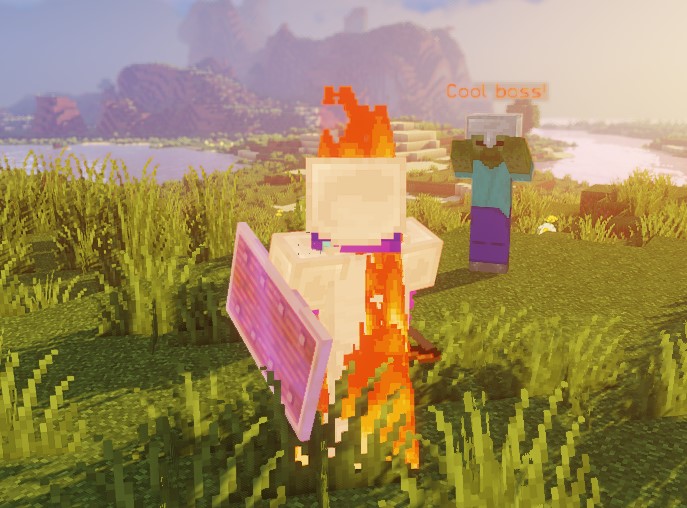
Sets on fire all players within 10 blocks from the boss for 3 seconds (60 ticks).
SET_TIME
Sets the in-game time of the world the target is in.
| Values | Details | Mandatory |
|---|---|---|
Target | More info here | ✅ |
time | Sets the time | ✅ |
Example
eliteScript:
  Example:
    Events:
    - EliteMobDamagedByPlayerEvent
    Actions:
    - action: SET_TIME
      Target:
        targetType: SELF
      time: 10000
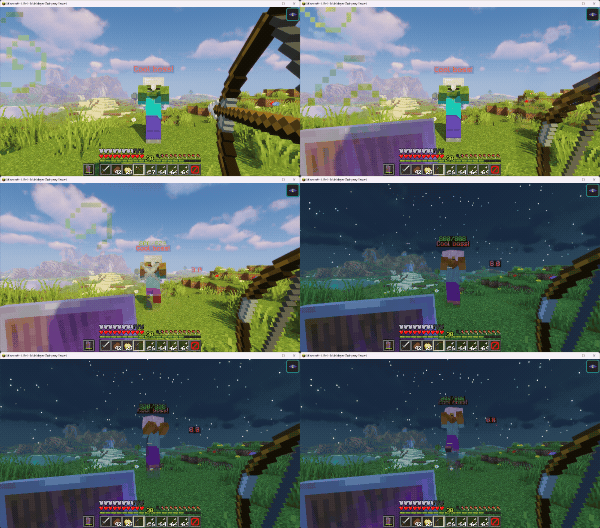
When struck the boss will set the time of the world the boss is in to be 10000 ticks.
SET_WEATHER
Sets the weather of the world the target is in for a set amount of time.
This action resolves entity targets, so use SELF or another entity selector rather than a bare LOCATION. An omitted or nonpositive duration uses 6,000 ticks for the vanilla weather timer. Positive precipitation/thunder durations also schedule a clear-weather change after duration + 1 ticks; overlapping weather actions do not use the temporary-state restoration stack described above.
| Values | Details | Mandatory |
|---|---|---|
Target | More info here | ✅ |
weather | Sets the weather type | ✅ |
duration | Duration in ticks; omitted or nonpositive values use the fallback described above. | ❌ |
Example
eliteScript:
  Example:
    Events:
    - EliteMobDamagedByPlayerEvent
    Actions:
    - action: SET_WEATHER
      Target:
        targetType: SELF
      weather: PRECIPITATION
      duration: 120
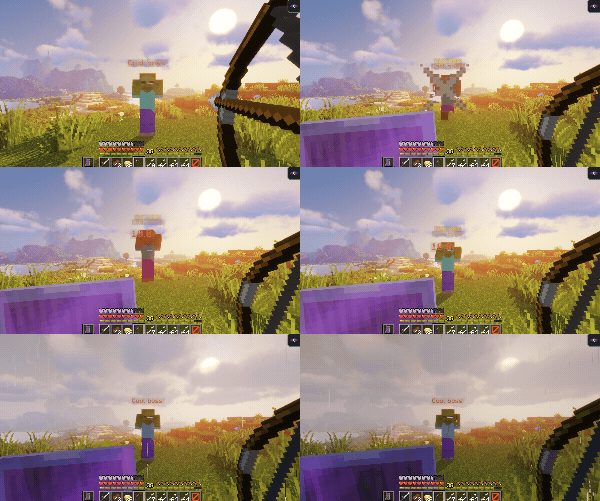
Sets rain or snow in the boss's world for 120 ticks (6 seconds). Precipitation depends on biome and location.
Note: The effect will take a while to trigger.
weather
The following are valid weather patterns:
CLEAR- Sets the weather to be clearPRECIPITATION- Sets the weather to rain / snow, depending on the biome, location height and other vanilla Minecraft considerations.THUNDER- Sets the weather to thunderstorm
SPAWN_FIREWORKS
Spawns fireworks.
| Values | Details | Mandatory | Special |
|---|---|---|---|
Target | More info here | ✅ | ❌ |
vValue | Sets the velocity of the fireworks rocket. Setting it also makes the rocket fire at an angle instead of straight up. | ❌ | ❌ |
flicker | Sets if the firework particles will flicker | ❌ | Default: true |
withTrail | Sets if the firework rocket will leave a trail | ❌ | Default: true |
power | Sets the power of the fireworks | ❌ | Default: 10 |
fireworkEffects | Lists the colors for each explosion effect. Flight duration is controlled by power, not this list. | ✅ | ❌ |
fireworkEffectType | Sets the shape of the firework from this list | ❌ | Default: BALL_LARGE |
fireworkEffectTypes | Sets the shapes of the firework from this list . This is a list of shapes - if you want a list of shapes, don't use fireworkEffectType! [1] | ❌ | ❌ |
[1] Each shape uses the color list at the same position. If there are more shapes than color lists, later shapes reuse the last color list. Extra color lists without matching shapes are unused.
Example
eliteScript:
  fireworkShot1:
    Events:
    - EliteMobDamagedByPlayerEvent
    Actions:
    - action: SPAWN_FIREWORKS
      Target:
        targetType: SELF
        offset: 1,1.5,0
      vValue: .5,-.35,1
      flicker: false
      withTrail: false
      power: 2
      fireworkEffects:
      - [ORANGE, RED]
      - [YELLOW, BLUE]
      fireworkEffectTypes:
      - BALL_LARGE
      - STAR
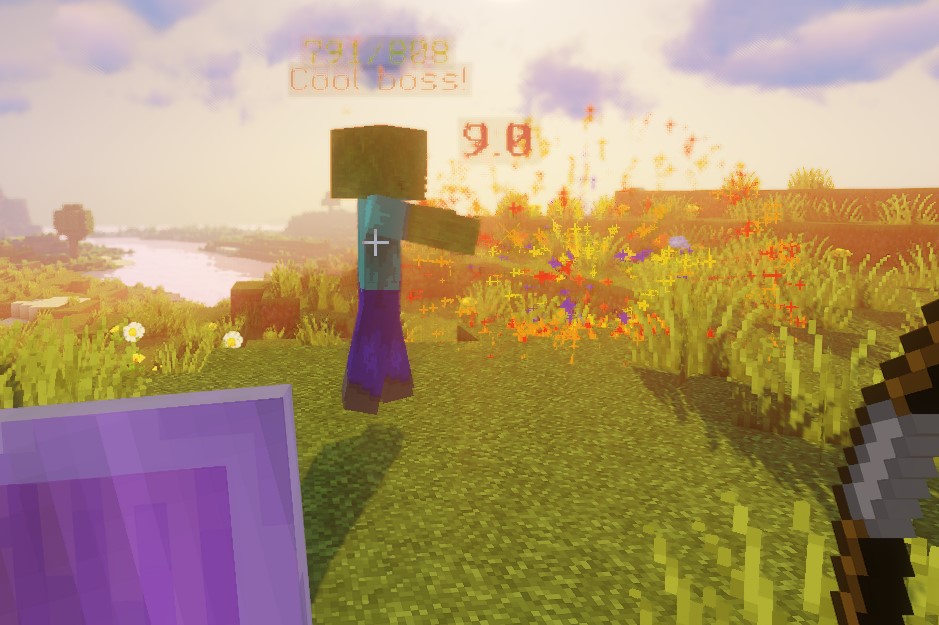
Spawns fireworks at the boss location offset by x= 1, y= 1.5 and z = 0. Gives the fireworks a velocity of x=.5, y=-.35 and z=1. The fireworks won't flicker or have trails. power: 2 is passed to the firework's flight-power setting; it is not a delay of 2 ticks or 2 seconds.
Finally, there are two lists of color lists: list 1 is orange & red and list 2 is yellow & blue. There are two shapes for the fireworks: BALL_LARGE and STAR. This means that BALL_LARGE (element 1) will use orange & red colors (list 1) and STAR (element 2) will use yellow & blue colors (list 2).
fireworkEffects
These are the effects the fireworks rocket will show. At least one effect is required. The following are valid effects:
- WHITE, SILVER, GRAY, BLACK, RED, MAROON, YELLOW, OLIVE, LIME, GREEN, AQUA, TEAL, BLUE, NAVY, FUCHSIA, PURPLE, ORANGE
STRIKE_LIGHTNING
Strikes lightning. This is a visual effect, if you want damage you should add a damage action.
| Values | Details | Mandatory |
|---|---|---|
Target | More info here | ✅ |
Example
eliteScript:
  Example:
    Events:
    - EliteMobDamagedByPlayerEvent
    Actions:
    - action: STRIKE_LIGHTNING
      Target:
        targetType: SELF
      repeatEvery: 5
      times: 5
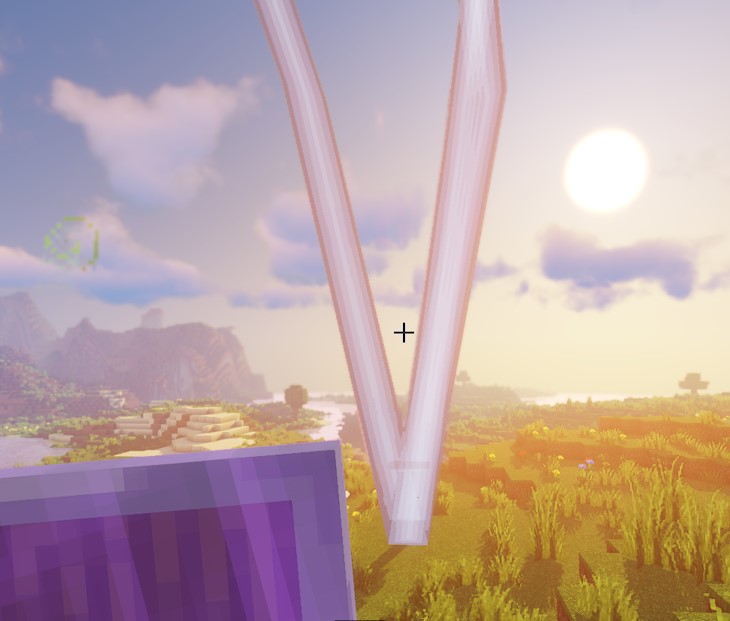
Strikes lightning the boss every 5 ticks for 5 times.
SPAWN_FALLING_BLOCK
Spawns a falling block at the target. Visual only, does not place the block.
| Values | Details | Mandatory |
|---|---|---|
Target | More info here | ✅ |
material | Sets the Material of the falling block. Check valid types here and make sure they are a valid block material. | ✅ |
landingScripts | Sets the scripts to run when the falling block attempts to become a block. Optional; the visual can be used without a callback. | ❌ |
vValue | Sets the velocity and direction of a falling block. | ❌ |
landingScripts works the same way as RUN_SCRIPT but can accept the special target type LANDING_LOCATION.
The LANDING_LOCATION is inherited by script runners, allowing for a landing location script to also function as a script runner. You can add a wait on the action that calls the scripts, followed by the subsequent script calls. The LANDING_LOCATION will always be the argument for the target, even when inherited, as it is assigned in a single specific way.
Note: This action also accepts relative vectors. Learn more about how to use those here.
Example
eliteScript:
  Example:
    Events:
    - EliteMobDamagedByPlayerEvent
    Actions:
    - action: SPAWN_FALLING_BLOCK
      Target:
        targetType: SELF
        offset: 3,10,0
      material: STONE
      vValue: 0,0,0
      landingScripts:
      - LandingScriptExample
  LandingScriptExample:
    Actions:
    - action: PLACE_BLOCK
      Target:
        targetType: LANDING_LOCATION
      duration: 200
      material: STONE
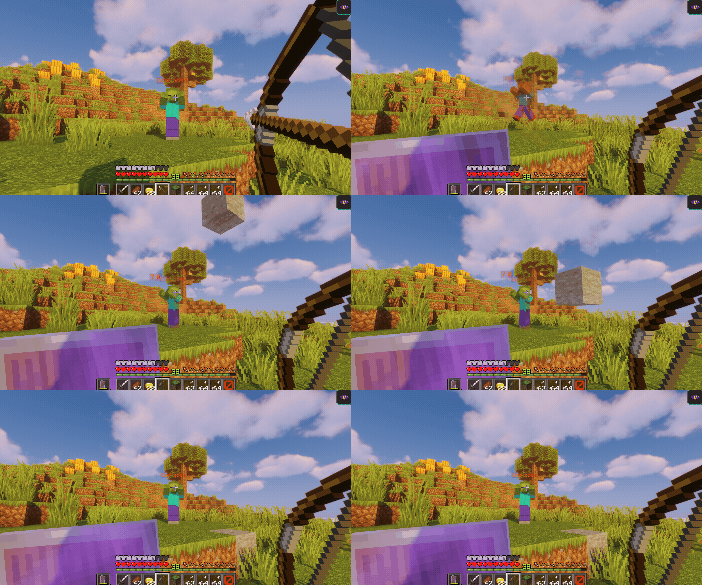
When the boss is struck, this script will spawn a falling stone block 10 blocks above and 3 blocks next to the boss location.
Once the block falls, it will run the LandingScriptExample script, which will place a stone block at the location the block landed on. The block will stay there for 10 seconds (200 ticks) before it disappears.
SPAWN_PARTICLE
Spawns particles at the target.
For zone targets only, omitted coverage defaults to 0.3. Set coverage: 1.0 explicitly to sample the whole zone. Ordinary entity/location targets do not receive this default reduction.
Zone, fixed-location, and landing-location particle targets are shifted by 0.5 on X and Z before spawning. Entity targets use their resolved locations without that shift.
| Values | Details | Mandatory |
|---|---|---|
Target | More info here | ✅ |
particles | Lists the particles that will be spawned | ✅ |
particles
Particles have their own special settings, which go as follows:
| Values | Details | Default | Special |
|---|---|---|---|
x | Sets offset of X | 0.01 | (1) |
y | Sets offset of Y | 0.01 | (1) |
z | Sets offset of Z | 0.01 | (1) |
amount | Sets amount of particles spawned | 1 | (1) |
speed | Sets speed of particles | 0.01 | ❌ |
particle | Sets the particle type | FLAME | Valid particles listed below |
red | Sets red value | 255 | (2) |
green | Sets green value | 255 | (2) |
blue | Sets blue value | 255 | (2) |
toRed | Sets final red value | 255 | (3) |
toGreen | Sets final green value | 255 | (3) |
toBlue | Sets final blue value | 255 | (3) |
material | Sets the block or item shown by particles that carry block/item data | STONE | (4) |
relativeVector | Sets a relative vector for the particle's direction. Learn more about relative vectors here. | none | (5) |
(1) If the amount is set to 0, x, y and z will set the particle's velocity instead.
(2) RGB applies to DUST, DUST_COLOR_TRANSITION and colour-data particles such as ENTITY_EFFECT. WITCH has a fixed colour; red, green and blue do not tint it.
(3) Only for the DUST_COLOR_TRANSITION particle
(4) Only for particles that require block data (BLOCK, FALLING_DUST, DUST_PILLAR, BLOCK_CRUMBLE, BLOCK_MARKER) or item data (ITEM). A material that is not valid for the particle's data type falls back to STONE.
(5) Setting a relativeVector forces amount to 0 and overwrites x, y and z with the resolved vector, which is what turns the particle into a directional one.
moveToTarget does nothingmoveToTarget is still accepted by the parser without a warning, but nothing reads it -- it has no effect at all. Use relativeVector to aim a particle, which is what actually works.
It is important to note that one SPAWN_PARTICLE script can spawn multiple particles. Each particle can then have its own configuration fields within the SPAWN_PARTICLE action. Here is an example:
Example
eliteScript:
  Example:
    Events:
    - EliteMobDamagedByPlayerEvent
    Zone:
      shape: CYLINDER
      radius: 4
      borderRadius: 3
      height: 30
      Target:
        targetType: DIRECT_TARGET
        track: true
    Actions:
    - action: SPAWN_PARTICLE
      Target:
        targetType: ZONE_BORDER
      particles:
        - particle: FLAME
          speed: 0.2
          amount: 1
        - particle: SMOKE_NORMAL
          speed: 0.1
          amount: 1
      repeatEvery: 10
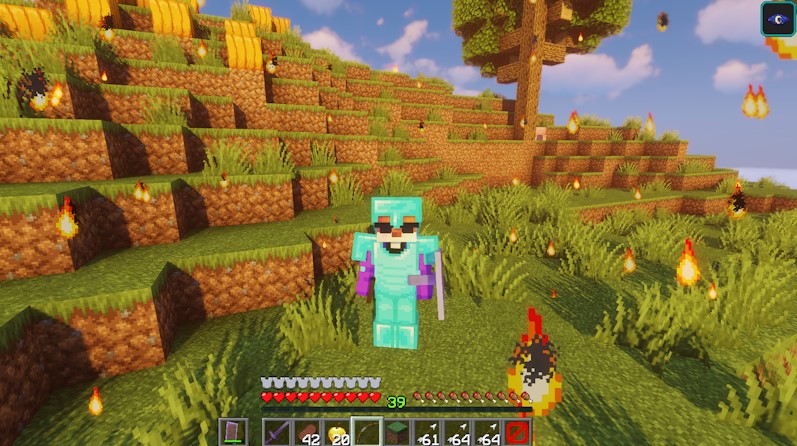
This will spawn a cylinder made from flame and smoke particles around the player that damaged the boss.
Moving a particle:
It is possible to set a specific speed for a particle, and it works the same way the Spigot API does. This allows scripters to set a particle to go in a specific direction at a specific speed. It is not possible to make particles change direction midway. This effect is used in the flamethrower enchantment and boss power.
To move a particle, set amount: 0. This will signal to Minecraft that the x, y and z values are actually a vector. This vector sets the direction toward which your particle will go.
Let's say that you want a FLAME particle to go up. To do this, you want a positive y value, and nothing else. Finally, you will want to set the velocity to what you want the speed to be. Here is a full example:
Example
eliteScript:
  Example:
    Events:
    - EliteMobEnterCombatEvent
    Zone:
      shape: CYLINDER
      radius: 4
      borderRadius: 3
      height: 30
      Target:
        targetType: DIRECT_TARGET
        track: true
    Actions:
    - action: SPAWN_PARTICLE
      Target:
        targetType: ZONE_BORDER
      particles:
        - particle: FLAME
          amount: 0
          x: 0
          y: 1
          z: 0
          speed: 0.2
        - particle: SMOKE_NORMAL
          speed: 0.1
          amount: 0
          x: 0.5
          y: 1
          z: 0.5
      repeatEvery: 10
This spawns upward-moving flames and diagonally moving smoke along the cylinder border around the player who triggered combat. Set amount inside each particle entry; an action-level amount does not control particles.
Valid particles
EliteMobs accepts any particle from the Spigot Particle enum. The following are the most commonly used particles. Legacy particle names (from older Minecraft versions) are automatically converted to their modern equivalents.
Simple particles (no extra data required in EliteScript; boss trails have separate restrictions):
POOF, EXPLOSION, EXPLOSION_EMITTER, FIREWORK, BUBBLE, SPLASH, FISHING, UNDERWATER, CRIT, ENCHANTED_HIT, SMOKE, LARGE_SMOKE, WITCH, DRIPPING_WATER, DRIPPING_LAVA, ANGRY_VILLAGER, HAPPY_VILLAGER, MYCELIUM, NOTE, PORTAL, ENCHANT, FLAME, LAVA, CLOUD, ITEM_SNOWBALL, ITEM_SLIME, HEART, RAIN, ELDER_GUARDIAN, END_ROD, DAMAGE_INDICATOR, SWEEP_ATTACK, TOTEM_OF_UNDYING, SPIT, SQUID_INK, BUBBLE_POP, CURRENT_DOWN, BUBBLE_COLUMN_UP, NAUTILUS, DOLPHIN, SNEEZE, CAMPFIRE_COSY_SMOKE, CAMPFIRE_SIGNAL_SMOKE, COMPOSTER, FALLING_LAVA, LANDING_LAVA, FALLING_WATER, DRIPPING_HONEY, FALLING_HONEY, LANDING_HONEY, FALLING_NECTAR, SOUL_FIRE_FLAME, ASH, CRIMSON_SPORE, WARPED_SPORE, SOUL, DRIPPING_OBSIDIAN_TEAR, FALLING_OBSIDIAN_TEAR, LANDING_OBSIDIAN_TEAR, REVERSE_PORTAL, WHITE_ASH, FALLING_SPORE_BLOSSOM, SPORE_BLOSSOM_AIR, SMALL_FLAME, SNOWFLAKE, DRIPPING_DRIPSTONE_LAVA, FALLING_DRIPSTONE_LAVA, DRIPPING_DRIPSTONE_WATER, FALLING_DRIPSTONE_WATER, GLOW_SQUID_INK, GLOW, WAX_ON, WAX_OFF, ELECTRIC_SPARK, SCRAPE, SONIC_BOOM, SCULK_SOUL, SCULK_CHARGE_POP, CHERRY_LEAVES, PALE_OAK_LEAVES, EGG_CRACK, DUST_PLUME, WHITE_SMOKE, GUST, SMALL_GUST, GUST_EMITTER_LARGE, GUST_EMITTER_SMALL, TRIAL_SPAWNER_DETECTION, TRIAL_SPAWNER_DETECTION_OMINOUS, VAULT_CONNECTION, INFESTED, ITEM_COBWEB, OMINOUS_SPAWNING, RAID_OMEN, TRIAL_OMEN, FIREFLY, COPPER_FIRE_FLAME
Special particles (require additional config data in EliteScript):
| Particle | Notes |
|---|---|
DUST | Uses red, green, blue values for color. Legacy name: REDSTONE |
DUST_COLOR_TRANSITION | Uses red/green/blue for start color and toRed/toGreen/toBlue for end color |
ENTITY_EFFECT and other colour-data particles | Use red, green, blue for color |
Particles that require block or item data — usable in EliteScript, set the block or item with material:
BLOCK, FALLING_DUST, DUST_PILLAR, BLOCK_CRUMBLE, BLOCK_MARKER take a block material; ITEM takes an item material. If material is omitted or is not valid for that particle, STONE is used.
      particles:
        - particle: BLOCK
          material: CRIMSON_NYLIUM
          amount: 20
Particles with other special data types:
EliteScript now inspects what Bukkit says each particle needs and supplies it automatically:
- Particles that take a single number (such as
SCULK_CHARGE) are given the particle'sspeedvalue. - Particles that take a single whole number (such as
SHRIEK) are given0. - Any remaining particle whose data EliteScript cannot build (
VIBRATION, for example) is skipped. Warnings are deduplicated by particle and required data type across scripts; the first warning identifies the script that encountered it:
[EliteMobs] Skipping script particle VIBRATION in script MyScript because Bukkit requires unsupported Vibration data.
Boss trails are a separate system with stricter requirements -- a particle working in EliteScript does not guarantee it works as a trail.
Legacy name conversions (old names still work in config files):
| Legacy Name | Modern Name |
|---|---|
EXPLOSION_NORMAL | EXPLOSION |
EXPLOSION_LARGE | EXPLOSION |
EXPLOSION_HUGE | EXPLOSION |
SMOKE_NORMAL | SMOKE |
SMOKE_LARGE | LARGE_SMOKE |
REDSTONE | DUST |
SLIME | ITEM_SLIME |
DRIP_LAVA | DRIPPING_LAVA |
DRIP_WATER | DRIPPING_WATER |
SNOWBALL | SNOWFLAKE |
SPELL | WITCH |
SPELL_MOB | WITCH |
VILLAGER_ANGRY | ANGRY_VILLAGER |
VILLAGER_HAPPY | HAPPY_VILLAGER |
WATER_BUBBLE | UNDERWATER |
WATER_SPLASH | SPLASH |
SUMMON_REINFORCEMENT
Summons reinforcements from EliteMobs Custom Bosses.
| Values | Details | Mandatory |
|---|---|---|
Target | More info here | ✅ |
sValue | Sets the filename of the Custom Boss reinforcement | ✅ |
duration | Sets the duration of the reinforcement (ticks) | ❌ |
vValue | Sets the velocity of the spawned reinforcement | ❌ |
Note: This action also accepts relative vectors. Learn more about how to use those here.
Example
eliteScript:
  Example:
    Events:
    - EliteMobEnterCombatEvent
    Actions:
    - action: SUMMON_REINFORCEMENT
      Target:
        targetType: DIRECT_TARGET
      sValue: your_boss_file.yml
Spawns your_boss_file.yml at the location of the player who triggered combat. Use SELF to spawn it at the boss instead.
SUMMON_ENTITY
Summons an entity at the target location. Projectiles launched by a living boss are an exception: they launch from the boss, once for each resolved target location. The target locations do not move the projectile's launch origin.
landingScripts are polled until the entity is on the ground, becomes invalid, or the monitor exceeds 6,000 ticks. This is not a projectile-hit callback. Use a compatible event when an exact impact is required.
| Values | Details | Mandatory |
|---|---|---|
Target | More info here | ✅ |
sValue | Sets the entity type to summon | ✅ |
vValue | Sets the velocity of the summoned entity | ❌ |
duration | Sets how long before the summoned entity is removed (ticks) | ❌ |
landingScripts | Scripts to run when the entity lands or becomes invalid | ❌ |
Note: This action also accepts relative vectors. Learn more about how to use those here.
Example
eliteScript:
  Example:
    Events:
    - EliteMobEnterCombatEvent
    Actions:
    - action: SUMMON_ENTITY
      sValue: ARROW
      vValue: 0,1,0
      Target:
        targetType: SELF
        track: false
      RelativeVector:
        SourceTarget:
          targetType: SELF
        DestinationTarget:
          targetType: NEARBY_PLAYERS
          range: 20
        normalize: true
        multiplier: 8.0
Launches an arrow from the boss toward the first player in the nearby search box extending 20 blocks along each axis. The relative direction is normalized and multiplied by 8.0, overriding vValue.
TAG
Adds tags to the bosses or players. Tags are just Strings, or words, that scripters can define. These are only used to run condition checks and have no direct gameplay effect outside of what they are used for in scripts.
| Values | Details | Mandatory |
|---|---|---|
Target | More info here | ✅ |
tags | Sets the tags | ✅ |
duration | Sets the duration of the tags (ticks) | ❌ |
Example
eliteScript:
  Example:
    Events:
    - EliteMobSpawnEvent
    Actions:
    - action: TAG
      Target:
        targetType: SELF
      tags:
      - fireworks
    - action: SPAWN_FIREWORKS
      Target:
        targetType: SELF
        offset: 0,3,0
      wait: 20
      vValue: 0,.1,0
      flicker: true
      withTrail: true
      power: 1
      fireworkEffects:
      - [ORANGE, RED]
      repeatEvery: 20
      Conditions:
        hasTags:
        - fireworks
Tags the boss with the string "fireworks", which can later be checked through script conditions.
Important: It is only possible to tag player and elite mobs.
TELEPORT
Teleports all target entities to the first location resolved by FinalTarget. Multiple destinations are not paired with individual entities or chosen at random.
| Values | Details | Mandatory |
|---|---|---|
Target | Sets who will get teleported. General target info here! | ✅ |
FinalTarget | Sets where they will be teleported. General target info here! | ✅ |
location is a target key, not an action keyFinalTarget is the only way to set a teleport destination. Writing location: directly under the action is not read by TELEPORT — it logs Failed to read key location ... on startup and the action then warns Failed to get teleport destination ... because there is no set FinalTarget! at runtime.
To teleport to fixed coordinates, put location inside FinalTarget together with targetType: LOCATION:
FinalTarget:
  targetType: LOCATION
  location: world,0,64,0,0,0
Example
eliteScript:
  Example:
    Events:
    - EliteMobDamagedByPlayerEvent
    Actions:
    - action: TELEPORT
      Target:
        targetType: NEARBY_PLAYERS
        range: 10
      FinalTarget:
        targetType: SELF_SPAWN
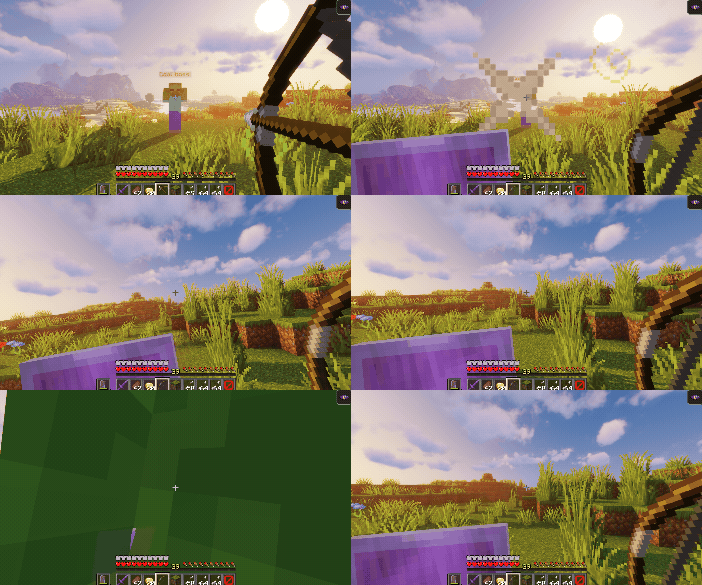
This would teleport all players that are within 10 blocks from the boss to the boss spawn location.
location
Sets the location where the player will be teleported. It goes inside FinalTarget, alongside targetType: LOCATION. The format is the standard EliteMobs world_name,x,y,z,yaw,pitch.
Example
FinalTarget:
  targetType: LOCATION
  location: world,0,64,0,0,0
The parser accepts exactly three shapes:
| Form | Example | Notes |
|---|---|---|
world,x,y,z,yaw,pitch | world,0,64,0,0,0 | The normal form |
world,x,y,z | world,0,64,0 | yaw and pitch default to 0 |
x,y,z,yaw,pitch | 0,64,0,0,0 | No world name, see the caution below |
The last two values are yaw then pitch, in that order. Anything else -- notably a bare three-value x,y,z -- is rejected with Attempted to deserialize an invalid location! in the console, and the action fails with an error when it runs.
If the world name is set to same_as_boss, it is replaced with the name of the world the boss is currently in:
location: same_as_boss,0,64,0,0,0
An unloaded configured world also resolves to the boss' world when the boss is inside an instanced clone of it (<worldName>_1, <worldName>_2, ...), which is what keeps dungeon scripts working inside instances.
x,y,z,yaw,pitch parses, but it produces a location with no world attached, and EliteScript does not fill one in. It is not a "relative to the boss" shorthand. To place something relative to the boss, use same_as_boss for absolute coordinates in the boss world, or use targetType: SELF / SELF_SPAWN with an offset.
TITLE_MESSAGE
Sets a title message for the targets.
Note: This action supports placeholders. See Placeholders for the full list.
| Values | Details | Mandatory | Special | Default |
|---|---|---|---|---|
Target | More info here | ✅ | ❌ | ❌ |
title | Sets the title message. Supply at least one of title or subtitle. | ❌ | Can use Color Codes with & | Empty string |
subtitle | Sets the subtitle message. Supply at least one of title or subtitle. | ❌ | Can use Color Codes with & | Empty string |
duration | Sets the duration of the message (ticks) | ✅ | ❌ | 0 |
fadeIn | Sets fade in time (ticks) | ❌ | ❌ | 1 |
fadeOut | Sets fade out time (ticks) | ❌ | ❌ | 1 |
Example
eliteScript:
  Example:
    Events:
    - EliteMobDamagedByPlayerEvent
    Actions:
    - action: TITLE_MESSAGE
      Target:
        targetType: NEARBY_PLAYERS
        range: 10
      title: "&2Hello World!"
      subtitle: "&2I am a subtitle!"
      duration: 120
      fadeIn: 20
      fadeOut: 20
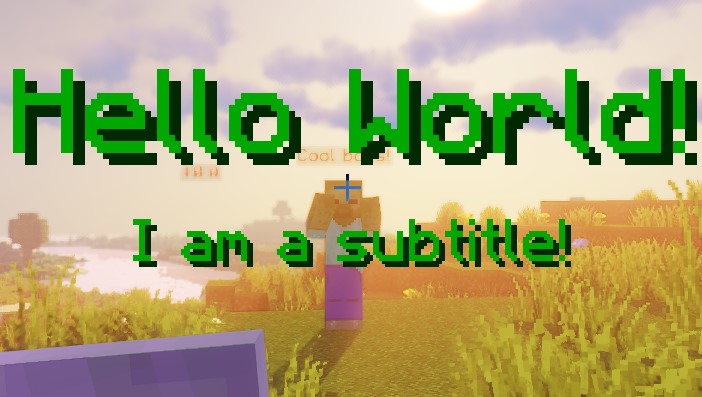
Will set the title message to show the title "&2Hello World!" with the subtitle "&2I am a subtitle!" to all players that are within 10 blocks from the boss.
The message will stay on screen for 8 seconds (120 + 20 + 20 = 160 ticks) including the fade in and out animation.
UNTAG
Removes tags from targeted elites or players. Check TAG to see how tags work.
| Values | Details | Mandatory |
|---|---|---|
Target | More info here | ✅ |
tags | Sets the tags | ✅ |
duration | Sets the duration of the remove of the tags (ticks) | ❌ |
Example
eliteScript:
  Example:
    Events:
    - EliteMobSpawnEvent
    Actions:
    - action: TAG
      Target:
        targetType: SELF
      tags:
      - fireworks
    - action: SPAWN_FIREWORKS
      Target:
        targetType: SELF
        offset: 0,3,0
      wait: 20
      vValue: 0,.1,0
      flicker: true
      withTrail: true
      power: 1
      fireworkEffects:
      - [ORANGE, RED]
      repeatEvery: 20
      Conditions:
        hasTags:
        - fireworks
  Example2:
    Events:
    - EliteMobEnterCombatEvent
    Actions:
    - action: UNTAG
      Target:
        targetType: SELF
      tags:
      - fireworks
Removes the tag "fireworks" from the boss, which can later be checked through script conditions.
VISUAL_FREEZE
Adds freeze ticks to each target. Minecraft handles the resulting visual effect, thawing, and freeze damage; this action does not directly deal damage or guarantee a fixed visual duration. Repeated applications can counter thawing.
| Values | Details | Mandatory |
|---|---|---|
Target | More info here | ✅ |
amount | Number of freeze ticks to add to the target | ✅ |
Example
eliteScript:
  Example:
    Events:
    - EliteMobDamagedByPlayerEvent
    Actions:
    - action: VISUAL_FREEZE
      Target:
        targetType: NEARBY_PLAYERS
        range: 10
      amount: 20
      repeatEvery: 20
      times: 3
Adds 20 freeze ticks to players in the nearby target box on each of three executions, 20 ticks apart. Players may thaw between applications, so this does not guarantee a three-second frozen visual.
Multiple actions
List multiple actions under the same event script. Actions without a wait run in list order; each action's wait is independent and does not pause later entries. This example sends two chat messages:
Example
eliteScript:
  MessagePlayers:
    Events:
    - EliteMobDamagedByPlayerEvent
    Actions:
    - action: MESSAGE
      Target:
        targetType: ALL_PLAYERS
      sValue: I am messaging all online players!
    - action: MESSAGE
      Target:
        targetType: DIRECT_TARGET
      sValue: I am messaging the player that hit the boss!