Zonas de Elite Script
Las zonas son ubicaciones definidas por una forma que pueden ser usadas como objetivos por los creadores de scripts para ejecutar cualquier tipo de acción.
Solo se puede establecer un mapa Zone por script. Usa exactamente esa escritura en el nivel superior; sus campos internos no distinguen mayúsculas, pero los valores de forma y filtro deben estar en mayúsculas. Varios objetivos de origen pueden generar varias formas a partir de ese mapa.
Para apuntar a las zonas se pueden usar los tipos de objetivo ZONE_FULL o ZONE_BORDER.
Las zonas en sí también usan Objetivos de Script para definir dónde aparecerá la zona.
Si se omite el Target de la zona, se usa SELF. Los demás valores predeterminados del analizador son shape: CYLINDER, filter: PLAYER, radius: 5, borderRadius: 1, height: 1, pointRadius: 0.5, animationDuration: 0 e ignoresSolidBlocks: true. Las rotaciones y dimensiones del cuboide empiezan en cero. Define dimensiones útiles explícitamente; estos valores no validan un encuentro completo. Las tablas indican qué campos conviene establecer para cada forma, no qué omisiones provocan siempre un error de análisis.
Usa dimensiones finitas y positivas, y extremos distintos del mismo mundo para rayos y conos. Es preferible usar números fijos: un intervalo decimal con ~ elige valores desde min hasta max, sin incluir max, y puede muestrearse varias veces. Un intervalo invertido como 5~1 hace que EliteMobs omita todo el script. Los volúmenes grandes generan muchas posiciones. Las consultas de entidades de cilindros, conos, cuboides y rayos buscan en una caja alrededor de la forma cuando esa caja mide 256 bloques o menos en cada eje; las esferas, las cúpulas y las formas más grandes examinan candidatos de todo el mundo de la forma. Ajusta el tamaño y la frecuencia de repetición al efecto.
Las partículas usan posiciones geométricas muestreadas, no las cajas de colisión de las entidades. Una acción de zona SPAWN_PARTICLE tiene una cobertura predeterminada aproximada del 30%; establece coverage: 1.0 en su objetivo para conservar todas las posiciones muestreadas. filter no modifica las posiciones de partículas. La comprobación de entidades varía según la forma, como se explica abajo; el contorno de partículas no representa una frontera de colisión exacta.
shape
Establece la forma de la zona. Formas válidas:
| Tipo de forma | Detalles | Animable | Borde |
|---|---|---|---|
CYLINDER | Forma cilíndrica | ❌ | ✅ |
SPHERE | Forma esférica | ❌ | ✅ |
DOME | Forma de cúpula (media esfera) | ❌ | ✅ |
CUBOID | Forma de cuboide (tipo cubo) | ❌ | ✅ |
STATIC_RAY | Línea entre dos puntos resueltos, sin animación propia | ❌ | ❌ |
ROTATING_RAY | Una línea giratoria entre dos puntos | ✅ | ❌ |
TRANSLATING_RAY | Una línea que se mueve desde dos puntos iniciales hasta dos puntos finales | ✅ | ❌ |
CONE | Forma de cono | ❌ | ✅ |
Animable
Una forma animada empieza su animación cuando una acción la genera y almacena en caché. Con animationDuration positivo, esto suele ocurrir al iniciar la acción, antes de su wait. Distintas acciones pueden crear formas animadas independientes.
Esto significa que si una acción tiene un tiempo de espera, cuando la acción comience la zona ya se habrá estado moviendo mientras la acción esperaba.
Las animaciones avanzan cada tick. Usa SPAWN_PARTICLE con repeatEvery: 1 para mostrar partículas cada tick. Una frecuencia menor muestra menos fotogramas mientras la zona sigue moviéndose.
Si quieres crear una acción de zona giratoria pero quieres esperar una cantidad determinada de ticks antes de iniciar la acción, hazla en un script distinto y llama a ese script mediante RUN_SCRIPT. Asegúrate de que el RUN_SCRIPT tenga el tiempo de espera que quieres.
Las zonas conservan su última geometría calculada cuando termina la tarea de animación. Usa duraciones positivas. El último fotograma de la animación aplica exactamente la rotación configurada o alcanza exactamente los objetivos finales.
Con un animationDuration positivo, cada acción guarda en caché sus formas al empezar, sea cual sea su ajuste track. Las formas almacenadas se animan desde sus extremos iniciales, sin seguir a jefes o jugadores en movimiento. Para formas estáticas, pon track: false en el Target de la acción para fijar el origen; ponerlo solo en Zone.Target no fija la forma de la acción. La guía de objetivos explica la duración de la caché.
Borde
Ciertas zonas pueden tener bordes. Que una zona tenga borde significa que se puede usar ZONE_BORDER como objetivo de la zona. Los bordes se definen creando una segunda forma más pequeña dentro de la primera forma, la más grande. El área entre la zona pequeña y la zona grande es el borde.
borderRadius es el radio interior, no el grosor del borde. Debe ser no negativo y menor que el radio exterior. Los cilindros restan un cilindro interior de igual altura, formando un anillo lateral sin tapas superiores o inferiores. El muestreo del borde del cuboide usa reglas distintas y puede diferir de su consulta de entidades. Los rayos no tienen resultado de borde; usa ZONE_FULL.
Ejemplo
eliteScript:
  Example:
    Events:
      - EliteMobDamagedByPlayerEvent
    Zone:
      shape: CYLINDER
      radius: 4
      borderRadius: 3
      height: 8
      Target:
        targetType: SELF
    Actions:
      - action: SPAWN_PARTICLE
        particles:
          - particle: SMOKE_LARGE
        Target:
          targetType: ZONE_BORDER
        repeatEvery: 5
        times: 20
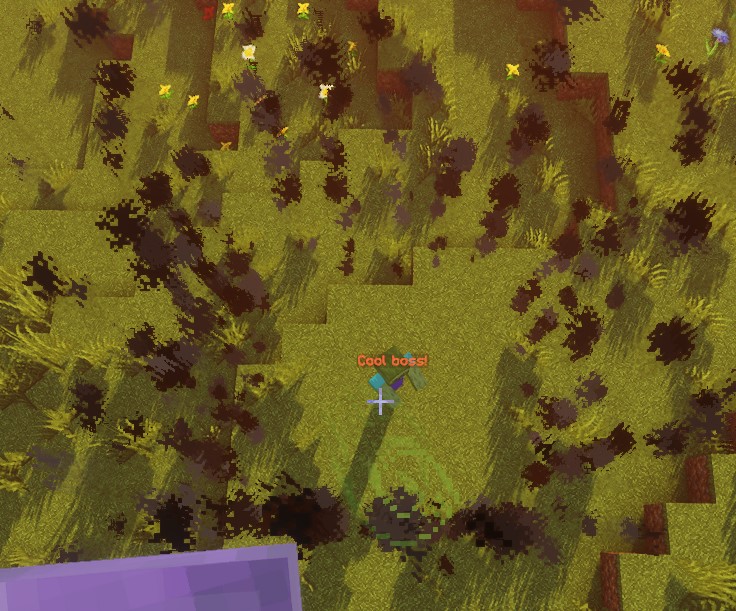
Este script produce 20 ráfagas de humo en posiciones muestreadas del borde, a intervalos de 5 ticks. La primera es inmediata y la última llega 95 ticks después, unos 4,75 segundos a 20 ticks por segundo; la tarea de repetición termina en el siguiente intervalo. La duración de cada partícula es independiente del tiempo de la acción.
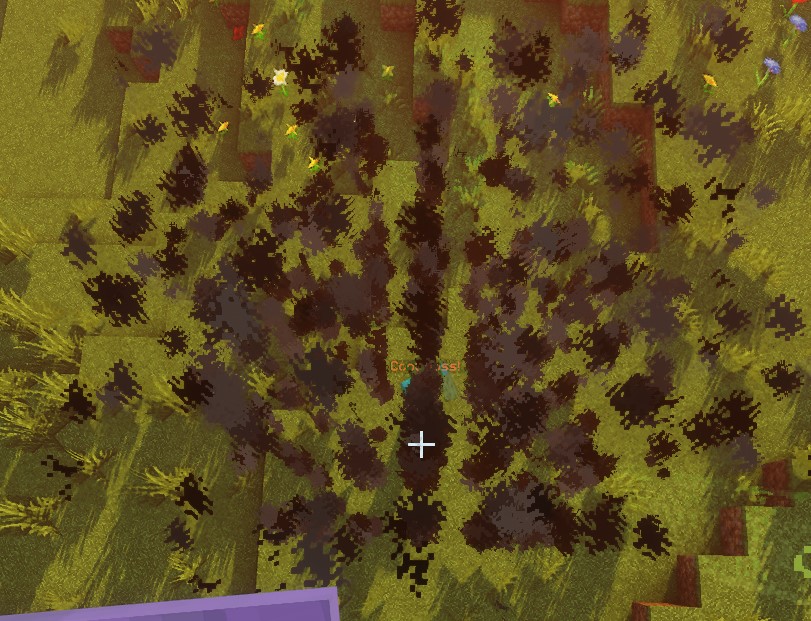
Con ZONE_FULL, las posiciones muestreadas proceden de toda la zona en lugar de su borde:
SPHERE
El origen es el centro de la esfera. Las posiciones se muestrean en una cuadrícula de pasos enteros dentro del radio. Las comprobaciones de entidades aproximan cada entidad como una esfera cuyo radio es la mitad de la distancia entre sus pies y sus ojos; por ello pueden solaparse con la zona aunque sus pies estén fuera. La consulta del borde también excluye entidades que se solapan con la esfera interior.
| Clave | Detalles | Establecer explícitamente |
|---|---|---|
shape | Establece la forma de la zona. Debe ser SPHERE | ✅ |
target | Establece la ubicación del centro de la esfera | ✅ |
filter | Establece qué tipos de entidades son seleccionadas | ❌ |
radius | Radio de la esfera | ✅ |
borderRadius | Radio de la esfera interior | ❌ |
Ejemplo
eliteScript:
  Example:
    Events:
      - EliteMobDamagedByPlayerEvent
    Zone:
      shape: SPHERE
      radius: 4
      borderRadius: 3
      Target:
        targetType: SELF
    Actions:
      - action: SPAWN_PARTICLE
        particles:
          - particle: CLOUD
        Target:
          targetType: ZONE_FULL
        repeatEvery: 5
        times: 20
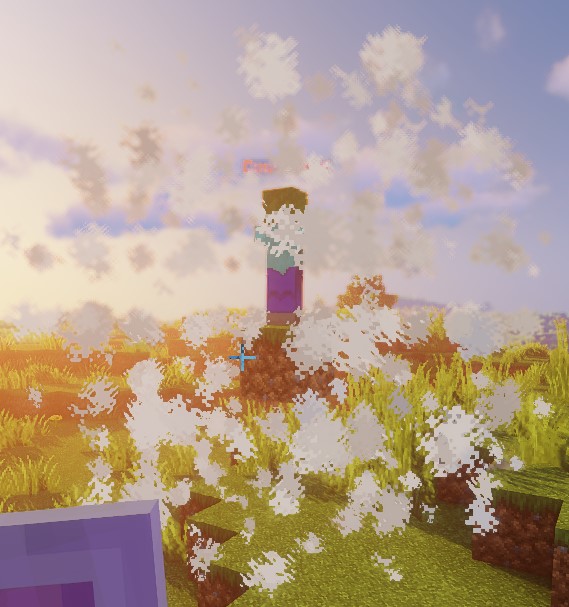
Este script demuestra la forma de una esfera usando partículas de nube.
DOME
Las partículas muestrean la mitad superior de la esfera desde la altura del origen. Limitación actual: la consulta completa de entidades hereda la comprobación de esfera sin restringirse a un hemisferio, por lo que ZONE_FULL puede seleccionar entidades bajo la cúpula. La consulta del borde exige además pies por encima de originY - 1; las comprobaciones directas de posiciones usan ese mismo umbral. Las partículas de una cúpula no demuestran que su área de impacto se limite a la mitad superior.
| Clave | Detalles | Establecer explícitamente |
|---|---|---|
shape | Establece la forma de la zona. Debe ser DOME | ✅ |
target | Establece la ubicación del centro de la cúpula | ✅ |
filter | Establece qué tipos de entidades son seleccionadas | ❌ |
radius | Radio de la cúpula | ✅ |
borderRadius | Radio de la cúpula interior | ❌ |
Ejemplo
eliteScript:
  Example:
    Events:
      - EliteMobDamagedByPlayerEvent
    Zone:
      shape: DOME
      radius: 4
      borderRadius: 3
      Target:
        targetType: SELF
    Actions:
      - action: SPAWN_PARTICLE
        particles:
          - particle: CLOUD
        Target:
          targetType: ZONE_FULL
        repeatEvery: 5
        times: 20
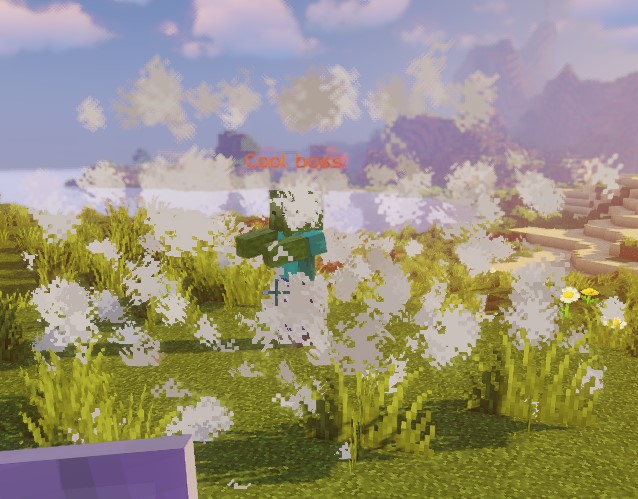
Este script demuestra la forma de una cúpula usando partículas de nube.
CONE
Para cada origen, el cono usa la primera posición resuelta de Target2. Las consultas de jugadores cercanos no se ordenan por distancia; usa un único objetivo si el cono debe apuntar a una entidad concreta.
Target es la punta y Target2 el centro de la base; su distancia determina la altura del cono. Usa puntos distintos del mismo mundo. La comprobación de entidades examina los pies, el centro y la parte superior de su caja de colisión, no una intersección exacta de cajas. Las posiciones muestreadas usan la cuadrícula de coordenadas enteras del mundo.
| Clave | Detalles | Establecer explícitamente |
|---|---|---|
shape | Establece la forma de la zona. Debe ser CONE | ✅ |
target | Establece la ubicación del vértice (la punta) del cono | ✅ |
target2 | Establece la ubicación del centro de la base del cono | ✅ |
filter | Establece qué tipos de entidades son seleccionadas | ❌ |
radius | Radio de la base del cono | ✅ |
borderRadius | Radio del cono interior | ❌ |
Ejemplo
eliteScript:
  Example:
    Events:
    - EliteMobDamagedByPlayerEvent
    Zone:
      shape: CONE
      radius: 10
      Target:
        targetType: SELF
        offset: 0,0,0
      Target2:
        targetType: SELF
        offset: 0,10,0
    Actions:
      - action: SPAWN_PARTICLE
        particles:
        - particle: CLOUD
        Target:
          targetType: ZONE_FULL
          coverage: 0.8
        repeatEvery: 5
        times: 20
Este script demuestra la forma de un cono usando partículas de nube. Ten en cuenta que esta zona es una forma CONE, es decir, un volumen 3D, algo importante a considerar si buscas crear efectos de barrido.
CYLINDER
El origen es el centro de la cara inferior. El cilindro se extiende height hacia arriba, no por igual encima y debajo del origen. La comprobación de entidades exige que toda la altura de su caja de colisión quepa entre la base y la parte superior, además de la comprobación horizontal. Por ello, un cilindro visual de altura 1 normalmente no selecciona a un jugador de pie. Usa suficiente altura y un origen adecuado para acciones sobre entidades.
| Clave | Detalles | Establecer explícitamente |
|---|---|---|
shape | Establece la forma de la zona. Debe ser CYLINDER | ✅ |
target | Centro de la cara inferior | ✅ |
filter | Establece qué tipos de entidades son seleccionadas | ❌ |
radius | Radio del cilindro | ✅ |
borderRadius | Radio del cilindro interior | ❌ |
height | Altura del cilindro | ✅ |
Ejemplo
eliteScript:
  Example:
    Events:
      - EliteMobDamagedByPlayerEvent
    Zone:
      shape: CYLINDER
      radius: 4
      borderRadius: 3
      height: 8
      Target:
        targetType: SELF
    Actions:
      - action: SPAWN_PARTICLE
        particles:
          - particle: CLOUD
        Target:
          targetType: ZONE_FULL
        repeatEvery: 5
        times: 20
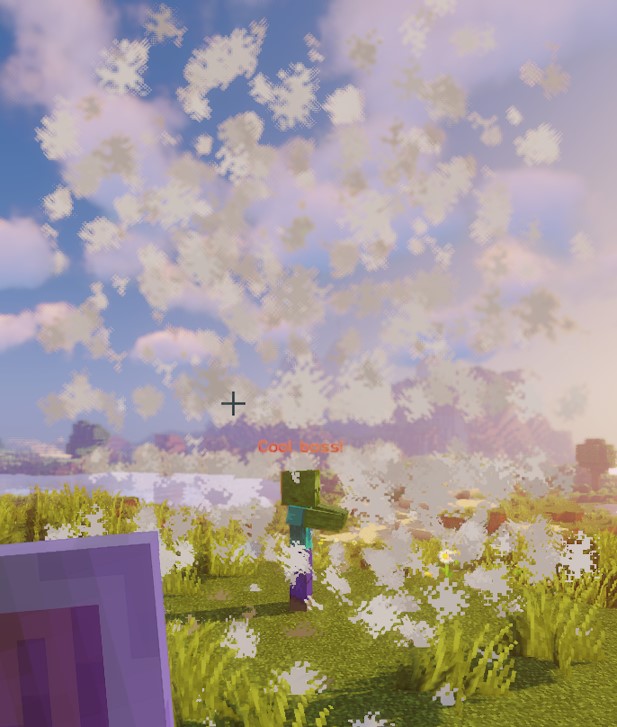
Este script demuestra la forma de un cilindro usando partículas de nube.
CUBOID
La implementación actual del cuboide usa límites distintos para posiciones muestreadas, comprobaciones de puntos y comprobaciones de entidades. Las posiciones abarcan x y z bloques alrededor del centro y suben y bloques. El solapamiento de entidades usa semianchos x / 2 y z / 2, pero solo sube y / 2. La comprobación directa de un punto usa ±x, ±y y ±z. No supongas que las partículas y la consulta de entidades cubren volúmenes idénticos; verifica la geometría prevista en tu servidor. Esto también afecta a los cuboides nativos de Lua.
Con dimensiones enteras positivas, las coordenadas de partículas van de -floor(x / 2) a x - 1 - floor(x / 2), de forma equivalente para Z, y de 0 a y - 1 en vertical. Los límites de entidades usan las coordenadas de bloque del origen y redondean hacia abajo sus bordes horizontales. Las partículas del borde conservan puntos con Y <= yBorder y X o Z fuera del semiancho interior; no forman una envoltura completa obtenida al restar un cuboide interior del exterior.
| Clave | Detalles | Establecer explícitamente |
|---|---|---|
shape | Establece la forma de la zona. Debe ser CUBOID | ✅ |
target | Establece la ubicación del centro del cuboide | ✅ |
filter | Establece qué tipos de entidades son seleccionadas | ❌ |
x | Establece la longitud del cuboide | ✅ |
y | Establece la altura del cuboide | ✅ |
z | Establece la anchura del cuboide; por defecto es igual a x | ❌ |
xBorder | Establece la longitud del cuboide interior | ❌ |
yBorder | Establece la altura del cuboide interior | ❌ |
zBorder | Anchura del cuboide interior; 0 usa xBorder cuando este no es cero | ❌ |
Ejemplo
eliteScript:
  Example:
    Events:
      - EliteMobDamagedByPlayerEvent
    Zone:
      shape: CUBOID
      x: 4
      y: 4
      z: 4
      xBorder: 3
      yBorder: 3
      zBorder: 3
      Target:
        targetType: SELF
    Actions:
      - action: SPAWN_PARTICLE
        particles:
          - particle: CLOUD
        Target:
          targetType: ZONE_FULL
        repeatEvery: 5
        times: 20
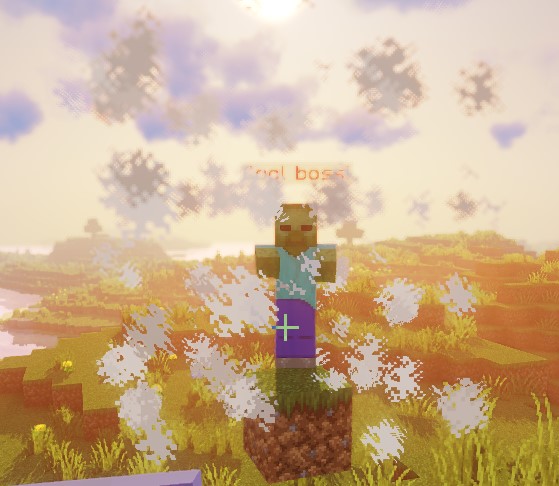
Este script demuestra la forma de un cuboide usando partículas de nube.
STATIC_RAY
Cada origen resuelto de Target se combina con cada extremo resuelto de Target2 del mismo mundo. STATIC_RAY no tiene animación independiente, pero con track: true predeterminado en el objetivo de la acción, las repeticiones lo regeneran desde los extremos actuales. Usa track: false en el objetivo de la acción para fijarlos.
pointRadius controla tanto el paso de muestreo como el radio de impacto; no es el diámetro completo. Los rayos estáticos y de traslación dan como máximo 500 pasos, por lo que su alcance muestreado máximo es aproximadamente 500 * pointRadius bloques. Los rayos giratorios usan pasos de 2 * pointRadius. Usa un valor estrictamente positivo. Con ignoresSolidBlocks: false, el muestreo se detiene al encontrar un bloque sólido en un punto muestreado; no es una detección continua y los pasos grandes pueden saltarse obstáculos. Las comprobaciones de entidades detectan solapamientos con esferas alrededor de los puntos muestreados.
| Clave | Detalles | Establecer explícitamente |
|---|---|---|
shape | Establece la forma de la zona. Debe ser STATIC_RAY | ✅ |
target | Establece la ubicación del primer punto de la línea | ✅ |
target2 | Establece la ubicación del último punto de la línea | ✅ |
filter | Establece qué tipos de entidades son seleccionadas | ❌ |
ignoresSolidBlocks | Establece si el rayo atravesará bloques sólidos. Por defecto true | ❌ |
pointRadius | Establece el grosor del rayo. Por defecto es 0.5 bloques. | ❌ |
Ejemplo
eliteScript:
  Example:
    Events:
      - EliteMobDamagedByPlayerEvent
    Zone:
      shape: STATIC_RAY
      Target2:
        targetType: DIRECT_TARGET
        offset: 0,1,0
      Target:
        targetType: SELF
        offset: 0,1,0
    Actions:
      - action: SPAWN_PARTICLE
        particles:
          - particle: CLOUD
        Target:
          targetType: ZONE_FULL
        repeatEvery: 5
        times: 20
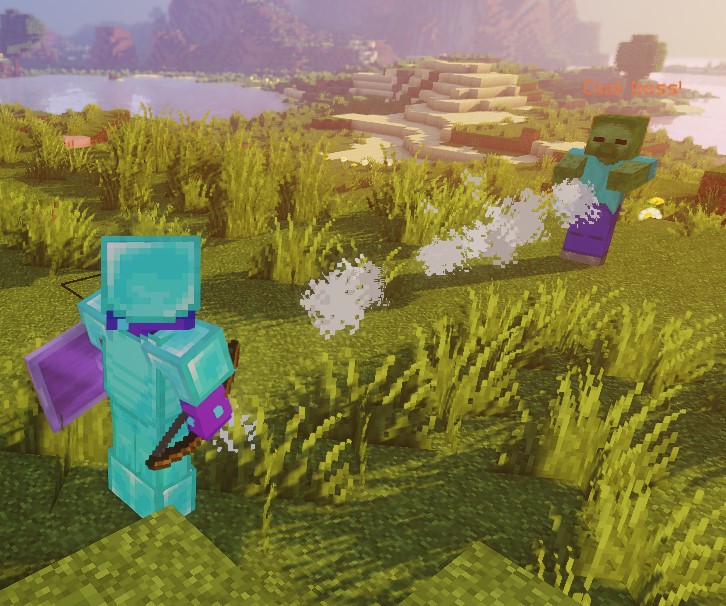
Este script demuestra la forma de un rayo estático usando partículas de nube.
Ambos extremos usan offset: 0,1,0, que coloca el rayo un bloque por encima de los pies. No corresponde automáticamente al centro de entidades de cualquier altura.
ROTATING_RAY
Las rotaciones se expresan en grados y la duración en ticks. Cada origen se combina con cada Target2 válido del mismo mundo. El extremo de origen permanece fijo como pivote. Las rotaciones de pitch/yaw, tanto iniciales como animadas, aceptan ambos signos. El rayo completo con la rotación previa ya existe antes del primer tick de animación, también cuando la duración es cero. Los extremos iniciales deben ser distintos. Se rechazan las duraciones negativas y los valores no finitos.
| Clave | Detalles | Establecer explícitamente |
|---|---|---|
shape | Establece la forma de la zona. Debe ser ROTATING_RAY | ✅ |
filter | Establece qué tipos de entidades son seleccionadas | ❌ |
target | Establece la ubicación del primer punto de la línea | ✅ |
target2 | Establece la ubicación del último punto de la línea | ✅ |
animationDuration | Establece, en ticks, la duración de la rotación | ✅ |
pitchPreRotation | Aplica una rotación inicial al pitch antes de la animación | ❌ |
yawPreRotation | Aplica una rotación inicial al yaw antes de la animación | ❌ |
pitchRotation | Establece la rotación de pitch para la animación | ❌ |
yawRotation | Establece la rotación de yaw para la animación | ❌ |
ignoresSolidBlocks | Establece si el rayo atravesará bloques sólidos. Por defecto true | ❌ |
pointRadius | Establece el grosor del rayo. Por defecto es 0.5 bloques. | ❌ |
Ejemplo
eliteScript:
  Example:
    Events:
      - EliteMobDamagedByPlayerEvent
    Zone:
      shape: ROTATING_RAY
      animationDuration: 100
      pitchPrerotation: 0
      yawPrerotation: 0
      pitchRotation: 0
      yawRotation: 360
      ignoresSolidBlocks: true
      Target:
        targetType: SELF
        offset: 0,1,0
      Target2:
        targetType: DIRECT_TARGET
        offset: 0,1,0
    Actions:
      - action: SPAWN_PARTICLE
        particles:
          - particle: CLOUD
        Target:
          targetType: ZONE_FULL
        repeatEvery: 1
        times: 100
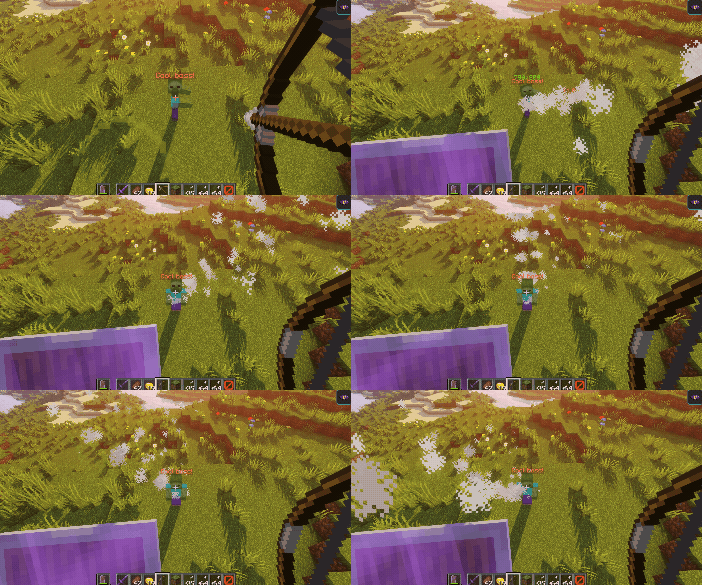
Este script muestra cómo se ve un rayo giratorio usando partículas de nube.
Primero, crea un rayo desde el jefe hasta el jugador que lo dañó, usando partículas de nube. Luego, ajusta las posiciones ligeramente hacia arriba un bloque usando offset.
A continuación, gira el rayo 360 grados desde el origen del lado del jefe durante 100 ticks. El jugador determina la dirección inicial, no el centro de rotación. Los valores negativos de pitch/yaw giran en sentido contrario.
TRANSLATING_RAY
Cada par inicial Target / Target2 usa el primer FinalTarget y FinalTarget2 resuelto. Si se omite un objetivo final, ese extremo permanece en su posición inicial. Mantén todos los extremos en el mismo mundo. Una duración positiva anima hasta los destinos exactos; una duración cero mantiene estático el rayo inicial. Se rechazan las duraciones negativas.
| Clave | Detalles | Establecer explícitamente |
|---|---|---|
shape | Establece la forma de la zona. Debe ser TRANSLATING_RAY | ✅ |
filter | Establece qué tipos de entidades son seleccionadas | ❌ |
animationDuration | Establece, en ticks, la duración del desplazamiento | ✅ |
target | Establece la ubicación del primer punto de la línea | ✅ |
finalTarget | Establece la ubicación de destino del primer punto de la línea | ✅ |
target2 | Establece la ubicación del segundo punto de la línea | ✅ |
finalTarget2 | Establece la ubicación de destino del segundo punto de la línea | ✅ |
ignoresSolidBlocks | Establece si el rayo atravesará bloques sólidos. Por defecto true | ❌ |
pointRadius | Establece el grosor del rayo. Por defecto es 0.5 bloques. | ❌ |
Ejemplo
eliteScript:
  Example:
    Events:
      - EliteMobDamagedByPlayerEvent
    Zone:
      shape: TRANSLATING_RAY
      Target:
        targetType: SELF
      FinalTarget:
        targetType: SELF
        offset: 0,10,0
      Target2:
        targetType: DIRECT_TARGET
      FinalTarget2:
        targetType: DIRECT_TARGET
        offset: 0,10,0
      animationDuration: 100
      ignoresSolidBlocks: true
    Actions:
      - action: SPAWN_PARTICLE
        particles:
          - particle: CLOUD
        Target:
          targetType: ZONE_FULL
        repeatEvery: 1
        times: 100
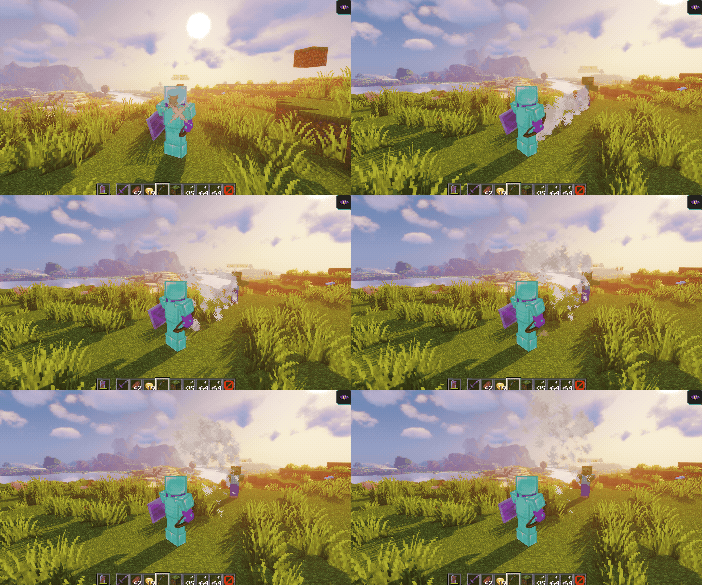
Este script muestra cómo se ve un rayo en movimiento usando partículas de nube.
Primero, crea un rayo desde el jefe hasta el jugador que lo dañó, usando partículas de nube.
Luego, anima el rayo hacia arriba 10 bloques usando los desplazamientos de FinalTarget y FinalTarget2.
La duración configurada es de 100 ticks, unos 5 segundos a 20 ticks por segundo. El último fotograma llega exactamente a los objetivos finales.
Podemos hacer que el rayo se mueva lateralmente con facilidad ajustando el offset de Z a algo como offset: 0,0,10:
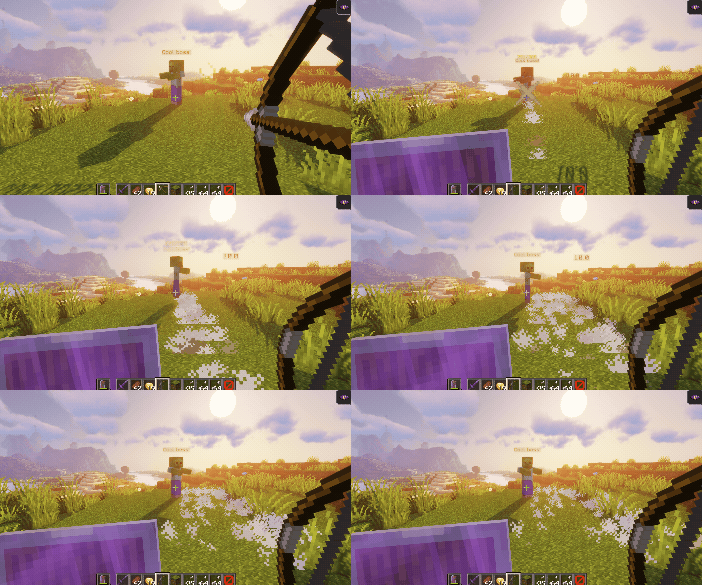
Los desplazamientos usan los ejes del mundo; cambiar la vista solo altera cómo se ve el movimiento en pantalla. Un desplazamiento X mueve sobre el eje X del mundo, independientemente de hacia dónde mires.
filter
La propiedad filter se puede usar para seleccionar únicamente entidades específicas dentro de la zona. Estas entidades pueden ser:
Estos filtros afectan a las consultas de entidades, no a las posiciones de partículas. ELITE y LIVING pueden incluir al jefe que lanza la habilidad si pasa la comprobación de la forma. PLAYER no excluye por sí mismo a espectadores o jugadores de otros encuentros. Todavía pueden aplicarse reglas adicionales propias de cada acción.
| Valor | Detalles |
|---|---|
PLAYER | Solo apunta a jugadores en la zona (predeterminado) |
ELITE | Entidades vivas registradas como élites dentro de la zona |
LIVING | Entidades vivas dentro de la zona, incluidos jugadores |
Ejemplo
eliteScript:
  FilterExample:
    Events:
    - PlayerDamagedByEliteMobEvent
    Zone:
      shape: SPHERE
      radius: 12
      borderRadius: 11
      filter: ELITE
      Target:
        targetType: SELF
        track: false
Este fragmento establece el filtro de entidades de la zona en élites. Todavía no tiene Actions y no es un script completo ejecutable. El track: false del objetivo de origen no fija la zona de una acción; ponlo en el objetivo ZONE_FULL o ZONE_BORDER de la acción cuando añadas acciones que necesiten un origen fijo.