Elite-Script-Zonen
Zonen sind durch eine Form definierte Bereiche, die Skript-Autoren als Ziele verwenden können, um beliebige Aktionen auszuführen.
Pro Skript kann nur ein YAML-Mapping Zone festgelegt werden. Verwende auf oberster Ebene genau diese Schreibweise. Bei den enthaltenen Feldnamen spielt die Großschreibung keine Rolle, Form- und Filterwerte müssen dagegen großgeschrieben sein. Mehrere Ursprungsziele können aus diesem Mapping mehrere Formen erzeugen.
Um Zonen anzuvisieren, können die Zieltypen ZONE_FULL oder ZONE_BORDER verwendet werden.
Zonen selbst verwenden ebenfalls Skript-Ziele, um festzulegen, wo die Zone erscheint.
Ohne Target verwendet die Zone SELF. Weitere Parser-Standardwerte sind shape: CYLINDER, filter: PLAYER, radius: 5, borderRadius: 1, height: 1, pointRadius: 0.5, animationDuration: 0 und ignoresSolidBlocks: true. Drehungen und Quaderabmessungen sind standardmäßig null. Gib sinnvolle Abmessungen ausdrücklich an; Standardwerte bestätigen keine vollständige Begegnung. Die Tabellen markieren Felder, die du für die jeweilige Form ausdrücklich setzen solltest, nicht ausschließlich solche, deren Fehlen einen Parserfehler auslöst.
Verwende endliche positive Abmessungen sowie unterschiedliche Endpunkte derselben Welt für Strahlen und Kegel. Feste Zahlen sind vorzuziehen: Ein Gleitkommabereich mit ~ zieht Werte ab min bis ausschließlich max und kann wiederholt ausgewertet werden. Ein umgekehrter Bereich wie 5~1 führt dazu, dass EliteMobs das gesamte Skript überspringt. Große Volumen erzeugen viele Positionen. Entitätsabfragen für Zylinder, Kegel, Quader und Strahlen durchsuchen einen Quader um die Form, wenn dieser auf jeder Achse höchstens 256 Blöcke umfasst; Kugeln, Kuppeln und größere Formen prüfen Kandidaten aus der gesamten Welt der Form. Passe Größe und Wiederholungsrate an den Effekt an.
Partikel verwenden geometrische Stichprobenpositionen, keine Kollisionsboxen von Entitäten. Eine Zonenaktion SPAWN_PARTICLE verwendet standardmäßig etwa 30 % Abdeckung. Setze coverage: 1.0 ausdrücklich am Aktionsziel, um alle ermittelten Positionen zu behalten. filter verändert die Partikelpositionen nicht. Die Entitätsprüfung unterscheidet sich je nach Form, wie unten beschrieben; eine Partikelkontur ist keine exakte Kollisionsgrenze.
shape
Legt die Form der Zone fest. Gültige Formen:
| Formtyp | Details | Animierbar | Rand |
|---|---|---|---|
CYLINDER | Zylindrische Form | ❌ | ✅ |
SPHERE | Kugelform | ❌ | ✅ |
DOME | Kuppelform (Halbkugel) | ❌ | ✅ |
CUBOID | Quaderform (würfelartig) | ❌ | ✅ |
STATIC_RAY | Linie zwischen zwei aufgelösten Punkten ohne eigene Animation | ❌ | ❌ |
ROTATING_RAY | Eine rotierende Linie zwischen zwei Punkten | ✅ | ❌ |
TRANSLATING_RAY | Eine Linie, die sich von zwei Anfangspunkten zu zwei Endpunkten bewegt | ✅ | ❌ |
CONE | Kegelform | ❌ | ✅ |
Animierbar
Eine animierte Form startet ihre Animation, wenn eine Aktion sie erzeugt und zwischenspeichert. Bei positivem animationDuration geschieht das normalerweise beim Start der Aktion vor deren wait. Verschiedene Aktionen können eigene animierte Formen erzeugen.
Das bedeutet: Hat eine Aktion eine Wartezeit, hat sich die Zone beim Start der Aktion bereits bewegt, während die Aktion gewartet hat.
Zonenanimationen schreiten jeden Tick voran. Verwende SPAWN_PARTICLE mit repeatEvery: 1 für eine Darstellung in jedem Tick. Seltenere Partikelaktionen zeigen weniger Einzelbilder, während die Zone weiterläuft.
Wenn du eine rotierende Zonenaktion erstellen möchtest, aber vor dem Start der Aktion eine bestimmte Anzahl Ticks warten willst, mache daraus ein separates Skript und rufe dieses über RUN_SCRIPT auf. Achte darauf, dass RUN_SCRIPT die gewünschte Wartezeit hat.
Nach Ende der Animation behalten Zonen ihre zuletzt berechnete Geometrie. Verwende positive Animationsdauern. Das letzte Animationsbild wendet genau die konfigurierte Drehung an bzw. erreicht genau die finalen Ziele.
Mit einem positiven animationDuration speichert jede Aktion ihre Formen beim Start, unabhängig von ihrer track-Einstellung. Die gespeicherten Formen animieren von ihren ursprünglichen Endpunkten aus und folgen bewegten Bossen oder Spielern nicht. Setze bei statischen Formen track: false im Target der Aktion, um den Ursprung zu fixieren; allein in Zone.Target friert es die Aktionsform nicht ein. Die Lebensdauer des Caches steht im Zielhandbuch.
Rand
Bestimmte Zonen können Ränder haben. Ränder bedeuten, dass ZONE_BORDER als Ziel der Zone verwendet werden kann. Ränder entstehen dadurch, dass eine zweite, kleinere Form innerhalb der ersten, größeren Form erzeugt wird. Der Bereich zwischen der kleineren und der größeren Zone ist der Rand.
borderRadius ist der innere Radius, nicht die Randdicke. Er sollte nicht negativ und kleiner als der äußere Radius sein. Zylinder ziehen einen inneren Zylinder gleicher Höhe ab: Es entsteht ein seitlicher Ring ohne obere oder untere Deckfläche. Die Positionsauswahl am Quaderrand verwendet eigene Regeln und kann von dessen Entitätsabfrage abweichen. Strahlen liefern keinen Rand; verwende dafür ZONE_FULL.
Beispiel
eliteScript:
  Example:
    Events:
      - EliteMobDamagedByPlayerEvent
    Zone:
      shape: CYLINDER
      radius: 4
      borderRadius: 3
      height: 8
      Target:
        targetType: SELF
    Actions:
      - action: SPAWN_PARTICLE
        particles:
          - particle: SMOKE_LARGE
        Target:
          targetType: ZONE_BORDER
        repeatEvery: 5
        times: 20
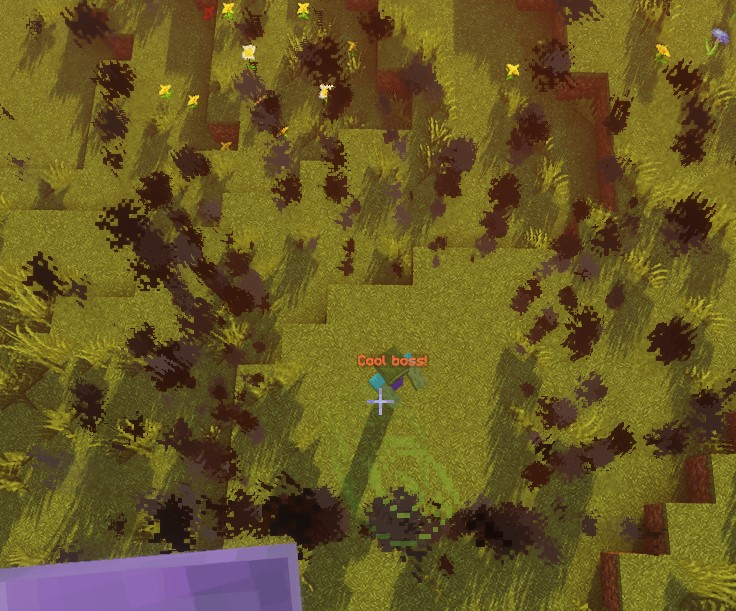
Dieses Skript erzeugt 20 Rauchausgaben an ausgewählten Randpositionen im Abstand von 5 Ticks. Die erste erfolgt sofort, die letzte 95 Ticks später, also nach etwa 4,75 Sekunden bei 20 Ticks pro Sekunde. Die Wiederholungsaufgabe endet im nächsten Intervall. Die Lebensdauer der Partikel ist vom Zeitplan der Aktion unabhängig.
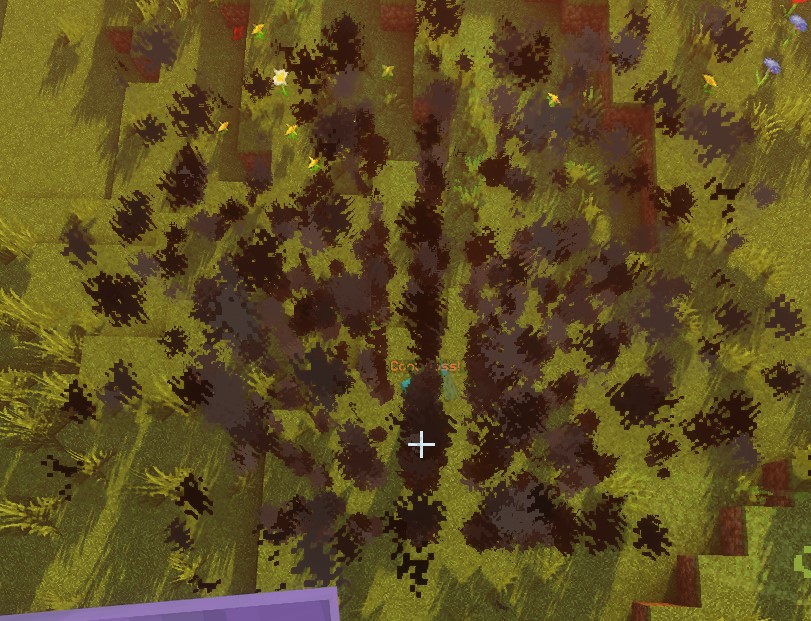
Mit ZONE_FULL stammen die ausgewählten Partikelpositionen aus der gesamten Zone statt nur aus ihrem Rand:
SPHERE
Der Ursprung ist der Kugelmittelpunkt. Positionen werden auf einem Raster mit ganzzahligen Schritten innerhalb des Radius ausgewählt. Entitätsprüfungen nähern jede Entität als Kugel mit der halben Fuß-zu-Augen-Höhe als Radius an. Eine Entität kann die Zone daher überlappen, obwohl ihre Füße außerhalb liegen. Randprüfungen schließen auch Entitäten aus, die die innere Kugel überlappen.
| Schlüssel | Details | Ausdrücklich setzen |
|---|---|---|
shape | Legt die Form der Zone fest. Sollte SPHERE sein | ✅ |
target | Legt die Position für den Mittelpunkt der Kugel fest | ✅ |
filter | Legt fest, welche Entitätstypen anvisiert werden | ❌ |
radius | Radius der Kugel | ✅ |
borderRadius | Radius der inneren Kugel | ❌ |
Beispiel
eliteScript:
  Example:
    Events:
      - EliteMobDamagedByPlayerEvent
    Zone:
      shape: SPHERE
      radius: 4
      borderRadius: 3
      Target:
        targetType: SELF
    Actions:
      - action: SPAWN_PARTICLE
        particles:
          - particle: CLOUD
        Target:
          targetType: ZONE_FULL
        repeatEvery: 5
        times: 20
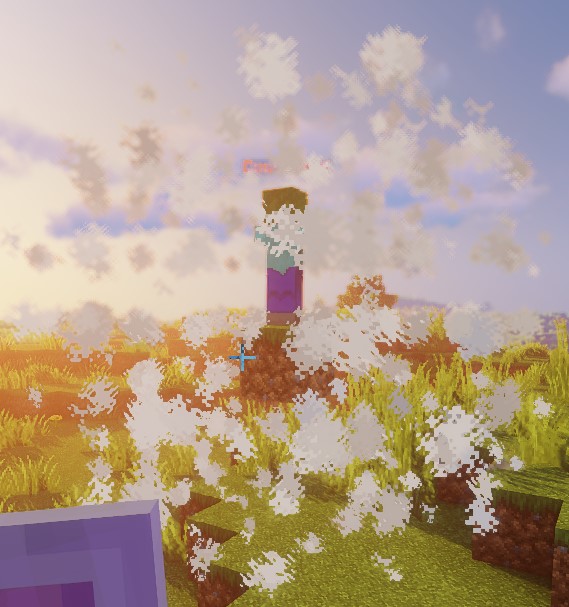
Dieses Skript veranschaulicht die Form einer Kugel mithilfe von Wolkenpartikeln.
DOME
Partikel verwenden die obere Kugelhälfte ab der Höhe des Ursprungs. Aktuelle Einschränkung: Die vollständige Entitätsabfrage erbt die Kugelprüfung ohne Beschränkung auf eine Halbkugel; ZONE_FULL kann deshalb Entitäten unter der Kuppel auswählen. Randabfragen verlangen zusätzlich Füße oberhalb von originY - 1; direkte Positionsprüfungen verwenden ebenfalls diese Grenze. Die Partikeldarstellung beweist keine auf die obere Hälfte begrenzte Trefferzone.
| Schlüssel | Details | Ausdrücklich setzen |
|---|---|---|
shape | Legt die Form der Zone fest. Sollte DOME sein | ✅ |
target | Legt die Position für den Mittelpunkt der Kuppel fest | ✅ |
filter | Legt fest, welche Entitätstypen anvisiert werden | ❌ |
radius | Radius der Kuppel | ✅ |
borderRadius | Radius der inneren Kuppel | ❌ |
Beispiel
eliteScript:
  Example:
    Events:
      - EliteMobDamagedByPlayerEvent
    Zone:
      shape: DOME
      radius: 4
      borderRadius: 3
      Target:
        targetType: SELF
    Actions:
      - action: SPAWN_PARTICLE
        particles:
          - particle: CLOUD
        Target:
          targetType: ZONE_FULL
        repeatEvery: 5
        times: 20
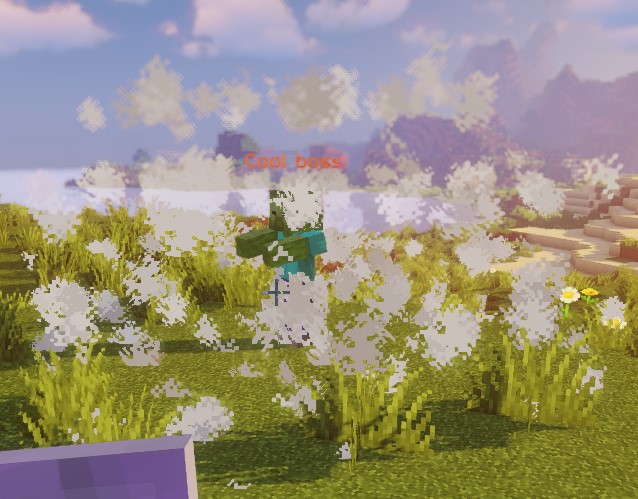
Dieses Skript veranschaulicht die Form einer Kuppel mithilfe von Wolkenpartikeln.
CONE
Für jeden Ursprung verwendet ein Kegel die erste aufgelöste Position von Target2. Eine Abfrage naher Spieler sortiert nicht nach Entfernung. Verwende ein einzelnes Ziel, wenn der Kegel auf eine bestimmte Entität zeigen soll.
Target ist die Spitze und Target2 der Mittelpunkt der Grundfläche; ihr Abstand bestimmt die Kegelhöhe. Die Punkte müssen verschieden sein und in derselben Welt liegen. Entitätsprüfungen testen Füße, Mittelpunkt und Oberkante der Kollisionsbox statt einer exakten Boxüberschneidung. Die Positionsauswahl verwendet das ganzzahlige Koordinatenraster der Welt.
| Schlüssel | Details | Ausdrücklich setzen |
|---|---|---|
shape | Legt die Form der Zone fest. Sollte CONE sein | ✅ |
target | Legt die Position für die Spitze des Kegels fest | ✅ |
target2 | Legt die Position für den Mittelpunkt der Grundfläche des Kegels fest | ✅ |
filter | Legt fest, welche Entitätstypen anvisiert werden | ❌ |
radius | Radius der Grundfläche des Kegels | ✅ |
borderRadius | Radius des inneren Kegels | ❌ |
Beispiel
eliteScript:
  Example:
    Events:
    - EliteMobDamagedByPlayerEvent
    Zone:
      shape: CONE
      radius: 10
      Target:
        targetType: SELF
        offset: 0,0,0
      Target2:
        targetType: SELF
        offset: 0,10,0
    Actions:
      - action: SPAWN_PARTICLE
        particles:
        - particle: CLOUD
        Target:
          targetType: ZONE_FULL
          coverage: 0.8
        repeatEvery: 5
        times: 20
Dieses Skript veranschaulicht die Form eines Kegels mithilfe von Wolkenpartikeln. Denk daran, dass diese Zone eine CONE-Form hat, also ein 3D-Volumen ist -- wichtig, wenn du Schwungeffekte erzeugen möchtest.
CYLINDER
Der Ursprung ist der Mittelpunkt der unteren Fläche. Der Zylinder erstreckt sich um height nach oben, nicht gleichmäßig über und unter den Ursprung. Die gesamte Höhe der Entitätskollisionsbox muss zwischen Boden und Oberkante passen; zusätzlich gilt die horizontale Prüfung. Ein sichtbarer Zylinder mit Höhe 1 erfasst daher normalerweise keinen stehenden Spieler. Verwende für Entitätsaktionen genügend Höhe und einen geeigneten Ursprung.
| Schlüssel | Details | Ausdrücklich setzen |
|---|---|---|
shape | Legt die Form der Zone fest. Sollte CYLINDER sein | ✅ |
target | Mittelpunkt der unteren Fläche | ✅ |
filter | Legt fest, welche Entitätstypen anvisiert werden | ❌ |
radius | Radius des Zylinders | ✅ |
borderRadius | Radius des inneren Zylinders | ❌ |
height | Höhe des Zylinders | ✅ |
Beispiel
eliteScript:
  Example:
    Events:
      - EliteMobDamagedByPlayerEvent
    Zone:
      shape: CYLINDER
      radius: 4
      borderRadius: 3
      height: 8
      Target:
        targetType: SELF
    Actions:
      - action: SPAWN_PARTICLE
        particles:
          - particle: CLOUD
        Target:
          targetType: ZONE_FULL
        repeatEvery: 5
        times: 20
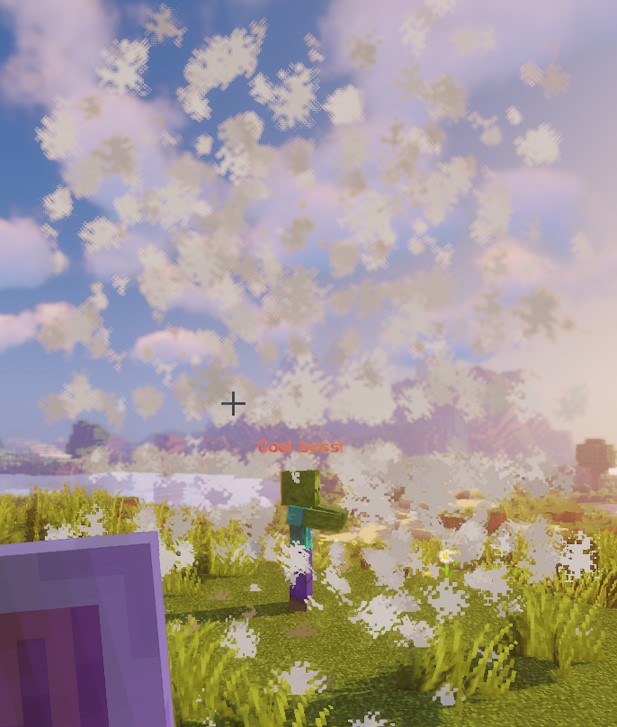
Dieses Skript veranschaulicht die Form eines Zylinders mithilfe von Wolkenpartikeln.
CUBOID
Die aktuelle Quaderimplementierung verwendet unterschiedliche Grenzen für ausgewählte Positionen, einzelne Punktprüfungen und Entitätsprüfungen. Die Positionen verteilen sich über x und z Blöcke um den Mittelpunkt und steigen y Blöcke nach oben. Entitätsüberschneidungen verwenden Halbbreiten von x / 2 und z / 2, reichen aber nur y / 2 nach oben. Direkte Punktprüfungen verwenden dagegen ±x, ±y und ±z. Gehe nicht davon aus, dass Partikel und Entitätsabfrage dasselbe Volumen abdecken; prüfe die gewünschte Geometrie auf deinem Server. Das betrifft auch native Lua-Quader.
Bei positiven ganzzahligen Abmessungen reichen die Partikelkoordinaten von -floor(x / 2) bis x - 1 - floor(x / 2), entsprechend für Z, und vertikal von 0 bis y - 1. Entitätsgrenzen verwenden stattdessen die Blockkoordinaten des Ursprungs und runden horizontale Kanten ab. Randpartikel behalten Punkte mit Y <= yBorder, deren X oder Z außerhalb der inneren Halbbreite liegt. Das ist keine vollständige Hülle aus äußerem minus innerem Quader.
| Schlüssel | Details | Ausdrücklich setzen |
|---|---|---|
shape | Legt die Form der Zone fest. Sollte CUBOID sein | ✅ |
target | Legt die Position für den Mittelpunkt des Quaders fest | ✅ |
filter | Legt fest, welche Entitätstypen anvisiert werden | ❌ |
x | Legt die Länge des Quaders fest | ✅ |
y | Legt die Höhe des Quaders fest | ✅ |
z | Legt die Breite des Quaders fest, Standard ist x | ❌ |
xBorder | Legt die Länge des inneren Quaders fest | ❌ |
yBorder | Legt die Höhe des inneren Quaders fest | ❌ |
zBorder | Breite des inneren Quaders; 0 übernimmt xBorder, wenn dieses ungleich null ist | ❌ |
Beispiel
eliteScript:
  Example:
    Events:
      - EliteMobDamagedByPlayerEvent
    Zone:
      shape: CUBOID
      x: 4
      y: 4
      z: 4
      xBorder: 3
      yBorder: 3
      zBorder: 3
      Target:
        targetType: SELF
    Actions:
      - action: SPAWN_PARTICLE
        particles:
          - particle: CLOUD
        Target:
          targetType: ZONE_FULL
        repeatEvery: 5
        times: 20
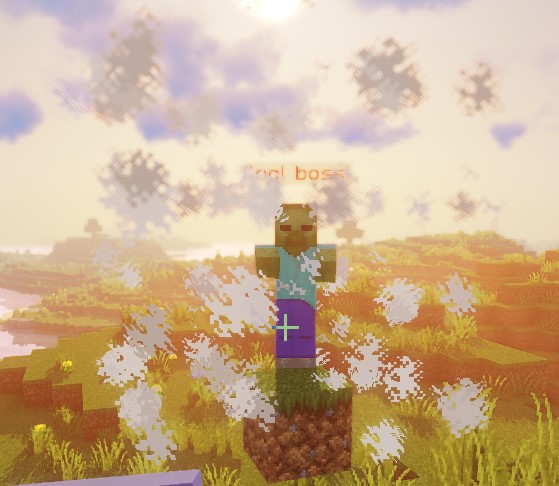
Dieses Skript veranschaulicht die Form eines Quaders mithilfe von Wolkenpartikeln.
STATIC_RAY
Jeder aufgelöste Ursprung aus Target wird mit jedem aufgelösten Endpunkt aus Target2 derselben Welt verbunden. STATIC_RAY hat keine eigene Animation. Mit dem standardmäßigen track: true am Aktionsziel erzeugen wiederholte Aktionen ihn jedoch aus den aktuellen Endpunkten neu. Verwende track: false am Aktionsziel, um diese zu fixieren.
pointRadius bestimmt sowohl den Abtastschritt als auch den Trefferradius, nicht den gesamten Durchmesser. Statische und verschobene Strahlen machen höchstens 500 Schritte; ihre maximale abgetastete Reichweite beträgt daher ungefähr 500 * pointRadius Blöcke. Rotierende Strahlen verwenden Schritte von 2 * pointRadius. Verwende einen strikt positiven Wert. Mit ignoresSolidBlocks: false endet die Abtastung an einem abgetasteten festen Block. Das ist keine kontinuierliche Kollisionsprüfung; große Schritte können Hindernisse überspringen. Entitätsprüfungen testen Überschneidungen mit Kugeln um die abgetasteten Punkte.
| Schlüssel | Details | Ausdrücklich setzen |
|---|---|---|
shape | Legt die Form der Zone fest. Sollte STATIC_RAY sein | ✅ |
target | Legt die Position für den ersten Punkt der Linie fest | ✅ |
target2 | Legt die Position für den letzten Punkt der Linie fest | ✅ |
filter | Legt fest, welche Entitätstypen anvisiert werden | ❌ |
ignoresSolidBlocks | Legt fest, ob der Strahl feste Blöcke durchdringt. Standard ist true | ❌ |
pointRadius | Legt die Dicke des Strahls fest. Standard sind 0.5 Blöcke. | ❌ |
Beispiel
eliteScript:
  Example:
    Events:
      - EliteMobDamagedByPlayerEvent
    Zone:
      shape: STATIC_RAY
      Target2:
        targetType: DIRECT_TARGET
        offset: 0,1,0
      Target:
        targetType: SELF
        offset: 0,1,0
    Actions:
      - action: SPAWN_PARTICLE
        particles:
          - particle: CLOUD
        Target:
          targetType: ZONE_FULL
        repeatEvery: 5
        times: 20
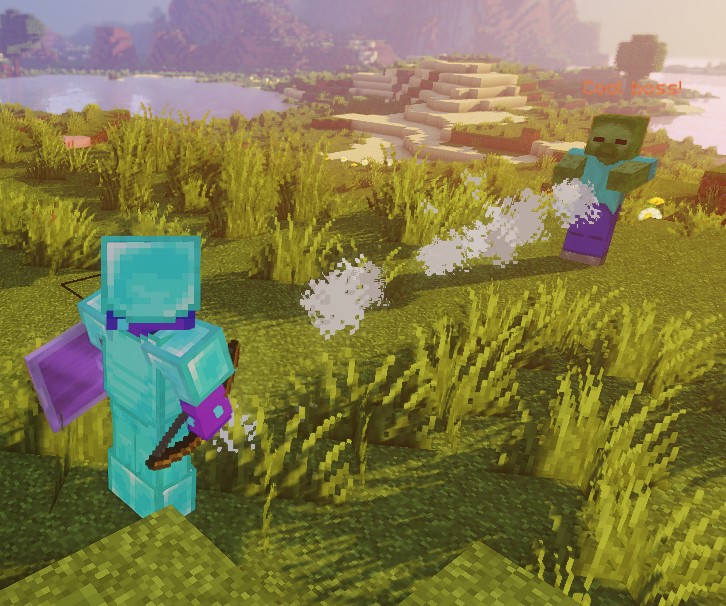
Dieses Skript veranschaulicht die Form eines statischen Strahls mithilfe von Wolkenpartikeln.
Beide Endpunkte verwenden offset: 0,1,0, sodass der Strahl einen Block über ihren Füßen liegt. Das ist nicht automatisch die Mitte von Entitäten jeder Größe.
ROTATING_RAY
Drehwerte sind Gradangaben, die Dauer wird in Ticks angegeben. Jeder Ursprung wird mit jedem gültigen Target2 derselben Welt verbunden. Der Ausgangspunkt bleibt als Drehpunkt fest. Anfängliche und animierte Pitch-/Yaw-Drehungen akzeptieren beide Vorzeichen. Der vollständige, vorab gedrehte Strahl existiert bereits vor dem ersten Animationstick, auch bei einer Dauer von null. Die Ausgangspunkte müssen sich unterscheiden. Negative Dauern und nicht endliche Werte werden abgelehnt.
| Schlüssel | Details | Ausdrücklich setzen |
|---|---|---|
shape | Legt die Form der Zone fest. Sollte ROTATING_RAY sein | ✅ |
filter | Legt fest, welche Entitätstypen anvisiert werden | ❌ |
target | Legt die Position für den ersten Punkt der Linie fest | ✅ |
target2 | Legt die Position für den letzten Punkt der Linie fest | ✅ |
animationDuration | Legt in Ticks die Dauer der Rotation fest | ✅ |
pitchPreRotation | Wendet vor der Animation eine anfängliche Drehung auf den Pitch an | ❌ |
yawPreRotation | Wendet vor der Animation eine anfängliche Drehung auf den Yaw an | ❌ |
pitchRotation | Legt die Pitch-Drehung für die Animation fest | ❌ |
yawRotation | Legt die Yaw-Drehung für die Animation fest | ❌ |
ignoresSolidBlocks | Legt fest, ob der Strahl feste Blöcke durchdringt. Standard ist true | ❌ |
pointRadius | Legt die Dicke des Strahls fest. Standard sind 0.5 Blöcke. | ❌ |
Beispiel
eliteScript:
  Example:
    Events:
      - EliteMobDamagedByPlayerEvent
    Zone:
      shape: ROTATING_RAY
      animationDuration: 100
      pitchPrerotation: 0
      yawPrerotation: 0
      pitchRotation: 0
      yawRotation: 360
      ignoresSolidBlocks: true
      Target:
        targetType: SELF
        offset: 0,1,0
      Target2:
        targetType: DIRECT_TARGET
        offset: 0,1,0
    Actions:
      - action: SPAWN_PARTICLE
        particles:
          - particle: CLOUD
        Target:
          targetType: ZONE_FULL
        repeatEvery: 1
        times: 100
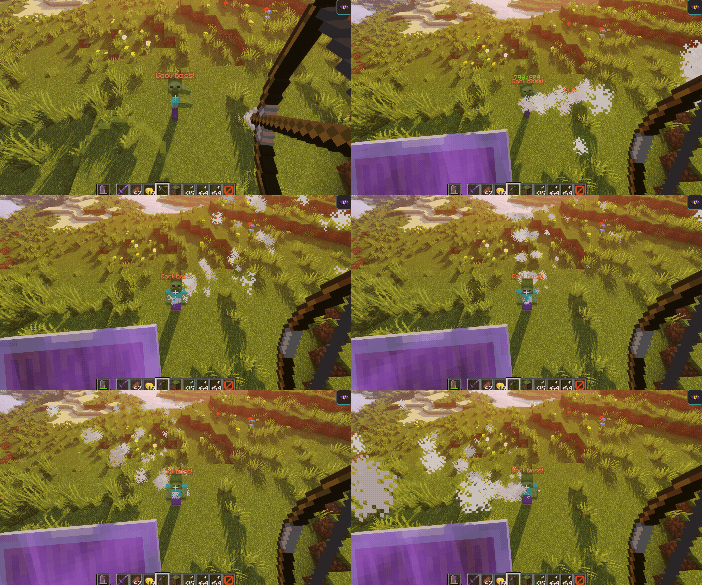
Dieses Skript zeigt, wie ein rotierender Strahl mit Wolkenpartikeln aussieht.
Zuerst erzeugt es einen Strahl vom Boss zu dem Spieler, der ihm Schaden zugefügt hat, mithilfe von Wolkenpartikeln. Anschließend verschiebt es die Positionen mit offset um einen Block nach oben.
Danach dreht sich der Strahl über 100 Ticks um 360 Grad um den bossseitigen Ursprung. Der Spieler bestimmt die Anfangsrichtung, nicht den Drehpunkt. Negative Pitch-/Yaw-Werte drehen in die entgegengesetzte Richtung.
TRANSLATING_RAY
Jedes anfängliche Paar aus Target und Target2 verwendet das erste aufgelöste FinalTarget und FinalTarget2. Ein weggelassenes finales Ziel lässt den betreffenden Endpunkt an seiner Ausgangsposition. Halte alle Endpunkte in derselben Welt. Eine positive Dauer animiert bis genau zu den Zielen; eine Dauer von null lässt den anfänglichen Strahl statisch. Eine negative Dauer wird abgelehnt.
| Schlüssel | Details | Ausdrücklich setzen |
|---|---|---|
shape | Legt die Form der Zone fest. Sollte TRANSLATING_RAY sein | ✅ |
filter | Legt fest, welche Entitätstypen anvisiert werden | ❌ |
animationDuration | Legt in Ticks die Dauer der Verschiebung fest | ✅ |
target | Legt die Position für den ersten Punkt der Linie fest | ✅ |
finalTarget | Legt die Zielposition für den ersten Punkt der Linie fest | ✅ |
target2 | Legt die Position für den zweiten Punkt der Linie fest | ✅ |
finalTarget2 | Legt die Zielposition für den zweiten Punkt der Linie fest | ✅ |
ignoresSolidBlocks | Legt fest, ob der Strahl feste Blöcke durchdringt. Standard ist true | ❌ |
pointRadius | Legt die Dicke des Strahls fest. Standard sind 0.5 Blöcke. | ❌ |
Beispiel
eliteScript:
  Example:
    Events:
      - EliteMobDamagedByPlayerEvent
    Zone:
      shape: TRANSLATING_RAY
      Target:
        targetType: SELF
      FinalTarget:
        targetType: SELF
        offset: 0,10,0
      Target2:
        targetType: DIRECT_TARGET
      FinalTarget2:
        targetType: DIRECT_TARGET
        offset: 0,10,0
      animationDuration: 100
      ignoresSolidBlocks: true
    Actions:
      - action: SPAWN_PARTICLE
        particles:
          - particle: CLOUD
        Target:
          targetType: ZONE_FULL
        repeatEvery: 1
        times: 100
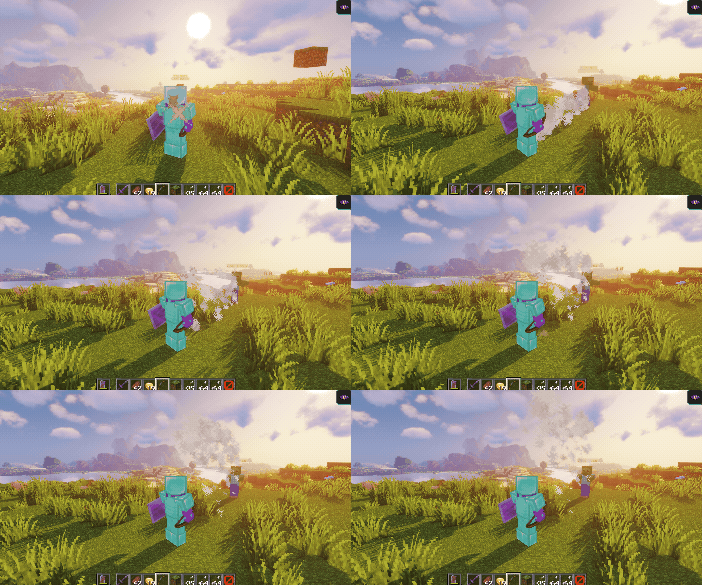
Dieses Skript zeigt, wie ein verschiebender Strahl mit Wolkenpartikeln aussieht.
Zuerst erzeugt es einen Strahl vom Boss zu dem Spieler, der ihm Schaden zugefügt hat, mithilfe von Wolkenpartikeln.
Anschließend bewegt es den Strahl durch die Offsets von FinalTarget und FinalTarget2 um 10 Blöcke nach oben.
Die konfigurierte Dauer beträgt 100 Ticks, ungefähr 5 Sekunden bei 20 Ticks pro Sekunde. Das letzte Bild landet genau auf den finalen Zielen.
Wir können den Strahl leicht seitwärts bewegen lassen, indem wir den Z-offset auf etwas wie offset: 0,0,10 anpassen:
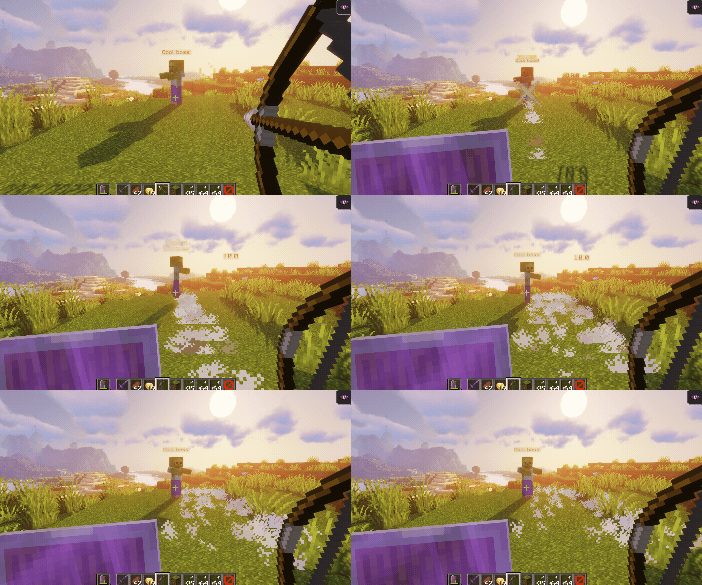
Offsets folgen den Weltachsen. Eine andere Blickrichtung verändert nur, wie die Bewegung auf dem Bildschirm aussieht. Ein X-Offset bewegt entlang der X-Achse der Welt, unabhängig von deiner Blickrichtung.
filter
Mit der Eigenschaft filter lassen sich innerhalb der Zone nur bestimmte Entitäten anvisieren. Diese Entitäten können sein:
Diese Filter gelten für Entitätsabfragen, nicht für Partikelpositionen. ELITE und LIVING können auch den ausführenden Boss erfassen, wenn er die Formprüfung besteht. PLAYER schließt Zuschauer und Spieler anderer Begegnungen nicht selbst aus. Zusätzliche Regeln der jeweiligen Aktion können weiterhin gelten.
| Wert | Details |
|---|---|
PLAYER | Visiert nur Spieler in der Zone an (Standard) |
ELITE | Als Elite registrierte Lebewesen in der Zone |
LIVING | Lebewesen in der Zone einschließlich Spielern |
Beispiel
eliteScript:
  FilterExample:
    Events:
    - PlayerDamagedByEliteMobEvent
    Zone:
      shape: SPHERE
      radius: 12
      borderRadius: 11
      filter: ELITE
      Target:
        targetType: SELF
        track: false
Dieses Fragment setzt den Entitätsfilter der Zone auf Elites. Es enthält noch keine Actions und ist kein vollständig ausführbares Skript. Das gezeigte track: false am Ursprungsziel fixiert nicht die Zone einer Aktion. Setze es beim Ergänzen von Aktionen mit festem Ursprung an deren ZONE_FULL- oder ZONE_BORDER-Ziel.