精英腳本區域
區域是由形狀定義的位置,可以被腳本編寫者用作目標來執行任何類型的動作。
每個腳本只能設定一個 Zone 映射。頂層名稱必須使用這個大小寫;內部欄位名稱不區分大小寫,但形狀與篩選器的列舉值必須大寫。同一個映射可透過多個原點目標產生多個形狀。
要以區域為目標,可以使用目標類型 ZONE_FULL 或 ZONE_BORDER。
區域本身也會使用腳本目標來定義該區域會出現在哪裡。
省略區域的 Target 時預設為 SELF。其他解析器預設值為 shape: CYLINDER、filter: PLAYER、radius: 5、borderRadius: 1、height: 1、pointRadius: 0.5、animationDuration: 0 與 ignoresSolidBlocks: true。旋轉量與長方體尺寸預設為零。請明確設定合適的尺寸;有預設值不表示完整戰鬥設定已通過驗證。下表標記的是各形狀建議明確設定的欄位,而非省略後必定造成解析錯誤的欄位。
尺寸應為有限正數,射線與圓錐的端點應位於同一世界且彼此不同。建議使用固定數值:浮點 ~ 範圍會從 min 取樣到 max,但不包含 max,並可能反覆取樣。反向範圍(例如 5~1)會讓 EliteMobs 略過整個腳本。大體積會產生大量位置。圓柱、圓錐、長方體與射線的實體查詢,在形狀外圍的方框每個軸向都不超過 256 格時,只會搜尋該方框;球體、圓頂與更大的形狀則會檢查形狀所在世界中的候選實體。請依效果控制形狀大小與重複頻率。
粒子動作使用幾何取樣位置,而非實體碰撞箱。區域 SPAWN_PARTICLE 動作的預設覆蓋率約為 30%;若要保留所有取樣位置,請在動作目標上明確設定 coverage: 1.0。filter 不會改變粒子位置。下文的實體包含檢查因形狀而異,因此粒子輪廓不代表精確的碰撞邊界。
shape
設定區域的形狀。有效形狀:
| 形狀類型 | 說明 | 可動畫化 | 邊界 |
|---|---|---|---|
CYLINDER | 圓柱形 | ❌ | ✅ |
SPHERE | 球形 | ❌ | ✅ |
DOME | 穹頂形(半球) | ❌ | ✅ |
CUBOID | 長方體形 | ❌ | ✅ |
STATIC_RAY | 兩個已解析點之間的線,沒有獨立動畫 | ❌ | ❌ |
ROTATING_RAY | 兩點之間的旋轉線 | ✅ | ❌ |
TRANSLATING_RAY | 從兩個起始點移動到兩個終點的線 | ✅ | ❌ |
CONE | 圓錐形 | ❌ | ✅ |
可動畫
動畫形狀在動作產生並快取該形狀時開始播放。animationDuration 為正數時,通常發生在動作啟動時、其 wait 之前。不同動作可能建立各自的動畫形狀。
這表示如果某個動作有等待時間,當該動作開始時,區域在動作等待期間就已經在移動了。
區域動畫每個 tick 都會推進。使用 SPAWN_PARTICLE 搭配 repeatEvery: 1 可每個 tick 顯示一次。較低的粒子動作頻率會減少顯示影格,但區域仍會繼續移動。
如果你想製作旋轉區域的動作,但希望等待一定數量的 tick 之後才開始該動作,請把它做成另一個腳本,並透過 RUN_SCRIPT 呼叫那個腳本。請確認該 RUN_SCRIPT 帶有你想要的等待時間。
動畫任務結束後,區域保留最後計算出的幾何形狀。請使用正數動畫時長。最後一個動畫畫格會精確套用設定的旋轉,或精確抵達最終目標。
animationDuration 為正數時,無論 track 設定為何,每個動作都會在開始時快取其形狀。快取形狀從初始端點開始動畫,不跟隨移動的 Boss 或玩家。靜態形狀請在動作的 Target 上設定 track: false 以固定原點;只在 Zone.Target 上設定不會固定動作形狀。快取壽命請參閱目標指南。
邊界
某些區域可以有邊界。有邊界表示 ZONE_BORDER 可以被用作該區域的目標。邊界的定義方式是在第一個較大的形狀內部建立第二個較小的形狀。較小區域與較大區域之間的範圍就是邊界。
borderRadius 是內半徑,不是邊界厚度。請使用非負且小於外半徑的值。圓柱會減去同高度的內圓柱,形成側面環帶,不包含上下端蓋。長方體邊界取樣採用獨立規則,可能與其實體邊界查詢不同。射線沒有邊界結果,請使用 ZONE_FULL。
範例
eliteScript:
  Example:
    Events:
      - EliteMobDamagedByPlayerEvent
    Zone:
      shape: CYLINDER
      radius: 4
      borderRadius: 3
      height: 8
      Target:
        targetType: SELF
    Actions:
      - action: SPAWN_PARTICLE
        particles:
          - particle: SMOKE_LARGE
        Target:
          targetType: ZONE_BORDER
        repeatEvery: 5
        times: 20
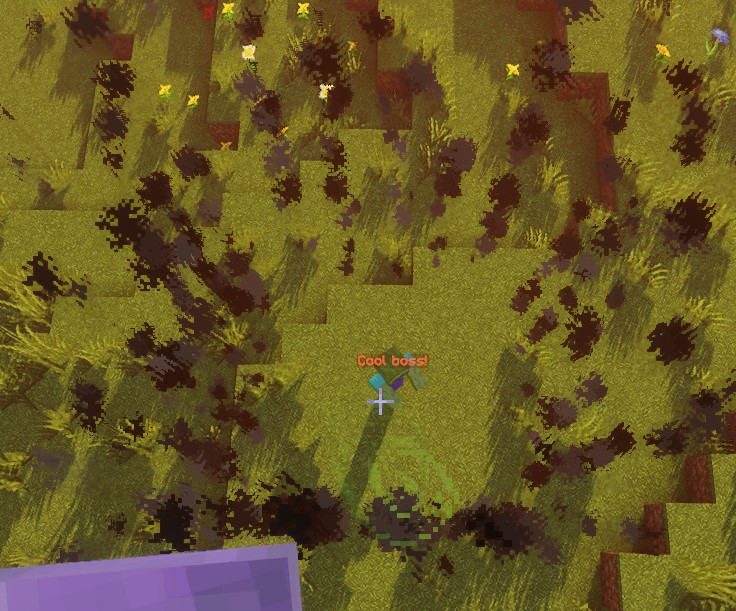
此腳本在取樣的邊界位置產生 20 次煙霧,間隔 5 tick。第一次立即執行,最後一次在 95 tick 後;每秒 20 tick 時約為 4.75 秒。重複任務在下一個間隔結束。粒子自身壽命與動作時序無關。
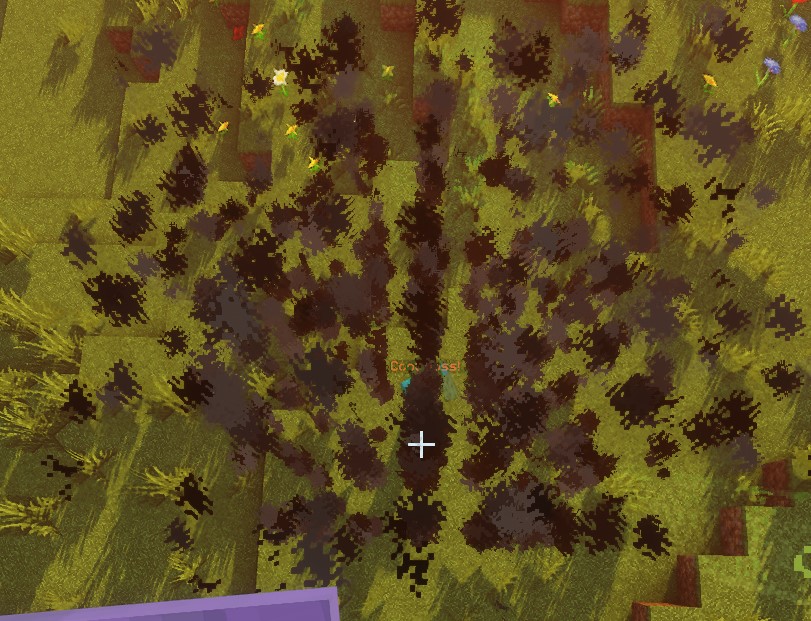
使用 ZONE_FULL 時,粒子取樣位置來自整個區域,而不只是邊界:
SPHERE
原點是球心。位置取樣使用半徑內的整數步長網格。實體檢查將每個實體近似為球體,其半徑是腳部到眼睛高度的一半,因此實體腳部在區域外時仍可能與區域重疊。邊界實體檢查也會排除與內球體重疊的實體。
| 欄位 | 說明 | 明確設定 |
|---|---|---|
shape | 設定該區域的形狀。應為 SPHERE | ✅ |
target | 設定球體中心的位置 | ✅ |
filter | 設定哪些類型的實體會被鎖定 | ❌ |
radius | 球體的半徑 | ✅ |
borderRadius | 內側球體的半徑 | ❌ |
範例
eliteScript:
  Example:
    Events:
      - EliteMobDamagedByPlayerEvent
    Zone:
      shape: SPHERE
      radius: 4
      borderRadius: 3
      Target:
        targetType: SELF
    Actions:
      - action: SPAWN_PARTICLE
        particles:
          - particle: CLOUD
        Target:
          targetType: ZONE_FULL
        repeatEvery: 5
        times: 20
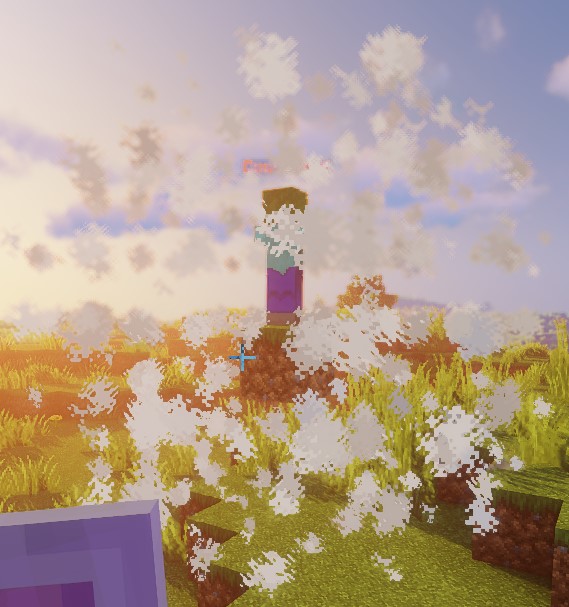
此腳本使用雲粒子演示球體的形狀。
DOME
粒子從原點高度開始對上半球取樣。目前限制:完整實體查詢繼承球體的實體檢查,沒有半球限制,因此 ZONE_FULL 可能選取穹頂下方的實體。邊界實體查詢額外要求腳部高於 originY - 1;直接位置檢查也使用此門檻。不要把穹頂粒子顯示當作命中區域僅限上半球的證明。
| 欄位 | 說明 | 明確設定 |
|---|---|---|
shape | 設定該區域的形狀。應為 DOME | ✅ |
target | 設定穹頂中心的位置 | ✅ |
filter | 設定哪些類型的實體會被鎖定 | ❌ |
radius | 穹頂的半徑 | ✅ |
borderRadius | 內側穹頂的半徑 | ❌ |
範例
eliteScript:
  Example:
    Events:
      - EliteMobDamagedByPlayerEvent
    Zone:
      shape: DOME
      radius: 4
      borderRadius: 3
      Target:
        targetType: SELF
    Actions:
      - action: SPAWN_PARTICLE
        particles:
          - particle: CLOUD
        Target:
          targetType: ZONE_FULL
        repeatEvery: 5
        times: 20
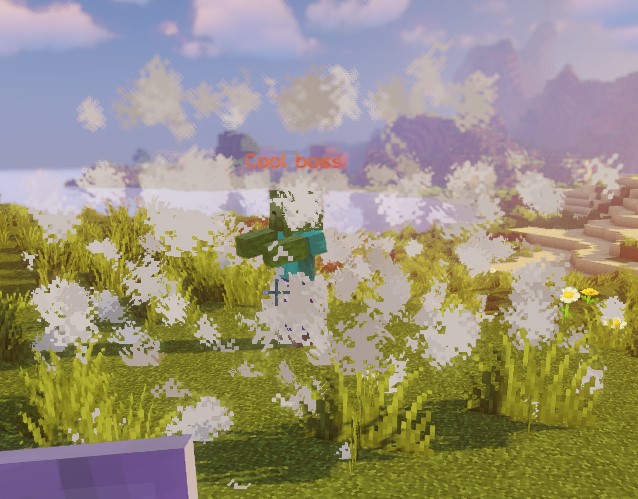
此腳本使用雲粒子演示穹頂的形狀。
CONE
對於每個原點,圓錐使用 Target2 解析出的第一個位置。附近玩家查詢不依距離排序;若必須瞄準特定實體,請使用單一目標。
Target 為尖端,Target2 為底面中心;兩者距離決定圓錐高度。兩點應不同且位於同一世界。實體檢查會測試腳部、碰撞箱中心與頂部,而非精確的碰撞箱交集。取樣位置使用世界整數座標網格。
| 欄位 | 說明 | 明確設定 |
|---|---|---|
shape | 設定該區域的形狀。應為 CONE | ✅ |
target | 設定圓錐頂點(尖端)的位置 | ✅ |
target2 | 設定圓錐底面中心的位置 | ✅ |
filter | 設定哪些類型的實體會被鎖定 | ❌ |
radius | 圓錐底面的半徑 | ✅ |
borderRadius | 內側圓錐的半徑 | ❌ |
範例
eliteScript:
  Example:
    Events:
    - EliteMobDamagedByPlayerEvent
    Zone:
      shape: CONE
      radius: 10
      Target:
        targetType: SELF
        offset: 0,0,0
      Target2:
        targetType: SELF
        offset: 0,10,0
    Actions:
      - action: SPAWN_PARTICLE
        particles:
        - particle: CLOUD
        Target:
          targetType: ZONE_FULL
          coverage: 0.8
        repeatEvery: 5
        times: 20
此腳本使用雲粒子演示圓錐的形狀。請記得這個區域是 CONE 形狀,也就是說它是一個 3D 體積,如果你想製作橫掃效果,這一點很重要。
CYLINDER
原點是底面中心。圓柱向上延伸 height,而非在原點上下等距展開。實體檢查要求整個碰撞箱高度都位於底面與頂面之間,同時通過水平檢查。因此,高度為 1 的視覺圓柱通常無法選取站立的玩家。實體動作應使用足夠高度與合適的原點。
| 欄位 | 說明 | 明確設定 |
|---|---|---|
shape | 設定該區域的形狀。應為 CYLINDER | ✅ |
target | 底面中心 | ✅ |
filter | 設定哪些類型的實體會被鎖定 | ❌ |
radius | 圓柱的半徑 | ✅ |
borderRadius | 內側圓柱的半徑 | ❌ |
height | 圓柱的高度 | ✅ |
範例
eliteScript:
  Example:
    Events:
      - EliteMobDamagedByPlayerEvent
    Zone:
      shape: CYLINDER
      radius: 4
      borderRadius: 3
      height: 8
      Target:
        targetType: SELF
    Actions:
      - action: SPAWN_PARTICLE
        particles:
          - particle: CLOUD
        Target:
          targetType: ZONE_FULL
        repeatEvery: 5
        times: 20
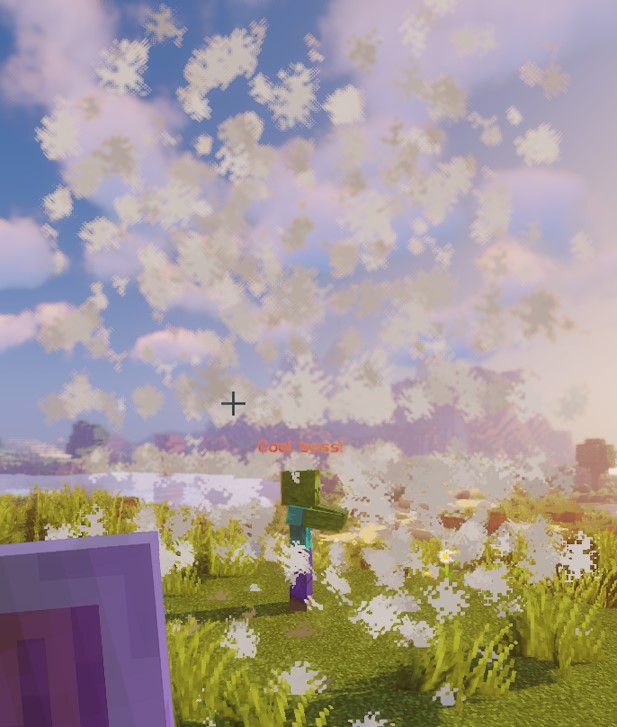
此腳本使用雲粒子演示圓柱的形狀。
CUBOID
目前長方體實作對取樣位置、單點檢查與實體檢查使用不同邊界。取樣點在中心周圍橫跨 x 與 z 格,並向上延伸 y 格。實體重疊檢查使用 x / 2 與 z / 2 的半寬,但只向上延伸 y / 2。直接點檢查則使用 ±x、±y 與 ±z。不要假定粒子長方體與實體查詢涵蓋相同體積;請在伺服器上檢查預期的戰鬥幾何範圍。原生 Lua 長方體也有此限制。
對於正整數尺寸,粒子 X 座標從 -floor(x / 2) 到 x - 1 - floor(x / 2),Z 同理,垂直座標從 0 到 y - 1。實體邊界改用原點的方塊座標,並向下取整水平邊緣。邊界粒子保留 Y <= yBorder 且 X 或 Z 位於內部半寬之外的取樣點;這不是完整的外長方體減去內長方體所形成的殼。
| 欄位 | 說明 | 明確設定 |
|---|---|---|
shape | 設定該區域的形狀。應為 CUBOID | ✅ |
target | 設定長方體中心的位置 | ✅ |
filter | 設定哪些類型的實體會被鎖定 | ❌ |
x | 設定長方體的長度 | ✅ |
y | 設定長方體的高度 | ✅ |
z | 設定長方體的寬度,預設為 x | ❌ |
xBorder | 設定內側長方體的長度 | ❌ |
yBorder | 設定內側長方體的高度 | ❌ |
zBorder | 內長方體寬度;設為 0 且 xBorder 非零時,使用 xBorder | ❌ |
範例
eliteScript:
  Example:
    Events:
      - EliteMobDamagedByPlayerEvent
    Zone:
      shape: CUBOID
      x: 4
      y: 4
      z: 4
      xBorder: 3
      yBorder: 3
      zBorder: 3
      Target:
        targetType: SELF
    Actions:
      - action: SPAWN_PARTICLE
        particles:
          - particle: CLOUD
        Target:
          targetType: ZONE_FULL
        repeatEvery: 5
        times: 20
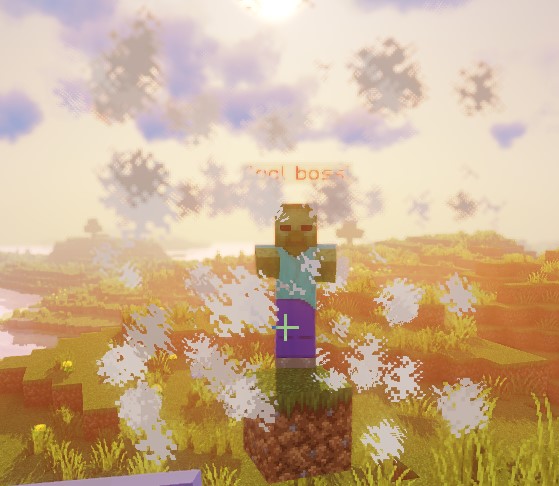
此腳本使用雲粒子演示長方體的形狀。
STATIC_RAY
每個解析出的 Target 原點會與同一世界中每個解析出的 Target2 端點配對。STATIC_RAY 沒有獨立動畫,但動作目標預設為 track: true,因此重複動作會依目前端點重新產生射線。若要固定端點,請在動作目標上設定 track: false。
pointRadius 同時控制取樣步長與命中半徑,不是完整直徑。靜態與平移射線最多前進 500 步,最大取樣距離約為 500 * pointRadius 格。旋轉射線使用 2 * pointRadius 的步長。請使用嚴格正數。ignoresSolidBlocks: false 會在取樣到固體方塊時停止;這不是連續碰撞偵測,大步長可能跳過障礙。實體檢查會測試實體與取樣點周圍球體的重疊。
| 欄位 | 說明 | 明確設定 |
|---|---|---|
shape | 設定該區域的形狀。應為 STATIC_RAY | ✅ |
target | 設定線段第一個點的位置 | ✅ |
target2 | 設定線段最後一個點的位置 | ✅ |
filter | 設定哪些類型的實體會被鎖定 | ❌ |
ignoresSolidBlocks | 設定該射線是否會穿過固體方塊。預設為 true | ❌ |
pointRadius | 設定該射線的粗細。預設為 0.5 格。 | ❌ |
範例
eliteScript:
  Example:
    Events:
      - EliteMobDamagedByPlayerEvent
    Zone:
      shape: STATIC_RAY
      Target2:
        targetType: DIRECT_TARGET
        offset: 0,1,0
      Target:
        targetType: SELF
        offset: 0,1,0
    Actions:
      - action: SPAWN_PARTICLE
        particles:
          - particle: CLOUD
        Target:
          targetType: ZONE_FULL
        repeatEvery: 5
        times: 20
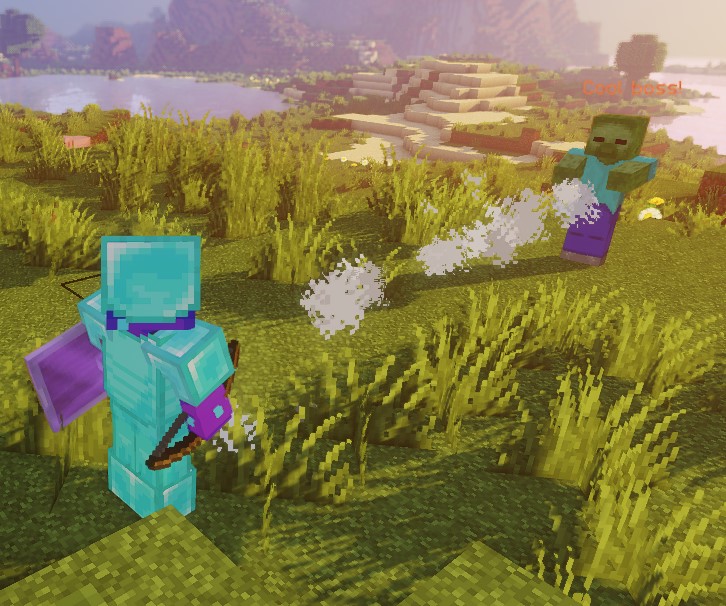
此腳本使用雲粒子演示靜態射線的形狀。
兩端皆使用 offset: 0,1,0,讓射線位於腳部上方一格。這不一定是所有高度實體的身體中段。
ROTATING_RAY
旋轉值以度為單位,時長以 tick 為單位。每個原點與同一世界中每個有效的 Target2 配對,起始端點固定作為旋轉支點。初始與動畫的 pitch/yaw 旋轉都可使用正負值。完整的預先旋轉射線在首次動畫 tick 之前就已存在,時長為零時也一樣。起始端點必須彼此不同。負數時長與非有限數值會被拒絕。
| 欄位 | 說明 | 明確設定 |
|---|---|---|
shape | 設定該區域的形狀。應為 ROTATING_RAY | ✅ |
filter | 設定哪些類型的實體會被鎖定 | ❌ |
target | 設定線段第一個點的位置 | ✅ |
target2 | 設定線段最後一個點的位置 | ✅ |
animationDuration | 以 tick 設定旋轉所需的時間 | ✅ |
pitchPreRotation | 在動畫開始前對 pitch 套用一個初始旋轉 | ❌ |
yawPreRotation | 在動畫開始前對 yaw 套用一個初始旋轉 | ❌ |
pitchRotation | 設定該動畫的 pitch 旋轉 | ❌ |
yawRotation | 設定該動畫的 yaw 旋轉 | ❌ |
ignoresSolidBlocks | 設定該射線是否會穿過固體方塊。預設為 true | ❌ |
pointRadius | 設定該射線的粗細。預設為 0.5 格。 | ❌ |
範例
eliteScript:
  Example:
    Events:
      - EliteMobDamagedByPlayerEvent
    Zone:
      shape: ROTATING_RAY
      animationDuration: 100
      pitchPrerotation: 0
      yawPrerotation: 0
      pitchRotation: 0
      yawRotation: 360
      ignoresSolidBlocks: true
      Target:
        targetType: SELF
        offset: 0,1,0
      Target2:
        targetType: DIRECT_TARGET
        offset: 0,1,0
    Actions:
      - action: SPAWN_PARTICLE
        particles:
          - particle: CLOUD
        Target:
          targetType: ZONE_FULL
        repeatEvery: 1
        times: 100
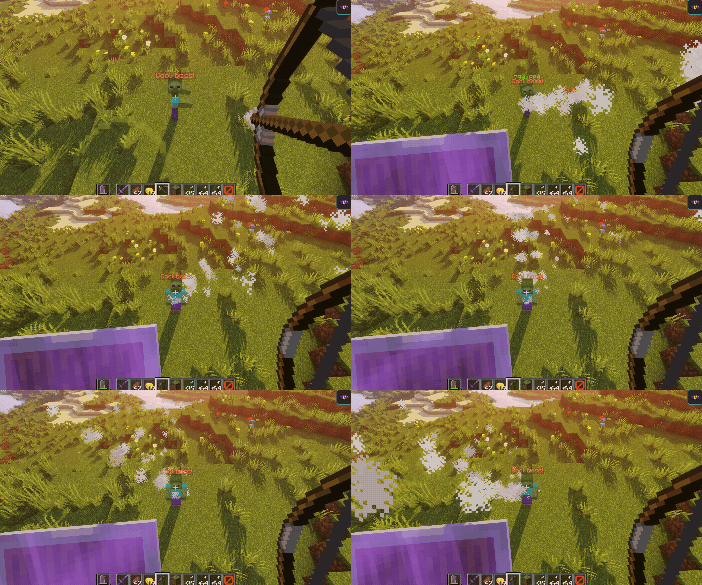
此腳本展示了使用雲粒子的旋轉射線的效果。
首先,它使用雲粒子從 Boss 拉出一條射線到傷害它的玩家身上。接著,它使用 offset 把位置略微向上調整一格。
接著,射線在 100 tick 內繞 Boss 一側的原點旋轉 360 度。目標玩家決定初始方向,不是旋轉中心。負的 pitch/yaw 值會朝相反方向旋轉。
TRANSLATING_RAY
每組初始 Target / Target2 使用第一個解析出的 FinalTarget 與 FinalTarget2。省略某個最終目標時,該端點會留在起始位置。請將所有端點放在同一世界。正數時長會讓動畫精確抵達目的地;時長為零時,初始射線保持靜止。負數時長會被拒絕。
| 欄位 | 說明 | 明確設定 |
|---|---|---|
shape | 設定該區域的形狀。應為 TRANSLATING_RAY | ✅ |
filter | 設定哪些類型的實體會被鎖定 | ❌ |
animationDuration | 以 tick 設定平移所需的時間 | ✅ |
target | 設定線段第一個點的位置 | ✅ |
finalTarget | 設定線段第一個點的目的地位置 | ✅ |
target2 | 設定線段第二個點的位置 | ✅ |
finalTarget2 | 設定線段第二個點的目的地位置 | ✅ |
ignoresSolidBlocks | 設定該射線是否會穿過固體方塊。預設為 true | ❌ |
pointRadius | 設定該射線的粗細。預設為 0.5 格。 | ❌ |
範例
eliteScript:
  Example:
    Events:
      - EliteMobDamagedByPlayerEvent
    Zone:
      shape: TRANSLATING_RAY
      Target:
        targetType: SELF
      FinalTarget:
        targetType: SELF
        offset: 0,10,0
      Target2:
        targetType: DIRECT_TARGET
      FinalTarget2:
        targetType: DIRECT_TARGET
        offset: 0,10,0
      animationDuration: 100
      ignoresSolidBlocks: true
    Actions:
      - action: SPAWN_PARTICLE
        particles:
          - particle: CLOUD
        Target:
          targetType: ZONE_FULL
        repeatEvery: 1
        times: 100
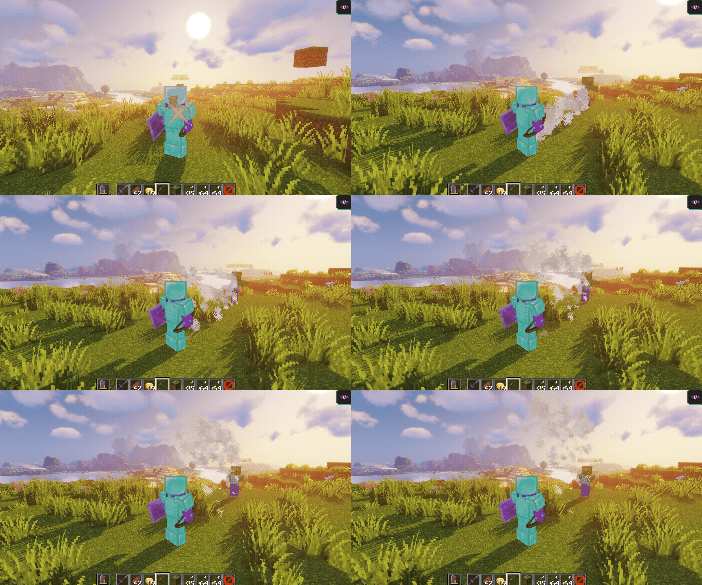
此腳本展示了使用雲粒子的移動射線的效果。
首先,它使用雲粒子從 Boss 拉出一條射線到傷害它的玩家身上。
接著,透過 FinalTarget 與 FinalTarget2 的偏移,讓射線向上平移 10 格。
設定時長為 100 tick,每秒 20 tick 時約為 5 秒。最後一個畫格會精確落在最終目標上。
我們只要把 Z 的 offset 調整成類似 offset: 0,0,10 的值,就能輕鬆讓射線橫向移動:
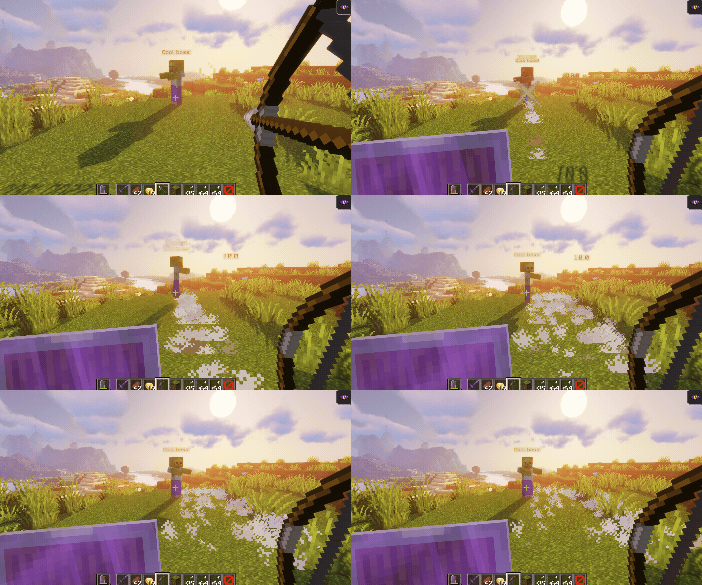
偏移使用世界座標軸;改變視角只會改變畫面上的移動觀感。X 偏移一律沿世界 X 軸移動,與玩家朝向無關。
filter
filter 屬性可以用來只鎖定區域內的特定實體。這些實體可以是:
這些篩選器用於實體查詢,不作用於粒子位置。施法 Boss 若通過形狀檢查,也可能被 ELITE 與 LIVING 包含。PLAYER 本身不會排除旁觀者或其他戰鬥中的玩家。個別動作仍可能有額外的資格規則。
| 值 | 說明 |
|---|---|
PLAYER | 僅目標區域內的玩家(預設) |
ELITE | 區域內被追蹤為精英的活體實體 |
LIVING | 區域內的活體實體,包括玩家 |
範例
eliteScript:
  FilterExample:
    Events:
    - PlayerDamagedByEliteMobEvent
    Zone:
      shape: SPHERE
      radius: 12
      borderRadius: 11
      filter: ELITE
      Target:
        targetType: SELF
        track: false
此片段將區域的實體篩選器設為精英。它還沒有 Actions,不是完整的可執行腳本。原點目標上顯示的 track: false 不會固定動作區域;加入需要固定原點的動作時,請將此設定放在動作的 ZONE_FULL 或 ZONE_BORDER 目標上。