精英脚本区域
区域是由形状定义的位置,可以被脚本编写者用作目标来执行任何类型的动作。
每个脚本只能设置一个 Zone 映射。顶层名称必须使用这个大小写;内部字段名不区分大小写,但形状和过滤器的枚举值必须大写。同一个映射可通过多个原点目标生成多个形状。
要以区域为目标,可以使用目标类型 ZONE_FULL 或 ZONE_BORDER。
区域本身也会使用脚本目标来定义区域将出现在哪里。
省略区域的 Target 时默认为 SELF。其他解析器默认值为 shape: CYLINDER、filter: PLAYER、radius: 5、borderRadius: 1、height: 1、pointRadius: 0.5、animationDuration: 0 和 ignoresSolidBlocks: true。旋转量和长方体尺寸默认为零。请明确设置合适的尺寸;存在默认值不代表完整战斗配置已经通过验证。下表标记的是建议为各形状显式设置的字段,而不是省略后一定会导致解析错误的字段。
尺寸应为有限正数,射线和圆锥的端点应位于同一世界且彼此不同。建议使用固定数值:浮点 ~ 范围会抽取从 min 开始、到 max 为止(不包含 max)的值,并可能反复采样。颠倒的范围(例如 5~1)会使 EliteMobs 跳过整个脚本。大体积会生成大量位置。对于圆柱、圆锥、长方体和射线,当形状周围的包围盒在每个轴上都不超过 256 格时,实体查询会在该包围盒内搜索;球体、穹顶以及更大的形状则会检查形状所在世界中的候选实体。请根据效果控制形状大小和重复频率。
粒子动作使用几何采样位置,而非实体碰撞箱。区域 SPAWN_PARTICLE 动作默认覆盖率约为 30%;若要保留所有采样位置,请在动作目标上显式设置 coverage: 1.0。filter 不会改变粒子位置。下文所述的实体包含检查因形状而异,因此粒子轮廓不代表精确的碰撞边界。
shape
设置区域的形状。有效形状:
| 形状类型 | 详情 | 可动画 | 边界 |
|---|---|---|---|
CYLINDER | 圆柱形 | ❌ | ✅ |
SPHERE | 球形 | ❌ | ✅ |
DOME | 穹顶形(半球) | ❌ | ✅ |
CUBOID | 长方体形 | ❌ | ✅ |
STATIC_RAY | 两个已解析点之间的线,没有独立动画 | ❌ | ❌ |
ROTATING_RAY | 两点之间的旋转线 | ✅ | ❌ |
TRANSLATING_RAY | 从两个起始点移动到两个终点的线 | ✅ | ❌ |
CONE | 圆锥形 | ❌ | ✅ |
可动画
动画形状在动作生成并缓存该形状时开始播放。animationDuration 为正数时,通常在动作启动后、其 wait 之前发生。不同动作可能创建各自的动画形状。
这意味着如果某个动作有等待时间,那么当该动作开始时,区域在动作等待期间就已经在移动了。
区域动画每刻推进。使用 SPAWN_PARTICLE 并设置 repeatEvery: 1 可每刻显示一次。较低的粒子动作频率会减少显示帧数,但区域仍会继续移动。
如果你想制作一个旋转区域的动作,但希望在动作开始前先等待固定刻数,请把它拆成另一个脚本,并通过 RUN_SCRIPT 调用那个脚本。确保 RUN_SCRIPT 上设置了你想要的等待时间。
动画任务结束后,区域保留最后计算出的几何形状。请使用正数动画时长。最后一个动画帧会精确应用配置的旋转,或精确到达最终目标。
animationDuration 为正数时,无论 track 如何设置,每个动作都会在开始时缓存其形状。缓存形状从初始端点开始动画,不跟随移动的 Boss 或玩家。对于静态形状,请在动作的 Target 上设置 track: false 来固定原点;仅在 Zone.Target 上设置不会固定动作形状。缓存寿命请参阅目标指南。
边界
某些区域可以拥有边界。有边界意味着可以把 ZONE_BORDER 用作该区域的目标。边界的定义方式是在第一个较大的形状内部再创建一个较小的形状。较小区域与较大区域之间的那部分空间就是边界。
borderRadius 是内半径,而非边界厚度。请使用非负且小于外半径的值。圆柱会减去同高度的内圆柱,形成侧面环带,不包含上下端盖。长方体边界采样采用单独的规则,可能与其实体边界查询不同。射线没有边界结果,应使用 ZONE_FULL。
示例
eliteScript:
  Example:
    Events:
      - EliteMobDamagedByPlayerEvent
    Zone:
      shape: CYLINDER
      radius: 4
      borderRadius: 3
      height: 8
      Target:
        targetType: SELF
    Actions:
      - action: SPAWN_PARTICLE
        particles:
          - particle: SMOKE_LARGE
        Target:
          targetType: ZONE_BORDER
        repeatEvery: 5
        times: 20
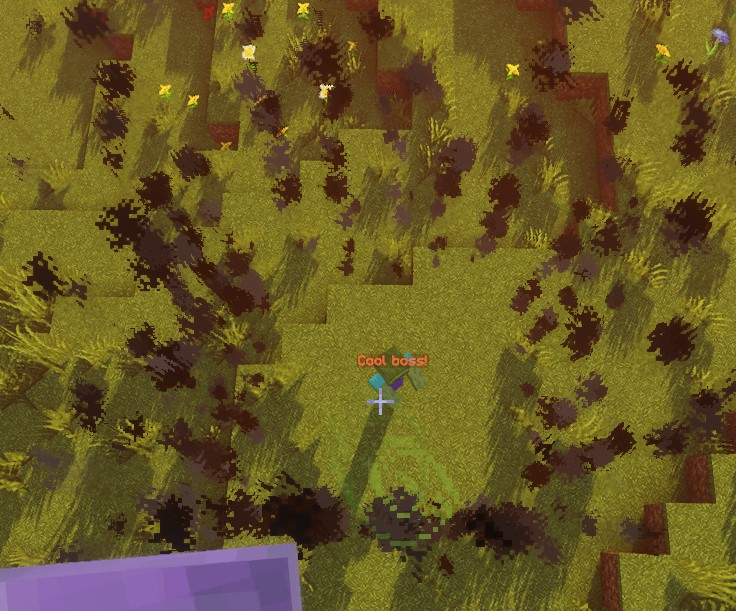
此脚本在采样的边界位置生成 20 次烟雾,间隔 5 刻。第一次立即执行,最后一次在 95 刻后;每秒 20 刻时约为 4.75 秒。重复任务在下一个间隔结束。粒子自身的寿命与动作时序无关。
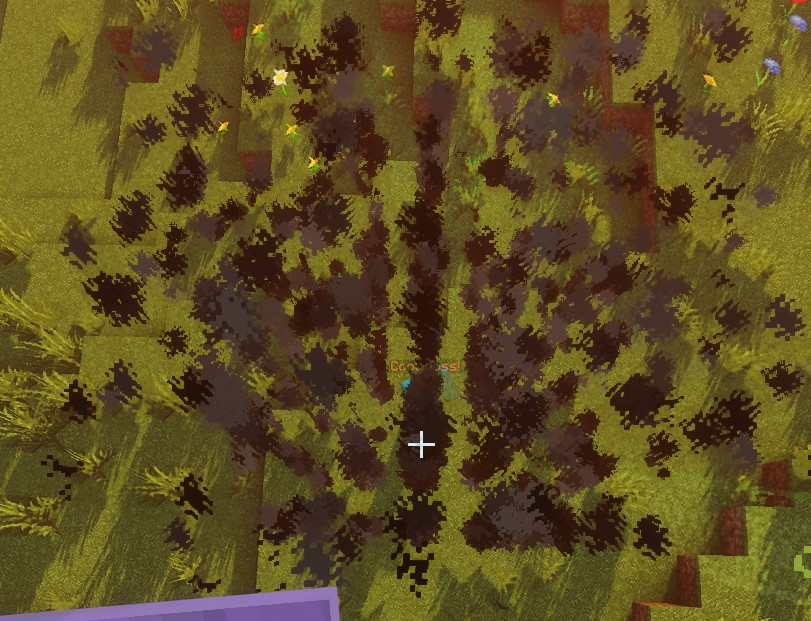
使用 ZONE_FULL 时,粒子采样位置来自整个区域,而不仅是边界:
SPHERE
原点是球心。位置采样使用半径内的整数步长网格。实体检查将每个实体近似为球体,其半径为脚部到眼睛高度的一半,因此实体脚部在区域外时仍可能与区域重叠。边界实体检查也会排除与内球体重叠的实体。
| 键 | 详情 | 显式设置 |
|---|---|---|
shape | 设置区域的形状。应为 SPHERE | ✅ |
target | 设置球体中心的位置 | ✅ |
filter | 设置哪些类型的实体会被作为目标 | ❌ |
radius | 球体的半径 | ✅ |
borderRadius | 内部球体的半径 | ❌ |
示例
eliteScript:
  Example:
    Events:
      - EliteMobDamagedByPlayerEvent
    Zone:
      shape: SPHERE
      radius: 4
      borderRadius: 3
      Target:
        targetType: SELF
    Actions:
      - action: SPAWN_PARTICLE
        particles:
          - particle: CLOUD
        Target:
          targetType: ZONE_FULL
        repeatEvery: 5
        times: 20
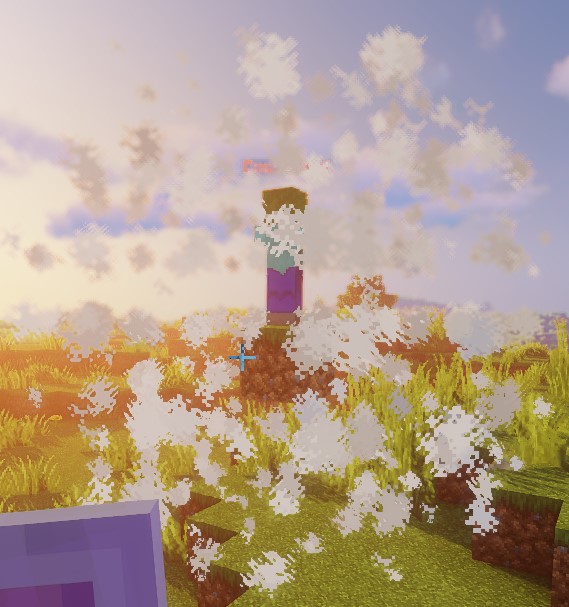
此脚本使用云粒子演示球体的形状。
DOME
粒子从原点高度开始,对上半球采样。当前限制:完整实体查询继承球体的实体检查,没有半球限制,因此 ZONE_FULL 可能选择穹顶下方的实体。边界实体查询额外要求脚部高于 originY - 1;直接位置检查也使用该阈值。不要把穹顶粒子显示当作命中区域仅限上半球的证明。
| 键 | 详情 | 显式设置 |
|---|---|---|
shape | 设置区域的形状。应为 DOME | ✅ |
target | 设置穹顶中心的位置 | ✅ |
filter | 设置哪些类型的实体会被作为目标 | ❌ |
radius | 穹顶的半径 | ✅ |
borderRadius | 内部穹顶的半径 | ❌ |
示例
eliteScript:
  Example:
    Events:
      - EliteMobDamagedByPlayerEvent
    Zone:
      shape: DOME
      radius: 4
      borderRadius: 3
      Target:
        targetType: SELF
    Actions:
      - action: SPAWN_PARTICLE
        particles:
          - particle: CLOUD
        Target:
          targetType: ZONE_FULL
        repeatEvery: 5
        times: 20
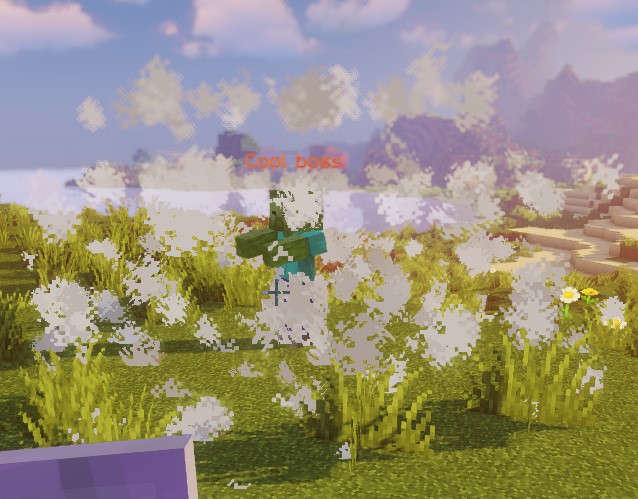
此脚本使用云粒子演示穹顶的形状。
CONE
对于每个原点,圆锥使用 Target2 解析出的第一个位置。附近玩家查询不按距离排序;若必须瞄准特定实体,请使用单一目标。
Target 为尖端,Target2 为底面中心;两者距离决定圆锥高度。两点应不同且位于同一世界。实体检查会测试脚部、碰撞箱中心和顶部,而非精确的碰撞箱交集。采样位置使用世界整数坐标网格。
| 键 | 详情 | 显式设置 |
|---|---|---|
shape | 设置区域的形状。应为 CONE | ✅ |
target | 设置圆锥顶点(尖端)的位置 | ✅ |
target2 | 设置圆锥底面中心的位置 | ✅ |
filter | 设置哪些类型的实体会被作为目标 | ❌ |
radius | 圆锥底面的半径 | ✅ |
borderRadius | 内部圆锥的半径 | ❌ |
示例
eliteScript:
  Example:
    Events:
    - EliteMobDamagedByPlayerEvent
    Zone:
      shape: CONE
      radius: 10
      Target:
        targetType: SELF
        offset: 0,0,0
      Target2:
        targetType: SELF
        offset: 0,10,0
    Actions:
      - action: SPAWN_PARTICLE
        particles:
        - particle: CLOUD
        Target:
          targetType: ZONE_FULL
          coverage: 0.8
        repeatEvery: 5
        times: 20
此脚本使用云粒子演示圆锥的形状。请注意,这个区域是 CONE 形状,也就是说它是一个三维体积,如果你想制作扇形横扫效果,这一点很重要。
CYLINDER
原点是底面中心。圆柱向上延伸 height,而非在原点上下等距展开。实体检查要求整个碰撞箱的高度都位于底面与顶面之间,同时通过水平检查。因此,高度为 1 的视觉圆柱通常无法选择站立的玩家。实体动作应使用足够的高度和合适的原点。
| 键 | 详情 | 显式设置 |
|---|---|---|
shape | 设置区域的形状。应为 CYLINDER | ✅ |
target | 底面中心 | ✅ |
filter | 设置哪些类型的实体会被作为目标 | ❌ |
radius | 圆柱的半径 | ✅ |
borderRadius | 内部圆柱的半径 | ❌ |
height | 圆柱的高度 | ✅ |
示例
eliteScript:
  Example:
    Events:
      - EliteMobDamagedByPlayerEvent
    Zone:
      shape: CYLINDER
      radius: 4
      borderRadius: 3
      height: 8
      Target:
        targetType: SELF
    Actions:
      - action: SPAWN_PARTICLE
        particles:
          - particle: CLOUD
        Target:
          targetType: ZONE_FULL
        repeatEvery: 5
        times: 20
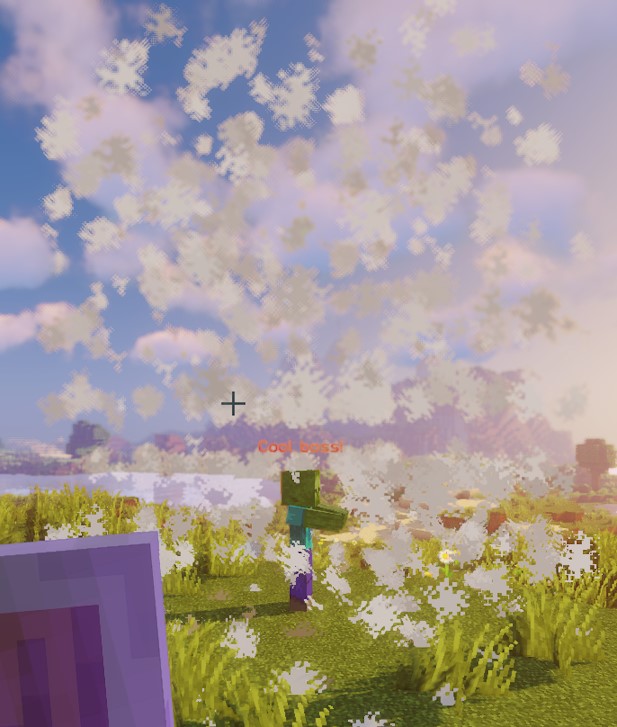
此脚本使用云粒子演示圆柱的形状。
CUBOID
当前长方体实现对采样位置、单点检查和实体检查使用不同的边界。采样点在中心周围横跨 x 和 z 格,并向上延伸 y 格。实体重叠检查使用 x / 2 和 z / 2 的半宽,但只向上延伸 y / 2。直接点检查则使用 ±x、±y 和 ±z。不要假定粒子长方体与实体查询覆盖相同体积;请在服务器上检查预期的战斗几何范围。原生 Lua 长方体也有此限制。
对于正整数尺寸,粒子 X 坐标从 -floor(x / 2) 到 x - 1 - floor(x / 2),Z 同理,垂直坐标从 0 到 y - 1。实体边界改用原点的方块坐标,并向下取整水平边缘。边界粒子保留 Y <= yBorder 且 X 或 Z 位于内部半宽之外的采样点;这不是完整的外长方体减去内长方体形成的壳。
| 键 | 详情 | 显式设置 |
|---|---|---|
shape | 设置区域的形状。应为 CUBOID | ✅ |
target | 设置长方体中心的位置 | ✅ |
filter | 设置哪些类型的实体会被作为目标 | ❌ |
x | 设置长方体的长度 | ✅ |
y | 设置长方体的高度 | ✅ |
z | 设置长方体的宽度,默认与 x 相同 | ❌ |
xBorder | 设置内部长方体的长度 | ❌ |
yBorder | 设置内部长方体的高度 | ❌ |
zBorder | 内长方体宽度;设为 0 且 xBorder 非零时,使用 xBorder | ❌ |
示例
eliteScript:
  Example:
    Events:
      - EliteMobDamagedByPlayerEvent
    Zone:
      shape: CUBOID
      x: 4
      y: 4
      z: 4
      xBorder: 3
      yBorder: 3
      zBorder: 3
      Target:
        targetType: SELF
    Actions:
      - action: SPAWN_PARTICLE
        particles:
          - particle: CLOUD
        Target:
          targetType: ZONE_FULL
        repeatEvery: 5
        times: 20
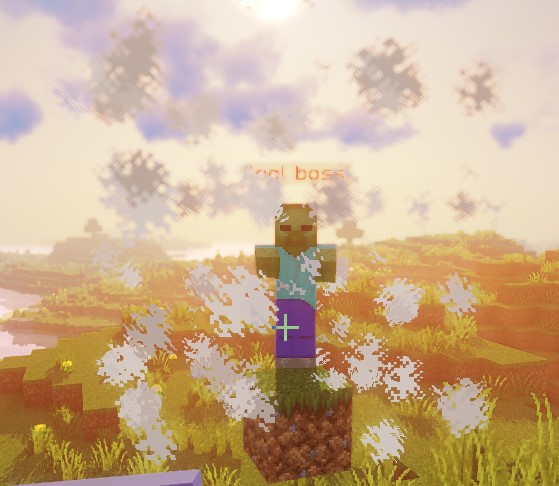
此脚本使用云粒子演示长方体的形状。
STATIC_RAY
每个解析出的 Target 原点会与同一世界中每个解析出的 Target2 端点配对。STATIC_RAY 没有独立动画,但动作目标默认 track: true,因此重复动作会根据当前端点重新生成射线。若要固定端点,请在动作目标上设置 track: false。
pointRadius 同时控制采样步长和命中半径,而非完整直径。静态和平移射线最多前进 500 步,最大采样距离约为 500 * pointRadius 格。旋转射线使用 2 * pointRadius 的步长。请使用严格正数。ignoresSolidBlocks: false 会在采样到固体方块时停止;这不是连续碰撞检测,大步长可能跳过障碍。实体检查会测试实体与采样点周围球体的重叠。
| 键 | 详情 | 显式设置 |
|---|---|---|
shape | 设置区域的形状。应为 STATIC_RAY | ✅ |
target | 设置线段第一个端点的位置 | ✅ |
target2 | 设置线段最后一个端点的位置 | ✅ |
filter | 设置哪些类型的实体会被作为目标 | ❌ |
ignoresSolidBlocks | 设置射线是否会穿透固体方块。默认为 true | ❌ |
pointRadius | 设置射线的粗细。默认为 0.5 格。 | ❌ |
示例
eliteScript:
  Example:
    Events:
      - EliteMobDamagedByPlayerEvent
    Zone:
      shape: STATIC_RAY
      Target2:
        targetType: DIRECT_TARGET
        offset: 0,1,0
      Target:
        targetType: SELF
        offset: 0,1,0
    Actions:
      - action: SPAWN_PARTICLE
        particles:
          - particle: CLOUD
        Target:
          targetType: ZONE_FULL
        repeatEvery: 5
        times: 20
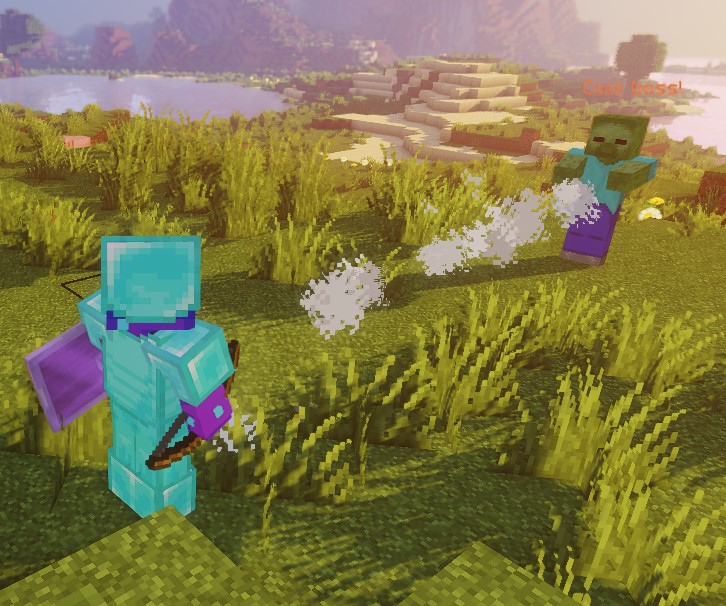
此脚本使用云粒子演示静态射线的形状。
两端均使用 offset: 0,1,0,使射线位于脚部上方一格。这不一定是所有高度实体的身体中部。
ROTATING_RAY
旋转值以度为单位,时长以刻为单位。每个原点与同一世界中每个有效的 Target2 配对,起始端点固定作为旋转支点。初始和动画中的俯仰角与偏航角都可使用正负值。完整的预旋转射线在首个动画刻之前就已存在,时长为零时也是如此。起始端点必须彼此不同。负数时长和非有限值会被拒绝。
| 键 | 详情 | 显式设置 |
|---|---|---|
shape | 设置区域的形状。应为 ROTATING_RAY | ✅ |
filter | 设置哪些类型的实体会被作为目标 | ❌ |
target | 设置线段第一个端点的位置 | ✅ |
target2 | 设置线段最后一个端点的位置 | ✅ |
animationDuration | 设置旋转所需的时间(以刻为单位) | ✅ |
pitchPreRotation | 在动画开始前对俯仰角(pitch)施加一个初始旋转 | ❌ |
yawPreRotation | 在动画开始前对偏航角(yaw)施加一个初始旋转 | ❌ |
pitchRotation | 设置动画的俯仰角旋转量 | ❌ |
yawRotation | 设置动画的偏航角旋转量 | ❌ |
ignoresSolidBlocks | 设置射线是否会穿透固体方块。默认为 true | ❌ |
pointRadius | 设置射线的粗细。默认为 0.5 格。 | ❌ |
示例
eliteScript:
  Example:
    Events:
      - EliteMobDamagedByPlayerEvent
    Zone:
      shape: ROTATING_RAY
      animationDuration: 100
      pitchPrerotation: 0
      yawPrerotation: 0
      pitchRotation: 0
      yawRotation: 360
      ignoresSolidBlocks: true
      Target:
        targetType: SELF
        offset: 0,1,0
      Target2:
        targetType: DIRECT_TARGET
        offset: 0,1,0
    Actions:
      - action: SPAWN_PARTICLE
        particles:
          - particle: CLOUD
        Target:
          targetType: ZONE_FULL
        repeatEvery: 1
        times: 100
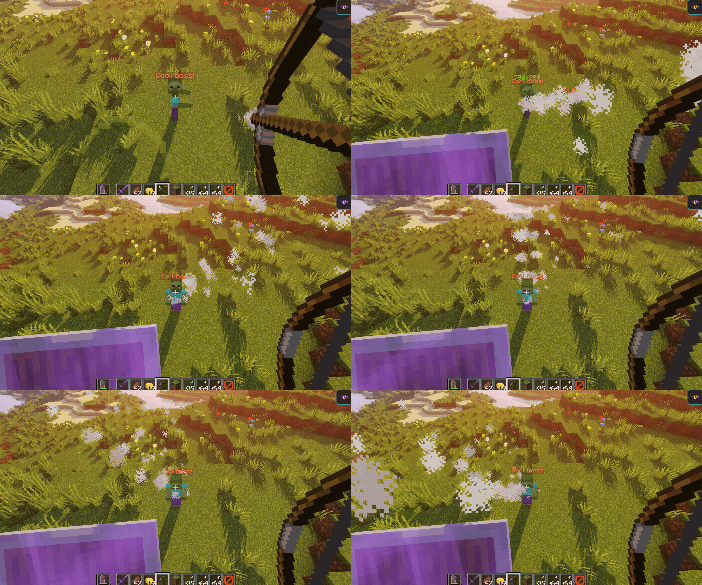
此脚本展示了使用云粒子的旋转射线的效果。
首先,它用云粒子创建一条从 Boss 指向伤害它的玩家的射线。然后,它用 offset 把两端位置略微上移一格。
接着,射线在 100 刻内围绕 Boss 一侧的原点旋转 360 度。目标玩家决定初始方向,而非旋转中心。负的俯仰角和偏航角值会朝相反方向旋转。
TRANSLATING_RAY
每组初始 Target / Target2 使用第一个解析出的 FinalTarget 和 FinalTarget2。省略某个最终目标时,对应端点会留在起始位置。请将所有端点放在同一世界。正数时长会动画到精确的目的地;时长为零时初始射线保持静止。负数时长会被拒绝。
| 键 | 详情 | 显式设置 |
|---|---|---|
shape | 设置区域的形状。应为 TRANSLATING_RAY | ✅ |
filter | 设置哪些类型的实体会被作为目标 | ❌ |
animationDuration | 设置平移所需的时间(以刻为单位) | ✅ |
target | 设置线段第一个端点的位置 | ✅ |
finalTarget | 设置线段第一个端点的终点位置 | ✅ |
target2 | 设置线段第二个端点的位置 | ✅ |
finalTarget2 | 设置线段第二个端点的终点位置 | ✅ |
ignoresSolidBlocks | 设置射线是否会穿透固体方块。默认为 true | ❌ |
pointRadius | 设置射线的粗细。默认为 0.5 格。 | ❌ |
示例
eliteScript:
  Example:
    Events:
      - EliteMobDamagedByPlayerEvent
    Zone:
      shape: TRANSLATING_RAY
      Target:
        targetType: SELF
      FinalTarget:
        targetType: SELF
        offset: 0,10,0
      Target2:
        targetType: DIRECT_TARGET
      FinalTarget2:
        targetType: DIRECT_TARGET
        offset: 0,10,0
      animationDuration: 100
      ignoresSolidBlocks: true
    Actions:
      - action: SPAWN_PARTICLE
        particles:
          - particle: CLOUD
        Target:
          targetType: ZONE_FULL
        repeatEvery: 1
        times: 100
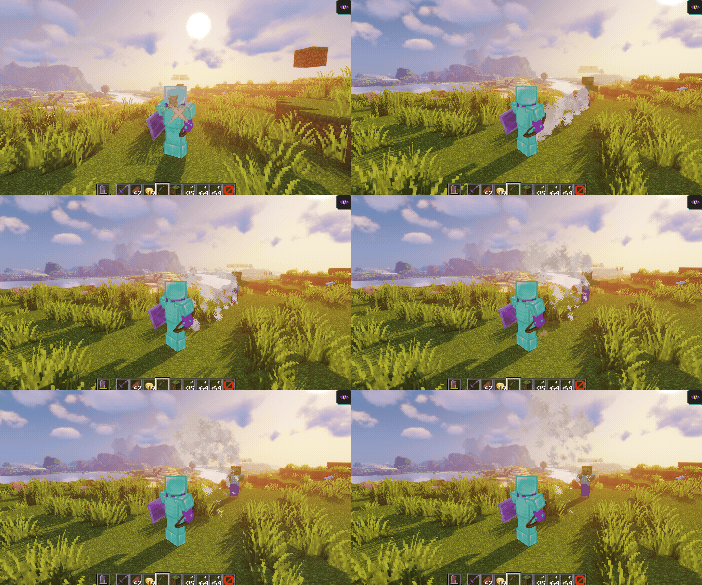
此脚本展示了使用云粒子的移动射线的效果。
首先,它用云粒子创建一条从 Boss 指向伤害它的玩家的射线。
然后,通过 FinalTarget 和 FinalTarget2 的偏移,使射线向上平移 10 格。
配置时长为 100 刻,每秒 20 刻时约为 5 秒。最后一帧会精确落在最终目标上。
我们只需把 Z 方向的 offset 调整为类似 offset: 0,0,10 的值,就能轻松让射线横向移动:
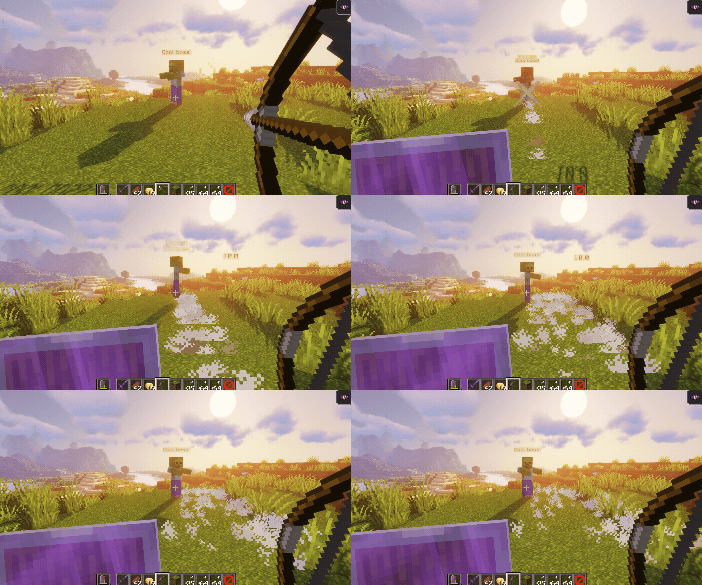
偏移使用世界坐标轴;改变视角只会改变屏幕上的移动观感。X 偏移始终沿世界 X 轴移动,与玩家朝向无关。
filter
filter 属性可用于只把区域内特定的实体作为目标。这些实体可以是:
这些过滤器用于实体查询,不作用于粒子位置。施法 Boss 若通过形状检查,也可能被 ELITE 和 LIVING 包含。PLAYER 本身不会排除旁观者或其他战斗中的玩家。具体动作仍可能有额外的资格规则。
| 值 | 详情 |
|---|---|
PLAYER | 仅目标区域内的玩家(默认) |
ELITE | 区域内被追踪为精英的活体实体 |
LIVING | 区域内的活体实体,包括玩家 |
示例
eliteScript:
  FilterExample:
    Events:
    - PlayerDamagedByEliteMobEvent
    Zone:
      shape: SPHERE
      radius: 12
      borderRadius: 11
      filter: ELITE
      Target:
        targetType: SELF
        track: false
此片段将区域的实体过滤器设为精英。它尚无 Actions,不是完整的可运行脚本。原点目标上显示的 track: false 不会固定动作区域;添加需要固定原点的动作时,请将此设置放在动作的 ZONE_FULL 或 ZONE_BORDER 目标上。