创建任务

示例任务
这个简化示例采用随插件提供的 test_quest.yml 格式。
在服务器目录下的 plugins/EliteMobs/customquests/ 中创建名称唯一的 .yml 文件。使用 /em reload 加载任务及其引用的内容,然后按下文将任务分配给 NPC。
test_quest.yml
isEnabled: true
customObjectives:
  Objective1:
    amount: '1'
    filename: test_boss.yml
    objectiveType: KILL_CUSTOM
customRewards:
- filename=magmaguys_toothpick.yml:amount=1:chance=1
name: "&aKill the Test Boss"
questLore:
- "&cEnd the test boss' reign of terror!"
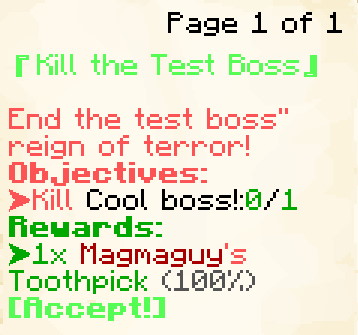
截图展示旧版书本界面。/em alt 会切换菜单偏好:Java 玩家选择该偏好后,在 Minecraft 1.21.6 之前使用书本,较新版本使用 Minecraft 对话框。Bedrock 玩家和选择背包菜单的玩家使用背包界面。
这个示例任务会给玩家下达击杀 1 个 test_boss.yml 的任务。(任务追踪器中显示的 Boss 实际名称将是 test_boss.yml 中设置的 name:。)作为完成任务的奖励,他们会获得 1 个 Magmaguy's Toothpick。
接受任务时所有目标同时启用;Objective1、Objective2 等键不规定顺序。必须满足全部目标才能获得奖励。默认还需向 NPC 交任务。若在 Quests.yml 中设置 requireQuestTurnIn: false,目标完成后会立即尝试结算,包括检查和消耗收集物品。maximumActiveQuests 默认将已接受任务限制为 10 个。
创建自定义任务
isEnabled
设定任务是否启用。
| 键 | 值 | 默认值 |
|---|---|---|
isEnabled | 布尔值 | true |
示例
isEnabled: true
customObjectives
设定任务目标。
| 键 | 值 | 默认值 |
|---|---|---|
customObjectives | 特殊 [1] | 无 |
多阶段 Boss 应引用第一阶段的文件名。只有 Boss 死亡才计入进度,阶段切换不算。KILL_CUSTOM 匹配自定义 Boss 的文件名,不把 questLevel 当作击杀目标的最低等级。
示例
KILL_CUSTOM:
customObjectives:
  Objective1:
    amount: '1'
    filename: my_cool_boss.yml
    objectiveType: KILL_CUSTOM
DIALOG:
customObjectives:
  Objective1:
    dialog:
    - "&a[Dialog NPC] &fCome here often?"
    - "&7&oI should eat more apples."
    filename: dialog_npc.yml
    npcName: Dialog NPC
    location: at dialog location.
    objectiveType: DIALOG
FETCH_ITEM:
收集目标统计背包中匹配的 EliteMobs 自定义物品标签。交任务时,会先使用同一份背包快照检查所有收集目标,再移除物品或发放奖励。若两个目标要求同一种物品,需要它们的数量总和,不能重复使用同一堆物品。丢弃物品可能使已达成的收集目标重新变为未完成。
customObjectives:
  Objective1:
    amount: '99'
    itemName: Red Apples
    filename: my_quest_item_red_apples.yml
    objectiveType: FETCH_ITEM
ARENA:
customObjectives:
  Objective1:
    objectiveType: ARENA
    filename: my_arena.yml
    name: "Complete the Arena"
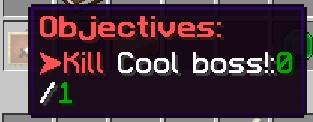
特殊 [1]
展开表格
自定义目标使用以下值来构建:
| 键 | 描述 |
|---|---|
objectiveType | 目标类型:KILL_CUSTOM 击杀自定义 Boss,FETCH_ITEM 收集自定义物品,DIALOG 与 NPC 对话,ARENA 完成竞技场,CLASS_UNLOCK 检查职业解锁。 |
filename | 必填的 .yml 文件名,指向 Boss、物品、对话 NPC、竞技场或职业训练师。使用已加载的定义,不是显示名称。缺少 filename,或 objectiveType 缺失或未知的目标,会导致整个任务被禁用并在控制台给出警告。无效的 CLASS_UNLOCK 会保留在任务中,但无法完成。提供任务前应修复所有警告。 |
amount | 需要击杀的 Boss 数或收集数量,使用正整数;默认为 1。小于 1 的值会禁用该任务。DIALOG、ARENA 和 CLASS_UNLOCK 的目标数量均为一,忽略此字段。 |
dialog | 仅 DIALOG —— 玩家与该 NPC 对话时它所说的台词。 |
location | 仅 DIALOG —— 关于该 NPC 位置的自由文本提示,在任务菜单的摘要行中以 $location 显示。 |
name / npcName / itemName | FETCH_ITEM、DIALOG、ARENA 和 CLASS_UNLOCK 显示标签的可选别名,只设置一个。三者均可翻译,可用于专门措辞或隐藏信息。不设置时,FETCH_ITEM 使用物品的翻译名称,DIALOG 使用 NPC 的翻译名称。KILL_CUSTOM 使用 Boss 配置的名称。 |
class | 仅 CLASS_UNLOCK: 要检查的职业形态 ID,例如 adventurer。 |
提供非空的 customObjectives 映射,每个目标使用唯一的键(Objective1、Objective2 等)。字段名区分大小写,目标类型使用上表的大写值。使用 KILL_CUSTOM:filename=X.yml:amount=Y 等单行字符串的旧任务会在首次加载时自动转换并保存。
目标标签有独立的翻译条目,以任务文件名和 customObjectives.Objective1.itemName 这样的字段路径标识。即使底层物品已翻译,也需要翻译语言 CSV 中的这一条。缺少翻译时会保留原始覆盖标签,避免泄露隐藏的物品名称。源文本保留在任务 YAML 中,已有翻译修改也会保留。
FETCH_ITEM 的行为
FETCH_ITEM 识别物品的文件名标签,不检查材质、显示名称或描述。接受任务前获得的物品也算,包括护甲槽和副手。接受任务、拾取或丢弃匹配物品以及任务奖励会安排下一 tick 重新统计。其他背包变化可能不会立即更新显示,但交任务时必定重新检查。成功时消耗所需物品;合计数量不足则取消,不会部分扣除。
DIALOG 在玩家与匹配的 NPC 交互时推进,早于该 NPC 的普通菜单打开,不要求读完对话。location 只是文字提示,不是指南针坐标。ARENA 要求在任务有效期间完成指定竞技场,之前的完成记录不计入。
职业解锁目标
CLASS_UNLOCK 检查通过高级战斗系统解锁的职业,不会直接授予职业。例如:
customObjectives:
  Objective1:
    objectiveType: CLASS_UNLOCK
    class: adventurer
    filename: class_trainer_adventurer.yml
class 必须标识现有职业形态。filename 将追踪指向训练师 NPC;可用 name 覆盖显示名称。目标数量为一,能识别接受任务前已解锁但当前未装备的职业。职业进度功能必须可用,结算时还会重新检查解锁状态。无效职业或缺失训练师文件名会留下无法完成的目标,不会直接跳过。
追踪与放弃
每位玩家只能追踪一个任务。Quests.yml 中 autoTrackNextQuestOnCompletion: true 会在追踪任务结算后的下一 tick 选择另一个进行中且可追踪的任务。questAutoTrackNextMessage 支持 $questName。autoTrackQuestsOnAccept 也默认为 true,但当前调用的是追踪开关:正在追踪时再接受任务,可能停止追踪而不是切换。必要时从菜单重新选择追踪。
指南针搜索支持的目的地:自定义 Boss、对话或训练师 NPC,以及战利品表包含目标物品的 Boss 和宝箱。它不会找到所有物品来源;竞技场和动态击杀目标没有专门的目的地搜索。目标在其他世界时,可以指向合适的直达虫洞或显示目标世界,但不保证存在可通行路线。缺少目的地不影响目标进度。
正常放弃操作需要再次确认,文字和悬浮说明由 questAbandonConfirmationText、questAbandonConfirmationHover 设置。放弃会移除进行中的任务及其追踪,不会启动 questLockoutMinutes 的完成冷却,也不会授予完成标记。满足通常条件时仍可重新接受。
NPC 任务标记因玩家而异,在 30 格内显示。指南针包含上下方向提示。Boss 血条对话会独占该区域,隐藏其他受管理血条,并移除旧的 hideKeyedBossBarsDuringQuestDialogue 开关。hideQuestScoreboardDuringQuestDialogue 单独控制侧边记分板。
Java 血条对话中,潜行先显示当前页全文,再次操作推进下一页。对话施加最多 30 秒的缓慢 III,而非完全冻结玩家。受到未取消且大于零的伤害会关闭任务界面及对话。Bedrock 使用聊天显示这类对话。对话图案需要对应资源包素材。
customRewards
设定任务奖励。
| 键 | 值 | 默认值 |
|---|---|---|
customRewards | EliteMobs 通用战利品格式 | 无 |
示例
customRewards:
- currencyAmount=50:amount=1:chance=0.05
- material=COOKED_COD:amount=3:chance=1.0
- filename=magmaguys_toothpick.yml:amount=1:chance=1.0
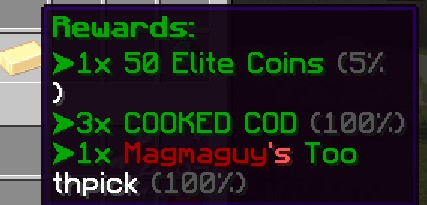
自定义任务不会自动生成奖励条目。customRewards 为空时,这张表不发物品或货币;单独设置的完成命令仍会执行。自动奖励条目适用于动态任务。
编写的可缩放物品奖励使用玩家当前选择的动态副本等级或战斗等级,有 10% 概率加一级。固定或限制等级物品仍遵循原有缩放规则。questLevel 不决定实际奖励物品的等级。
任务奖励是直接发放的:物品会直接进入玩家背包(放不下的会掉在他们脚边),货币会加入他们的余额。若要在完成时运行命令,请使用 questCompleteCommands,而不是 command= 战利品条目。
预览和发放分别抽取。显示的随机物品或等级加成不会预留给玩家。
questAcceptPermission
接受任务前必须拥有的一个 EliteMobs 完成标记。权限插件授予的同名普通权限不能满足检查。
| 键 | 值 | 默认值 |
|---|---|---|
questAcceptPermission | 字符串 | 无 |
示例
questAcceptPermission: elitequest.my_permission
questAcceptPermissions
要求列出的所有 EliteMobs 完成标记。如果也设置了 questAcceptPermission,还需同时满足该标记。
| 键 | 值 | 默认值 |
|---|---|---|
questAcceptPermissions | 字符串列表 | 无 |
示例
questAcceptPermissions:
- elitequest.my_previous_quest_one.yml
- elitequest.my_previous_quest_two.yml
questLockoutPermission
设置成功结算后授予的标记。它可以解锁后续任务,并在 questLockoutMinutes 为零或负数时防止重复此任务。省略标记不会禁用正数的定时锁定。
| 键 | 值 | 默认值 |
|---|---|---|
questLockoutPermission | 字符串 | 无 |
示例
questLockoutPermission: elitequest.my_quest.yml
questLockoutMinutes
设定玩家在能够再次进行该任务之前必须等待多长时间(以分钟为单位)。
| 键 | 值 | 默认值 |
|---|---|---|
questLockoutMinutes | 整数 | -1(使用下述标记规则) |
共有两套锁定系统,而这个键决定使用哪一套:
- 任何大于
0的值都会使用定时锁定追踪器。玩家在上交任务之后的这么多分钟内被锁定,无法再接该任务;再次尝试接取时会被告知还剩多久,并且可用性检查会忽略questLockoutPermission。 0或更小则回退到旧式的questLockoutPermission标记,该标记在完成时被永久授予。如果也没有设置questLockoutPermission,那么该任务保持可重复。
两项同时设置且时长为正时,仍会授予完成标记,但标记会在相同时长后过期。依赖该标记的后续任务必须在过期前接受。定时锁定按任务文件名保存,与前置条件使用的标记独立。
示例
questLockoutMinutes: 60
name
设定任务名称。接受 颜色代码。
| 键 | 值 | 默认值 |
|---|---|---|
name | 字符串 | 空 |
示例
name: "&aMy Great Quest Name"
questLore
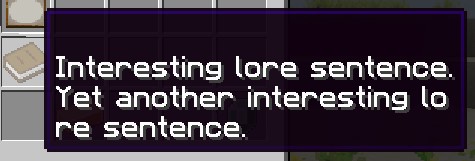
设定任务的 lore(描述文本),它会出现在游戏内的任务菜单中。
| 键 | 值 | 默认值 |
|---|---|---|
questLore | 字符串列表 | 无 |
示例
questLore:
- "Interesting lore sentence."
- "Yet another interesting lore sentence."
temporaryPermissions
接受任务时授予实际 Bukkit 权限,登录后恢复进行中任务时重新应用。完成或放弃任务会移除这些权限,退出登录则会释放它们,直到下次登录。每个任务分别授予自己的节点,因此两个进行中的任务可以共用一个节点:结束其中一个任务后,该节点仍由另一个任务保持授予。
正常物品生成还需在物品文件中配置相同权限,但该检查不覆盖所有发放路径。
| 键 | 值 | 默认值 |
|---|---|---|
temporaryPermissions | 字符串列表 | 无 |
示例
temporaryPermissions:
- elitequest.item_that_should_drop_only_during_quest.yml
questAcceptDialog
设定接受任务时在聊天中出现的对白。
当任务对话 Boss 血条被启用时,这个列表同时也用作任务发布者在任务被接受之前在对话框中说出的对白。如果它为空,则改用 questLore 作为那段对白。
| 键 | 值 | 默认值 |
|---|---|---|
questAcceptDialog | 字符串列表 | 无 |
示例
questAcceptDialog:
- "My hero! You are so helpful!"
- "I wish you the best of luck!"

questCompleteMessage
设置交任务相关的对话。启用 Quests.yml 中的 useQuestDialogueBossBars 后,可能在提交菜单打开前显示;否则在成功结算时显示。最近已显示过的提交对话不会在结算时重复。Bedrock 使用聊天文字。看到该对话本身不证明已经发放奖励。
| 键 | 值 | 默认值 |
|---|---|---|
questCompleteMessage | 字符串列表 | 无 |
示例
questCompleteMessage:
- "My hero! You have completed my difficult quest!"
- "As a reward you can have this loaf of bread!"

questCompleteCommands
设定完成任务时将运行的命令。命令由控制台派发,因此不要加开头的斜杠,也不要依赖玩家自身拥有相应权限。
支持的占位符:$player 表示玩家名称,$getWorld 表示玩家所在世界的名称,$getX、$getY、$getZ 表示玩家所在位置的坐标。
| 键 | 值 | 默认值 |
|---|---|---|
questCompleteCommands | 字符串列表 | 无 |
示例
questCompleteCommands:
- say $player has finished a quest at $getX, $getY, $getZ!
- give $player diamond 1

turnInNPC
设置交任务的 NPC 文件名,可与发布者不同;省略时使用原发布者。独立的接收 NPC 应使用 interactionType: CUSTOM_QUEST_GIVER,其提供任务列表可以为空。
| 键 | 值 | 默认值 |
|---|---|---|
turnInNPC | 文件名 | 无 |
示例
turnInNPC: my_cool_quest_npc.yml
任务发布者
要将任务分配给某个会向玩家发布它的 NPC,你需要配置 NPC 文件,而不是任务文件。
在 NPC 配置文件(plugins/EliteMobs/npcs/)中添加:
interactionType: CUSTOM_QUEST_GIVER
questFileName:
- my_quest.yml
对于发布多个任务的 NPC:
interactionType: CUSTOM_QUEST_GIVER
questFileName:
- quest_one.yml
- quest_two.yml
即使只有一个任务,也必须使用 YAML 列表。标量 questFileName: my_quest.yml 不会作为提供列表加载。打开列表需要 interactionType: CUSTOM_QUEST_GIVER。
关于配置 NPC 的更多信息,请参阅 NPC 创建文档。
trackable
允许手动或自动指南针追踪。设为 false 不会停止目标进度、奖励或临时进度记分板。
| 键 | 值 | 默认值 |
|---|---|---|
trackable | 布尔值 | true |
示例
trackable: true
questLevel
设定任务的等级。这只是一个视觉参考,方便玩家了解任务会有多大挑战性。它不会以任何方式修改 Boss、物品或其他等级。
| 键 | 值 | 默认值 |
|---|---|---|
questLevel | 整数 | 0 |
示例
questLevel: 10
questAcceptSound
设定接受任务时播放的音效。既可以播放 Minecraft 音效,也可以播放资源包中的音效。未设置此项时,EliteMobs 会改为播放 SoundsConfig 中的全局任务接受音效。
| 键 | 值 | 默认值 |
|---|---|---|
questAcceptSound | 字符串 | 无 |
示例
questAcceptSound: entity.experience_orb.pickup
questCompleteSound
设定完成(上交)任务时播放的音效。既可以播放 Minecraft 音效,也可以播放资源包中的音效。未设置此项时,EliteMobs 会改为播放 SoundsConfig 中的全局任务完成音效。
| 键 | 值 | 默认值 |
|---|---|---|
questCompleteSound | 字符串 | 无 |
示例
questCompleteSound: entity.player.levelup
本地化支持
以下字段支持本地化,适用于多语言服务器:
namequestLorequestAcceptDialogquestCompleteMessagecustomObjectives的每个条目内部:dialog、name、npcName、itemName和location
这使你能够为服务器上的不同语言提供翻译。
权限
如上方表格所述,权限通常是 Strings(字符串)或 String Lists(字符串列表)。但下面我们更详细地讲解你将如何使用它们来锁定和解锁任务。
重要: questAcceptPermission 与 questAcceptPermissions 检查 EliteMobs 内部标记,而非普通权限。完成带有匹配 questLockoutPermission 的任务会创建标记。通过 LuckPerms 授予同名权限不会解锁任务。temporaryPermissions 则在任务进行期间授予真实权限。
假设你正在制作一系列规划好的任务中的 quest_3,并且不希望玩家在完成 quest_2 之前就能接受 quest_3。我们会这样配置任务文件:
questAcceptPermission: elitequest.quest_2.yml
questLockoutPermission: elitequest.quest_3.yml
任务 2 必须通过自己的 questLockoutPermission 授予 elitequest.quest_2.yml,任务 3 再用 questAcceptPermission 要求该标记。使用默认的非正数时长时,完成任务 3 会授予其永久标记并防止重复。另一个 NPC 提供同一进行中任务,并不会创建独立的第二份。
如果你想制作一个只有在玩家完成了一系列任务后才会变得可用的任务,那么你会这样配置任务文件:
questAcceptPermissions:
- elitequest.quest_2.yml
- elitequest.quest_3.yml
- elitequest.quest_4.yml
要在接受任务后允许物品正常生成,可向 temporaryPermissions 添加节点,并在物品的 permission 字段使用相同节点。
例如,我们会打开任务文件并添加以下内容:
temporaryPermissions:
- elitequest.my_cool_item.yml
然后我们会打开物品文件,在我们的例子中即 my_cool_item.yml,并添加以下内容:
permission: elitequest.my_cool_item.yml
现在,任务会在进行期间授予正常物品生成所检查的节点,并在完成或放弃任务时将其移除。
队伍与共享击杀计数
任务始终属于个人:加入队伍不会为其他玩家接受、提交或奖励任务。成员获得击杀计数时,同一世界且位于 sharedProgressRange(Party.yml 中默认 128 格)内的在线成员也会推进自己的匹配进行中击杀目标,包括特定自定义 Boss。
收集物品、NPC 对话和竞技场目标不会共享。接收者需要自己的匹配任务及已加载的玩家数据。如果其比赛已过等待或启动阶段,还必须属于比赛开始时的参赛名单。检查不会额外比较其副本与击杀来源副本是否相同,但同一世界内的距离条件仍然适用。
动态任务
动态任务(Dynamic Quests)是由 EliteMobs 自动创建并刷新的程序化生成任务。与在配置文件中定义的自定义任务不同,动态任务无需手动设置,并会随每位玩家的进度而适应调整。
工作原理
- 发布者: 使用
interactionType: QUEST_GIVER的 NPC。提供内容来自动态池,不是questFileName。 - 任务层级: 先将战斗等级限制为 1–100,整数除以五,再把层级限制为 1–20。战斗等级 45 对应层级 9。层级决定模板池与击杀数,目标最低等级则使用玩家限制后的战斗等级。
- 每层三个模板: 每个模板从
Quests.yml的questEntityTypes选择实体类型。未知的实体类型以及没有 EliteMobs 怪物属性的类型会被跳过并给出警告;如果列表中没有可用条目,动态任务将不再提供。每个模板还会在tier + 1到tier * 10之间(包含两端)选择击杀数。匹配类型的 Elite Mob 必须达到或超过最低等级;普通原版怪物不算。 - 刷新: 所有模板每 1200 tick 更新,20 TPS 时约为 60 秒。已有任务及进度保留。菜单合并已有动态任务与当前层级的三个模板,并排除重复模板 ID,因此不一定只有三项。
- 动态副本适配: 进入动态副本会把已有动态任务的最低怪物等级、显示等级和名称更新为选择的等级,限制在 1–100。目标数量和进度保留,货币奖励不会重新计算。
- 奖励: 货币在创建任务提供项时固定为
floor(questLevel / 2 * targetKillCount)。物品在交任务时通过普通战利品系统生成,采用选择的动态副本等级或当前战斗等级,有 10% 概率加一级,最后限制为 1–100。物品可用性和缩放规则仍适用;预览独立抽取。