Criar Quests

Quest de exemplo
Este exemplo simplificado segue o formato do ficheiro incluído test_quest.yml.
Cria ficheiros .yml com nomes únicos em plugins/EliteMobs/customquests/, a partir da pasta do servidor. Carrega a quest e os conteúdos referenciados com /em reload e atribui-a a um NPC como se explica abaixo.
test_quest.yml
isEnabled: true
customObjectives:
  Objective1:
    amount: '1'
    filename: test_boss.yml
    objectiveType: KILL_CUSTOM
customRewards:
- filename=magmaguys_toothpick.yml:amount=1:chance=1
name: "&aKill the Test Boss"
questLore:
- "&cEnd the test boss' reign of terror!"
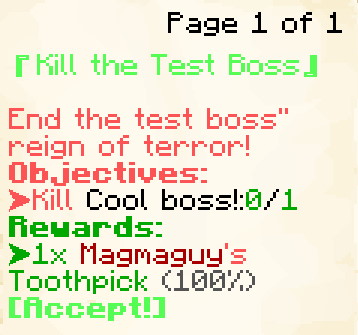
A imagem mostra a antiga interface de livro. /em alt altera a preferência de menu: os jogadores Java com essa preferência recebem livros antes do Minecraft 1.21.6 e diálogos do Minecraft nas versões mais recentes. Os jogadores Bedrock e quem prefere menus de inventário recebem uma interface de inventário.
Esta quest de exemplo dará aos jogadores a tarefa de derrotar 1 test_boss.yml. (O nome real do boss apresentado no rastreador de quests será o name: definido no test_boss.yml.) E, como recompensa por completar a quest, eles serão recompensados com 1 Magmaguy's Toothpick.
Os objetivos ficam ativos em simultâneo quando a quest é aceite; chaves como Objective1 e Objective2 não impõem uma ordem. É necessário cumprir todos para receber recompensas. Por predefinição, o jogador entrega depois a quest ao NPC. Com requireQuestTurnIn: false em Quests.yml, cumprir os objetivos tenta concluir imediatamente, incluindo verificar e consumir os itens de recolha. maximumActiveQuests limita as quests aceites a 10 por predefinição.
Criar quests personalizadas
isEnabled
Define se a quest está ativada.
| Chave | Valores | Predefinição |
|---|---|---|
isEnabled | Booleano | true |
Exemplo
isEnabled: true
customObjectives
Define os objetivos da quest.
| Chave | Valores | Predefinição |
|---|---|---|
customObjectives | Especial [1] | nenhum |
Num boss com várias fases, referencia o ficheiro da primeira fase. O progresso é atribuído quando o boss morre, não em cada transição. KILL_CUSTOM compara o nome do ficheiro e não exige questLevel como nível mínimo do boss abatido.
Exemplos
KILL_CUSTOM:
customObjectives:
  Objective1:
    amount: '1'
    filename: my_cool_boss.yml
    objectiveType: KILL_CUSTOM
DIALOG:
customObjectives:
  Objective1:
    dialog:
    - "&a[Dialog NPC] &fCome here often?"
    - "&7&oI should eat more apples."
    filename: dialog_npc.yml
    npcName: Dialog NPC
    location: at dialog location.
    objectiveType: DIALOG
FETCH_ITEM:
Os objetivos de recolha contam as etiquetas de itens personalizados do EliteMobs no inventário. Ao entregar a quest, todos são verificados contra uma única cópia do inventário antes de remover itens ou conceder recompensas. Se dois objetivos pedirem o mesmo item, são necessárias as quantidades somadas; a mesma pilha não pode satisfazer ambos. Largar um item pode voltar a tornar incompleto um objetivo.
customObjectives:
  Objective1:
    amount: '99'
    itemName: Red Apples
    filename: my_quest_item_red_apples.yml
    objectiveType: FETCH_ITEM
ARENA:
customObjectives:
  Objective1:
    objectiveType: ARENA
    filename: my_arena.yml
    name: "Complete the Arena"

Especial [1]
Expandir Tabela
Os Objetivos Personalizados são construídos usando os seguintes valores:
| Chave | Descrição |
|---|---|
objectiveType | Tipo de objetivo: KILL_CUSTOM abate um boss personalizado, FETCH_ITEM reúne um item personalizado, DIALOG fala com um NPC, ARENA conclui uma arena e CLASS_UNLOCK observa o desbloqueio de uma classe. |
filename | Nome obrigatório do ficheiro .yml do boss, item, NPC de diálogo, arena ou treinador. Usa uma definição carregada, não o nome apresentado. Um objetivo sem filename, ou com um objectiveType em falta ou desconhecido, desativa a quest inteira com um aviso na consola. Um CLASS_UNLOCK inválido continua na quest, mas não pode ser concluído. Corrige todos os avisos antes de oferecer a quest. |
amount | Número inteiro positivo de bosses a abater ou itens a reunir; predefinição 1. Um valor inferior a 1 desativa a quest. DIALOG, ARENA e CLASS_UNLOCK têm uma meta de um e ignoram este campo. |
dialog | Apenas DIALOG: linhas ditas pelo NPC quando o jogador interage com ele. |
location | Apenas DIALOG: pista textual sobre a localização do NPC, apresentada como $location no resumo do menu. |
name / npcName / itemName | Nomes alternativos do campo de texto de FETCH_ITEM, DIALOG, ARENA e CLASS_UNLOCK. Define apenas um. Todos são traduzíveis e permitem uma descrição própria ou ocultar informação. Sem substituição, FETCH_ITEM usa o nome traduzido do item e DIALOG o do NPC. KILL_CUSTOM usa o nome configurado do boss. |
class | Apenas CLASS_UNLOCK: ID da forma de classe observada, por exemplo adventurer. |
Fornece um mapa customObjectives não vazio, com uma chave única por objetivo (Objective1, Objective2, ...). Os campos distinguem maiúsculas de minúsculas e os tipos usam os valores em maiúsculas indicados acima. Ficheiros antigos com entradas como KILL_CUSTOM:filename=X.yml:amount=Y são convertidos automaticamente para este formato no primeiro carregamento e guardados em disco.
As descrições dos objetivos têm entradas de tradução próprias, identificadas pelo ficheiro da quest e por um caminho como customObjectives.Objective1.itemName. Traduz essa entrada do CSV mesmo que o item já tenha tradução. Sem tradução, mantém-se a descrição original para não revelar um nome oculto. O texto de origem permanece no YAML e as traduções existentes são preservadas.
Comportamento de FETCH_ITEM
FETCH_ITEM identifica a etiqueta do ficheiro do item, não o material, nome visível ou descrição. Contam itens obtidos antes de aceitar a quest, incluindo os espaços de armadura e a mão secundária. Aceitar, apanhar ou largar itens correspondentes e receber recompensas de quests agenda uma recontagem no tick seguinte. Outras alterações do inventário podem não atualizar imediatamente a apresentação, mas a entrega verifica sempre o inventário novamente. Se tiver sucesso, consome os itens necessários; uma quantidade combinada insuficiente cancela a entrega sem remoção parcial.
DIALOG avança ao interagir com um NPC correspondente, antes de abrir o seu menu habitual. Não exige terminar de ler o diálogo. location é apenas uma pista textual, não coordenadas para a bússola. ARENA avança quando o jogador conclui a arena indicada com a quest ativa; conclusões anteriores não contam retroativamente.
Objetivos de desbloqueio de classe
CLASS_UNLOCK observa uma classe desbloqueada pelo Sistema de Combate Avançado. Não concede a classe. Por exemplo:
customObjectives:
  Objective1:
    objectiveType: CLASS_UNLOCK
    class: adventurer
    filename: class_trainer_adventurer.yml
class deve identificar uma forma existente. filename orienta o acompanhamento para o treinador; name substitui opcionalmente o texto apresentado. A meta é um e reconhece classes desbloqueadas antes de aceitar, mesmo que não estejam equipadas. A progressão de classes deve estar disponível e o desbloqueio é verificado novamente na conclusão. Uma classe inválida ou a falta do ficheiro do treinador deixa um objetivo impossível de concluir; não é ignorado.
Acompanhamento e abandono
Cada jogador só pode acompanhar uma quest. Com autoTrackNextQuestOnCompletion: true em Quests.yml, concluir a quest acompanhada seleciona outra ativa que permita acompanhamento no tick seguinte. questAutoTrackNextMessage aceita $questName. autoTrackQuestsOnAccept também é true por predefinição, mas atualmente usa a função de alternância: aceitar outra quest enquanto uma já é acompanhada pode parar o acompanhamento em vez de o mudar. Se necessário, volta a selecioná-lo no menu.
A bússola procura destinos suportados: bosses personalizados, NPCs de diálogo ou treinadores, e bosses ou baús cujas tabelas de loot incluam o item pedido. Não encontra todas as fontes possíveis de itens; objetivos de arena ou abate dinâmico não têm uma pesquisa de destino própria. Para outro mundo, pode apontar para um portal direto adequado ou indicar o mundo de destino, sem garantir um caminho transitável. A ausência de destino não impede o progresso.
A ação normal de abandonar pede uma segunda confirmação. O texto e a descrição usam questAbandonConfirmationText e questAbandonConfirmationHover. Abandonar remove a quest ativa e o acompanhamento, mas não inicia o bloqueio de conclusão de questLockoutMinutes nem concede o marcador de conclusão. A quest pode ser aceite novamente se cumprir as condições habituais.
Os indicadores de quest dos NPCs são pessoais e aparecem a menos de 30 blocos. A bússola inclui indicações verticais. Durante o diálogo por barras de boss, a área é exclusiva: outras barras geridas são ocultadas e a antiga opção hideKeyedBossBarsDuringQuestDialogue é removida. hideQuestScoreboardDuringQuestDialogue controla separadamente o painel lateral.
Em Java, agachar revela a página atual e depois permite avançar. O diálogo aplica Lentidão III durante um máximo de 30 segundos, sem imobilizar o jogador. Sofrer dano não cancelado superior a zero fecha os ecrãs e o diálogo da quest. Bedrock recebe este diálogo no chat. A imagem do diálogo exige os recursos correspondentes do pacote de recursos.
customRewards
Define as recompensas da quest.
| Chave | Valores | Predefinição |
|---|---|---|
customRewards | Formato universal de loot do EliteMobs | nenhum |
Exemplo
customRewards:
- currencyAmount=50:amount=1:chance=0.05
- material=COOKED_COD:amount=3:chance=1.0
- filename=magmaguys_toothpick.yml:amount=1:chance=1.0
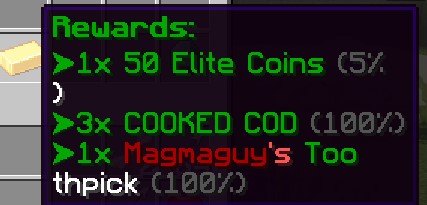
As quests personalizadas não geram entradas de recompensa automaticamente. Se customRewards estiver vazio, a tabela não concede itens nem moeda; os comandos de conclusão definidos separadamente continuam a executar. As recompensas automáticas aplicam-se às quests dinâmicas.
As recompensas de itens escaláveis usam o nível selecionado da masmorra dinâmica ou o nível de combate atual, com 10 % de probabilidade de somar um. Itens fixos e limitados mantêm as suas regras de escala. questLevel não define o nível real do item.
As recompensas são entregues diretamente: os itens entram no inventário, o que não couber cai aos pés do jogador e a moeda é adicionada ao saldo. Para executar comandos, usa questCompleteCommands em vez de uma entrada de loot command=.
A pré-visualização e a entrega fazem sorteios separados. Um item aleatório ou nível adicional apresentado não fica reservado para o jogador.
questAcceptPermission
Exige um marcador de conclusão de quest do EliteMobs antes da aceitação. Uma permissão normal com o mesmo nome não satisfaz a verificação.
| Chave | Valores | Predefinição |
|---|---|---|
questAcceptPermission | Texto | nenhum |
Exemplo
questAcceptPermission: elitequest.my_permission
questAcceptPermissions
Exige todos os marcadores de conclusão listados. Se também estiver definido questAcceptPermission, esse marcador é necessário além da lista.
| Chave | Valores | Predefinição |
|---|---|---|
questAcceptPermissions | Lista de textos | nenhum |
Exemplo
questAcceptPermissions:
- elitequest.my_previous_quest_one.yml
- elitequest.my_previous_quest_two.yml
questLockoutPermission
Define o marcador concedido depois de concluir com sucesso. Pode desbloquear quests seguintes e, com questLockoutMinutes igual ou inferior a zero, impede repetir esta. Omitir o marcador não desativa um bloqueio temporal positivo.
| Chave | Valores | Predefinição |
|---|---|---|
questLockoutPermission | Texto | nenhum |
Exemplo
questLockoutPermission: elitequest.my_quest.yml
questLockoutMinutes
Define quantos minutos o jogador tem de esperar antes de repetir a quest.
| Chave | Valores | Predefinição |
|---|---|---|
questLockoutMinutes | Inteiro | -1 (regra do marcador abaixo) |
Existem dois sistemas de bloqueio:
- Acima de
0, o controlo temporal bloqueia a quest durante esse número de minutos após a entrega e apresenta o tempo restante. A disponibilidade ignora entãoquestLockoutPermission. 0ou menos usa o marcadorquestLockoutPermission, concedido permanentemente na conclusão. Sem esse marcador, a quest continua repetível.
Se ambos os campos estiverem definidos com duração positiva, o marcador continua a ser concedido, mas expira após essa duração. Uma quest seguinte que o exija deve ser aceite antes de expirar. O bloqueio temporal é guardado pelo nome do ficheiro da quest, separado do marcador de requisitos.
Exemplo
questLockoutMinutes: 60
name
Define o nome da quest. Aceita códigos de cor.
| Chave | Valores | Predefinição |
|---|---|---|
name | Texto | vazio |
Exemplo
name: "&aMy Great Quest Name"
questLore
Define a descrição (lore) da quest que aparecerá no menu de quests no jogo.
| Chave | Valores | Predefinição |
|---|---|---|
questLore | Lista de textos | nenhum |
Exemplo
questLore:
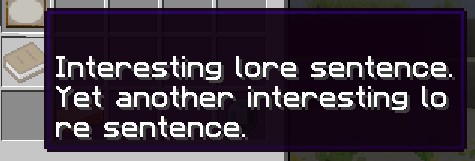
- "Interesting lore sentence."
- "Yet another interesting lore sentence."
temporaryPermissions
Concede permissões Bukkit reais quando o jogador aceita a quest e reaplica-as quando uma quest ativa é restaurada após iniciar sessão. Concluir ou abandonar a quest remove-as, e terminar sessão liberta-as até ao próximo início de sessão. Cada quest concede os seus nós separadamente, pelo que duas quests ativas podem partilhar um nó: terminar uma delas mantém o nó concedido pela outra.
Para a geração normal, configura a mesma permissão no item. Esta verificação não cobre todas as formas de entrega.
| Chave | Valores | Predefinição |
|---|---|---|
temporaryPermissions | Lista de textos | nenhum |
Exemplo
temporaryPermissions:
- elitequest.item_that_should_drop_only_during_quest.yml
questAcceptDialog
Define o diálogo que aparece no chat ao aceitar a quest.
Com diálogos por barras de boss ativados, esta lista também é dita pelo NPC antes da aceitação. Se estiver vazia, usa-se questLore para esse diálogo.
| Chave | Valores | Predefinição |
|---|---|---|
questAcceptDialog | Lista de textos | nenhum |
Exemplo
questAcceptDialog:
- "My hero! You are so helpful!"
- "I wish you the best of luck!"

questCompleteMessage
Define o diálogo da entrega. Com useQuestDialogueBossBars em Quests.yml, pode aparecer antes de abrir o menu de entrega; caso contrário, aparece ao concluir com sucesso. Um diálogo de entrega mostrado recentemente não é repetido na conclusão. Bedrock recebe texto no chat. Ver o diálogo não prova, por si só, que a recompensa foi entregue.
| Chave | Valores | Predefinição |
|---|---|---|
questCompleteMessage | Lista de textos | nenhum |
Exemplo
questCompleteMessage:
- "My hero! You have completed my difficult quest!"
- "As a reward you can have this loaf of bread!"

questCompleteCommands
Define os comandos executados na conclusão. São enviados pela consola: não uses uma barra inicial nem dependas das permissões do jogador.
Placeholders suportados: $player para o nome do jogador, $getWorld para o mundo atual e $getX, $getY, $getZ para as coordenadas.
| Chave | Valores | Predefinição |
|---|---|---|
questCompleteCommands | Lista de textos | nenhum |
Exemplo
questCompleteCommands:
- say $player has finished a quest at $getX, $getY, $getZ!
- give $player diamond 1

turnInNPC
Define o ficheiro do NPC ao qual entregar a quest. Pode ser diferente de quem a oferece; se for omitido, usa-se o NPC original. Um NPC de entrega separado deve usar interactionType: CUSTOM_QUEST_GIVER, podendo ter uma lista de ofertas vazia.
| Chave | Valores | Predefinição |
|---|---|---|
turnInNPC | Nome de ficheiro | nenhum |
Exemplo
turnInNPC: my_cool_quest_npc.yml
NPCs que oferecem quests
Para atribuir uma quest a um NPC que a dará aos jogadores, precisas de configurar o ficheiro do NPC, não o ficheiro da quest.
No ficheiro do NPC (plugins/EliteMobs/npcs/), adiciona:
interactionType: CUSTOM_QUEST_GIVER
questFileName:
- my_quest.yml
Para NPCs que dão várias quests:
interactionType: CUSTOM_QUEST_GIVER
questFileName:
- quest_one.yml
- quest_two.yml
Usa uma lista YAML mesmo para uma só quest; o valor escalar questFileName: my_quest.yml não é carregado como lista de ofertas. Para a abrir é necessário interactionType: CUSTOM_QUEST_GIVER.
Consulta a documentação de criação de NPCs para mais informações sobre como configurar NPCs.
trackable
Permite acompanhamento manual e automático pela bússola. false não impede o progresso dos objetivos, as recompensas ou os painéis temporários de progresso.
| Chave | Valores | Predefinição |
|---|---|---|
trackable | Booleano | true |
Exemplo
trackable: true
questLevel
Define o nível da quest. Isto é apenas um guia visual para que os jogadores saibam quão desafiante a quest será. Isto não modifica de forma alguma os níveis de bosses, itens ou outros.
| Chave | Valores | Predefinição |
|---|---|---|
questLevel | Inteiro | 0 |
Exemplo
questLevel: 10
questAcceptSound
Define o som ao aceitar a quest, do Minecraft ou de um pacote de recursos. Se for omitido, usa-se o som global de aceitação de SoundsConfig.
| Chave | Valores | Predefinição |
|---|---|---|
questAcceptSound | Texto | nenhum |
Exemplo
questAcceptSound: entity.experience_orb.pickup
questCompleteSound
Define o som ao concluir a quest, do Minecraft ou de um pacote de recursos. Se for omitido, usa-se o som global de conclusão de SoundsConfig.
| Chave | Valores | Predefinição |
|---|---|---|
questCompleteSound | Texto | nenhum |
Exemplo
questCompleteSound: entity.player.levelup
Tradução
Os seguintes campos suportam localização para servidores multilíngues:
namequestLorequestAcceptDialogquestCompleteMessage- Em cada entrada de
customObjectives:dialog,name,npcName,itemNameelocation
Isto permite-te fornecer traduções para diferentes idiomas no teu servidor.
Permissões
As permissões são textos ou listas de textos. Os exemplos seguintes mostram como bloquear e desbloquear quests.
Importante: questAcceptPermission e questAcceptPermissions verificam marcadores internos do EliteMobs, não permissões normais. Concluir uma quest com o questLockoutPermission correspondente cria o marcador. Conceder o mesmo nome pelo LuckPerms não desbloqueia a quest. temporaryPermissions, por sua vez, concede permissões reais enquanto a quest está ativa.
Digamos que estás a criar a quest_3 numa série de quests que planeaste e não queres que os jogadores possam aceitar a quest_3 antes de terminarem a quest_2. Configuraríamos o ficheiro da quest assim:
questAcceptPermission: elitequest.quest_2.yml
questLockoutPermission: elitequest.quest_3.yml
A quest 2 deve conceder elitequest.quest_2.yml pelo seu próprio questLockoutPermission. A quest 3 exige esse marcador com questAcceptPermission. Com a duração não positiva por predefinição, concluir a quest 3 concede o seu marcador permanente e impede repetições. Oferecer uma quest já ativa noutro NPC não cria uma segunda cópia independente.
Caso queiras criar uma quest que só fica disponível depois de os jogadores terem completado uma série de quests, então configurarias o ficheiro da quest assim:
questAcceptPermissions:
- elitequest.quest_2.yml
- elitequest.quest_3.yml
- elitequest.quest_4.yml
Para que aceitar a quest dê acesso à geração normal de um item, adiciona um nó a temporaryPermissions e usa-o também no campo permission do item.
Por exemplo, abriríamos o nosso ficheiro de quest e adicionaríamos o seguinte:
temporaryPermissions:
- elitequest.my_cool_item.yml
Depois abriríamos o ficheiro do item, no nosso caso my_cool_item.yml, e então adicionaríamos o seguinte:
permission: elitequest.my_cool_item.yml
A quest concede agora o nó verificado na geração normal do item enquanto está ativa, e remove-o na conclusão ou no abandono.
Grupos e crédito de abate partilhado
As quests continuam pessoais: aderir a um grupo não aceita, entrega ou recompensa quests de outros jogadores. Quando um membro recebe crédito por um abate, os membros online no mesmo mundo e dentro de sharedProgressRange (128 blocos por predefinição em Party.yml) também progridem nos seus objetivos ativos correspondentes, incluindo bosses personalizados.
Itens de recolha, diálogos e objetivos de arena não são partilhados. Os destinatários precisam da sua própria quest ativa correspondente e dos dados carregados. Se a sua partida já passou a espera ou o arranque, têm de pertencer à lista inicial de participantes. A verificação não compara separadamente a sua instância com a do abate; continua a exigir proximidade no mesmo mundo.
Quests dinâmicas
As Quests Dinâmicas são quests geradas proceduralmente que são criadas e atualizadas automaticamente pelo EliteMobs. Ao contrário das quests personalizadas definidas em ficheiros de configuração, as quests dinâmicas não requerem configuração manual e adaptam-se à progressão de cada jogador.
Como funcionam
- NPC: usa
interactionType: QUEST_GIVER. As ofertas vêm do conjunto dinâmico, não dequestFileName. - Tier: limita o nível de combate a 1–100, divide por cinco com divisão inteira e limita o tier a 1–20. O nível 45 usa o tier 9. O tier determina as opções e a quantidade de abates; o nível mínimo dos inimigos usa o nível de combate limitado do jogador.
- Três modelos por tier: cada modelo escolhe um tipo de entidade de
questEntityTypesemQuests.yml. Tipos de entidade desconhecidos e tipos sem propriedades de mob do EliteMobs são ignorados com um aviso, e uma lista sem entradas utilizáveis desativa as ofertas de quests dinâmicas. Cada modelo escolhe também uma quantidade de abates entretier + 1etier * 10, inclusive. O Elite Mob correspondente deve atingir ou ultrapassar o nível mínimo; um mob normal do Minecraft não conta. - Atualização: os modelos renovam-se a cada 1200 ticks, cerca de 60 segundos a 20 TPS. As quests existentes e o progresso são preservados. O menu combina-as com os três modelos do tier atual, evitando IDs de modelo duplicados; não tem necessariamente três entradas.
- Masmorras dinâmicas: entrar atualiza o nível mínimo do inimigo, o nível apresentado e o nome das quests dinâmicas existentes para o nível selecionado, limitado a 1–100. Preserva quantidades e progresso. Não recalcula a recompensa monetária.
- Recompensas: a moeda é fixada ao criar a oferta como
floor(questLevel / 2 * targetKillCount). O item é gerado pelo sistema normal de loot na entrega, usando o nível selecionado da masmorra dinâmica ou o nível de combate atual, com 10 % de probabilidade de somar um e um limite final de 1–100. Aplicam-se as regras de disponibilidade e escala; a pré-visualização faz um sorteio separado.