建立任務

範例任務
這個簡化範例採用隨外掛提供的 test_quest.yml 格式。
在伺服器目錄下的 plugins/EliteMobs/customquests/ 建立名稱唯一的 .yml 檔案。使用 /em reload 載入任務與參照的內容,再按下文將任務指派給 NPC。
test_quest.yml
isEnabled: true
customObjectives:
  Objective1:
    amount: '1'
    filename: test_boss.yml
    objectiveType: KILL_CUSTOM
customRewards:
- filename=magmaguys_toothpick.yml:amount=1:chance=1
name: "&aKill the Test Boss"
questLore:
- "&cEnd the test boss' reign of terror!"
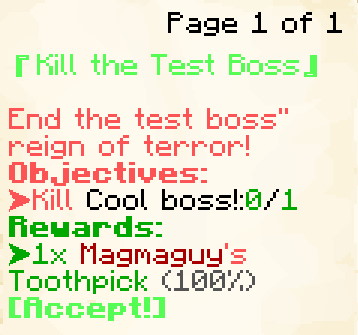
圖片顯示舊版書本介面。/em alt 會切換選單偏好:Java 玩家選用該偏好時,Minecraft 1.21.6 以前使用書本,較新版本使用 Minecraft 對話框。Bedrock 玩家與偏好物品欄選單的玩家使用物品欄介面。
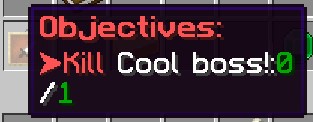
這個範例任務會交給玩家一個討伐 1 隻 test_boss.yml 的目標。(任務追蹤器中顯示的 Boss 實際名稱會是 test_boss.yml 裡所設定的 name:。)作為完成任務的獎勵,玩家會得到 1 個 Magmaguy's Toothpick。
接受任務時所有目標同時啟用;Objective1、Objective2 等鍵不規定順序。必須滿足全部目標才能領獎。預設還需要向 NPC 繳交任務。若在 Quests.yml 設定 requireQuestTurnIn: false,達成目標後會立即嘗試結算,包括檢查與消耗收集物品。maximumActiveQuests 預設將已接受任務限制為 10 個。
建立自訂任務
isEnabled
設定任務是否啟用。
| 鍵 | 值 | 預設值 |
|---|---|---|
isEnabled | 布林值 | true |
範例
isEnabled: true
customObjectives
設定任務目標。
| 鍵 | 值 | 預設值 |
|---|---|---|
customObjectives | 特殊 [1] | 無 |
多階段 Boss 應參照第一階段的檔名。只有 Boss 死亡才計入進度,階段切換不算。KILL_CUSTOM 比對自訂 Boss 的檔名,不將 questLevel 當作擊殺目標的最低等級。
範例
KILL_CUSTOM:
customObjectives:
  Objective1:
    amount: '1'
    filename: my_cool_boss.yml
    objectiveType: KILL_CUSTOM
DIALOG:
customObjectives:
  Objective1:
    dialog:
    - "&a[Dialog NPC] &fCome here often?"
    - "&7&oI should eat more apples."
    filename: dialog_npc.yml
    npcName: Dialog NPC
    location: at dialog location.
    objectiveType: DIALOG
FETCH_ITEM:
收集目標計算物品欄中相符的 EliteMobs 自訂物品標籤。繳交時會先用同一份物品欄快照檢查所有收集目標,再移除物品或發獎。若兩個目標要求相同物品,需要它們的數量總和,不能重複使用同一疊。丟棄物品可能使已達成的收集目標重新變成未完成。
customObjectives:
  Objective1:
    amount: '99'
    itemName: Red Apples
    filename: my_quest_item_red_apples.yml
    objectiveType: FETCH_ITEM
ARENA:
customObjectives:
  Objective1:
    objectiveType: ARENA
    filename: my_arena.yml
    name: "Complete the Arena"
特殊 [1]
展開表格
自訂目標是使用以下這些值來建構的:
| 鍵 | 說明 |
|---|---|
objectiveType | 目標類型:KILL_CUSTOM 擊殺自訂 Boss、FETCH_ITEM 收集自訂物品、DIALOG 與 NPC 對話、ARENA 完成競技場、CLASS_UNLOCK 檢查職業解鎖。 |
filename | 必填的 .yml 檔名,指向 Boss、物品、對話 NPC、競技場或職業訓練師。使用已載入的定義,不是顯示名稱。缺少 filename,或 objectiveType 缺漏或無法識別的目標,會讓整個任務停用並在控制台顯示警告。無效的 CLASS_UNLOCK 會留在任務中,但無法完成。提供任務前應修正所有警告。 |
amount | 需要擊殺的 Boss 數或收集數量,使用正整數,預設 1。小於 1 的值會停用任務。DIALOG、ARENA 和 CLASS_UNLOCK 的目標數量都是一,忽略此欄位。 |
dialog | 僅限 DIALOG —— 玩家與 NPC 交談時 NPC 所說的台詞。 |
location | 僅限 DIALOG —— 關於 NPC 位置的自由文字提示,會在任務選單的摘要行中以 $location 顯示。 |
name / npcName / itemName | FETCH_ITEM、DIALOG、ARENA 和 CLASS_UNLOCK 顯示標籤的可選別名,只設定一個。三者皆可翻譯,用於特定措辭或隱藏資訊。省略時,FETCH_ITEM 使用物品的翻譯名稱,DIALOG 使用 NPC 的翻譯名稱。KILL_CUSTOM 使用 Boss 設定的名稱。 |
class | 僅限 CLASS_UNLOCK: 要檢查的職業形態 ID,例如 adventurer。 |
提供非空的 customObjectives 對應表,每個目標使用唯一的鍵(Objective1、Objective2 等)。欄位名稱區分大小寫,目標類型使用上表的大寫值。採用 KILL_CUSTOM:filename=X.yml:amount=Y 等單行字串的舊任務會在首次載入時自動轉換並儲存。
目標標籤有獨立翻譯項目,以任務檔名和 customObjectives.Objective1.itemName 這樣的欄位路徑識別。即使原物品已翻譯,也要翻譯語言 CSV 中的這一項。缺少翻譯時保留原始覆寫標籤,避免洩露隱藏的物品名稱。來源文字留在任務 YAML 中,已有翻譯編輯也會保留。
FETCH_ITEM 的行為
FETCH_ITEM 識別物品的檔名標籤,而非材質、顯示名稱或說明。接任務前取得的物品也算,包括護甲欄與副手。接受任務、撿起或丟棄相符物品及任務獎勵會安排下一 tick 重新計算。其他物品欄變動可能不會立即反映,但繳交時一定重新檢查。成功時消耗所需物品;合計數量不足則取消,不會部分扣除。
DIALOG 在玩家與相符 NPC 互動時推進,早於其普通選單開啟,不要求讀完對話。location 只是文字提示,不是指南針座標。ARENA 要求在任務有效期間完成指定競技場,過去的完成紀錄不計入。
職業解鎖目標
CLASS_UNLOCK 檢查透過進階戰鬥系統解鎖的職業,不直接授予職業。例如:
customObjectives:
  Objective1:
    objectiveType: CLASS_UNLOCK
    class: adventurer
    filename: class_trainer_adventurer.yml
class 必須指定現有職業形態。filename 將追蹤指向訓練師 NPC;可用 name 覆寫顯示名稱。目標數量為一,能辨識接任務前已解鎖、但目前未裝備的職業。職業進度功能必須可用,結算時還會重新確認解鎖狀態。無效職業或缺少訓練師檔名會留下無法完成的目標,不會跳過。
追蹤與放棄
每位玩家只能追蹤一個任務。Quests.yml 的 autoTrackNextQuestOnCompletion: true 會在追蹤任務結算後的下一 tick 選擇另一個進行中且可追蹤的任務。questAutoTrackNextMessage 支援 $questName。autoTrackQuestsOnAccept 也預設為 true,但目前呼叫的是追蹤開關:已有追蹤時再接受任務,可能停止追蹤而非切換。必要時從選單重新選擇追蹤。
指南針搜尋支援的目的地:自訂 Boss、對話或訓練師 NPC,以及戰利品表包含要求物品的 Boss 與寶箱。它不會找到所有物品來源;競技場與動態擊殺目標沒有專屬目的地搜尋。目標在其他世界時,可指向適合的直達蟲洞或顯示目標世界,但不保證存在可通行路線。缺少目的地不影響進度。
一般放棄操作需要再次確認,文字與懸浮說明由 questAbandonConfirmationText、questAbandonConfirmationHover 設定。放棄會移除進行中的任務與追蹤,不啟動 questLockoutMinutes 的完成冷卻,也不授予完成標記。滿足一般條件時仍可重新接受。
NPC 任務標記依玩家而異,在 30 格內顯示。指南針包含上下方向提示。Boss 血條對話會獨占該區域、隱藏其他受管理血條,並移除舊的 hideKeyedBossBarsDuringQuestDialogue 開關。hideQuestScoreboardDuringQuestDialogue 獨立控制側邊計分板。
Java 血條對話中,潛行先顯示目前頁面的全文,再次操作往後推進。對話施加最多 30 秒的緩速 III,而非完全凍結玩家。受到未取消且大於零的傷害會關閉任務畫面及對話。Bedrock 使用聊天顯示這類對話。對話圖案需要對應的資源包素材。
customRewards
設定任務獎勵。
| 鍵 | 值 | 預設值 |
|---|---|---|
customRewards | EliteMobs 通用戰利品格式 | 無 |
範例
customRewards:
- currencyAmount=50:amount=1:chance=0.05
- material=COOKED_COD:amount=3:chance=1.0
- filename=magmaguys_toothpick.yml:amount=1:chance=1.0
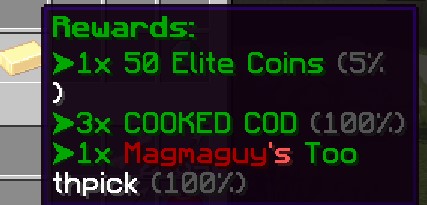
自訂任務不會自動產生獎勵項目。customRewards 為空時,這張表不發物品或貨幣;獨立設定的完成指令仍會執行。自動獎勵項目適用於動態任務。
設定的可調整等級物品獎勵使用玩家目前選擇的動態地城等級或戰鬥等級,有 10% 機率加一級。固定或限制等級物品仍遵循原本的調整規則。questLevel 不決定實際獎勵物品等級。
任務獎勵是直接發放的:物品會直接進入玩家的物品欄(放不下的會掉在他們腳邊),貨幣則會加進他們的餘額。若要在完成時執行指令,請使用 questCompleteCommands,而不是 command= 的戰利品項目。
預覽與發放分別抽取。顯示的隨機物品或等級加成不會預留給玩家。
questAcceptPermission
接受任務前必須具備的一個 EliteMobs 完成標記。權限外掛授予的同名普通權限無法滿足檢查。
| 鍵 | 值 | 預設值 |
|---|---|---|
questAcceptPermission | 字串 | 無 |
範例
questAcceptPermission: elitequest.my_permission
questAcceptPermissions
要求列出的所有 EliteMobs 完成標記。如果也設定 questAcceptPermission,還要同時滿足該標記。
| 鍵 | 值 | 預設值 |
|---|---|---|
questAcceptPermissions | 字串列表 | 無 |
範例
questAcceptPermissions:
- elitequest.my_previous_quest_one.yml
- elitequest.my_previous_quest_two.yml
questLockoutPermission
設定成功結算後授予的標記。它可解鎖後續任務,並在 questLockoutMinutes 為零或負數時防止重複此任務。省略標記不會停用正數的計時鎖定。
| 鍵 | 值 | 預設值 |
|---|---|---|
questLockoutPermission | 字串 | 無 |
範例
questLockoutPermission: elitequest.my_quest.yml
questLockoutMinutes
設定玩家在能夠再次進行該任務之前必須等待多久(以分鐘計)。
| 鍵 | 值 | 預設值 |
|---|---|---|
questLockoutMinutes | 整數 | -1(使用下述標記規則) |
共有兩套鎖定系統,而此鍵決定使用哪一套:
- 任何大於
0的值會使用計時鎖定追蹤器。玩家在繳交任務後,會被鎖定該任務指定的分鐘數;當他們嘗試再次接取時會被告知還剩多久;而questLockoutPermission在可用性檢查中會被忽略。 0或更低則退回使用舊式的questLockoutPermission標記,該標記會在完成時永久授予。若同時也沒有設定questLockoutPermission,該任務就會保持可重複。
兩項同時設定且時長為正時,仍會授予完成標記,但標記在相同時長後失效。依賴該標記的後續任務必須在失效前接受。計時鎖定按任務檔名儲存,與前置條件使用的標記獨立。
範例
questLockoutMinutes: 60
name
設定任務名稱。可使用 Color Codes(顏色代碼)。
| 鍵 | 值 | 預設值 |
|---|---|---|
name | 字串 | 空 |
範例
name: "&aMy Great Quest Name"
questLore
設定任務的說明文字,會出現在遊戲內的任務選單中。
| 鍵 | 值 | 預設值 |
|---|---|---|
questLore | 字串列表 | 無 |
範例
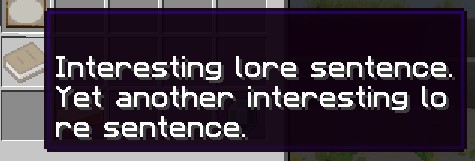
questLore:
- "Interesting lore sentence."
- "Yet another interesting lore sentence."
temporaryPermissions
接受任務時授予實際 Bukkit 權限,登入後恢復進行中任務時重新套用。完成或放棄任務會移除這些權限,登出則會釋放它們,直到下次登入。每個任務分別授予自己的節點,因此兩個進行中的任務可以共用同一節點:結束其中一個,另一個任務授予的節點仍會保留。
一般物品產生還需要在物品檔案設定相同的權限,但此檢查不涵蓋所有發放途徑。
| 鍵 | 值 | 預設值 |
|---|---|---|
temporaryPermissions | 字串列表 | 無 |
範例
temporaryPermissions:
- elitequest.item_that_should_drop_only_during_quest.yml
questAcceptDialog
設定接受任務時出現在聊天欄中的對話。
當任務對話 Boss 血條啟用時,此清單同時也會作為任務發布者在任務被接受之前於對話框中所說的對話。若它為空,則改用 questLore 作為該對話。
| 鍵 | 值 | 預設值 |
|---|---|---|
questAcceptDialog | 字串列表 | 無 |
範例
questAcceptDialog:
- "My hero! You are so helpful!"
- "I wish you the best of luck!"

questCompleteMessage
設定繳交相關的對話。啟用 Quests.yml 的 useQuestDialogueBossBars 後,可能在繳交選單開啟前顯示;否則在成功結算時顯示。最近已顯示的繳交對話不會在結算時重複。Bedrock 使用聊天文字。看到這段對話本身不證明已發放獎勵。
| 鍵 | 值 | 預設值 |
|---|---|---|
questCompleteMessage | 字串列表 | 無 |
範例
questCompleteMessage:
- "My hero! You have completed my difficult quest!"
- "As a reward you can have this loaf of bread!"

questCompleteCommands
設定任務完成時會執行的指令。指令是從主控台派發的,因此請勿加上開頭的斜線,也不要依賴玩家擁有這些指令的權限。
支援的預留位置:$player 代表玩家名稱、$getWorld 代表玩家所在世界的名稱,以及 $getX、$getY、$getZ 代表玩家所在位置的座標。
| 鍵 | 值 | 預設值 |
|---|---|---|
questCompleteCommands | 字串列表 | 無 |
範例
questCompleteCommands:
- say $player has finished a quest at $getX, $getY, $getZ!
- give $player diamond 1

turnInNPC
設定接收任務的 NPC 檔名,可與發布者不同;省略時使用原發布者。獨立的接收 NPC 應使用 interactionType: CUSTOM_QUEST_GIVER,提供任務的清單可留空。
| 鍵 | 值 | 預設值 |
|---|---|---|
turnInNPC | 檔名 | 無 |
範例
turnInNPC: my_cool_quest_npc.yml
任務發布者
若要將任務指派給某個會發給玩家的 NPC,你需要設定 NPC 檔案,而不是任務檔案。
在 NPC 設定檔(plugins/EliteMobs/npcs/)中加入:
interactionType: CUSTOM_QUEST_GIVER
questFileName:
- my_quest.yml
對於會發出多個任務的 NPC:
interactionType: CUSTOM_QUEST_GIVER
questFileName:
- quest_one.yml
- quest_two.yml
即使只有一個任務,也要使用 YAML 清單。純量 questFileName: my_quest.yml 不會載入為提供清單。開啟清單需要 interactionType: CUSTOM_QUEST_GIVER。
關於設定 NPC 的更多資訊,請參閱 NPC 建立文件。
trackable
允許手動及自動指南針追蹤。設為 false 不會停止目標進度、獎勵或暫時進度計分板。
| 鍵 | 值 | 預設值 |
|---|---|---|
trackable | 布林值 | true |
範例
trackable: true
questLevel
設定任務的等級。這只是視覺上的參考,讓玩家能夠判斷任務的挑戰性有多高。這不會以任何方式修改 Boss、物品或其他等級。
| 鍵 | 值 | 預設值 |
|---|---|---|
questLevel | 整數 | 0 |
範例
questLevel: 10
questAcceptSound
設定接受任務時播放的音效。可以播放 Minecraft 音效,也可以播放來自資源包的音效。當未設定此項時,EliteMobs 會改為播放 SoundsConfig 中的全域任務接受音效。
| 鍵 | 值 | 預設值 |
|---|---|---|
questAcceptSound | 字串 | 無 |
範例
questAcceptSound: entity.experience_orb.pickup
questCompleteSound
設定任務完成(繳交)時播放的音效。可以播放 Minecraft 音效,也可以播放來自資源包的音效。當未設定此項時,EliteMobs 會改為播放 SoundsConfig 中的全域任務完成音效。
| 鍵 | 值 | 預設值 |
|---|---|---|
questCompleteSound | 字串 | 無 |
範例
questCompleteSound: entity.player.levelup
在地化支援
以下欄位支援為多語言伺服器提供在地化:
namequestLorequestAcceptDialogquestCompleteMessage- 每個
customObjectives項目內的:dialog、name、npcName、itemName與location
這讓你能夠為伺服器上的不同語言提供翻譯。
權限
如上方表格所述,權限通常是 字串 或 字串列表。但讓我們更詳細地說明你會如何使用這些權限來鎖定和解鎖任務。
重要: questAcceptPermission 與 questAcceptPermissions 檢查 EliteMobs 內部標記,而非普通權限。完成具有相符 questLockoutPermission 的任務會建立標記。透過 LuckPerms 授予同名權限不會解鎖任務。temporaryPermissions 則會在任務進行期間授予真實權限。
假設你正在製作一系列你已規劃好的任務中的 quest_3,而你不希望玩家在完成 quest_2 之前就能接取 quest_3。我們會像這樣設定任務檔案:
questAcceptPermission: elitequest.quest_2.yml
questLockoutPermission: elitequest.quest_3.yml
任務 2 必須用自己的 questLockoutPermission 授予 elitequest.quest_2.yml,任務 3 再用 questAcceptPermission 要求該標記。使用預設的非正數時長時,完成任務 3 會授予永久標記並防止重複。另一個 NPC 提供同一個進行中任務,不會建立獨立的第二份。
如果你想製作一個只在玩家完成一系列任務後才會解鎖的任務,那麼你會像這樣設定任務檔案:
questAcceptPermissions:
- elitequest.quest_2.yml
- elitequest.quest_3.yml
- elitequest.quest_4.yml
要在接受任務後允許物品正常產生,可在 temporaryPermissions 加入節點,並在物品的 permission 欄位使用相同節點。
舉例來說,我們會打開任務檔案並加入以下內容:
temporaryPermissions:
- elitequest.my_cool_item.yml
然後我們會打開物品檔案,在我們的例子中是 my_cool_item.yml,然後加入以下內容:
permission: elitequest.my_cool_item.yml
任務現在會在進行期間授予正常物品產生所檢查的節點,並在完成或放棄時將其移除。
隊伍與共享擊殺計數
任務始終屬於個人:加入隊伍不會替其他玩家接受、繳交或領取任務獎勵。成員取得擊殺計數時,同一世界且位於 sharedProgressRange(Party.yml 中預設 128 格)內的線上成員,也會推進自己的相符進行中擊殺目標,包括特定自訂 Boss。
收集物品、NPC 對話與競技場目標不共享。接收者需要自己的相符任務與已載入的玩家資料。如果其比賽已過等待或啟動階段,還必須屬於開始時的參賽名單。檢查不會額外比對其副本與擊殺來源副本,但同一世界內的距離條件仍適用。
動態任務
動態任務是由 EliteMobs 程序化產生並自動建立與刷新的任務。與在設定檔中定義的自訂任務不同,動態任務不需要任何手動設定,並會隨每位玩家的進度而調整。
運作方式
- 發布者: 使用
interactionType: QUEST_GIVER的 NPC。提供內容來自動態池,而非questFileName。 - 任務階層: 先把戰鬥等級限制為 1–100,以整數除以五,再把階層限制為 1–20。等級 45 對應第 9 階。階層決定範本與擊殺數,目標最低等級則使用玩家限制後的戰鬥等級。
- 每階三個範本: 每個範本從
Quests.yml的questEntityTypes選擇類型。未知的實體類型,以及沒有 EliteMobs 怪物屬性的類型,會被跳過並顯示警告;清單中若沒有可用項目,會停用動態任務的提供。每個範本也會選擇擊殺數,介於tier + 1與tier * 10,包含兩端。相符類型的 Elite Mob 必須達到或超過最低等級;一般原版怪物不算。 - 更新: 全部範本每 1200 tick 更新,20 TPS 時約 60 秒。已有任務與進度保留。選單合併已有動態任務與目前階層的三個範本,排除重複範本 ID,因此不一定只有三項。
- 動態地城調整: 進入後,把已有動態任務的最低怪物等級、顯示等級與名稱更新為選擇的等級,限制於 1–100。目標數量與進度保留,不重算貨幣獎勵。
- 獎勵: 貨幣在建立任務提供項目時固定為
floor(questLevel / 2 * targetKillCount)。物品在繳交時透過一般戰利品系統產生,採用選擇的動態地城等級或目前戰鬥等級,有 10% 機率加一級,最後限制為 1–100。物品可用性與等級調整規則仍適用;預覽獨立抽取。