Dungeon Packager

What are dungeons?
You can find info about dungeons, including info about premade dungeons here.
What is the dungeon packager?
The dungeon packager bundles EliteMobs content for distribution, including dungeons, events, models, arenas, NPCs and items. The export command collects selected configuration folders; some files must be added manually before the archive is ready to import.
Why use dungeon packages?
- Instanced dungeons! Instanced dungeons can only be created through the dungeon package system.
- Safe backups of Minidungeons! If you make a Dungeon Package, you'll be able to deploy and redeploy it in any server you want at any time and for any reason.
- Easy to turn off and on! You can always do
/em setupand temporarily or permanently turn Dungeon Packages off and on. - Easy to share! If you wish to share your creations, Dungeon Packages can just be zipped up and sent to other people. There is a Discord room dedicated to community creations if you are interested!
- Teleports! Installed combat packages can appear in the Teleports page of the
/emmenu whenlistedInTeleportsis enabled. Configure their entry locations; the packager does not choose coordinates for you.
Creating Dungeons
The following settings are used to create a configuration file which should go into the content_packages folder. These settings are used to create dungeons specifically, and are not required if you just want to use the dungeon packager to distribute non-dungeon content such as a pack of items or events.
Required plugins
None. Dungeon protection is handled by EliteMobs itself: setting protect: true applies EliteMobs' own per-world protection suite to the package's world, with no region plugin involved.
WorldGuard is still an optional soft dependency. When it is installed, its EliteMobs-specific region flags become available, but it is not needed for a dungeon package to be protected.
Creating a dungeon, step-by-step
EliteMobs used to have two major kinds of dungeons: world-based and schematic-based.
Schematic-based dungeons, were associated with a schematic build. They are now phased out and not supported anymore.
All EliteMobs dungeons are now world based.
Required pack.meta file
Your dungeon package should include a pack.meta file, which is simply a renamed .txt file with a .meta extension. This file should contain just one word, indicating which plugin the package is for (e.g., "elitemobs," written in lowercase). The pack.meta file must be located in the root directory of your package, alongside all the other folders.
Global values
The following values apply to all dungeons. Defaults below describe a new custom package; premade packages can supply their own defaults. Set dungeonVersion explicitly before distributing an update.
isEnabled
Sets if the dungeon package is enabled.
| Key | Values | Default | Mandatory |
|---|---|---|---|
isEnabled | Boolean | true | ✅ |
Example
isEnabled: true
name
Sets the name of the content. Supports Color Codes.
| Key | Values | Default | Mandatory |
|---|---|---|---|
name | String | none | ✅ |
Example
name: '&c[lvl 999] &aThe Green Dungeon'
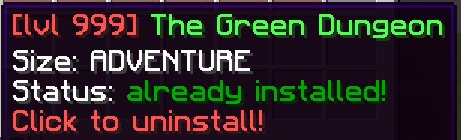
contentType
Sets the type of dungeon.
| Key | Values | Default | Mandatory |
|---|---|---|---|
contentType | OPEN_DUNGEON / INSTANCED_DUNGEON / DYNAMIC_DUNGEON / HUB / META_PACKAGE / ITEMS_PACKAGE / EVENTS_PACKAGE / MODELS_PACKAGE | none | ✅ |
Example
contentType: INSTANCED_DUNGEON
SCHEMATIC_DUNGEON is deadSCHEMATIC_DUNGEON is still accepted by the parser but schematic dungeons were removed in EliteMobs 9.0 and replaced by world dungeons. A package using it loads nothing and prints a console warning telling you to delete the entry. If you want the schematic experience, use BetterStructures with the elite shrines packages instead.
customInfo
Retained descriptive text, registered with the translation system. The current setup menu reads setupMenuDescription instead; setting customInfo does not populate that menu's description. Supports Color Codes.
| Key | Values | Default | Mandatory |
|---|---|---|---|
customInfo | String List | none | ✅ |
Example
customInfo:
- '&aThe best dungeon.'
- '&aMade by: CoolPlayer'
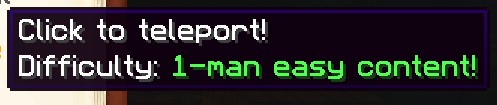
setupMenuDescription
Sets the description that will appear in the /em setup menu for this dungeon package. Supports Color Codes.
| Key | Values | Default | Mandatory |
|---|---|---|---|
setupMenuDescription | String List | none | ❌ |
Example
setupMenuDescription:
- '&2A cool dungeon for levels 10-20!'
- '&2Features 3 bosses and custom loot!'
downloadLink
Sets the manual download link sent when an administrator selects download for a package without a built-in Nightbreak slug. Premade packages with a Nightbreak slug use the account download flow instead. This field alone does not enable automatic downloads or version checks for a custom package.
| Key | Values | Default | Mandatory |
|---|---|---|---|
downloadLink | String | empty string | ❌ |
Example
downloadLink: http://www.example.org

dungeonSizeCategory
Sets the descriptive size category. It does not select instancing or progression rules; contentType controls the package implementation.
| Key | Values | Default | Mandatory |
|---|---|---|---|
dungeonSizeCategory | Special [1] | LAIR | ❌ |
Example
dungeonSizeCategory: MINIDUNGEON
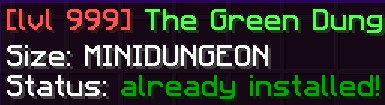
Special [1]
Expand Table
| Key | Description |
|---|---|
LAIR | Lairs are a type of small dungeon which focuses on one big boss fight. |
SANCTUM | Sanctums are the equivalent of instanced Lairs. This means that they focus around one huge boss fight. |
MINIDUNGEON | Minidungeons are a type of medium sized dungeon which usually contains 3-15 minibosses and a big boss, as well as a lot of "trash" mobs which are meant to be "farmed" for coins and gear by players. |
DUNGEON | Dungeons are the equivalent of instanced Minidungeons. This is the most traditional MMORPG type of dungeon, where players party up and go through a gauntlet of trash mobs and minibosses to fight a final boss. |
RAID | A recognized size label. It does not enable a separate raid system or content type. |
ADVENTURE | Adventures are full adventure maps. They include quests lines, npcs, large amounts of minibosses and bosses and can even contain their own arenas or dungeons inside of them. |
ARENA | Arenas are wave-based survival areas in which players get rewarded for defeating waves. |
OTHER | Anything else that does not already fall in the previous categories. |
REALM | A label for large worlds with extensive content. The package's contentType determines whether the world is shared or instanced. |
For more detailed descriptions see Dungeons
protect
Sets whether EliteMobs registers the world with MagmaCore's protection suite. It blocks player block breaking and placing, burning, ignition, most fading, leaf decay, bonemeal, bucket emptying, sign edits, supported container access except registered treasure chests, door/trapdoor/fence-gate opening, dragon-egg and flowerpot interaction, item-frame and armour-stand tampering, entity block changes and non-CUSTOM creature spawns. Frosted ice may still fade. Player-thrown Weaving splash and lingering potions are also blocked. allowExplosionBlockDamage, allowLiquidFlow and allowElytra control their respective protections. Global dungeon settings control friendly fire and environmental damage multipliers. With preventFlyToggleInDungeons: true in CombatTag.yml (the default), protection also stops players who are not operators from starting to fly. Administrators can use /em protection bypass for the player actions that support bypass.
When protect is false, that protection suite is not registered. The world still belongs to EliteMobs: dungeon ownership, instance lifecycle, combat systems and other dungeon features remain active. Disabling protection does not turn a dungeon into an ordinary survival world.
| Key | Values | Default | Mandatory |
|---|---|---|---|
protect | Boolean | true | ❌ |
Example
protect: true
dungeonVersion
Sets the version of the dungeon package. Increment it in the configuration shipped inside each update. Nightbreak version checks compare this value for eligible installed packages; the /em package version argument does not write it.
| Key | Values | Default | Mandatory |
|---|---|---|---|
dungeonVersion | Integer | 0 | ❌ |
Example
dungeonVersion: 1
playerInfo
Sets the description in the book, inventory and dialog teleport menus. Supports Color Codes and $bossCount, $lowestTier, $highestTier placeholders. The package must qualify for that menu and have listedInTeleports: true.
| Key | Values | Default | Mandatory |
|---|---|---|---|
playerInfo | String | none | ❌ |
Example
playerInfo: 'Difficulty: &a1-man easy content!'
regionEnterMessage
Retained and translated by the configuration loader, but the current implementation does not read this value to display an entry message. Setting it has no visible effect.
| Key | Values | Default | Mandatory |
|---|---|---|---|
regionEnterMessage | String | none | ❌ |
Example
regionEnterMessage: '&aYou have entered the dungeon!'
regionLeaveMessage
Retained and translated by the configuration loader, but the current implementation does not read this value to display a departure message. Setting it has no visible effect.
| Key | Values | Default | Mandatory |
|---|---|---|---|
regionLeaveMessage | String | none | ❌ |
Example
regionLeaveMessage: '&aYou have left the dungeon!'
hasCustomModels
Flags that the dungeon package ships custom models (for ModelEngine or FreeMinecraftModels). The key is read and written, but nothing in EliteMobs currently acts on it - models are installed purely on the strength of the models folder being present in the package. Treat it as a documentation marker.
| Key | Values | Default | Mandatory |
|---|---|---|---|
hasCustomModels | Boolean | false | ❌ |
Example
hasCustomModels: false
dungeonConfigFolderName
Sets the name of the folders used for files associated to this dungeon.
Mandatory for instanced dungeons!
| Key | Values | Default | Mandatory |
|---|---|---|---|
dungeonConfigFolderName | String | none | ❌ |
Example
dungeonConfigFolderName: my_dungeon_folder
anchorPoint
A schematic-era reference point for relative coordinates. The package parser still reads anchorPoint and calculatedRotation, but no current command or feature uses them. The /em relativecoords command that measured from the anchor was removed in EliteMobs 9.0.5. Position bosses, chests and NPCs with the locations in their own files instead.
| Key | Values | Default | Mandatory |
|---|---|---|---|
anchorPoint | Location | none | ❌ |
calculatedRotation | Integer (degrees) | 0 | ❌ |
Example
anchorPoint: my_dungeon_world,100,64,100,0,0
calculatedRotation: 0
contentLevel
Sets the content level the dungeon should display in the EM menu.
| Key | Values | Default | Mandatory |
|---|---|---|---|
contentLevel | Integer | 0 | ❌ |
Example
contentLevel: 20
enchantmentChallenge
Registers the package as an Enchantment Challenge for the item-upgrade flow. These are solo instances and are excluded from the ordinary dungeon teleport list. They still need an instanced package, valid blueprint, starting location and completable objectives.
| Key | Values | Default | Mandatory |
|---|---|---|---|
enchantmentChallenge | Boolean | false | ❌ |
Example
enchantmentChallenge: false
song
Sets if the dungeon should have a soundtrack.
| Key | Values | Default | Mandatory |
|---|---|---|---|
song | String | none | ❌ |
name= The sound identifier defined by the client resource pack, rather than a disk filename.
length= The length of the soundtrack in milliseconds. EliteMobs converts this to ticks internally, so it must be the real duration of the sound or the track will restart early or late.
The two parts are separated by a space. Two tracks can be chained with ->, in which case the first plays once and the second loops using the same name=/length= syntax. With one track, that track loops. Clients need the resource pack containing the sound; this setting does not distribute it.
Example
song: name=elitemobs:dark_cathedral.ambient length=93830
Two-track form:
song: name=elitemobs:intro length=12000->name=elitemobs:dark_cathedral.ambient length=93830
dungeonLockoutMinutes
Sets the reward lockout, in minutes, for each killed instanced boss. It is tracked per player and boss identity, including eligible party members, rather than blocking dungeon entry. The default is 4320, or 72 hours. Set 0 to disable it for a package or another positive value to change its duration. Locked-out players also do not earn skill XP from the boss they are on cooldown for.
| Key | Values | Default | Mandatory |
|---|---|---|---|
dungeonLockoutMinutes | Integer | 4320 | ❌ |
Example
dungeonLockoutMinutes: 1440
containedPackages
Sets the list of dungeon packages contained within a meta package. This is used when the contentType is set to META_PACKAGE to list all sub-packages that belong to the larger dungeon.
| Key | Values | Default | Mandatory |
|---|---|---|---|
containedPackages | String List | none | ❌ |
Example
containedPackages:
- my_dungeon_adventure.yml
- my_dungeon_sanctum.yml
- my_dungeon_boss_fight.yml
customItemFilenames
Sets the list of custom item files for an item package. A non-null list, including an empty list, overrides contentType with ITEMS_PACKAGE. The event and model lists are processed afterward and can override it again; use only the list for the intended package type.
| Key | Values | Default | Mandatory |
|---|---|---|---|
customItemFilenames | String List | none | ❌ |
Example
customItemFilenames:
- my_custom_sword.yml
- my_custom_armor.yml
customEventFilenames
Sets the list of custom event files for an event package. Setting this value will automatically set the contentType to EVENTS_PACKAGE.
| Key | Values | Default | Mandatory |
|---|---|---|---|
customEventFilenames | String List | none | ❌ |
Example
customEventFilenames:
- my_custom_event.yml
modelNames
Sets the list of model names for a model package. Setting this value will automatically set the contentType to MODELS_PACKAGE.
| Key | Values | Default | Mandatory |
|---|---|---|---|
modelNames | String List | none | ❌ |
Example
modelNames:
- my_custom_model
Retained schematic-era fields
relativeBossLocations, relativeTreasureChestLocations, schematicName, defaultSchematicRotation, corner1 and corner2 remain in the package parser for older files. They are not how current world or instanced packages place content. Use the boss/chest definitions' locations and the world blueprint instead. anchorPoint and calculatedRotation are retained the same way; see anchorPoint.
Translatable keys
Six of the values above are registered with the translation system when the package loads: name, customInfo, playerInfo, regionEnterMessage, regionLeaveMessage and the name of each entry in difficulties. On a server running a non-English language these are looked up in that language's CSV, and the text you write in the YAML is what the English column is reconciled against. Write them in English if you want your package to be translatable.
World-based dungeon packages
The following values only apply to world-based dungeons.
worldName
Sets the name of the world that should be packaged.
| Key | Values | Default | Mandatory |
|---|---|---|---|
worldName | String | none | ✅ |
Example
worldName: my_minecraft_world
wormholeWorldName
Names a secondary world loaded alongside a world package, using the same environment and protection settings. It does not create wormhole definitions or automatically connect locations. Include the world and configure the required wormholes separately.
| Key | Values | Default | Mandatory |
|---|---|---|---|
wormholeWorldName | String | none | ❌ |
Example
wormholeWorldName: my_minecraft_world_wormhole
environment
Sets the world's environment.
| Key | Values | Default | Mandatory |
|---|---|---|---|
environment | Environment | NORMAL | ❌ |
Example
environment: NORMAL
teleportLocation
Sets the entry location for a world package. For an instance, it is the pre-start lobby location, remapped to the cloned world; if omitted there, the instance uses startLocation as its lobby. Use the serialized world,x,y,z,yaw,pitch format.
| Key | Values | Default | Mandatory |
|---|---|---|---|
teleportLocation | String | none | ✅ |
Example
teleportLocation: my_minecraft_world,-1.5,68,0.5,0.0,0.0
allowExplosionBlockDamage
Allows or prevents explosion block damage in a protected dungeon world. Enabling it does not turn vanilla explosions into elite explosions. EliteMobs regeneration handles tracked elite explosions when doExplosionRegen is enabled; restoration starts after one minute and processes one recorded block per tick, so completion time depends on the damaged area. Other explosions can leave permanent damage.
| Key | Values | Default | Mandatory |
|---|---|---|---|
allowExplosionBlockDamage | Boolean | false | ❌ |
Example
allowExplosionBlockDamage: true
allowLiquidFlow
Sets whether liquid may flow when the package's world is protected. It does not permit players to empty buckets or bypass other protections.
| Key | Values | Default | Mandatory |
|---|---|---|---|
allowLiquidFlow | Boolean | true | ❌ |
Example
allowLiquidFlow: false
allowElytra
Sets whether players may glide with an elytra in this package's protected world (protect: true). When false, the default, protection cancels glide starts, stops gliding on world entry and enforces it on movement events. Players who enabled protection bypass are exempt.
| Key | Values | Default | Mandatory |
|---|---|---|---|
allowElytra | Boolean | false | ❌ |
Example
allowElytra: true
listedInTeleports
Controls visibility in the /em teleport menu for installed combat packages. Enchantment Challenges are excluded separately. Setting this to false hides the entry; it is not an access permission or a block on direct commands and wormholes.
| Key | Values | Default | Mandatory |
|---|---|---|---|
listedInTeleports | Boolean | true | ❌ |
Example
listedInTeleports: false
teleportLocationOffset
Sets an offset for the teleport location of the dungeon package.
This key is parsed but currently unused - nothing in EliteMobs reads the resulting offset, so setting it has no effect on where players land. Adjust teleportLocation itself instead.
| Key | Values | Default | Mandatory |
|---|---|---|---|
teleportLocationOffset | String | none | ❌ |
Example
teleportLocationOffset: my_minecraft_world,0.5,2,0.5,0.0,0.0
Instanced dungeons
Instanced dungeons create a new world for every time a group of players wants to complete a dungeon, and deletes it when it's done. For this to work correctly, you must put a folder following the dungeonConfigFolderName in the world_blueprints configuration folder of EliteMobs.
Place one exported dimension at world_blueprints/<dungeonConfigFolderName>/<worldName>/. The validator requires exactly one terrain location with region .mca files, either at the root or in the matching legacy DIM-1/DIM1 child. It accepts complete legacy worlds, terrain-only exports and modern dimension exports. level.dat is not mandatory for every accepted layout. A server-wide dimensions container, mixed layouts and linked or non-regular files are rejected. Modern dimension exports require a server using modern storage.
Work on an unloaded export copy and preserve that dimension's terrain, entity, point-of-interest and data files. The clone process omits uid.dat, session.lock and Paper's per-dimension identity metadata. It does not modify the blueprint. Instance worlds use the <worldName>_<number> naming pattern. Startup retains crash leftovers; the running instance lifecycle only cleans up worlds it created. Before manually removing a leftover, confirm its ownership and that no active instance uses it.
The following values only apply to instanced dungeons. Note that all instanced dungeons are world dungeons, so they also use the values from world dungeons.
startLocation
Sets the teleport location of the instanced dungeon starting point. This is where the players will be teleported to when starting the instanced dungeon with /em start. An instanced or dynamic package without a valid startLocation does not load.
| Key | Values | Default | Mandatory |
|---|---|---|---|
startLocation | String | none | ✅ |
Example
startLocation: my_minecraft_world,10.5,70,10.5,0.0,0.0
permission
Sets the permission required in order to enter the dungeon instance.
| Key | Values | Default | Mandatory |
|---|---|---|---|
permission | String | none | ❌ |
Example
permission: elitedungeon.mypermission
minPlayerCount
Sets the minimum player count required to start a dungeon.
| Key | Values | Default | Mandatory |
|---|---|---|---|
minPlayerCount | Integer | 1 | ❌ |
Example
minPlayerCount: 1
maxPlayerCount
Sets the maximum player count allowed in a dungeon.
| Key | Values | Default | Mandatory |
|---|---|---|---|
maxPlayerCount | Integer | 5 | ❌ |
Example
maxPlayerCount: 5
dungeonObjectives
Sets list of dungeon objectives required for the dungeon to be considered completed.
| Key | Values | Default | Mandatory |
|---|---|---|---|
dungeonObjectives | String List | none | ✅ |
Examples
Use a kill-target objective: filename=boss.yml:amount=X. amount defaults to 1. It counts deaths of matching instanced bosses in this instance, also matching a phase boss's original phase-one filename. All registered objectives must complete while the dungeon is ongoing.
dungeonObjectives:
- filename=dungeon_final_boss.yml
- filename=dungeon_miniboss_one.yml
- filename=dungeon_miniboss_two.yml
dungeonObjectives:
- filename=dungeon_guard.yml:amount=5
A bare boss.yml with no filename= prefix is still accepted and silently treated as filename=boss.yml, so older packages keep working. New packages should use the explicit form.
The filename must end in .yml and amount must be a whole number of at least 1. Each field may appear once. An unknown field, a missing filename or an invalid amount stops the package from loading, and the console error names the file and the objective.
Percentage objectives are unsupported and are rejected when the dungeon definition loads. Use explicit kill targets such as filename=boss.yml:amount=2. An invalid required objective rejects the definition; it is never silently omitted from the completion requirements.
difficulties
Sets list of difficulties in the instanced dungeon.
Mandatory for instanced dungeons!
| Key | Values | Default | Mandatory |
|---|---|---|---|
difficulties | Special [1] | none | ❌ |
Examples
difficulties:
- levelSync: 25
  id: 0
  name: normal
- levelSync: 20
  id: 1
  name: hard
- levelSync: 15
  id: 2
  name: mythic
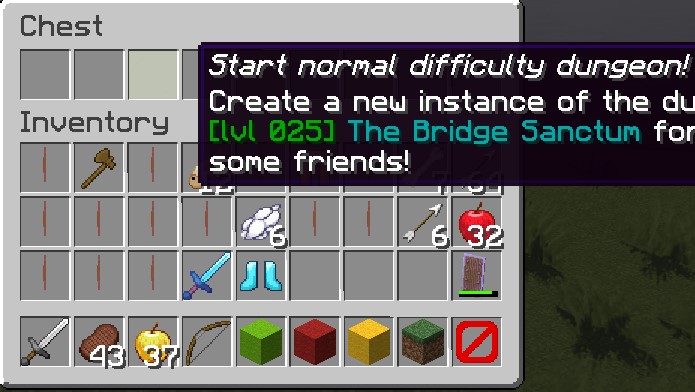
Special [1]
Expand Table
Setting instanced dungeon difficulties will automatically create different difficulty options when entering the dungeon.
Use id to match difficulty filters in boss powers and loot. name is the player-facing, translatable label. Explicit IDs 0, 1, and 2 are recommended for Normal, Hard, and Mythic. The resolver also recognizes Easy/Medium/Hard as those three tiers when that is the package's naming scheme; unknown IDs retain exact matching. If id is omitted, it is inferred from the authored name before translation.
Difficulties are in a list format which have the following fields:
| Key | Description | Values | Mandatory |
|---|---|---|---|
name | Name of the difficulty for players. | String | ✅ |
id | ID of the difficulty, used in custom bosses and custom items for the difficulty-based feature. | String | ❌ |
levelSync | Caps the item tier in the cached player-item path. It does not rewrite equipment or cap every damage and defense calculation. | Absolute level (25) or a quoted value relative to contentLevel ('+5', '-3') | ❌ |
Relative level sync: a levelSync that starts with + or - is added to contentLevel and clamped to at least 1. For example, contentLevel: 40 with levelSync: '-5' sets the cached tier cap to 35. Quote relative values: YAML removes the leading plus from an unquoted +5, turning it into absolute level 5. Dynamic dungeons resolve relative values against the selected level. An invalid value disables sync with 0 and logs a warning.
Current melee offense, armor defense and projectile weapon calculations can read raw item levels, and equipment enchantment contributions are not capped by this setting. See instanced dungeon difficulty before relying on level sync for encounter balance.
Dynamic dungeons
Dynamic dungeons are an extension of instanced dungeons: their content scales to the level chosen by the player. The level-selection menu uses the player's current combat level as its base. It starts at the greater of level 5 and combat level minus 5, then offers five-level increments up to combat level plus 5, capped at 200. Guild rank does not unlock these choices.
When designing bosses for a dynamic dungeon, use level: dynamic. The selected level applies to the instance's EliteMobs bosses, not every vanilla entity or reward. Use scalability: scalable for custom items that should accept the reward level, and check the relevant loot path; weighted boss loot and explicit fixed rewards may retain their authored level.
The following values are needed for dynamic dungeons.
Since all dynamic dungeons are also instanced dungeons, they additionally use all values and settings from instanced dungeons.
contentType
Sets the type of dungeon. This must be set to DYNAMIC_DUNGEON.
| Key | Values | Default | Mandatory |
|---|---|---|---|
contentType | OPEN_DUNGEON / INSTANCED_DUNGEON / DYNAMIC_DUNGEON / HUB / META_PACKAGE / ITEMS_PACKAGE / EVENTS_PACKAGE / MODELS_PACKAGE | none | ✅ |
Example
contentType: DYNAMIC_DUNGEON
contentLevel
Premade dynamic dungeons set this to -1. A dynamic dungeon does not use the value: contentType: DYNAMIC_DUNGEON makes the package dynamic, its $lowestTier and $highestTier placeholders show 5 and 200, and relative levelSync values use the level the players select.
| Key | Values | Default | Mandatory |
|---|---|---|---|
contentLevel | Integer | 0 | ❌ |
Example
contentLevel: -1
difficulties
Sets the available list of difficulties and level sync in the dynamic dungeon.
Mandatory for instanced dungeons!
| Key | Values | Default | Mandatory |
|---|---|---|---|
difficulties | Special [1] | none | ✅ |
Examples
difficulties:
- levelSync: '+5'
  name: normal
  id: 0
- levelSync: '+0'
  name: hard
  id: 1
- levelSync: '-5'
  name: mythic
  id: 2
Special [1]
Expand Table
Setting instanced dungeon difficulties will automatically create different difficulty options when entering the dungeon.
Use id to match difficulty filters in boss powers and loot. name is the player-facing, translatable label. Explicit IDs 0, 1, and 2 are recommended for Normal, Hard, and Mythic. The resolver also recognizes Easy/Medium/Hard as those three tiers when that is the package's naming scheme; unknown IDs retain exact matching. If id is omitted, it is inferred from the authored name before translation.
Quoted signed levelSync values set a relative cap for the cached player-item path. They do not change the instance's selected boss level, raise low-level equipment, or cap every combat calculation.
For example, "+0" sets that cap to the selected dungeon level, "+5" sets it five levels higher, and "-5" sets it five levels lower, with a minimum of 1. The limitations described in the instanced-dungeon section still apply.
Difficulties are in a list format which have the following fields:
| Key | Description | Values | Mandatory |
|---|---|---|---|
name | Name of the difficulty for players. | String | ✅ |
id | ID of the difficulty, used in custom bosses and custom items for the difficulty-based feature. | String | ❌ |
levelSync | Caps the cached item tier; it is not a universal equipment cap. | Integer for an absolute cap, or a quoted signed offset such as '+5' | ❌ |
Using the meta_pack.yml dungeon package file for large dungeons.
Sometimes, you may be working on a large dungeon that includes other, smaller dungeons within itself, allowing players to travel between them through the main dungeon world. A great example of this is the EliteMobs Adventure Dungeon Primis.
Primis features a vast world where players can explore and complete quests, but it also includes two instanced dungeons within its world—one of which serves as the final boss fight. In cases like this, there will be multiple dungeon package files, even though they all belong to the same overarching dungeon.
To manage this, we use a meta dungeon package file. This file acts as a central directory, specifying the primary dungeon and listing all additional dungeon content associated with it.
This example illustrates Primis's package grouping. Its version is an example, not the current published Primis version:
isEnabled: true
name: '&2[000-020] The Primis Adventure!'
customInfo:
- The tutorial adventure for players
- new to EliteMobs!
downloadLink: https://discord.gg/9f5QSka
dungeonSizeCategory: LAIR
environment: NORMAL
protect: true
contentType: META_PACKAGE
containedPackages:
- primis_adventure.yml
- primis_blood_temple_sanctum.yml
- primis_gladius_invasion_dungeon.yml
setupMenuDescription:
- '&2A soft tutorial adventure for players between levels 0-20!'
- '&2Adventures are massive maps with quests,'
- '&2many bosses and npcs, among other things!'
- '&2Also has custom models!'
dungeonVersion: 1
As you can see, the meta dungeon package file is very similar to a regular dungeon package, with a few key differences. The contentType: is set to META_PACKAGE, and there is an additional setting called containedPackages:. This setting lists all the other dungeon packages that are part of the larger dungeon.
List every child package's exact filename under containedPackages. Include those configurations and their content in the archive. The meta package resolves already loaded package definitions and skips missing entries; the list itself does not bundle or download their files.
Use the meta package's dungeonVersion for the combined release. Nightbreak version checks skip listed children and compare the eligible parent package's version. A custom YAML meta package does not acquire Nightbreak download or update support just by declaring children.
Child dungeons can still appear in the player's /em teleport menu, separate from the administrator's /em setup menu. Set listedInTeleports: false in each child whose entry should be hidden.
For example, in the case of the Primis dungeon:
Disable teleport entries in the menu for primis_blood_temple_sanctum.yml and primis_gladius_invasion_dungeon.yml.
Leave teleport options enabled for primis_adventure.yml, as this serves as the main hub where players begin their journey and access the other dungeons.
Players then enter through the adventure's teleport entry and use its authored routes to reach the child dungeons.
When naming the file we recommend the following naming convention:
your_dungeon_name_meta_pack.yml
Recommended Boss Values
For Normal, Hard and Mythic loot targets, see automatic class loot and enchantment balancing. That guide covers equipment profiles by encounter rank, the actual enchantment budget, reusable reward presentation and administrator review commands. Boss HP and damage values below tune combat independently of reward quality.
Creating an average dungeon mob
Use normalizedCombat: true for the normalized combat path. Health and damage still depend on level, multipliers, player equipment, skills and combat settings. These examples are starting points for balancing, not fixed numbers of hits to kill.
For dungeon content, normalizeRegionalBosses: true in MobCombatSettings.yml (the default) enables normalized combat for regional bosses; instanced-dungeon bosses also use normalized combat. An explicit scaledCombat: true in the boss file takes priority for scaled combat calculations. The recommendations below assume normalized combat without that override.
normalizedCombat: true
healthMultiplier: 1.0 #Starting point; verify with intended player loadouts.
damageMultiplier: 1.0 #Damage scales with the player's health and defenses; playtest this value.
Note: Given that 1.0 is the default value for health and damage, you can simply omit defining healthMultiplier or damageMultiplier and set normalizedCombat to true.
Creating trash packs
Trash packs are numerous but not very dangerous:
normalizedCombat: true
healthMultiplier: 0.7 #Starting point for weaker mobs.
damageMultiplier: 0.5 #Damage scales with the player's health and defenses; playtest this value.
Creating reinforcements
Reinforcements should die very easily, but pose a danger damage-wise (these values are recommended for 4+ melee entities, actual use may vary):
normalizedCombat: true
healthMultiplier: 0.25 #Starting point for fragile reinforcements.
damageMultiplier: 0.6 #Damage scales with the player's health and defenses; playtest this value.
Creating minibosses
Minibosses should hold their ground, and pose a mechanic challenge to players. It should be a test of skill that lasts for a little while, but not something extremely deadly:
normalizedCombat: true
healthMultiplier: 3.0 #Starting point for minibosses.
damageMultiplier: 1.2 #Damage scales with the player's health and defenses; playtest this value.
Creating bosses
Bosses are a real challenge, the conclusion of a buildup in a dungeon and a real test of skill with everything on the line. Encounters should be long and death should be a present threat.
normalizedCombat: true
healthMultiplier: 7.0 #Starting point for bosses; check the health ceiling.
damageMultiplier: 1.4 #Damage scales with the player's health and defenses; playtest this value.
These recommended values are merely rough estimates, and the final values should be adjusted according to the specific encounters.
For final bosses, check encounter length with the intended party sizes, equipment and skills before increasing healthMultiplier.
healthMultiplier upBase boss health and the health-multiplied result are capped to the server's settings.attribute.maxHealth.max, 2048 on a default server. With that ceiling, 7.0 reaches the cap at level 36, 10.0 at 33, and 40.0 at 23. Instance party scaling multiplies the result afterward and is capped at the same ceiling, so a boss already at the cap gains no health from a larger party. Damage has separate calculations and caps; it does not follow the health ceiling. See healthMultiplier for the base calculation and how to raise the server limit.
Packaging EliteMobs content for distribution
Finally, you will probably want to package your dungeon either for storage or for distribution.
EliteMobs has an import system which allows admins to quickly import, install and uninstall content. You can see how it works here.
Distributing Dungeon Resource Packs
As of EliteMobs 9.6.0, dungeons can be packaged and distributed with their own resource packs! This allows you to do cool things like using custom textures or models for loot dropped in the dungeon, or adding custom sounds—like we did in our dungeon The Hallowed Haunt.
To distribute a resource pack with your dungeon, create it like any standard resource pack. If you want a template, you can reference the EliteMobs default resource pack, which EliteMobs exports on boot to plugins/EliteMobs/resource_pack/em_rsp_defaults/. The resource pack must be distributed unzipped, so create a folder named after your dungeon, for example: my_cool_dungeon_rsp. Place all the resource pack files that would normally go into the zip inside this folder. Then, place this folder inside a new folder called resource_pack—this is the same folder that EliteMobs uses to store its default resource pack.
Keep your changes in a separate pack. On boot, EliteMobs compares its bundled pack checksum with the saved .rsp_checksum and replaces em_rsp_defaults when the bundled pack changes or the saved checksum/directory is missing. It does not hash your edited files: edits may survive a restart, but a later re-export replaces them.
After organizing your files, the directory structure should look like this:
resource_pack
└── my_cool_dungeon_rsp
    └── [resource pack files]
The importer places that folder under plugins/EliteMobs/resource_pack/. Importing it does not send it to clients; include it in the resource pack distributed by your server's pack provider.
Trimming Worlds
Trimming unused chunks reduces a world's download size. The example below uses the WorldBorder plugin; check its supported versions before using it with your server. Trimming permanently removes chunks, so use an export copy with a backup.
Details
Tip
If you are doing this for the first time it might be a good idea to create a backup of your world just in case something goes wrong.Once the plugin is installed, navigate to the middle of the world or the specific area you wish to trim. Then, execute the command /wb set x, where x represents the approximate radius size you want for your area.
Details
Tip
If/wb is not working for you, try /worldborder:wb.After executing this command, fly to the edges of your world to verify that the world border has been properly set and covers the intended size. You will recognize reaching the world border edge when you are pushed back, accompanied by a message in the chat.
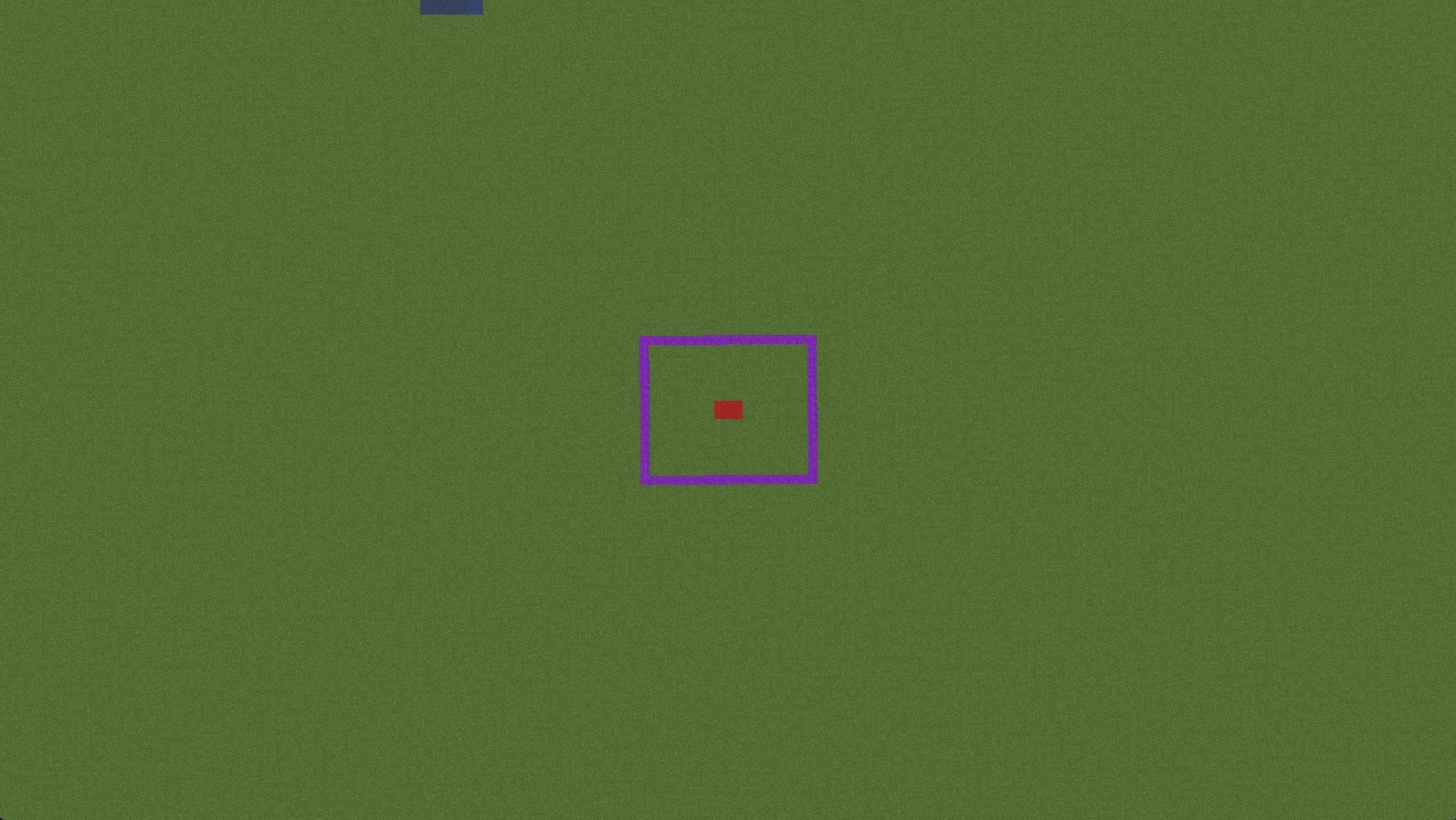
In the image above, we aim to trim the world around the purple blocks, leaving only a few chunks around them. To achieve this, we stand in the middle of the purple area on the red squares and execute /wb set 50, setting the world border just beyond the purple area.
Next, use /wb trim [freq] [pad]. The padding is measured in blocks, and the frequency controls how many chunks are checked per second. For example, /wb trim 200 20 checks up to 200 chunks per second while retaining 20 blocks beyond the border. Inspect that buffer before confirming with /wb trim confirm; choose a larger padding if your export needs more surrounding terrain. These units are defined in WorldBorder's trim command.
You can then remove this world's plugin border with /wb clear while standing in that world, or leave it in place.
Trimming the world folder
Prepare a backup and work on a separate export copy of the world while the source world is unloaded. Preserve its complete directory layout, including terrain, entities, points of interest and world data. Do not use a minimal file whitelist: it can delete terrain, item frames, armor stands or other authored content.
World layouts depend on the Minecraft version and server software. Older layouts distinguish Nether DIM-1 from End DIM1; modern storage places dimensions under dimensions/<namespace>/<key>/. Keep the layout produced by your server and export the single dimension required for each blueprint, as described above. Before distribution, import the copy on a separate server and inspect its terrain and authored entities. Remove temporary locks or private player data only from the export copy after identifying their paths for that server version.
Running the package command
EliteMobs has the /em package <dungeonName> <version> command, requiring elitemobs.package. This command looks for a subfolder named dungeonName inside each of the content folders below and copies whatever it finds into exports/<dungeonName>/, then zips that into exports/<dungeonName>_packaged.zip.
The folders it scans are, in order:
custombosses, customevents, npcs, npc_scripts, transport_routes, customitems, customquests, customarenas, customspawns, customtreasurechests, wormholes, world_blueprints, powers, behaviors
Anything it cannot find prints a "no subdirectory" notice and is skipped, which is normal for a package that does not use every content type.
For this reason, it is highly recommended you keep the content you want to package in folders with the same name as the name of your package. Otherwise, you will have to manually gather and package the files into the file structure for distribution.
The command does not collect content_packages, worldcontainer, models, scripts, enchantments or resource_pack, and does not create pack.meta. Add the files your package needs to the export folder before creating the final zip. The <version> argument must be an integer, but it does not update dungeonVersion; edit that field yourself.
Before copying, the command validates existing blueprints referenced by matching loaded package definitions. It can abort on an invalid layout or server mismatch. That check does not establish that every required configuration, boss or asset has been included.
Each run builds the export in a temporary folder first. When it succeeds, it replaces exports/<dungeonName>/ and exports/<dungeonName>_packaged.zip, so files you added to the previous export folder by hand are deleted. Keep those additions elsewhere and copy them in again after each run. If none of the content folders exist, or a content folder or file is a symbolic link, the command prints Failed to zip package!, logs the reason in the console and leaves the previous export untouched.
Adding the dungeon package file
If you are creating a dungeon, you will need to manually add the dungeon package file into the freshly generated folder in the exports folder. Your dungeon package configuration file should follow the format described above and be placed in a folder called content_packages. See the File structure section below for more on that.
Make sure you zip your dungeon once done!
File structure
If you did everything correctly, the file structure should be similar to this example, where we called the dungeon my_cool_dungeon:
my_cool_dungeon File Structure Example
- my_cool_dungeon.zip
- pack.meta (contains
elitemobs) - content_packages
- my_cool_dungeon.yml <- This is where your dungeon package configuration file goes
- worldcontainer
- [Your world folders go here]
- wormholes
- my_cool_dungeon
- [Your wormholes go here]
- my_cool_dungeon
- npcs
- my_cool_dungeon
- [Your NPCs go here]
- my_cool_dungeon
- customtreasurechests
- my_cool_dungeon
- [Your treasure chests go here]
- my_cool_dungeon
- customquests
- my_cool_dungeon
- [Your quests go here]
- my_cool_dungeon
- customitems
- my_cool_dungeon
- [Your custom items go here]
- my_cool_dungeon
- custombosses
- my_cool_dungeon
- [Your custom bosses go here]
- my_cool_dungeon
- customarenas
- my_cool_dungeon
- [Your custom arenas go here]
- my_cool_dungeon
- powers
- my_cool_dungeon
- [Your custom powers go here]
- my_cool_dungeon
- world_blueprints
- my_cool_dungeon
- [Your world folder goes here, used for instanced dungeons]
- my_cool_dungeon
- customevents
- my_cool_dungeon
- [Your custom events go here]
- my_cool_dungeon
- customspawns
- my_cool_dungeon
- [Your custom spawns go here]
- my_cool_dungeon
- models
- [Your bbmodel format models go here, accepts folders]
- scripts
- [Your FreeMinecraftModels Lua scripts go here]
- resource_pack
- my_cool_dungeon_rsp
- [Your resource pack files go here]
- my_cool_dungeon_rsp
- pack.meta (contains
Distribute the completed zip for import through plugins/EliteMobs/imports/, then reload and check /em setup. Test a clean installation before sharing it, including referenced bosses, quests, Lua files, models and world blueprints.
Recognized top-level folders
The importer only understands a fixed set of top-level names. For an EliteMobs package (pack.meta containing elitemobs) these are:
| Folder | Where it is installed |
|---|---|
content_packages | plugins/EliteMobs/content_packages |
dungeonpackages | plugins/EliteMobs/content_packages (legacy alias) |
custombosses | plugins/EliteMobs/custombosses |
customitems | plugins/EliteMobs/customitems |
customtreasurechests | plugins/EliteMobs/customtreasurechests |
customevents | plugins/EliteMobs/customevents |
customspawns | plugins/EliteMobs/customspawns |
customquests | plugins/EliteMobs/customquests |
customarenas | plugins/EliteMobs/customarenas |
npcs | plugins/EliteMobs/npcs |
npc_scripts | plugins/EliteMobs/npc_scripts |
transport_routes | plugins/EliteMobs/transport_routes |
behaviors | plugins/EliteMobs/behaviors |
enchantments | plugins/EliteMobs/enchantments |
wormholes | plugins/EliteMobs/wormholes |
powers | plugins/EliteMobs/powers |
world_blueprints | plugins/EliteMobs/world_blueprints |
resource_pack | plugins/EliteMobs/resource_pack |
worldcontainer | the server's world container |
models or modelengine | FreeMinecraftModels' models folder if FreeMinecraftModels is enabled, otherwise ModelEngine's blueprints folder when ModelEngine is enabled; if neither provider is enabled, FreeMinecraftModels' models folder |
scripts | plugins/FreeMinecraftModels/scripts |
elitemobs | plugins/EliteMobs, merged using the same layout as that data folder |
freeminecraftmodels | plugins/FreeMinecraftModels, merged using the same layout as that data folder. A models folder inside it goes to whichever models folder FreeMinecraftModels reads |
betterstructures | plugins/BetterStructures, merged using the same layout as that data folder |
pack.meta | not installed anywhere - it is only read to identify the package |
Use the elitemobs, freeminecraftmodels and betterstructures folders for files that have no top-level name of their own, for example freeminecraftmodels/enchantments for FreeMinecraftModels enchantments that your items use. After an import places files in its folder, FreeMinecraftModels reloads its imported content. BetterStructures reloads once its own startup has finished; builds without that reload entry point log a warning asking you to run /bs reload.
An unrecognized top-level entry rejects the whole package and retains the archive for correction. Keep stray readme files, screenshots and __MACOSX folders out of the archive root. If a destination write fails, the importer attempts to roll back every destination changed by that archive; inspect any rollback warnings before retrying.
schematics also rejects an EliteMobs archive, with an additional warning that schematic dungeons were removed in EliteMobs 9.0.
Ship dungeon configurations with isEnabled: false when administrators should install them through /em setup. Prepare and check an unloaded export copy of each world. Preserve the authoring server's files and verify the exported configuration rather than assuming the package command resets installation state.
Sharing Dungeon Packages you've created with the community
Discord contains a #community_dungeons section where people can share their Minidungeon creations. Feel free to contribute!