副本打包器

什麼是副本?
你可以在這裡找到關於副本的資訊,包括預製副本的資訊。
什麼是副本打包器?
副本套件系統可散布副本、事件、模型、競技場、NPC 和物品等 EliteMobs 內容。打包指令只收集部分支援的資料夾;世界、套件定義及部分資源仍須手動加入,如下文所述。
為什麼要使用副本套件?
- 副本地城! 副本地城只能透過副本套件系統來建立。
- 小型地城的安全備份! 如果你製作了副本套件,你就能隨時基於任何理由,把它部署與重新部署到任何你想要的伺服器上。
- 容易開啟與關閉! 你隨時都可以執行
/em setup,暫時或永久地關閉與開啟副本套件。 - 容易分享! 如果你想分享你的創作,副本套件只要壓縮成 zip 再傳給其他人就好。如果你有興趣,還有一個專門用於社群創作的 Discord 房間!
- 傳送! 已安裝的戰鬥內容套件在
listedInTeleports: true且不是附魔挑戰時,可出現在/em的傳送頁面。目的地座標由作者設定,選單不會自行建立。
建立副本
以下設定用來建立一個應放入 content_packages 資料夾的設定檔。這些設定專門用於建立副本;如果你只是想用副本打包器來散布非副本內容(例如一包物品或事件),就不需要它們。
必要外掛
不需要額外的區域外掛。EliteMobs 透過共用的 MagmaCore 保護程式,將 protect: true 的世界註冊為受保護世界。
WorldGuard 仍是可選的軟性相依。當它已安裝時,其 EliteMobs 專屬的區域旗標會變得可用,但副本套件並不需要它才能受到保護。
逐步建立副本
EliteMobs 以前有兩大類副本:以世界為基礎的,以及以藍圖(schematic)為基礎的。
舊式 schematic 副本會關聯到一份建築藍圖。它們已淘汰,SCHEMATIC_DUNGEON 不再受支援。
現在所有 EliteMobs 副本都是以世界為基礎。
必要的 pack.meta 檔案
你的副本套件應該包含一個 pack.meta 檔案,它其實就是把 .txt 檔案改成 .meta 副檔名。這個檔案只需要包含一個單字,用來表明該套件是給哪個外掛的(例如以小寫書寫的「elitemobs」)。pack.meta 檔案必須位於你套件的根目錄,與其他所有資料夾並列。
全域數值
以下數值適用於所有副本
isEnabled
設定該副本套件是否啟用。
| 鍵 | 值 | 預設值 | 必填 |
|---|---|---|---|
isEnabled | 布林值 | true | ✅ |
範例
isEnabled: true
name
設定內容名稱。支援色彩代碼。
| 鍵 | 值 | 預設值 | 必填 |
|---|---|---|---|
name | 字串 | 無 | ✅ |
範例
name: '&c[lvl 999] &aThe Green Dungeon'
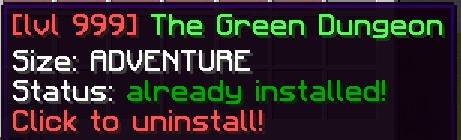
contentType
設定副本的類型。
| 鍵 | 值 | 預設值 | 必填 |
|---|---|---|---|
contentType | OPEN_DUNGEON / INSTANCED_DUNGEON / DYNAMIC_DUNGEON / HUB / META_PACKAGE / ITEMS_PACKAGE / EVENTS_PACKAGE / MODELS_PACKAGE | 無 | ✅ |
範例
contentType: INSTANCED_DUNGEON
customInfo
保留的資訊清單,會被讀取並註冊以供翻譯,但目前的設定選單不會顯示它。請使用 setupMenuDescription 設定 /em setup 的說明。
| 鍵 | 值 | 預設值 | 必填 |
|---|---|---|---|
customInfo | 字串清單 | 無 | ✅ |
範例
customInfo:
- '&aThe best dungeon.'
- '&aMade by: CoolPlayer'
setupMenuDescription
設定 /em setup 選單中此套件的說明。支援色彩代碼。
| 鍵 | 值 | 預設值 | 必填 |
|---|---|---|---|
setupMenuDescription | 字串清單 | 無 | ❌ |
範例
setupMenuDescription:
- '&2A cool dungeon for levels 10-20!'
- '&2Features 3 bosses and custom loot!'
downloadLink
當缺少內容且套件沒有 Nightbreak slug 時,在 /em setup 提供手動下載連結。單獨設定此值不會讓自訂套件獲得 Nightbreak 自動下載支援。
| 鍵 | 值 | 預設值 | 必填 |
|---|---|---|---|
downloadLink | 字串 | 空字串 | ❌ |
範例
downloadLink: http://www.example.org

dungeonSizeCategory
設定套件的規模標籤,預設為 LAIR。這不會決定世界是否採用實例模式;執行方式由 contentType 控制。
| 鍵 | 值 | 預設值 | 必填 |
|---|---|---|---|
dungeonSizeCategory | 特殊 [1] | LAIR | ❌ |
範例
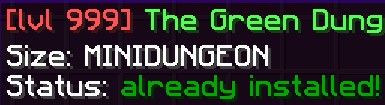
dungeonSizeCategory: MINIDUNGEON
特殊 [1]
展開表格
| 鍵 | 說明 |
|---|---|
LAIR | 巢穴是一種小型地城,聚焦在一場大型 Boss 戰上。 |
SANCTUM | 聖所相當於副本化的巢穴。這表示它們聚焦在一場巨大的 Boss 戰上。 |
MINIDUNGEON | 小型地城是一種中等規模的地城,通常包含 3-15 個小 Boss 與一個大 Boss,以及大量供玩家「刷」金幣與裝備的「雜魚」怪物。 |
DUNGEON | 地城相當於副本化的小型地城。這是最傳統的 MMORPG 地城型態,玩家會組隊,穿過一連串雜魚怪物與小 Boss 的考驗,去挑戰最終 Boss。 |
RAID | 團隊副本標籤,用於較大型的多人內容。這是有效值。 |
ADVENTURE | 冒險是完整的冒險地圖。它們包含任務線、NPC、大量的小 Boss 與 Boss,甚至可以在其中包含自己的競技場或地城。 |
ARENA | 競技場是以波次為基礎的生存區域,玩家擊敗波次即可獲得獎勵。 |
OTHER | 任何不屬於上述分類的其他內容。 |
REALM | 內容與進度豐富的大型副本標籤。仍可採用實例模式,請檢查 contentType。 |
更詳細的描述請見副本
protect
設定套件世界是否受 MagmaCore 的共用保護程式保護。保護涵蓋玩家破壞與放置方塊、燃燒、點燃、消退(霜冰除外)、樹葉腐朽、骨粉、倒出水桶或熔岩桶、告示牌編輯、容器存取(已註冊寶箱除外)、門/地板門/柵欄門、龍蛋、花盆、物品展示框、盔甲座、實體改變方塊,以及非 CUSTOM 原因的生物生成。也會阻擋玩家使用造成蛛網的編織藥水。
allowExplosionBlockDamage、allowLiquidFlow 與 allowElytra 控制相關例外。當 CombatTag.yml 中設有 preventFlyToggleInDungeons: true(預設值)時,保護也會阻止非 OP 玩家開始飛行。部分保護另受全域友軍傷害、環境保護與 /em protection bypass 管理員略過狀態影響。protect: false 會停用這套世界保護,但世界仍由 EliteMobs 管理,副本生命週期與戰鬥規則仍適用。
| 鍵 | 值 | 預設值 | 必填 |
|---|---|---|---|
protect | 布林值 | true | ❌ |
範例
protect: true
dungeonVersion
設定套件版本,預設為 0。發布新版本時請在此檔案中提高版本號;打包指令的版本參數不會寫入此欄位。
| 鍵 | 值 | 預設值 | 必填 |
|---|---|---|---|
dungeonVersion | 整數 | 0 | ❌ |
範例
dungeonVersion: 1
playerInfo
設定玩家傳送選單的說明,支援色彩代碼與 $bossCount、$lowestTier、$highestTier。書本、物品欄和對話框選單都會使用它;套件仍須符合傳送清單的顯示條件並啟用 listedInTeleports。
| 鍵 | 值 | 預設值 | 必填 |
|---|---|---|---|
playerInfo | 字串 | 無 | ❌ |
範例
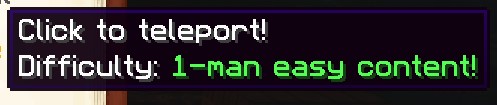
playerInfo: 'Difficulty: &a1-man easy content!'
regionEnterMessage
保留的區域進入訊息欄位。它會被讀取與註冊以供翻譯,但目前沒有執行時呼叫者。設定它不會建立進入訊息。
| 鍵 | 值 | 預設值 | 必填 |
|---|---|---|---|
regionEnterMessage | 字串 | 無 | ❌ |
範例
regionEnterMessage: '&aYou have entered the dungeon!'
regionLeaveMessage
保留的區域離開訊息欄位。它會被讀取與註冊以供翻譯,但目前沒有執行時呼叫者。設定它不會建立離開訊息。
| 鍵 | 值 | 預設值 | 必填 |
|---|---|---|---|
regionLeaveMessage | 字串 | 無 | ❌ |
範例
regionLeaveMessage: '&aYou have left the dungeon!'
hasCustomModels
標記該副本套件隨附自訂模型(供 ModelEngine 或 FreeMinecraftModels 使用)。此鍵會被讀取與寫入,但 EliteMobs 目前不會對它採取任何行動 —— 模型的安裝完全取決於套件中是否存在 models 資料夾。請把它視為一個文件用的標記。
| 鍵 | 值 | 預設值 | 必填 |
|---|---|---|---|
hasCustomModels | 布林值 | false | ❌ |
範例
hasCustomModels: false
dungeonConfigFolderName
設定用於存放與此副本相關檔案的資料夾名稱。
副本地城必填!
| 鍵 | 值 | 預設值 | 必填 |
|---|---|---|---|
dungeonConfigFolderName | 字串 | 無 | ❌ |
範例
dungeonConfigFolderName: my_dungeon_folder
anchorPoint
schematic 時代用於相對座標的參考點。套件解析器仍會讀取 anchorPoint 與 calculatedRotation,但目前沒有任何指令或功能使用它們。以錨點為基準測量的 /em relativecoords 指令已在 EliteMobs 9.0.5 中移除。請改用 Boss、寶箱與 NPC 各自檔案中的位置來定位它們。
| 鍵 | 值 | 預設值 | 必填 |
|---|---|---|---|
anchorPoint | 位置 | 無 | ❌ |
calculatedRotation | 整數(度) | 0 | ❌ |
範例
anchorPoint: my_dungeon_world,100,64,100,0,0
calculatedRotation: 0
contentLevel
設定該副本應在 EM 選單中顯示的內容等級。
| 鍵 | 值 | 預設值 | 必填 |
|---|---|---|---|
contentLevel | 整數 | 0 | ❌ |
範例
contentLevel: 20
enchantmentChallenge
將實例副本標記為單人附魔挑戰。它會加入挑戰清單並從一般傳送清單中排除。仍須有有效的實例套件、世界藍圖、起始位置與完成目標;此旗標不會自行建立它們。
| 鍵 | 值 | 預設值 | 必填 |
|---|---|---|---|
enchantmentChallenge | 布林值 | false | ❌ |
範例
enchantmentChallenge: false
song
設定該副本是否應有配樂。
| 鍵 | 值 | 預設值 | 必填 |
|---|---|---|---|
song | 字串 | 無 | ❌ |
name= 指定資源包中的音效 ID,而非檔案路徑。
length= 是以毫秒計的曲目長度。EliteMobs 將它轉換為 tick;應填入真實長度,否則循環時間會不準確。
這兩部分以空格分隔。一首曲目會循環播放;以 -> 串接兩首時,第一首只播放一次,第二首循環。第二首也使用 name=/length=。此設定不會把資源包傳送到玩家客戶端。
範例
song: name=elitemobs:dark_cathedral.ambient length=93830
雙曲目形式:
song: name=elitemobs:intro length=12000->name=elitemobs:dark_cathedral.ambient length=93830
dungeonLockoutMinutes
設定每位玩家對每個實例 Boss 的獎勵冷卻時間,以分鐘計。預設 4320,即 72 小時;0 可停用。這不會阻止玩家進入副本。擊敗 Boss 後會記錄玩家與隊伍的鎖定狀態,處於冷卻中的 Boss 也不提供技能 XP。
| 鍵 | 值 | 預設值 | 必填 |
|---|---|---|---|
dungeonLockoutMinutes | 整數 | 4320 | ❌ |
範例
dungeonLockoutMinutes: 1440
containedPackages
設定某個 meta 套件內所包含的副本套件清單。當 contentType 設為 META_PACKAGE 時,會用它來列出屬於這個較大型副本的所有子套件。
| 鍵 | 值 | 預設值 | 必填 |
|---|---|---|---|
containedPackages | 字串清單 | 無 | ❌ |
範例
containedPackages:
- my_dungeon_adventure.yml
- my_dungeon_sanctum.yml
- my_dungeon_boss_fight.yml
customItemFilenames
設定物品套件的自訂物品檔案清單。非 null 清單(包含空清單)會把 contentType 覆寫為 ITEMS_PACKAGE。事件與模型清單在之後處理,可能再次覆寫類型;只設定需要的清單。
| 鍵 | 值 | 預設值 | 必填 |
|---|---|---|---|
customItemFilenames | 字串清單 | 無 | ❌ |
範例
customItemFilenames:
- my_custom_sword.yml
- my_custom_armor.yml
customEventFilenames
設定事件套件的自訂事件檔案清單。非 null 清單(包含空清單)會把 contentType 覆寫為 EVENTS_PACKAGE,優先於物品清單。模型清單會在之後處理。
| 鍵 | 值 | 預設值 | 必填 |
|---|---|---|---|
customEventFilenames | 字串清單 | 無 | ❌ |
範例
customEventFilenames:
- my_custom_event.yml
modelNames
設定模型套件的模型名稱清單。非 null 清單(包含空清單)會把 contentType 覆寫為 MODELS_PACKAGE,優先於物品與事件清單。
| 鍵 | 值 | 預設值 | 必填 |
|---|---|---|---|
modelNames | 字串清單 | 無 | ❌ |
範例
modelNames:
- my_custom_model
保留的舊藍圖欄位
relativeBossLocations、relativeTreasureChestLocations、schematicName、defaultSchematicRotation、corner1 和 corner2 仍保留在套件解析器中,以支援舊檔案。目前的世界套件或實例套件並不是用它們來放置內容;請改用 Boss/寶箱定義中的位置以及世界藍圖。anchorPoint 與 calculatedRotation 也以相同方式保留;請參閱 anchorPoint。
可翻譯的鍵
上述其中六個值會在套件載入時註冊到翻譯系統:name、customInfo、playerInfo、regionEnterMessage、regionLeaveMessage,以及 difficulties 中每個項目的 name。在使用非英語語言的伺服器上,這些值會在該語言的 CSV 中被查找,而你在 YAML 中寫的文字就是英文欄位所比對的依據。如果你希望你的套件可被翻譯,請用英文撰寫它們。
以世界為基礎的副本套件
以下數值僅適用於以世界為基礎的副本。
worldName
設定應被打包的世界名稱。
| 鍵 | 值 | 預設值 | 必填 |
|---|---|---|---|
worldName | 字串 | 無 | ✅ |
範例
worldName: my_minecraft_world
wormholeWorldName
設定與主世界一起載入的次要世界,例如傳送中樞或特殊 Boss 房間。它使用套件的相同環境與保護設定;此欄位不會自行建立蟲洞或傳送連線。
| 鍵 | 值 | 預設值 | 必填 |
|---|---|---|---|
wormholeWorldName | 字串 | 無 | ❌ |
範例
wormholeWorldName: my_minecraft_world_wormhole
environment
設定該世界的環境。
| 鍵 | 值 | 預設值 | 必填 |
|---|---|---|---|
environment | 環境 | NORMAL | ❌ |
範例
environment: NORMAL
teleportLocation
設定世界副本的進入位置,或實例副本的等候區。實例會將位置重新對應到複製的世界;缺少位置時使用 startLocation。格式為 world,x,y,z,yaw,pitch。
| 鍵 | 值 | 預設值 | 必填 |
|---|---|---|---|
teleportLocation | 字串 | 無 | ✅ |
範例
teleportLocation: my_minecraft_world,-1.5,68,0.5,0.0,0.0
allowExplosionBlockDamage
控制受保護世界中的爆炸方塊傷害。這不會把一般爆炸變成精英爆炸。只有受追蹤的精英爆炸在 doExplosionRegen 啟用時才會修復,約一分鐘後開始,每 tick 還原一個方塊。其他爆炸的破壞可能永久保留。
| 鍵 | 值 | 預設值 | 必填 |
|---|---|---|---|
allowExplosionBlockDamage | 布林值 | false | ❌ |
範例
allowExplosionBlockDamage: true
allowLiquidFlow
控制受保護世界中的水與熔岩流動。水桶與熔岩桶互動由其他保護規則處理;允許流動不代表允許倒桶。
| 鍵 | 值 | 預設值 | 必填 |
|---|---|---|---|
allowLiquidFlow | 布林值 | true | ❌ |
範例
allowLiquidFlow: false
allowElytra
控制受保護世界中的鞘翅滑翔。false 會阻止開始滑翔,並在玩家進入世界或移動時停止既有滑翔;不是每 tick 執行。管理員略過保護的狀態仍適用。
| 鍵 | 值 | 預設值 | 必填 |
|---|---|---|---|
allowElytra | 布林值 | false | ❌ |
範例
allowElytra: true
listedInTeleports
控制符合條件的已安裝套件是否顯示於 /em 傳送選單。false 只隱藏該項目,不是存取權限,也不會阻止其他進入途徑。
| 鍵 | 值 | 預設值 | 必填 |
|---|---|---|---|
listedInTeleports | 布林值 | true | ❌ |
範例
listedInTeleports: false
teleportLocationOffset
設定副本套件傳送位置的偏移量。
此鍵會被解析但目前未被使用 —— EliteMobs 中沒有任何部分會讀取產生的偏移量,因此設定它不會影響玩家的落點。請改為調整 teleportLocation 本身。
| 鍵 | 值 | 預設值 | 必填 |
|---|---|---|---|
teleportLocationOffset | 字串 | 無 | ❌ |
範例
teleportLocationOffset: my_minecraft_world,0.5,2,0.5,0.0,0.0
副本地城
實例副本會為每次遊玩複製世界,結束後刪除該複本。將單一世界/維度的匯出內容放在 world_blueprints/<dungeonConfigFolderName>/<worldName>/。
藍圖必須恰好包含一份地形匯出。可使用完整的舊式世界、只有地形的匯出,或現代維度結構;有效地形含有 .mca 區域檔,位於根目錄或相應的 DIM-1/DIM1 子目錄。並非所有格式都要求 level.dat。整個伺服器的 dimensions 容器、混合結構、符號連結與非一般檔案都會被拒絕。現代藍圖需要採用現代儲存的伺服器。
請在已卸載的匯出副本上操作,保留該維度的地形、實體、興趣點與資料。複製器會略過 uid.dat、session.lock 與 Paper 維度識別中繼資料,不會改動來源。實例世界使用 <worldName>_<number> 命名模式。啟動時會保留當機後的殘留世界;實例生命週期只清理自身建立的世界。手動刪除殘留世界前,請確認其來源,並確認沒有運作中的實例正在使用它。
以下數值僅適用於副本地城。請注意所有副本地城都是世界副本,因此它們也會使用世界副本的那些數值。
startLocation
設定副本地城起始點的傳送位置。這是玩家以 /em start 開始該副本地城時會被傳送到的地方。沒有有效 startLocation 的實例或動態套件不會載入。
| 鍵 | 值 | 預設值 | 必填 |
|---|---|---|---|
startLocation | 字串 | 無 | ✅ |
範例
startLocation: my_minecraft_world,10.5,70,10.5,0.0,0.0
permission
設定進入該副本實例所需的權限。
| 鍵 | 值 | 預設值 | 必填 |
|---|---|---|---|
permission | 字串 | 無 | ❌ |
範例
permission: elitedungeon.mypermission
minPlayerCount
設定開始一個副本所需的最少玩家人數。
| 鍵 | 值 | 預設值 | 必填 |
|---|---|---|---|
minPlayerCount | 整數 | 1 | ❌ |
範例
minPlayerCount: 1
maxPlayerCount
設定副本中允許的最多玩家人數。
| 鍵 | 值 | 預設值 | 必填 |
|---|---|---|---|
maxPlayerCount | 整數 | 5 | ❌ |
範例
maxPlayerCount: 5
dungeonObjectives
設定該副本要被視為已完成所需的副本目標清單。
| 鍵 | 值 | 預設值 | 必填 |
|---|---|---|---|
dungeonObjectives | 字串清單 | 無 | ✅ |
範例
可用的目標是擊殺目標:filename=boss.yml:amount=X。省略 amount 時預設為 1。檔名須匹配目前實例中 Boss 的第一階段定義;所有仍進行中的匹配目標都會記錄該次擊殺。
dungeonObjectives:
- filename=dungeon_final_boss.yml
- filename=dungeon_miniboss_one.yml
- filename=dungeon_miniboss_two.yml
dungeonObjectives:
- filename=dungeon_guard.yml:amount=5
不含 filename= 的 boss.yml 仍可使用,系統會將它視為 filename=boss.yml。新套件應使用明確寫法。
檔名必須以 .yml 結尾,amount 必須是至少為 1 的整數。每個欄位只能出現一次。未知欄位、缺少檔名或無效的數量會讓套件無法載入,主控台錯誤訊息會指出該檔案與該目標。
不支援百分比目標,載入副本定義時會直接拒絕。請使用明確的擊殺目標,例如 filename=boss.yml:amount=2。無效的必要目標會使該定義遭到拒絕;它永遠不會被默默從通關條件中省略。
difficulties
設定該副本地城中的難度清單。
副本地城必填!
| 鍵 | 值 | 預設值 | 必填 |
|---|---|---|---|
difficulties | 特殊 [1] | 無 | ❌ |
範例
difficulties:
- levelSync: 25
  id: 0
  name: normal
- levelSync: 20
  id: 1
  name: hard
- levelSync: 15
  id: 2
  name: mythic

特殊 [1]
展開表格
設定副本地城難度後,進入該副本時會自動產生不同的難度選項。
用 id 匹配 Boss 能力與戰利品的難度條件。name 是可翻譯的玩家可見標籤。建議為 Normal、Hard、Mythic 明確設定 ID 0、1、2。套件採用 Easy/Medium/Hard 命名時,解析器也會將它們對應到這三個級別;未知 ID 維持精確匹配。省略 id 時,會在翻譯前根據原始名稱推斷它。
難度採用清單格式,具有以下欄位:
| 鍵 | 說明 | 值 | 必填 |
|---|---|---|---|
name | 顯示給玩家的難度名稱。 | 字串 | ✅ |
id | 難度 ID,供自訂 Boss 與自訂物品的難度相關功能使用。 | 字串 | ❌ |
levelSync | 限制玩家物品快取路徑中的物品等級,不會改寫裝備或限制所有傷害與防禦計算。 | 絕對等級(25),或相對於 contentLevel 的帶引號值('+5'、'-3') | ❌ |
相對等級同步: 以 + 或 - 開頭的 levelSync 會加到 contentLevel,結果至少為 1。例如 contentLevel: 40 與 levelSync: '-5' 將快取等級上限設為 35。相對值必須加引號,因為 YAML 會去掉未加引號的 +5 的加號,使它成為絕對等級 5。動態副本依所選等級解析相對值。無效值會設為 0 以停用同步,並記錄警告。
目前近戰攻擊、護甲防禦和投射物武器計算可能讀取原始物品等級,裝備附魔效果也不受此設定限制。依賴等級同步來平衡戰鬥前,請閱讀實例副本難度。
動態副本
動態副本是實例副本的延伸,內容依玩家選擇的等級縮放。選單以玩家目前的戰鬥等級為基準,從 5 級與戰鬥等級減 5 兩者中的較大值開始,每次增加 5 級,直到戰鬥等級加 5,最高 200 級。這些選項不需要公會等級解鎖。
動態副本 Boss 應使用 level: dynamic。所選等級適用於實例中的 EliteMobs Boss,並非所有原版實體或獎勵。需要按獎勵等級縮放的自訂物品應使用 scalability: scalable,並檢查實際戰利品路徑;加權 Boss 戰利品與明確設定的固定獎勵可能保留原始等級。
動態副本需要以下數值。
由於所有動態副本同時也是副本地城,它們額外會使用副本地城的所有數值與設定。
contentType
設定副本的類型。這必須設為 DYNAMIC_DUNGEON。
| 鍵 | 值 | 預設值 | 必填 |
|---|---|---|---|
contentType | OPEN_DUNGEON / INSTANCED_DUNGEON / DYNAMIC_DUNGEON / HUB / META_PACKAGE / ITEMS_PACKAGE / EVENTS_PACKAGE / MODELS_PACKAGE | 無 | ✅ |
範例
contentType: DYNAMIC_DUNGEON
contentLevel
預製的動態副本會將此值設為 -1。動態副本並不使用這個值:contentType: DYNAMIC_DUNGEON 才是讓套件成為動態副本的設定,其 $lowestTier 與 $highestTier 預留位置會顯示 5 與 200,而相對的 levelSync 值則使用玩家選擇的等級。
| 鍵 | 值 | 預設值 | 必填 |
|---|---|---|---|
contentLevel | 整數 | 0 | ❌ |
範例
contentLevel: -1
difficulties
設定該動態副本中可用的難度與等級同步清單。
副本地城必填!
| 鍵 | 值 | 預設值 | 必填 |
|---|---|---|---|
difficulties | 特殊 [1] | 無 | ✅ |
範例
difficulties:
- levelSync: '+5'
  name: normal
  id: 0
- levelSync: '+0'
  name: hard
  id: 1
- levelSync: '-5'
  name: mythic
  id: 2
特殊 [1]
展開表格
設定副本地城難度後,進入該副本時會自動產生不同的難度選項。
用 id 匹配 Boss 能力與戰利品的難度條件。name 是可翻譯的玩家可見標籤。建議為 Normal、Hard、Mythic 明確設定 ID 0、1、2。套件採用 Easy/Medium/Hard 命名時,解析器也會將它們對應到這三個級別;未知 ID 維持精確匹配。省略 id 時,會在翻譯前根據原始名稱推斷它。
帶引號且帶正負號的 levelSync 值,設定玩家物品快取路徑中的相對上限。它不會改變所選 Boss 等級、提高低等級裝備,也不會限制所有戰鬥計算。
例如,"+0" 將該上限設為所選副本等級,"+5" 提高 5 級,"-5" 降低 5 級,最低為 1。實例副本一節所述的限制仍然適用。
難度採用清單格式,具有以下欄位:
| 鍵 | 說明 | 值 | 必填 |
|---|---|---|---|
name | 顯示給玩家的難度名稱。 | 字串 | ✅ |
id | 難度 ID,供自訂 Boss 與自訂物品的難度相關功能使用。 | 字串 | ❌ |
levelSync | 限制快取中的物品等級,不是通用裝備上限。 | 用整數設定絕對上限,或用 '+5' 等帶引號的有符號偏移值 | ❌ |
為大型副本使用 meta_pack.yml 副本套件檔案
有時候,你可能正在製作一個大型副本,其中還包含其他較小的副本,讓玩家能透過主副本世界在它們之間往來。EliteMobs 的冒險副本 Primis 就是一個很好的例子。
Primis 擁有一個廣闊的世界,玩家可以在其中探索並完成任務,但它的世界內也包含兩個副本地城——其中之一就是最終 Boss 戰。像這種情況,就會有多個副本套件檔案,即使它們全都屬於同一個上層副本。
為了管理這種情況,我們會使用 meta 副本套件檔案。這個檔案的作用像是一份中央目錄,指明主要副本並列出所有與之相關的額外副本內容。
以下展示 Primis 的套件分組。版本號僅供示範,不是目前發布的 Primis 版本:
isEnabled: true
name: '&2[000-020] The Primis Adventure!'
customInfo:
- The tutorial adventure for players
- new to EliteMobs!
downloadLink: https://discord.gg/9f5QSka
dungeonSizeCategory: LAIR
environment: NORMAL
protect: true
contentType: META_PACKAGE
containedPackages:
- primis_adventure.yml
- primis_blood_temple_sanctum.yml
- primis_gladius_invasion_dungeon.yml
setupMenuDescription:
- '&2A soft tutorial adventure for players between levels 0-20!'
- '&2Adventures are massive maps with quests,'
- '&2many bosses and npcs, among other things!'
- '&2Also has custom models!'
dungeonVersion: 1
如你所見,meta 副本套件檔案與一般副本套件非常相似,只有幾個關鍵差異。contentType: 被設為 META_PACKAGE,而且多了一個叫做 containedPackages: 的設定。這個設定會列出屬於該大型副本的所有其他副本套件。
在 containedPackages 列出每個子套件的精確檔名,並將那些設定與內容加入壓縮檔。meta 套件只解析已載入的套件定義,缺少的項目會被略過。這份清單本身不會打包或下載檔案。
組合發布應使用 meta 套件的 dungeonVersion。Nightbreak 版本檢查會略過列出的子套件,並比較符合條件的父套件版本。自訂 YAML meta 套件不會僅因宣告子套件而獲得 Nightbreak 下載或更新支援。
子副本仍可能出現在玩家的 /em 傳送選單中。若要隱藏,請在對應設定檔中設為 listedInTeleports: false。這與管理員的 /em setup 安裝選單不同。
舉例來說,以 Primis 副本為例:
停用 primis_blood_temple_sanctum.yml 與 primis_gladius_invasion_dungeon.yml 在選單中的傳送項目。
讓 primis_adventure.yml 的傳送選項維持啟用,因為它是玩家展開旅程並前往其他副本的主要中樞。
玩家透過冒險副本的傳送項目進入,再使用作者設定的路線前往子副本。
為檔案命名時,我們建議採用以下命名慣例:
your_dungeon_name_meta_pack.yml
建議的 Boss 數值
Normal、Hard 和 Mythic 的戰利品目標請見自動職業戰利品與附魔平衡。該指南說明不同戰鬥級別的裝備配置、實際附魔預算、可重用的獎勵展示及管理員檢查指令。下列 Boss 生命值與傷害設定獨立於獎勵品質,用來調整戰鬥。
建立一般的副本怪物
使用 normalizedCombat: true 選擇正規化戰鬥路徑。生命值與傷害仍受等級、倍率、玩家裝備、技能和戰鬥設定影響。這些範例是平衡的起點,不保證固定的擊殺次數。
對於副本內容,MobCombatSettings.yml 中的 normalizeRegionalBosses: true(預設值)會為區域 Boss 啟用正規化戰鬥;實例副本 Boss 也使用正規化戰鬥。Boss 檔案中明確設定的 scaledCombat: true 在縮放戰鬥計算中優先。以下建議以未啟用此覆寫設定的正規化戰鬥為前提。
normalizedCombat: true
healthMultiplier: 1.0 #Starting point; verify with intended player loadouts.
damageMultiplier: 1.0 #Damage scales with the player's health and defenses; playtest this value.
註:由於 1.0 是生命值與傷害的預設值,你可以直接省略定義 healthMultiplier 或 damageMultiplier,並把 normalizedCombat 設為 true。
建立雜魚群
雜魚群數量眾多,但不太危險:
normalizedCombat: true
healthMultiplier: 0.7 #Starting point for weaker mobs.
damageMultiplier: 0.5 #Damage scales with the player's health and defenses; playtest this value.
建立增援
增援應該非常容易被殺死,但在傷害方面具有威脅性(這些數值是針對 4 個以上的近戰實體建議的,實際使用情況可能有所不同):
normalizedCombat: true
healthMultiplier: 0.25 #Starting point for fragile reinforcements.
damageMultiplier: 0.6 #Damage scales with the player's health and defenses; playtest this value.
建立小 Boss
小 Boss 應該撐得住場面,並對玩家構成機制上的挑戰。它應該是一場持續一小段時間的技術考驗,但不至於極度致命:
normalizedCombat: true
healthMultiplier: 3.0 #Starting point for minibosses.
damageMultiplier: 1.2 #Damage scales with the player's health and defenses; playtest this value.
建立 Boss
Boss 是真正的挑戰,是副本中層層鋪陳的收尾,也是一場賭上一切的真正技術考驗。這類遭遇應該很漫長,而死亡應該是隨時存在的威脅。
normalizedCombat: true
healthMultiplier: 7.0 #Starting point for bosses; check the health ceiling.
damageMultiplier: 1.4 #Damage scales with the player's health and defenses; playtest this value.
這些建議數值只是粗略估計,最終數值應依各個具體遭遇進行調整。
提高最終 Boss 的 healthMultiplier 之前,請用預期隊伍人數、裝備與技能檢查戰鬥時長。
healthMultiplier 之前,請留意生命值上限Boss 基礎生命值和乘上生命倍率後的結果,都受伺服器的 settings.attribute.maxHealth.max 限制,預設為 2048。在此上限下,7.0 於 36 級達到上限,10.0 於 33 級,40.0 於 23 級。實例的隊伍縮放會在此之後再乘上結果,且同樣受此上限限制,因此已達上限的 Boss 不會因隊伍人數增加而獲得更多生命值。傷害有各自的計算與限制,不沿用生命值上限。基礎計算與提高伺服器上限的方式,請見 healthMultiplier。
打包 EliteMobs 內容以供散布
最後,你大概會想要把你的副本打包起來,用於保存或散布。
EliteMobs 有一套匯入系統,讓管理員能快速匯入、安裝與解除安裝內容。你可以在這裡看它如何運作。
散布副本資源包
自 EliteMobs 9.6.0 起,副本可以連同自己的資源包一起被打包與散布!這讓你能做些很酷的事,例如為副本中掉落的戰利品使用自訂材質或模型,或加入自訂音效——就像我們在副本 The Hallowed Haunt 中所做的那樣。
若要隨你的副本一起散布資源包,請像製作任何標準資源包那樣建立它。如果你想要範本,可以參考 EliteMobs 的預設資源包,EliteMobs 會在啟動時把它匯出到 plugins/EliteMobs/resource_pack/em_rsp_defaults/。該資源包必須以未壓縮的形式散布,因此請建立一個以你的副本命名的資料夾,例如:my_cool_dungeon_rsp。把原本要放進 zip 的所有資源包檔案放進這個資料夾。接著,把這個資料夾放進一個名為 resource_pack 的新資料夾中——這正是 EliteMobs 用來存放其預設資源包的同一個資料夾。
請將修改放在獨立資源包中。EliteMobs 啟動時會比較內建資源的校驗碼與儲存的 .rsp_checksum。內建資源改變、校驗碼缺失或目錄缺失時,會重新匯出 em_rsp_defaults。它不會計算你編輯過的檔案的雜湊,因此修改可能暫時保留,但會在後續重新匯出時被取代。
整理好你的檔案之後,目錄結構應該會像這樣:
resource_pack
└── my_cool_dungeon_rsp
    └── [resource pack files]
安裝副本時,資源會匯入 plugins/EliteMobs/resource_pack/。向玩家客戶端傳送資源包仍需要 ResourcePackManager 或其他資源包分發設定;匯入本身不會完成客戶端傳送。
修剪世界
可使用 WorldBorder 外掛縮小世界以便散布。使用前請確認所選版本支援你的伺服器。修剪會永久刪除區塊,因此請在有備份的匯出副本上操作。
Details
提示
如果你是第一次這麼做,先為你的世界建立一份備份或許是個好主意,以防出了什麼差錯。外掛安裝好之後,移動到世界的中央,或你想修剪的特定區域。接著執行指令 /wb set x,其中 x 代表你希望該區域大致的半徑大小。
Details
提示
如果/wb 對你沒有作用,試試 /worldborder:wb。執行這個指令之後,飛到你世界的邊緣,確認世界邊界已被正確設定且涵蓋了預期的大小。當你被推回來並在聊天中看到一則訊息時,就知道自己抵達世界邊界了。
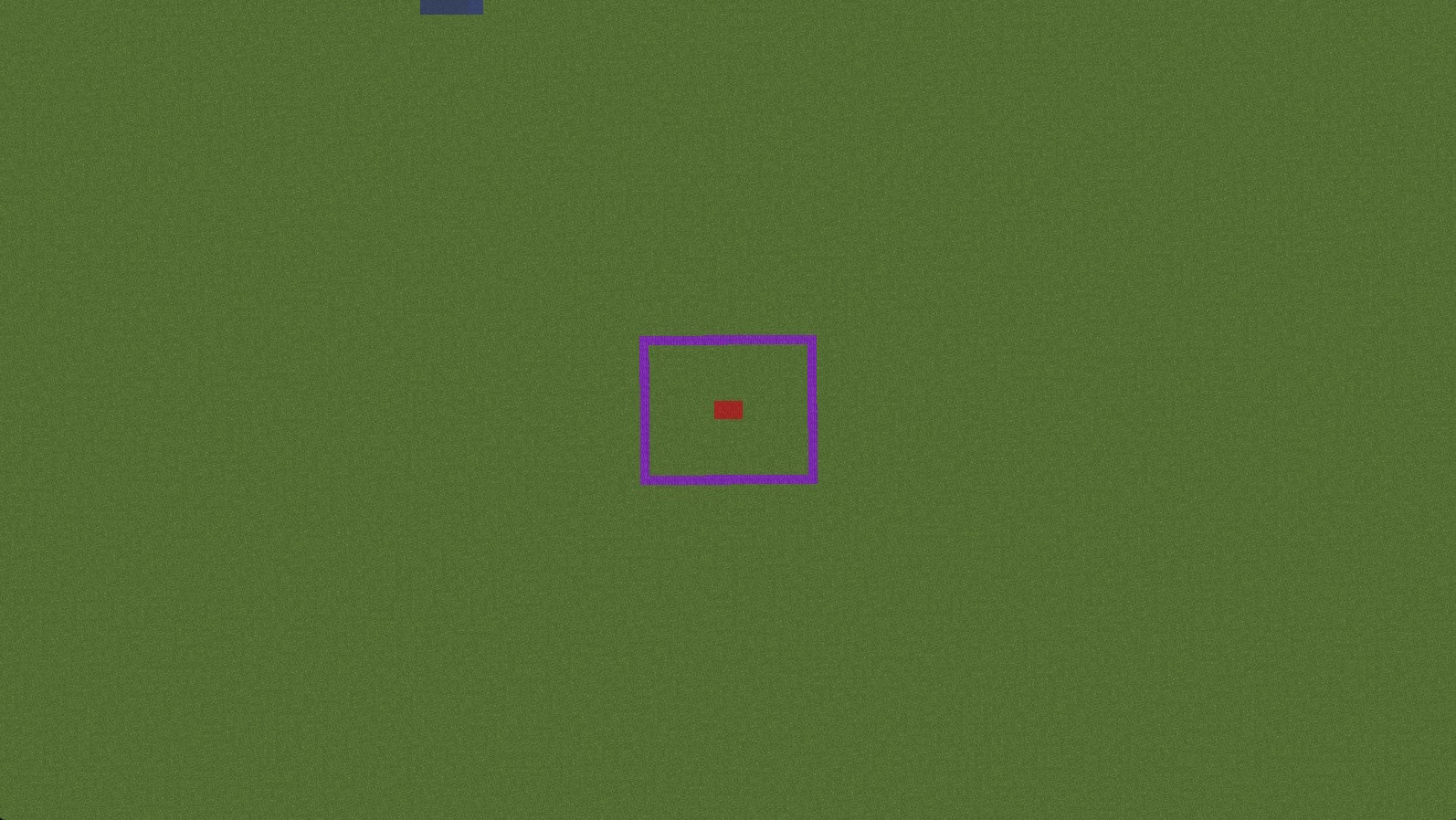
在上圖中,我們的目標是把世界修剪到只留下紫色方塊周圍的幾個區塊。為此,我們站在紫色區域中央的紅色方格上,執行 /wb set 50,把世界邊界設在紫色區域稍外側。
接著使用 /wb trim [freq] [pad]。邊距以方塊計量,頻率則是每秒檢查的區塊數。例如 /wb trim 200 20 每秒最多檢查 200 個區塊,保留邊界外 20 個方塊。執行 /wb trim confirm 前先檢查緩衝範圍;需要更多周邊地形時應增加邊距。單位定義見 WorldBorder 的修剪指令。
之後可站在該世界中,使用 /wb clear 移除這個世界的外掛邊界,也可以保留它。
修剪世界資料夾
先備份,並在來源世界已卸載時操作獨立的匯出副本。保留完整目錄結構,包括地形、實體、興趣點和世界資料。不要使用最小檔案白名單,否則可能刪除地形、物品展示框、盔甲座或其他製作內容。
世界結構取決於 Minecraft 版本與伺服器軟體。舊結構區分地獄 DIM-1 與終界 DIM1;現代儲存使用 dimensions/<namespace>/<key>/。保留伺服器產生的結構,並依上文說明為每份藍圖匯出所需的單一維度。發布前,將副本匯入獨立伺服器,檢查地形與製作的實體。確認該伺服器版本的路徑後,才能從匯出副本刪除暫存鎖定檔或私人玩家資料。
執行打包指令
EliteMobs 提供 /em package <dungeonName> <version> 指令,需要 elitemobs.package 權限。它在下列各內容資料夾尋找名為 dungeonName 的子資料夾,將找到的內容複製到 exports/<dungeonName>/,再壓縮成 exports/<dungeonName>_packaged.zip。
它掃描的資料夾依序為:
custombosses、customevents、npcs、npc_scripts、transport_routes、customitems、customquests、customarenas、customspawns、customtreasurechests、wormholes、world_blueprints、powers、behaviors
找不到的項目會印出一則「no subdirectory」提示並被略過,對於沒有使用所有內容類型的套件而言這是正常的。
因此,強烈建議你把想要打包的內容,放在與套件名稱同名的資料夾中。 否則,你就得手動收集這些檔案,並自行把它們整理成可供散布的檔案結構。
指令不會收集 content_packages、worldcontainer、models、scripts、enchantments 或 resource_pack,也不會建立 pack.meta。產生最終 zip 前,將需要的檔案加入匯出資料夾。<version> 參數必須是整數,但不會更新 dungeonVersion;請手動修改該欄位。
複製前,指令會驗證匹配的已載入套件定義所引用的現有藍圖。無效結構或伺服器不匹配可能使操作中止。這項檢查不代表所有必要設定、Boss 或資源都已包含。
每次執行都會先在暫存資料夾中建立匯出內容。成功後,它會取代 exports/<dungeonName>/ 與 exports/<dungeonName>_packaged.zip,因此你先前手動加入舊匯出資料夾的檔案會被刪除。請將這些補充檔案另外保存,並在每次執行後重新複製進去。若所有內容資料夾都不存在,或某個內容資料夾或檔案是符號連結,指令會印出 Failed to zip package!,在主控台記錄原因,並保留先前的匯出內容不變。
加入副本套件檔案
建立副本時,請手動將套件設定檔加入 exports 中剛產生的目錄,放在 content_packages 資料夾內,並遵循上文格式。詳見下方的「檔案結構」。
完成後請務必把你的副本壓縮成 zip!
檔案結構
如果你每一步都做對了,檔案結構應該會類似下面這個例子,我們在其中把該副本命名為 my_cool_dungeon:
my_cool_dungeon 檔案結構範例
- my_cool_dungeon.zip
- pack.meta(內容為
elitemobs) - content_packages
- my_cool_dungeon.yml <- 這裡是放你的副本套件設定檔的地方
- worldcontainer
- [你的世界資料夾放這裡]
- wormholes
- my_cool_dungeon
- [你的蟲洞放這裡]
- my_cool_dungeon
- npcs
- my_cool_dungeon
- [你的 NPC 放這裡]
- my_cool_dungeon
- customtreasurechests
- my_cool_dungeon
- [你的寶箱放這裡]
- my_cool_dungeon
- customquests
- my_cool_dungeon
- [你的任務放這裡]
- my_cool_dungeon
- customitems
- my_cool_dungeon
- [你的自訂物品放這裡]
- my_cool_dungeon
- custombosses
- my_cool_dungeon
- [你的自訂 Boss 放這裡]
- my_cool_dungeon
- customarenas
- my_cool_dungeon
- [你的自訂競技場放這裡]
- my_cool_dungeon
- powers
- my_cool_dungeon
- [你的自訂能力放這裡]
- my_cool_dungeon
- world_blueprints
- my_cool_dungeon
- [你的世界資料夾放這裡,供副本地城使用]
- my_cool_dungeon
- customevents
- my_cool_dungeon
- [你的自訂事件放這裡]
- my_cool_dungeon
- customspawns
- my_cool_dungeon
- [你的自訂生成放這裡]
- my_cool_dungeon
- models
- [你的 bbmodel 格式模型放這裡,可接受資料夾]
- scripts
- [你的 FreeMinecraftModels Lua 腳本放這裡]
- resource_pack
- my_cool_dungeon_rsp
- [你的資源包檔案放這裡]
- my_cool_dungeon_rsp
- pack.meta(內容為
將完成的 zip 放入 plugins/EliteMobs/imports/ 匯入,然後重新載入並檢查 /em setup。分享前測試全新安裝,包含引用的 Boss、任務、Lua 檔案、模型和世界藍圖。
可辨識的頂層資料夾
匯入器只認得一組固定的頂層名稱。對於 EliteMobs 套件(pack.meta 含有 elitemobs),這些名稱為:
| 資料夾 | 安裝位置 |
|---|---|
content_packages | plugins/EliteMobs/content_packages |
dungeonpackages | plugins/EliteMobs/content_packages(舊別名) |
custombosses | plugins/EliteMobs/custombosses |
customitems | plugins/EliteMobs/customitems |
customtreasurechests | plugins/EliteMobs/customtreasurechests |
customevents | plugins/EliteMobs/customevents |
customspawns | plugins/EliteMobs/customspawns |
customquests | plugins/EliteMobs/customquests |
customarenas | plugins/EliteMobs/customarenas |
npcs | plugins/EliteMobs/npcs |
npc_scripts | plugins/EliteMobs/npc_scripts |
transport_routes | plugins/EliteMobs/transport_routes |
behaviors | plugins/EliteMobs/behaviors |
enchantments | plugins/EliteMobs/enchantments |
wormholes | plugins/EliteMobs/wormholes |
powers | plugins/EliteMobs/powers |
world_blueprints | plugins/EliteMobs/world_blueprints |
resource_pack | plugins/EliteMobs/resource_pack |
worldcontainer | 伺服器的世界容器 |
models 或 modelengine | FreeMinecraftModels 啟用時使用其 models 資料夾;否則在 ModelEngine 啟用時使用其 blueprints 資料夾;兩者都未啟用時使用 FreeMinecraftModels 的 models 資料夾 |
scripts | plugins/FreeMinecraftModels/scripts |
elitemobs | plugins/EliteMobs,依照該資料夾相同的結構合併 |
freeminecraftmodels | plugins/FreeMinecraftModels,依照該資料夾相同的結構合併。其中的 models 資料夾會放到 FreeMinecraftModels 實際讀取的 models 資料夾 |
betterstructures | plugins/BetterStructures,依照該資料夾相同的結構合併 |
pack.meta | 不會被安裝到任何地方 —— 它只會被讀取以識別該套件 |
沒有專屬頂層名稱的檔案,請使用 elitemobs、freeminecraftmodels 與 betterstructures 資料夾,例如物品所使用的 FreeMinecraftModels 附魔可放在 freeminecraftmodels/enchantments。匯入將檔案放入其資料夾後,FreeMinecraftModels 會重新載入匯入的內容。BetterStructures 會在自身啟動完成後重新載入一次;沒有該重新載入入口的版本會記錄警告,請你執行 /bs reload。
無法辨識的頂層項目會使整個套件遭到拒絕,壓縮檔會保留供修正。請勿在根目錄放入零散的 readme、螢幕截圖或 __MACOSX 資料夾。目標寫入失敗時,匯入器會嘗試回復該壓縮檔變更的所有目標;重試前請檢查回復警告。
schematics 也會使 EliteMobs 壓縮檔遭到拒絕,並額外警告舊式 schematic 副本已在 EliteMobs 9.0 移除。
若要讓管理員透過 /em setup 安裝,發布的副本設定應使用 isEnabled: false。為每個世界準備並檢查已卸載的匯出副本。保留創作伺服器的檔案,核對匯出的設定,不要假設打包指令會重設安裝狀態。
與社群分享你所建立的副本套件
Discord 上有一個 #community_dungeons 區塊,人們可以在那裡分享自己的小型地城創作。歡迎踴躍貢獻!